

-

Written By Rohan Wiese
-
Updated on December 3rd, 2025
Quickly Export Apple Mail Emails to Outlook on Mac in Bulk
Summary: Many Mac users need a quick way to export Apple Mail emails to Outlook, especially when dealing with heavy mailboxes or multiple folders. Outlook offers better organization, so the shift is common. Manual steps take time and often fail when you handle bulk data. Because of this, users look for a faster and more reliable method that keeps their emails safe. This guide explains every effective way to export Apple Mail to Outlook Mac, and it also highlights how the Aryson MBOX to PST Converter makes bulk migration smooth and accurate.
User’s Need to Export Apple Mail Emails to Outlook on Mac
Many users switch from Apple Mail to Outlook because they want a more organized and reliable email experience. Outlook offers better features for work environments and compatibility with Microsoft. As a result, users often decide to move their entire mailbox to Outlook for ease and convenience.
- Outlook supports better email management and advanced search features.
- It offers smooth integration with Microsoft 365, Teams, and other business apps.
- Apple Mail may slow down or fail to sync properly with multiple accounts.
- Outlook provides improved calendar, contacts, and productivity tools.
- Many organizations use Outlook, so users switch for workplace compatibility.
These reasons clearly show why users look for a dependable method to transfer Apple Mail emails to Outlook.
How to Export Apple Mail to Outlook Mac
There are several ways to transfer Apple Mail data to Outlook on Mac, and each method works differently depending on your file size, Outlook version, and technical comfort. Some options involve manual steps, while others rely on automated tool for proper data accuracy. Understanding these methods helps you choose the most reliable approach for your situation.
Manual Method to Export Apple Mail to Outlook Mac
The manual method is the built-in option available to all Mac users. It uses Apple Mail’s export feature and Outlook’s import option. Although it works, this method is ideal for smaller mailboxes because it becomes slow and unreliable with heavy data. Even so, it helps you understand the basic flow of moving emails between both applications.
Step 1: Export Mailboxes from Apple Mail
- First, open Apple Mail on your Mac.
- Next, choose the mailbox or folder you want to export.
- Then, click the Mailbox tab from the top menu.
- After that, select Export Mailbox from the dropdown.
- Now, pick a location to save the exported file.
- Apple Mail will generate an MBOX file containing all your selected emails.
Step 2: Import the Exported File into Outlook
- To continue, launch Microsoft Outlook on your Mac.
- Afterward, go to File > Import.
- Then, choose Apple Mail or Outlook Data File, depending on your Outlook version.
- Next, browse and select the exported MBOX folder.
- Finally, click Continue to export Apple Mail to Outlook Mac.
Limitations of the Manual Method
- It does not convert MBOX files directly into PST format.
- It cannot handle large-scale or bulk migration smoothly.
- The folder structure may change during import.
- Some latest Outlook versions do not support direct MBOX import.
Because of these limitations, many users eventually choose an automated method for exporting Apple Mail to Outlook on Mac, especially when dealing with large or multiple mailboxes.
Directly Convert Apple Mail to Outlook Mac with the Automated Solution
As Apple stores its data in the MBOX format, you can simply use the Aryson MBOX to PST Converter to bulk export Apple Mail to Outlook Mac. It can convert MBOX files from Apple Mail, Thunderbird, Eudora, and many other email clients into Outlook-supported PST format. It maintains the original folder hierarchy, keeps the formatting intact, and ensures that no data gets lost—something that manual steps cannot guarantee. The clean interface also helps beginners complete the conversion without confusion. This utility supports all versions of Outlook and runs smoothly on different macOS editions.
Simple Working Steps to Migrate Apple Mail to Outlook Mac
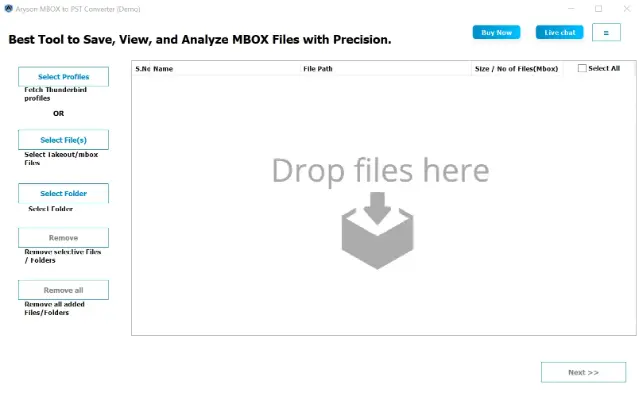
- First, download and install the Aryson MBOX to PST Converter on your system.
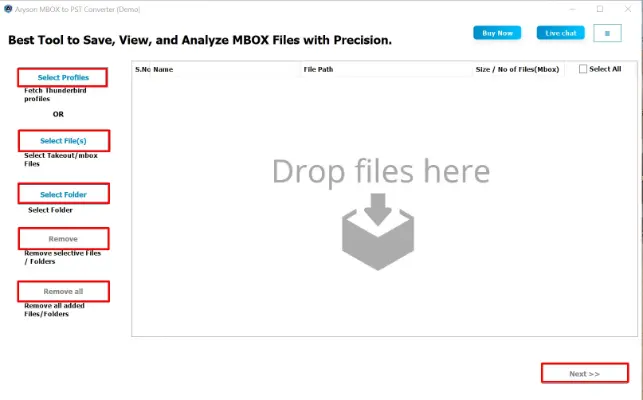
- Next, click on the Select File or Select Folder button to Apple Mail MBOX file.
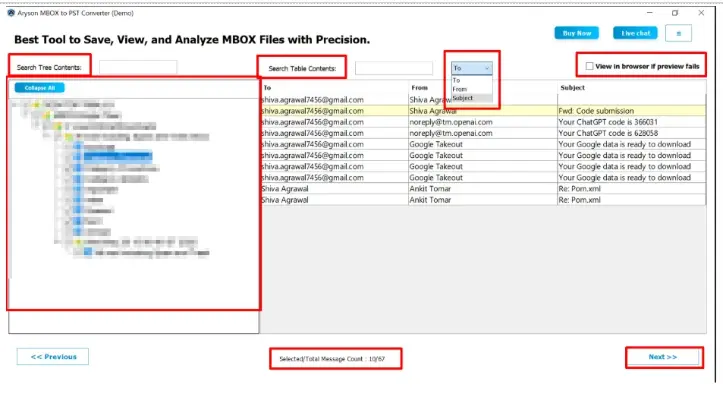
- Here, you can preview your emails, attachments, and folder structure. Click Next.
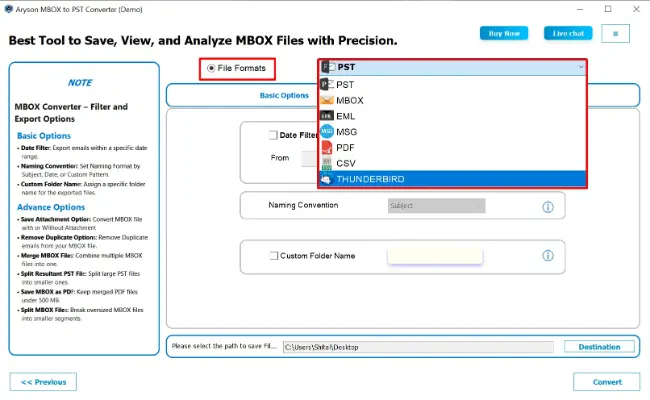
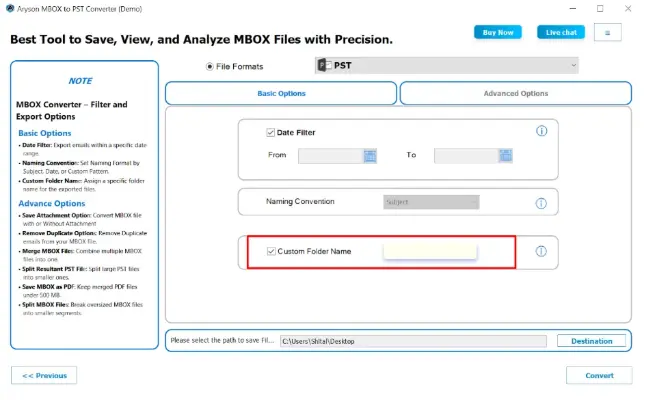
- Now, go to the output options and select Outlook PST as the saving format.
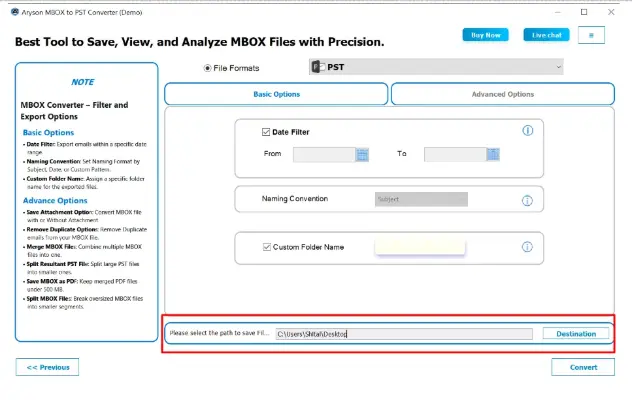
- Then, click Destination Path to choose the location where you want to save the PST file.
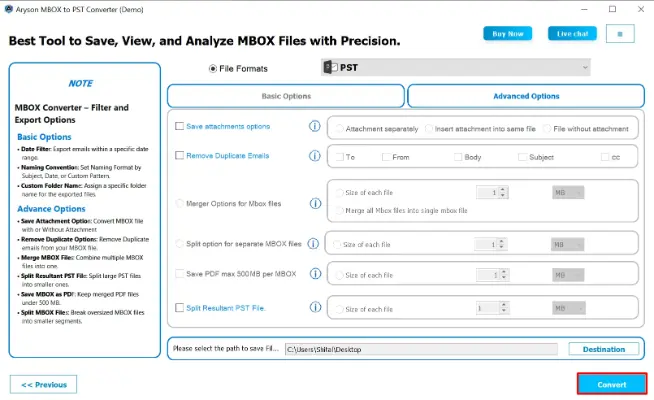
- Now, apply the Basic and Advanced Filters to select only the data you want in Outlook.
- Finally, click Convert to begin the Apple Mail to Outlook PST conversion.
Why does this Method work better Than Manual Steps?
Manual methods often fail to import MBOX files smoothly because Outlook does not read MBOX directly. An automated tool reads, scans, and converts your Apple Mail data without the usual issues like missing folders or incomplete imports. Also, it makes sure a seamless shift to Outlook, even when dealing with large or multiple mailboxes.
Also Read: How to Export Emails from Thunderbird to Outlook?
Conclusion
A smooth shift from Apple Mail to Outlook on Mac depends on choosing the right method. The manual steps help when the mailbox is small, but they often fall short for bulk data. The recommended reliable automated software offers accuracy, keeps your folders safe, and reduces the risk of data loss. With the proper approach in place, you can export Apple Mail to Outlook Mac without stress and continue working in Outlook without any disruption.
Frequently Asked Questions:
Q1. Can I directly import Apple Mail MBOX files into Outlook on Mac?
Ans: No, Outlook for Mac does not support direct MBOX import. You must either convert the MBOX files into an Outlook-compatible format like PST or use Aryson MBOX to PST Converter, which handles the conversion automatically.
Q2. Is the manual method suitable for large Apple Mail mailboxes?
Ans: Not really. The manual process becomes slow, unstable, and risky when handling large files. It may also disrupt your folder structure. For bulk migration, Aryson MBOX to PST Converter is the safe and fast choice.
Q3. Does the automated tool preserve my email formatting and attachments?
Ans: Yes. Aryson MBOX to PST Converter maintains your email formatting, metadata, inline images, and attachments while exporting your mailbox, ensuring complete and accurate migration.
About The Author:

Rohan Wiese is a Technical Content Writer at Aryson Technologies, specializing in databases, e-mail recovery, and e-mail migration solutions. He enjoys conducting research and generating information that assists database administrators, businesses, and novices in resolving issues with MS SQL Server, MySQL databases, Cloud Computing, and Microsoft Exchange.
Realted Post



