

-

Written By Rohan Wiese
-
Updated on November 20th, 2025
How to Download All Emails from Office 365 – A Complete Guide
In today’s digital era, most of our important communications, business records, and personal information are stored in email accounts. Office 365, also known as Microsoft 365, is one of the most popular platforms for managing professional emails. However, there are times when users may need to download all emails from Office 365 — either for backup, migration, compliance, or offline access.
Having a local copy of your Office 365 mailbox ensures your data remains safe even if your account faces unexpected issues or organizational changes. This complete guide explains the reasons behind downloading emails, different manual methods available, and the Aryson Office 365 Backup Tool to make the entire process smooth and reliable.
Why do we Need to Download Office 365 Mailbox?
There are several reasons why downloading your Office 365 mailbox is essential. While Microsoft 365 offers a secure cloud environment, it’s still wise to keep an offline copy of your data for safety, accessibility, and control. Below are the most common scenarios where users choose to download their Office 365 emails:
- To keep a backup: First of all, having a local backup helps protect your important emails from accidental deletion, hacking, or account issues.
- For offline access: Sometimes, you may need to check emails when the internet is not available. Downloading them lets you access everything offline.
- When leaving a company: If you are switching jobs or your Office 365 account will be removed, saving your emails ensures you don’t lose valuable data.
- For easy migration: Moreover, when you move to another email platform like Outlook, Thunderbird, or Apple Mail, downloading your mailbox helps in a smooth migration.
- To meet legal or compliance needs: In some cases, organizations must store email records for audits or legal purposes. Downloading emails helps meet those requirements.
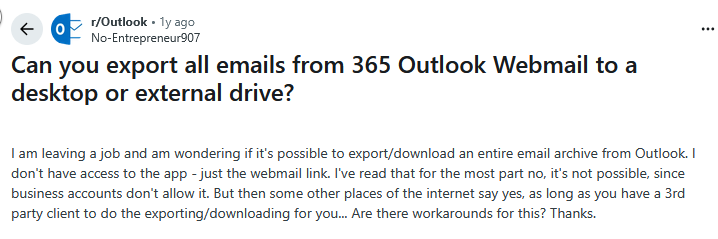
Common User Queries Found on Reddit
Different Approaches to Download All Emails from Office 365
You can download your emails using three main methods. The best choice depends on your role and the size of your mailbox. Next, we will go through the different ways to export all emails from Outlook 365:
Approach 01: Download Emails Using Outlook Desktop Client
If you have the Outlook desktop app connected to your Office 365 account, you can export your entire mailbox easily. Follow the steps below:
- Open the Outlook desktop application on your computer.
- Click on the File tab in the top menu.
- Choose Open & Export, then select Import/Export.
- In the wizard that appears, choose Export to a file, and click Next.
- Select Outlook Data File (.pst), then click Next.
- Choose the mailbox folder you wish to download. To include everything, check Include subfolders.
- Browse and select a location on your computer to save the PST file.
- Click Finish. If prompted, you can set a password for security or skip it.
Your emails, along with attachments and folder structures, will be saved in a PST file. You can later import this file into any Outlook profile or keep it as a backup.
Cons:
- Requires Outlook desktop installed.
- Large mailboxes can take longer to export.
- Not ideal for exporting multiple mailboxes at once.
Approach 02: Download Emails Using Microsoft 365 Compliance Center
This method is perfect for administrators who want to download emails from multiple mailboxes or large data sets. Microsoft offers the eDiscovery feature within its Compliance Center to export Office 365 data. Follow these steps to download all emails from Office 365:
- Log in to your Microsoft 365 Compliance Center.
- Navigate to Permissions and assign yourself the eDiscovery Manager role if not already assigned.
- Go to Content Search and create a new search.
- Choose the specific mailbox or all mailboxes you want to include.
- Leave search conditions blank if you want to download everything.
- Once the search completes, click Export Results.
- Choose to export messages in PST format.
- After the export process finishes, download the PST file to your system.
Cons:
- Requires admin rights.
- The process can take time for large exports.
- Involves several steps and technical understanding.
Approach 03: Use the Office Backup Tool to Export Office 365 emails to PST
Aryson Office 365 Backup Tool is a powerful and user-friendly software to help users download and back up their Office 365 mailboxes safely. It provides a complete solution for individuals, IT admins, and businesses that need to secure their emails, contacts, calendars, and attachments without technical complications. It can export Office 365 mailbox to PST, EML, MSG, PDF, and more. With its advanced filtering options, users can back up only specific folders or emails from a selected date range. It also supports incremental backup to avoid duplicating previously downloaded data, ensuring both speed and efficiency.
Simple Steps to Download all Emails from Office 365
- Launch the Aryson Office 365 Backup Tool on your system and click Backup.
- Now, click Continue and Log in using your Office 365 account credentials.
- After that, you can select the folders or mailboxes you want to back up.
- Now, choose the desired file format as PST to save Office 365 emails.
- Apply filters to include or exclude specific emails based on date or subject.
- Select the destination path to save and click Convert to backup Office 365 emails.
Conclusion
A complete backup of your Office 365 mailbox plays a vital role in ensuring data security and maintaining peace of mind. Whether you are an individual user or an administrator, there are several ways to download all emails from Office 365—using the Outlook desktop app, the Compliance Center, or reliable automated software. Each approach serves a unique purpose, but they all aim to safeguard your data and make it easily accessible when needed. By applying the above methods, you can achieve a smooth, dependable, and efficient way to protect all your Office 365 emails for future use.
Frequently Asked Questions
Q1. Can I download all Office 365 emails using the web version?
Ans: No, the Outlook Web App doesn’t provide a direct option to export emails. You must use the desktop Outlook application or admin tools for full exports.
Q2. What is the best format for long-term storage?
Ans: PST is the most recommended format since it retains structure and attachments. For individual messages, EML or MSG formats can also be useful.
Q3. Will attachments be included in the export?
Ans: Yes, when using the Aryson Office 365 backup Tool, all attachments are exported automatically with the emails.
Q4. How long does the export process take?
Ans: The duration depends on mailbox size and system performance. Small mailboxes may take minutes, while large ones can take several hours.
Q5. Can I open the exported file without Outlook?
Ans: Yes, with the help of the Aryson Office 365 backup Tool, you can open the exported file without Outlook.
About The Author:

Rohan Wiese is a Technical Content Writer at Aryson Technologies, specializing in databases, e-mail recovery, and e-mail migration solutions. He enjoys conducting research and generating information that assists database administrators, businesses, and novices in resolving issues with MS SQL Server, MySQL databases, Cloud Computing, and Microsoft Exchange.
Realted Post



