-

Written By Rohan Wiese
-
Updated on March 10th, 2026
Fix OST File Not Accessible in Outlook 2016, 2019 & 2013 – Complete Guide
IT Admins and Outlook users who work with Exchange, Microsoft 365, or IMAP accounts very often face the “OST file does not access in Outlook” issue. If this issue is not resolved, it can prevent users from accessing mailbox data such as emails, contacts, calendars, and tasks. It mainly occurs due to OST file corruption, synchronization failures, or profile misconfiguration. In this guide, we will discuss some of the key reasons behind this problem and explore some practical troubleshooting methods. Additionally, we will learn how to use the Aryson OST Recovery Tool, which can help you repair and access corrupted OST files securely and efficiently. Download Now Purchase Now
What is an OST File in Outlook?
An OST file stands for Offline Storage Table file in MS Outlook. It is a local data file that can store a synchronized copy of mailbox data from Microsoft Exchange, Office 365, or an IMAP account. Moreover, it allows users to access their emails, contacts, calendars, and other mailbox items even without an internet connection and automatically syncs changes once the connection is restored.
Why OST File does not Access in Outlook?
Listed below are some of the reasons why your Outlook 2016 OST file not opening. Review each one of them carefully and determine which one is responsible in your case.
- A corrupted or damaged OST file can prevent Outlook from accessing mailbox data.
- Even an incorrect or corrupted Outlook profile may trigger the corruption of the OST file.
- You might have shut down Outlook incorrectly, which damaged the OST file.
- Moreover, synchronization issues can also make the OST file inaccessible.
- Additionally, an oversized OST file might fail to open properly.
- Also, the Virus, malware attacks, or system errors can corrupt the OST file in Outlook.
Common Error Messages Related to OST File Issues
- “Cannot open your default email folders.”
- “OST file cannot be accessed.”
- “Outlook data file is in use.”
- “Errors have been detected in the file.”
Preliminary Checks Before Fixing OST File Issues
Before you begin the recovery process, it is important to follow the pre-recovery checklist to fix the “Outlook 2019 OST file not accessible” error.
- Make sure to resolve temporary glitches in Outlook or the system.
- Check internet connectivity & check whether Exchange is accessible.
- Cross-Verify the Outlook profile is correctly configured.
- Disable unnecessary Outlook add-ins that may interfere with OST file access.
- Check whether there is sufficient disk space available on the system drive.
- Review the folder permissions to confirm proper access to the OST file location.
Best Methods to Fix the OST File Not Accessible in Outlook
Now, as you have followed the pre-recovery checks, let us discuss some of the reliable fixes to resolve the OST file not accessible issue in MS Outlook.
- Recreate the OST File
- Repair the Corrupted Outlook Profile
- Use the ScanPST Tool
- Use and Advanced Recovery Software
Method 1: Recreate the OST File
An OST file is only a cached copy of mailbox data that is stored on the Microsoft Exchange or IMAP server. In case the file becomes corrupted or inaccessible, you can simply delete or disable the existing OST file. After that, Outlook will automatically recreate a new OST file when it reconnects to the server.
Steps to perform are as follows:
- Firstly, close the Microsoft Outlook application completely.
- After that, press the Win + R shortcut keys.
- In the textbox, type %localappdata%\Microsoft\Outlook, and press Enter.
- Now, browse the .ost file associated with your current Outlook profile.
- If required, you can rename this file or delete the OST file.
- At last, restart Outlook and verify whether the “OST file does not access in Outlook” issue is resolved or not.
Method 2: Repair Outlook Profile
Sometimes the issue takes place due to a corrupted Outlook profile rather than the OST file itself. In such a situation, you can simply create a new profile, which will rebuild the account settings and generate a fresh OST file, restoring the mailbox access.
Steps to Repair the Outlook Profile
- First, open the Control Panel on your existing system.
- After that, click on Mail (Microsoft Outlook).
- Then, select the Show Profiles option.
- Now, click on the Add option and provide a name for the new profile.
- Next, set up your email account with the required credentials.
- After that, select the Always use this profile option & choose the newly created profile.
- At last, run Outlook again & verify if the “Outlook 2013 OST file issue” is resolved.
Method 3: Use ScanPST Tool
Microsoft provides the users with a built-in utility called the Inbox Repair Tool (SCANPST.exe). This tool scans the Outlook data file for corruption and tries to repair the detected errors. It is commonly used when Outlook shows error messages that indicate data file corruption.
Steps to Use the ScanPST Tool
- Close the MS Outlook application before you begin the repair process.
- After that, navigate to the Outlook installation directory (for example):
|
C:\Program Files (x86)\Microsoft Office\root\Office16 |
- Then, browse the SCANPST.exe and open it.
- Click on the Browse option & select the Outlook data file to scan.
- After that, click Start to begin the scan process.
- If errors are detected, click Repair to fix the issues.
- After the repair completes, restart Outlook and check the mailbox.
Additional Note: If none of the above recovery options helped you, the actual issue might reside in the OST file itself. If not repaired, it can result in permanent inaccessibility of files. Therefore, use the automated software given below to repair the corrupted OST files in Outlook.
Method 4: Automated Software to Access Corrupt OST File
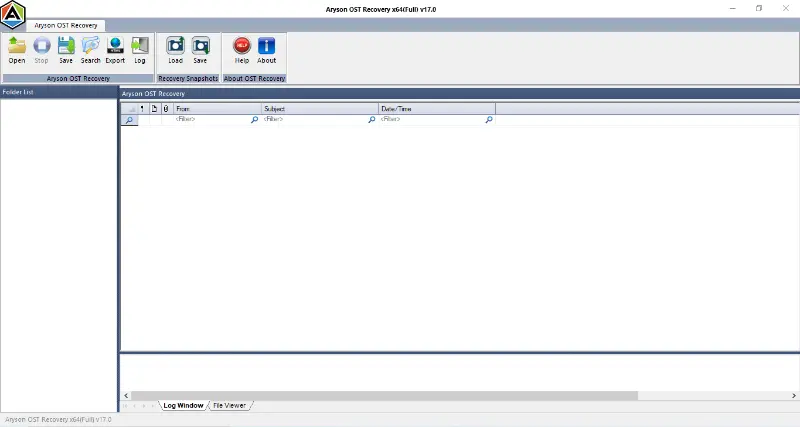
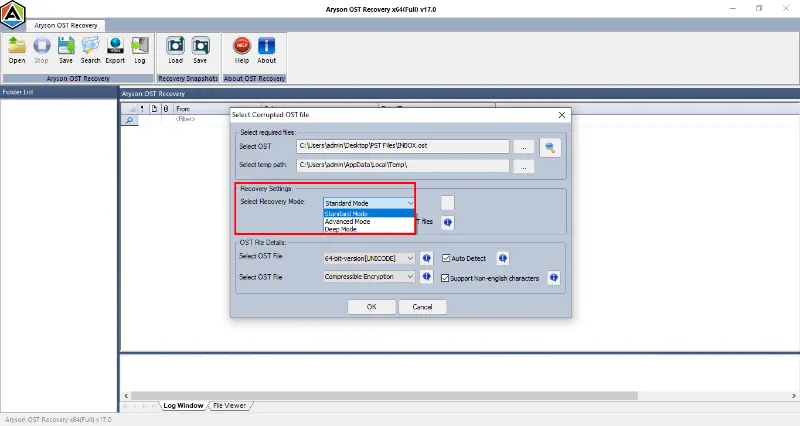
The Aryson OST Recovery Tool is one of the most reliable recovery solutions that helps IT admins and technicians to repair corrupted OST file and recover data successfully. It can efficiently restore emails, contacts, calendars, tasks, and journals. Moreover, it offers three recovery modes: Standard, Advanced, and Deep Mode of recovery. Additionally, it offers various advanced filters like the date range filter, remove duplicate files, etc., to remove data duplication. The software supports Outlook encryption and allows users to export recovered data to PST, MSG, DBX, EML, MBOX, and archive formats directly. Using the same software, you can fix Outlook error code 0x80072f06. Also, it supports Outlook 2021 and earlier versions on Windows systems.
Simple Steps to Repair the Corrupted OST File
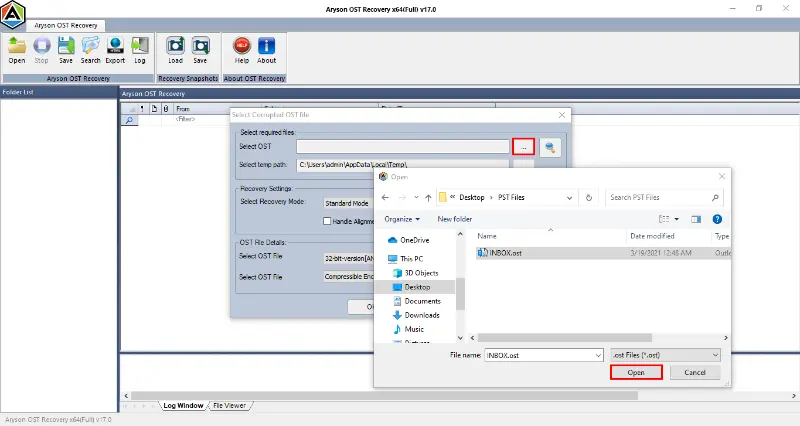
- First, download & run the Aryson OST Recovery Tool on your system.
- Then, load the desired corrupted OST files to recover >> Next.
- After that, choose among the Standard, Advanced, or Deep modes.
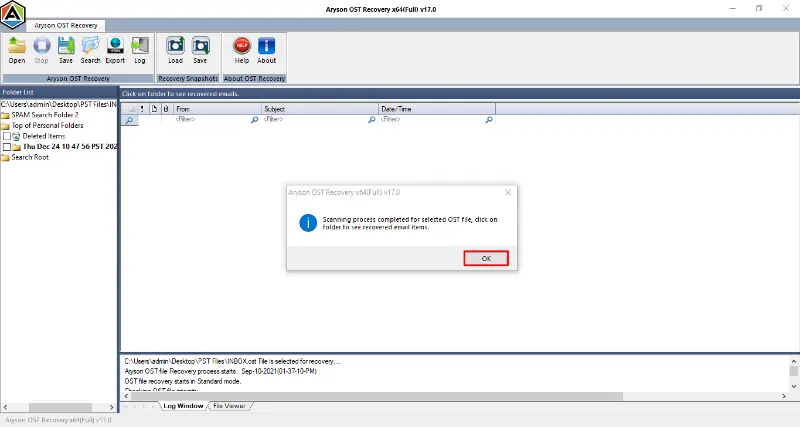
- The software will scan the selected OST files,>> click OK.
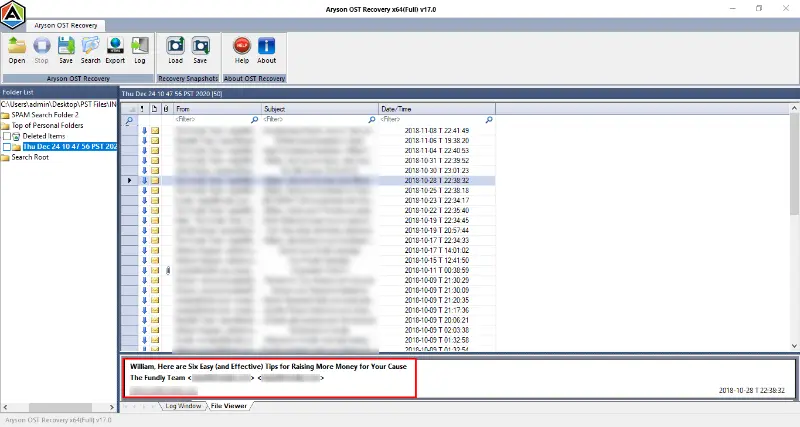
- Next, cross-verify the required OST files before saving them.
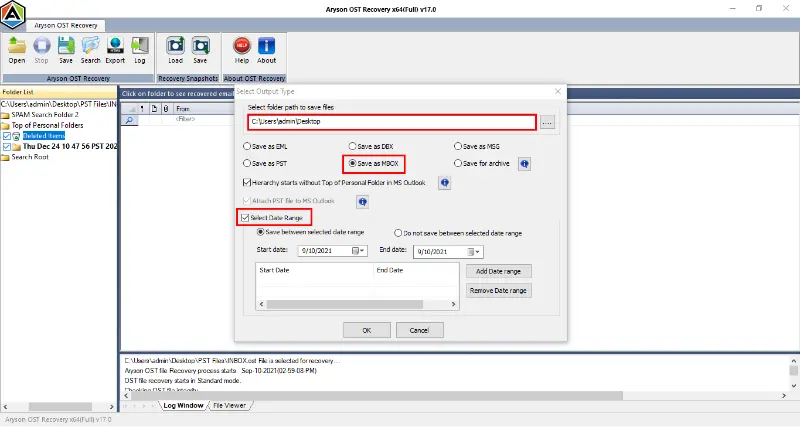
- Now, select the required output format and use the advanced features.
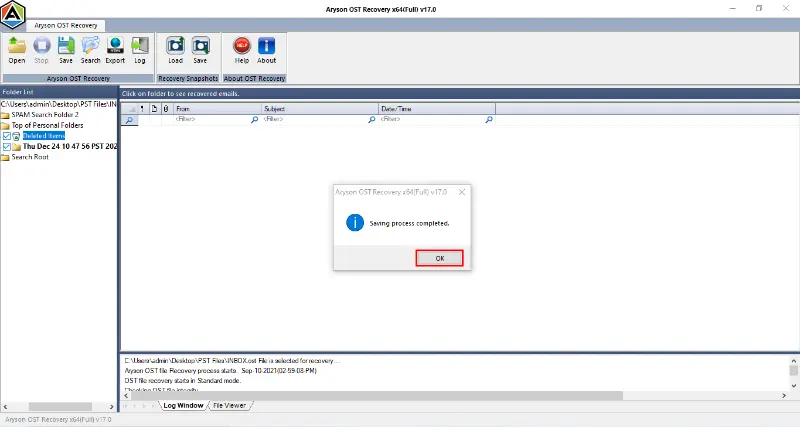
- Provide the path to save the output file & click on the OK button.
Conclusion
As we discussed above, an OST file does not access in Outlook due to several reasons, such as file corruption, profile issues, or synchronization problems. Following the pre-recovery checklist, trying the manual troubleshooting and automated software, the user can simplify the recovery process. However, the manual methods work well if the issue resides in the OST file; opt for the above automated recovery software. If you get stuck anywhere in the recovery process, reach out to our tech support team for personalised support.
FAQs
Q1. Why is my OST file not opening in Outlook 2016, 2019, or 2021?
Ans- An OST file may not open in Outlook due to corruption, synchronization issues with the Exchange server, a damaged Outlook profile, oversized OST files, or improper system shutdown. These issues can prevent Outlook from accessing the offline mailbox data stored in the OST file.
Q2. Can I recreate an OST file if it becomes inaccessible?
Ans- Yes, you can recreate OST file in Outlook because it is a cached copy of the mailbox stored on the mail server. However, there are some manual methods; for a secure recovery, you must use the Aryson OST Recovery Tool.
Q3. Can ScanPST repair an OST file in Outlook?
Ans- Yes, the ScanPST repairs an OST file in Outlook. However, for severe corruption, it is advised to use the above automated software.
Q4. Is it possible to convert an OST file to PST format?
Ans- Yes, with the help of the Aryson OST Recovery Tool, you can convert an OST file to PST format.
Q5. What happens if I delete an OST file from my system?
Ans- Deleting an OST file does not permanently delete mailbox data because the file is only a local cache of server data. When Outlook reconnects to the Exchange or IMAP server, it automatically creates a new OST file and resynchronizes all mailbox items.
About The Author:

Rohan Wiese is a Technical Content Writer at Aryson Technologies, specializing in databases, e-mail recovery, and e-mail migration solutions. He enjoys conducting research and generating information that assists database administrators, businesses, and novices in resolving issues with MS SQL Server, MySQL databases, Cloud Computing, and Microsoft Exchange.
Realted Post