-

Written By Rohan Wiese
-
Updated on October 5th, 2026
Import OST to Windows Live Mail – Step-by-Step Manual Guide
Microsoft Outlook uses OST files to store a copy of your mailbox data on your local computer. With these files, you can access emails, contacts, and calendars even without an internet connection. On the other hand, Windows Live Mail is a free desktop-based email client by Microsoft. It mainly supports the EML file format. Many users want to import OST file to Windows Live Mail.
Usually, it happens when someone switches from Outlook to Windows Live Mail. However, importing OST files directly into Windows Live Mail is not possible because the two clients use different file formats. If you are struggling with this, don’t worry. In this blog, we will explain all the solutions, including the Aryson OST to PST Converter to import OST to Windows Live Mail in a hassle-free manner.
Reasons to Import OST Files into Windows Live Mail
Users may need to bring their OST files into Windows Live Mail for different purposes. Some of the most common reasons include:
- Many users shift from Microsoft Outlook to Windows Live Mail to keep their old mailbox data accessible.
- If you save the OST data in Windows Live Mail, it will create a safe backup that can be used later.
- In case Outlook is not installed and the OST file becomes orphaned, importing into Windows Live Mail helps open and view the emails.
- Windows Live Mail provides a light and user-friendly experience, hence some users prefer it to handle emails easily.
Top Procedures to Import OST to Windows Live Mail
There are a few reliable ways that make it possible to move OST data into Windows Live Mail. Next, we will go through the top procedures to move OST emails to Windows Live Mail in detail.
Procedures 01: Import OST to Windows Live Mail Using MS Outlook
You can convert your OST file to PST using Microsoft Outlook and then import it into Windows Live Mail. Follow these steps to import OST file to Windows Live Mail:
- Open MS Outlook and click on File in the menu bar.
- Then, navigate further and select the Import/Export option.
- Next, you should choose Export to a file and click Next.
- Now, select the Outlook Data File (.pst) and click Next.
- Choose the folder that you want to export and click Next.
- Now, pick a location to save the PST file and click Finish.
After the PST file is ready, proceed with the next given steps.
- Now, open Windows Live Mail and go to the File menu.
- Tap on the Import Messages and select Microsoft Outlook.
- Browse and select the PST file you saved earlier>> Next.
- Next, choose the folders you want to import and click Next.
- At last, click Finish to complete the import process.
Procedures 02: Use IMAP to Synchronize Mailbox Data
This method works by syncing your mailbox via IMAP, allowing Windows Live Mail to access Exchange or Outlook data.
- Open Microsoft Outlook and go to the File tab.
- Click Account Settings and select Account Settings again.
- Choose the Exchange account you want to sync and click Change.
- Click More Settings, then go to the Advanced tab.
- Enable Use Cached Exchange Mode and check Download Shared Folders.
- At last, click on the OK button to import OST to Windows Live Mail.
Next, set up your Account in Windows Live Mail:
- Open Windows Live Mail and tap on the Accounts tab.
- Now, click Email, then select Add an Email Account.
- Next, input your Exchange account details and click Next.
- Later, select IMAP as the incoming server along with its server details.
- After that, enter your username and password, then click Next.
- Click Finish to complete the setup and save OST data in Windows Live Mail.
After this, Windows Live Mail will start synchronize your mailbox data with the Exchange server. So that, it will be easy to import OST to Windows Live Mail.
Disadvantages of Manual OST Import
Although the manual method allows you to import OST files into Windows Live Mail, it comes with several challenges that may make the process difficult for some users.
- You must have Microsoft Outlook installed to perform the manual conversion.
- Along with that, multiple steps will take up a lot of time of the users.
- Also, emails, attachments, or formatting may be lost during manual transfer.
- Large OST files can be difficult to handle and may cause errors.
- Users unfamiliar with Outlook or Windows Live Mail may find the process confusing.
- Manual methods do not allow importing large numbers of emails or folders at once.
Procedures 03: All-in-One Automated Solution to Import OST to Windows Live Mail
Aryson OST Converter provides a fast and reliable solution to convert OST to Windows Live Mail Data File(EML). It comes out as the direct solution to move OST emails to Windows Live Mail as their native EML data. Moreover, you can convert multiple OST files into EML format at a time without any loss of actual formatting. There are multiple advanced options that will filter out your OST data from the bulk OST files. You can filter out emails within a specific Date Range. Also, you have the option to remove duplicates from the selected emails. This utility can work with all versions of MS Outlook OST files and Windows Live Mail.
Simple Steps to Open OST in Windows Live Mail as EML:-
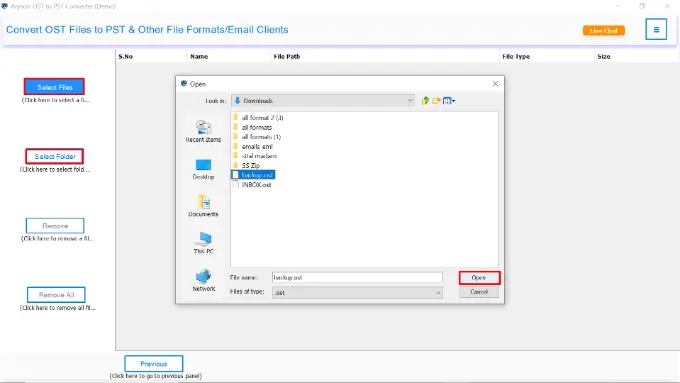
- Install and run the Aryson OST Converter on your Windows system.
- Click Select File/ Folder to select the OST file(s) you want to convert.
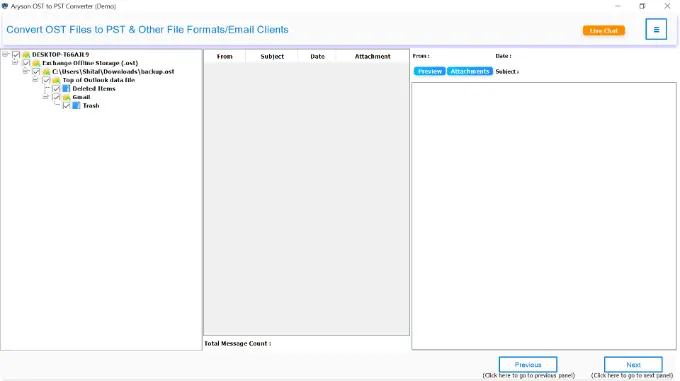
- Next panel will provide you with the complete preview of the OST data.
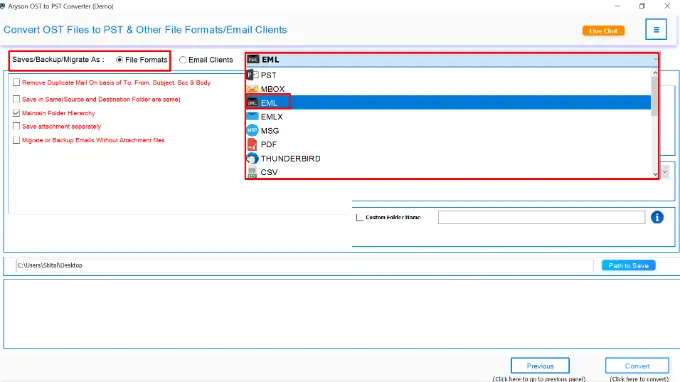
- After that, select EML as the export format for Windows Live Mail.
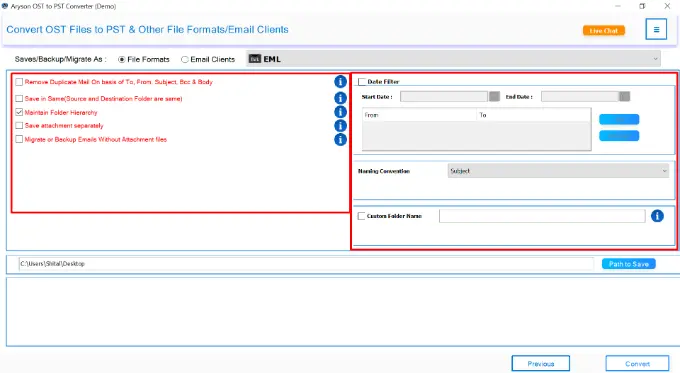
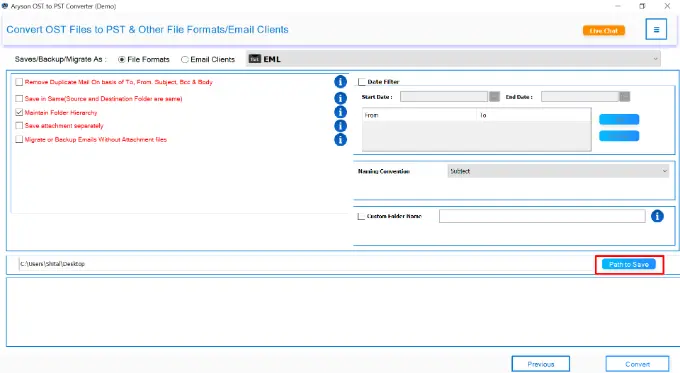
- According to your requirement, pick the built-in feature of the software.
- Now, pick a folder on your system where you want to save the EML files.
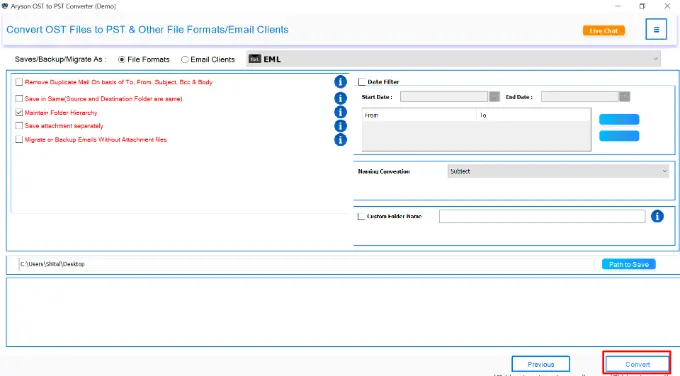
- At last, click the Convert button to import OST to Windows Live Mail.
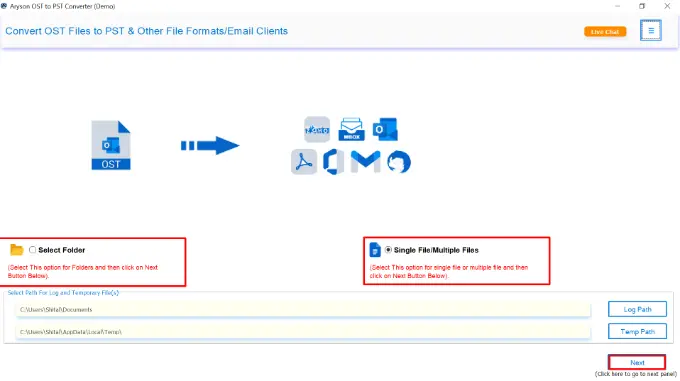
Note: Open Windows Live Mail, go to File >> Import messages, select the .eml file or folder, and click Next >> Finish to import your emails. In case your OST file is corrupted, then you should recover the OST file first. For that, use the OST recovery software and then convert them to EML.
Related Posts: Transfer Outlook PST Files to a New Computer, Convert OST to EMLX Archive Old Emails in Outlook to a PST.
Final Words
Now, you’d better know how to import OST to Windows Live Mail, either manually or professionally. If you use manual way to export your OST data, then you have to go through multiple stages. As a result, it will take a huge amount of time for the users. In contrast, Aryson OST Converter provides a safe and reliable solution. You can perform direct conversion to EML and keep all emails, attachments, and folder structures intact. For more updates and understanding, just connect with us, and we will guide you for further assistance.
Frequently Asked Questions:
Q1. Can Windows Live Mail open OST files directly?
Ans: No, Windows Live Mail does not support OST files. You need to convert them to EML format with Aryson OST to PST Converter to open OST files directly.
Q2. What is the easiest way to import OST files into Windows Live Mail?
Ans: Using the Aryson OST to PST Converter is the easiest way, as it directly converts OST files to EML and preserves emails, attachments, and folder structure.
About The Author:

Rohan Wiese is a Technical Content Writer at Aryson Technologies, specializing in databases, e-mail recovery, and e-mail migration solutions. He enjoys conducting research and generating information that assists database administrators, businesses, and novices in resolving issues with MS SQL Server, MySQL databases, Cloud Computing, and Microsoft Exchange.
Realted Post