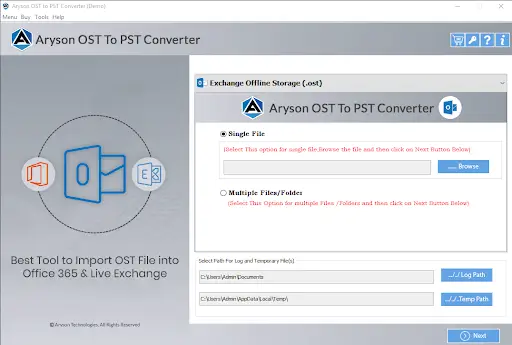



Screens

Video

Guide

Eula

Data Preservation
Emails Emails
Attachments Attachments
Folder Structure Folder Structure
Metadata Metadata
Date Time Date/Time
Tasks Tasks
Local Folders Local Folders
Notes Notes
Calendar Calendar
Contacts Contacts
HTML Body HTML Body
Headers Headers
MIME Metadata MIME Metadata
From To CC BCC From / To / CC / BCC
Inline Images Inline Images
Hyperlinks Hyperlinks

Aryson OST To PST Converter: Flexible Export Formats

Convert OST File to 15+ File Formats for Easy Access and Various Purposes

Why Enterprises Choose Aryson for OST to PST Converter?

Built for Enterprise-Scale OST Conversion & Migration

GDPR & Data Compliance Ready

Organizations that have strict data retention regulations often require complete, auditable mailbox records. Aryson OST file converter tool keeps every email, attachment, timestamp, & metadata field intact during conversion. Moreover, it makes sure that the PST files also fulfill the compliance standards.


Bulk Migration at Enterprise Scale

It is not practical to process hundreds of OST files individually for large IT teams. Aryson OST to PST conversion software converts multiple files simultaneously without an Exchange server, allowing teams to complete department-wide conversions. They do not need to compromise on the data quality or stretch project timelines.

Offline Conversion No Cloud Risk

Organizations that handle sensitive mailbox data cannot afford to expose it in the cloud. Aryson Outlook OST to PST converter converts OST files completely offline and keeps all the data within the corporate perimeter. This ensures maximum data privacy, security, and compliance with organizational policies, which makes it a trusted solution for businesses.

Data Integrity Maintained

Due to missing emails or corrupted attachments, various audit failures & legal complications take place. Aryson OST to PST migration tool converts every OST file exactly as-is, and keeps the folder structures, threads, attachments, & calendar data intact. Thus, it delivers a forensically complete PST file every time.

Aryson OST to PST Converter vs. Manual Methods

See how Aryson OST to PST Converter compares to manual methods of converting OST files.

Manual Methods Aryson OST to PST Converter
Users have to manually convert their OST files one by one, which may take even days for large mailboxes. You can even export OST data to 12+ formats and 6 email clients in total with the help of a single software.
You cannot export the OST data into multiple file formats & email clients using the manual approach. Moreover, users can preview their HTML Body, attachments, PLain text, raw HTML, calendar, etc to make sure of complete data integrity & security.
There is no way to verify mailbox content before processing, which increases the chances of errors and unwanted data loss. Moreover, users can preview their email content before conversion and make sure of complete data integrity & security.
The manual export of OST data may lead to disruption of the original folder hierarchy, which makes it difficult to locate emails in future. This utility makes sure to keep the original folder hierarchy, email threads, metadata, timestamps & attachment data fully intact after conversion.
Moreover, you would need to use an active Exchange Server connection to properly configure the Outlook profile and perform manual conversion. Also, there is no need to install Outlook or Exchange Server to uses this software.
6 Critical Limitations
Manual approaches lack consistency and accuracy
6 Complete Solutions
Aryson resolves every challenge automatically
Get Demo

Aryson OST to PST Converter - Core Functions with Export OST Data Types

Outlook Emails: Aryson OST to PST Converter software lets you export complete mailbox emails along with metadata such as Subject, To, From, Cc, Bcc, Date, Time, and Message Body. Moreover, users can export emails from specific folders, including Inbox, Sent Items, Outbox, Drafts, Junk Email, and Deleted Items.
Email Attachments: You can easily convert PST emails along with all attachments, such as images, docs, PDFs, media files, hyperlinks, and embedded items.
Email Filters: Users can apply filters like "From," "To," "Date Range," and "Subject" to move only required emails.
Contacts: Export Outlook contacts with complete attributes such as Full Name, Nickname, Display Name, Email ID, Job Title, Company Name, Business, and Home Address.
Contact Attachments: Maintains fields like Profile Pictures, Notes, Web Address, Department, IM Address, etc.
Supported Items:
  • Individual Contacts
  • Contact Groups
  • Phone Field Support:
Exports Business Phone, Home Phone, Mobile Phone, and Fax numbers accurately.
Calendar: Outlook OST to PST File Converter allows users to export their complete calendar schedules, ensuring no important details are missed. It accurately migrates every appointment stored in the PST file, including status, category, meeting duration, location, and event reminders.
Calendar Attachments: This software moves all types of attachments associated with calendar items, such as:
  • Meeting documents
  • Shared files
  • Linked notes
All attachments remain fully intact and accessible after conversion
Supported Calendar Items: It supports the complete migration of
  • Meetings –with attendees and time information
  • Appointments –including recurring schedules
  • Group schedules – shared or business events
  • Tasks linked with calendar entries. Every detail is preserved during the export.
All attachments remain fully intact and accessible after conversion
Tasks: Convert Outlook task entries with important details such as subject, start & due date, priority level, percentage of completion, current status, and reminder settings.
Task Types
  • One-time Tasks
  • Recurring Tasks
  • Assigned Tasks
Task Attachments: Exports comments, documents, notes, and files added to a task.
Notes: Export all OST sticky notes written in Outlook with original formatting, color scheme, and timestamp.
  • Notes Fields
  • Note Text
  • Created & Modified Time
Assigned Category
Other Folders: Apart from core items, the software supports export of custom user-defined folders, Archive OST data, search folders, and additional Outlook mailbox collections.
Folder Structure Preservation: Keeps the original mailbox hierarchy the same after conversion.

Aryson OST to PST Converter: Ratings & Reviews

Explore what IT admins and enterprise users say about the Aryson OST File Converter Tool

Expert Reviews:

Rating & Reviews:

Advanced Preview Panel for Complete Data Verification

The Aryson OST Converter provides a built-in preview panel that lets users verify their mailbox data before initiating the conversion. Simply double-click any email to open a split preview window; the upper section displays From, To, Subject, and Date, while the lower section shows the following:

  • HTML Format:Displays the email with its original formatting, including fonts, colors, and images.
  • Plain Text:Shows the email content in simple text without any formatting.
  • Headers: Displays detailed technical header information of the email.
  • MIME: Shows the MIME structure and encoding details of the message.
  • Calendars:Displays the calendars' associated fields.
  • Contacts:Shows information like phone numbers, emails, etc.
  • Tasks:Displays fields like start date, end date, due date, and sensitivity.
  • Notes: Preview the notes' content and their creation date.
  • Raw HTML::Displays the original HTML source code of the email message.
How to Use the Aryson Google Drive Duplicate Cleaner

Key Features of Aryson OST to PST Converter

Conversion

Secure & Complete OST to PST File Conversion

Aryson Outlook OST to PST converter ensures a secure and complete conversion of OST files to PST format, preserving all essential data, including emails, contacts, calendars, tasks, and notes. This guarantees that no useful information is lost during the process

Backup

Convert OST into Different File Formats

Aryson OST to PST Converter Wizard can export everything - emails, attachments, contacts, calendars, tasks, notes, and even deleted items. Convert your Outlook OST data file into PST, MBOX, EML, MSG, DOCX, PNG, ICS, VCF, PDF, CSV, MD, JSON, and Mozilla Thunderbird format, all within a few clicks.

Export

Export OST to Cloud-Based Email Platforms

Aryson OST Converter lets you move your OST emails directly into webmail services like Yahoo, Zoho Mail, Thunderbird, iCloud, and Outlook.com. It also supports migration to Yandex Mail, Yahoo Mail, AOL Mail, Hotmail, Office 365 (Microsoft 365), Gmail, GoDaddy (Office 365), G Suite / Google Workspace, and IMAP servers.

Selective Conversion

Advanced Preview Panel

Preview the required email details of the selected OST/PST files before committing to any conversion. Review the To, From, Subject, and Date fields, along with the HTML body, attachments, plain text, raw HTML, calendar, contacts, tasks, notes, MIME, and headers.

Calender

Date Range & Remove Duplicate Filter

Filter emails by a specific date range to fetch emails you need from certain periods. This ensures that enterprises don’t invest time converting the unnecessary data. The software also automatically detects and removes duplicate emails during conversion, giving you accurate and precise results.

Batch Conversion

Custom Folder Name Feature

Rename folders during the conversion process to match your own preferences. Whether organizing by project, client, or personal use, the Custom Folder Name feature makes navigating converted mailboxes a lot more intuitive.

Remove Duplicate

Split Resultant PST File

Divide large PST output files into smaller, manageable parts. This reduces the risk of PST corruption, improves Outlook performance, and makes storage and backups much more convenient. Users can choose the split size based on their own needs.

Split

Manage MBOX Files Efficiently

Split resultant MBOX files into subparts based on two criteria: either one MBOX per folder or divide by a specified file size per sub-MBOX. Useful for keeping large MBOX files organized and easy to manage.

Date Filter

Map OST Default Folders

Enable this option to map data from OST default folders- such as Inbox, Sent Items, Drafts, Deleted Items, Contacts, Calendar, Tasks and Notes- to their corresponding default folders in the destination email client. This ensures that mailbox data is migrated to the correct locations while preserving folder associations.

Exclude Attachments

Embedded with Naming Convention

Automatically rename emails or files during conversion based on user-selected patterns, for example, date + subject + sender. It keeps everything consistent and makes finding specific emails after conversion far easier.

Trial Version

Works with All Windows & Outlook Versions

Aryson OST Converter fully supports all editions of Microsoft Outlook, including Outlook 2021, 2019, 2016, 2013, 2010, and earlier. It runs smoothly on Windows 11, 10, 8, 7, and all major earlier versions.

Support

Free Trial Version & Simple GUI

The free trial version lets users export up to 50 items per OST/PST folder. This is enough to test features, check preview quality, and confirm conversion accuracy before purchasing

How Aryson OST to PST Converter Works

A simple four-step workflow to convert OST files to PST securely and efficiently.

01
STEP 01

Download & Install

Download, install, and run the Aryson OST to PST Converter as an administrator on your Windows system. Add the OST files you want to convert and prepare them for processing.

02
STEP 02

Load & Preview

Load one or multiple OST files and preview emails, attachments, contacts, calendars, notes, and other mailbox items. Browse folders and select the data you want to convert.

03
STEP 03

Select PST & Configure

Choose PST as the output format and select the required mailbox folders. Apply options such as date-range filtering, duplicate removal, attachment handling, and folder hierarchy preservation.

04
STEP 04

Convert & Verify

Choose the destination folder and start the OST-to-PST conversion. Monitor the conversion progress, review processed items and status, and open the export log after completion to verify the results.

Map OST/PST Files and Default Folders to the Right Destination Mailboxes

Assign Each OST/PST File to the Intended Office 365 or Google Workspace Mailbox

Mailbox Mapping for Office 365/Google Workspace:

Map each OST/PST file to its intended Office 365 or Google Workspace mailbox. You can perform mailbox mapping, with options to select destination users, search specific mailboxes, or import multiple users through CSV. The features provide users with 1:1, 1:M, M:1 & M:M mapping support.

Mapped with Default Mailboxes:

The Mapped with Default Mailboxes feature automatically matches standard folders such as Inbox, Sent Items, Drafts, and Deleted Items with their corresponding destination folders—Inbox → Inbox, Sent Items → Sent Items, Drafts → Drafts, and Deleted Items → Deleted Items in Office 365 / Trash in Google Workspace. Enable Follow Tree Hierarchy to retain the original folder and subfolder structure during migration.

Industry-Specific OST Migration Solutions

Multipurpose OST Converter Built for Different Roles and Industries

Healthcare & Medical

  • PHI Archives: Convert patient OST records to archives.
  • Offline Processing: Runs locally—no cloud upload, fully HIPAA-safe.
  • Retention Compliance: Build dated OST archives meeting 7-year retention mandates.
  • Encryption Ready: :Output files work with encrypted storage systems seamlessly.

Finance & Banking

  • Audit Trails: Export OST emails to PDF, preserving complete transaction records.
  • Regulatory Compliance: Convert archived OST data to meet SEC and FINRA mandates.
  • Bulk Mailbox Migration Move entire department OST files without disrupting daily operations.
  • Structured Data Export: Export OST email data to CSV for financial reporting tools.

Government & Public Sector

  • FOIA Requests: Convert OST to PDF or EML to meet request deadlines.
  • Agency Migration: Export orphaned OST files to PST, MBOX, or EML.
  • Records Management: Build structured OST archives aligned with NARA guidelines.
  • Air-Gapped Systems Works fully offline—suitable for secure government networks.

Legal & Law Firms

  • eDiscovery: Convert OST to PDF with full metadata intact.
  • Preserve Evidence: Export OST emails to MSG for legal hold platforms.
  • Metadata Retention: All timestamps and sender details stay exactly intact.
  • Air-Gapped Systems: Handle large OST archives in a single operation.

Trusted by IT Teams Worldwide

Supporting organisations of every size with secure, reliable, and enterprise-ready mailbox conversion solutions

alco abbott bupa cisco ibm capgemini dudley texas

Aryson OST to PST Converter: System Specifications

Software Requirements and Compatibility Overview of the Aryson OST to PST Migration Tool

Software Download

(Windows)

Download Now


(Linux)

Download Now


Size: 245 MBVersion: 26.07

Trial Limitations

The free demo version includes all features available in the fully licensed version, so you can properly evaluate the Aryson OST to PST Converter before committing to a purchase. The only limitation is that it allows backup of up to 50 emails per folder.

Requirements & Supported Versions

Hard Disk Space: 1 GB of free hard disk space required

Processor: Intel® Core™ 2 Duo CPU E4600 @ 2.40GHz 2.39GHz

RAM: 4 GB of RAM (8 GB is recommended)

Supported Platforms

Windows OS: Windows 11, 10, 8.1, 8, 7, Vista, XP, 2000, 98, NT, and 95.

Software Prerequisites

  • If you are operating Windows OS 11, 10, 8, or 7 (32-bit or 64-bit), then you must launch the tool as an Administrator.
  • Turn off the Windows Firewall for proper installation.
  • Disable the Antivirus programs.

FAQ

Request For Software Customization

Note: If you need to customize Aryson Software or need additional specific features, then provide this software customization. Request Quote

Aryson OST Converter Tool: Free & Premium Version

Product Features Free Version Full Version
Export OST Data into Multiple File Formats 50 Items per folder Complete Mailbox
Migrate OST Data to Email Services & Cloud Accounts 50 Items per folder Complete Mailbox
Built-in OST Mailbox Preview
IBatch OST File Conversion
Date-Based Email Filtering
Eliminate Duplicate Email Items
Extract & Save Attachments Independently
Flexible File Naming Options
PST File Size Split Option
Export Emails Excluding Attachments
Preserve Existing Folder Structure
Supports All Windows OS & Outlook Editions
24/7 Technical Support
Price Free $49
Money Back Policy

Frequently Asked Questions

Ans. Yes, the offline OST to PST converter is safe and secure; however, it is not free. The free version allows converting up to 50 email items per folder. For unlimited conversion, purchase the full version.

Ans. The OST/PST converter lets users map source OST/PST data to specific Microsoft 365 mailboxes. Users can select the required destination mailboxes, verify details such as the UPN and mailbox type, and apply the mapping before starting the migration.

Ans. Yes, the Offline OST to PST converter is safe and secure; however, it is not free. The free version allows converting up to 50 email items per folder. For unlimited conversion, purchase the full version.

Ans. Yes, the OST/PST converter supports Google Workspace as a destination and allows users to assign source data to specific Google Workspace accounts. Users can search and select directory users or import a CSV file to map multiple users for bulk migration.

Ans. No, neither Microsoft Exchange Server nor Microsoft Outlook is required to run the software. You can download and run the software independently to perform the conversion.

Ans. No, the Offline OST to PST converter does not support converting corrupt OST files. However, you can repair corrupt OST files using the OST Recovery tool and then use the converter to change it to PST format.

Ans. Admin consent is only required when the application asks for permissions that go beyond a single user’s data, for example, organisation-wide or multiple-user access. In such cases, only a Microsoft 365 administrator can approve the login for security reasons.

Ans. Yes, you can select the required mailbox folders and apply filters before conversion. The software supports date-range filtering to export emails from a specific period and duplicate detection to prevent redundant email items from being converted. Attachment handling options also allow you to exclude attachments when they are not required.

Ans. Yes, the software supports large-sized OST files without a specified file-size limitation and can process multiple OST files in a single operation. For PST output, the PST Split option can divide large resultant PST files into smaller parts based on the selected size, making them easier to manage and store.

Trusted by IT Professionals & Enterprises Worldwide

See what administrators and businesses say about Aryson OST to PST Converter

review-rating