-

Written By Rohan Wiese
-
Updated on November 17th, 2025
Best Ways to Remove Duplicate Emails in Outlook – Easy Guide
Duplicate emails in MS Outlook can quickly fill your mailbox and make it hard to find important messages. They also reduce Outlook’s performance and increase storage space unnecessarily. If you are struggling with duplicate items like emails, contacts, or calendar entries, don’t worry — there are some free ways to remove them easily. In this blog, you’ll learn both manual and automated solutions, including the Aryson Outlook Duplicate Remover Tool, to remove duplicate emails Outlook without losing data.
Why Duplicate Emails Appear in Outlook
Duplicate items in Outlook can appear due to many reasons. Sometimes, improper account settings or synchronization errors cause Outlook to download the same emails multiple times. Using multiple devices to access the same account or importing old PST files can also lead to duplicates. Additionally, incorrect mail rules or repeated Outlook crashes might create multiple copies of the same message.
Effects of Having Duplicate Items in Outlook
Duplicate emails not only waste mailbox space but also slow down Outlook’s performance. They can make searches slower and cause confusion while checking important messages. Over time, duplicates may even lead to file corruption or sync errors, especially if your PST file size grows too large.
How to Remove Duplicate Emails Outlook
There are several free and manual methods that can help you clean duplicate items in Outlook. Let’s look at them one by one to find duplicate emails Outlook:
Method 01: Use Outlook’s Built-in Clean Up Tool
Microsoft Outlook includes a built-in Clean Up option that helps remove duplicate and redundant messages from mail folders.
- Open MS Outlook and go to the Home tab.
- Click on the Clean Up option in the ribbon.
- Choose Clean Up Folder, Clean Up Folder & Subfolders, or Clean Up Conversation as needed.
- Confirm when prompted, and Outlook will remove duplicate messages automatically.
This method is quick and suitable for small mailboxes.
Method 02: Sort and Delete Duplicate Emails Manually
You can also manually search for and delete duplicates using sorting options.
- Open the folder containing duplicate emails.
- Click on the View tab and select View Settings.
- Choose Sort and select Subject, From, or Received to find duplicate items.
- Manually delete repeated messages to remove duplicate emails Outlook.
Though effective, this method takes time if you have a large mailbox.
Method 03: Use Outlook Rules to Prevent Future Duplicates
Outlook’s Rules feature can help prevent duplicate emails from appearing again.
- Go to File >> Info >> Manage Rules & Alerts.
- Click New Rule and set conditions for receiving or moving emails.
- Avoid overlapping rules that deliver the same message to multiple folders.
- Apply and save your rule to delete duplicate emails Outlook.
This method prevents new duplicates but doesn’t remove existing ones.
Method 04: Remove Duplicates by Creating a New PST File
Creating a new PST file helps you filter and move only unique messages.
- Open Outlook and go to File >> Info >> Account Settings > Data Files.
- Click Add to create a new PST file.
- Move only the unique emails to the new PST folder.
- Delete the old PST file once confirmed.
This ensures a fresh mailbox without redundant items.
Limitations of Manual and Free Methods
While the above methods are free, they have some drawbacks.
- You may miss some duplicate items during manual sorting.
- The Clean Up Tool sometimes fails to detect duplicates across multiple folders.
- It’s time-consuming if your mailbox is large.
- There’s a small risk of accidentally deleting important emails.
That’s why many users prefer using a professional tool for accurate and safe removal.
Direct Automated Solution to Remove Duplicate Emails Outlook
Aryson Outlook Duplicate Remover is a professional and reliable software to help users clean up their Outlook mailboxes effortlessly. It automatically detects and removes duplicate emails, contacts, calendars, tasks, and other mailbox items from both PST and OST files. This software offers advanced filtering options, allowing users to remove duplicates either within a specific folder or across the entire mailbox. Also, it supports a date range filter to target specific data for cleanup. With its easy-to-use interface, users can preview duplicate items before deletion, ensuring complete control over the process. Moreover, it maintains the original data integrity and folder hierarchy throughout. Hence, it comes out as a safe and efficient alternative for both personal and professional Outlook users.
Simplified Steps to Delete Duplicate Emails Outlook
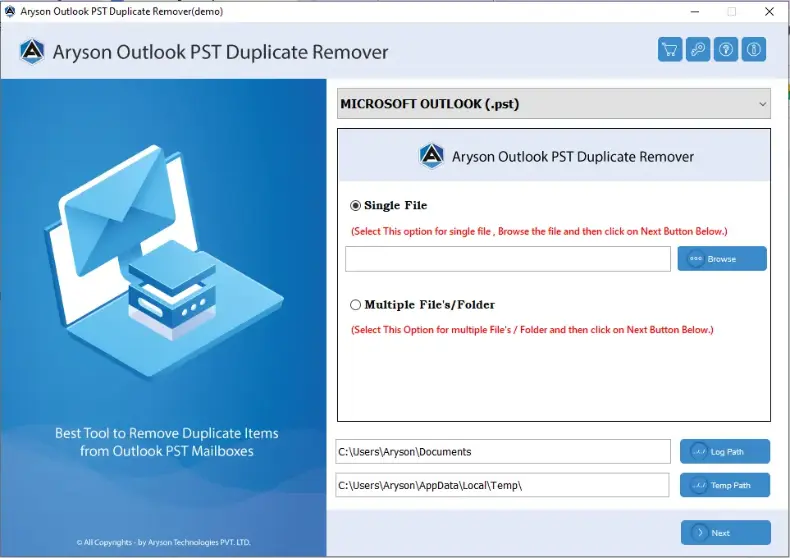
- Install and open the Aryson Outlook Duplicate Remover tool on your system.
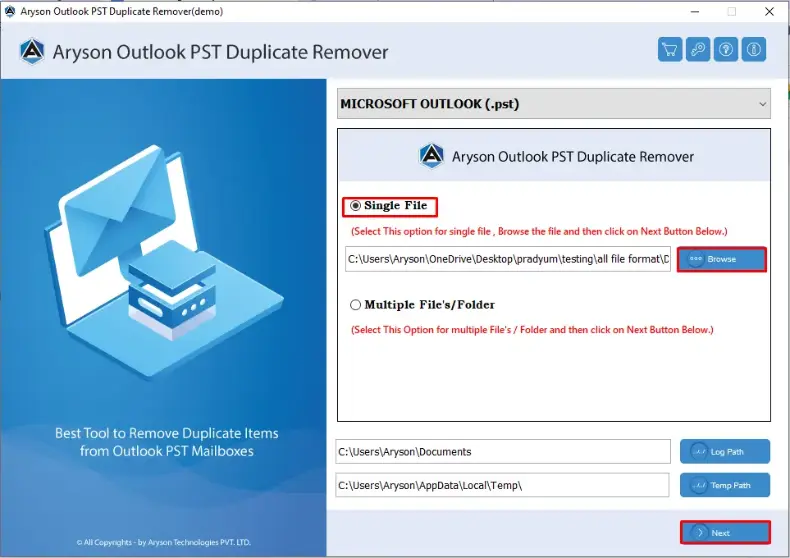
- Hit the Browse button and add one or more PST files from your Outlook account.
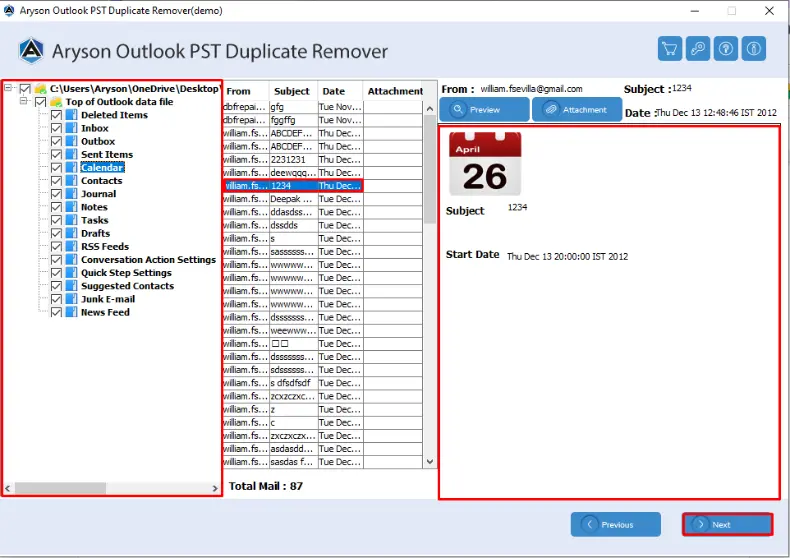
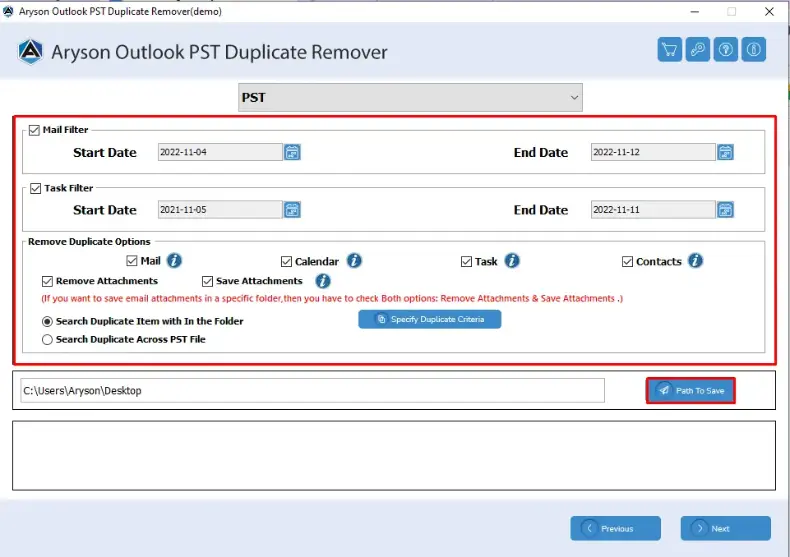
- From the listed Outlook items, select what you wish to scan — Emails, Contacts, Calendar, or Tasks.
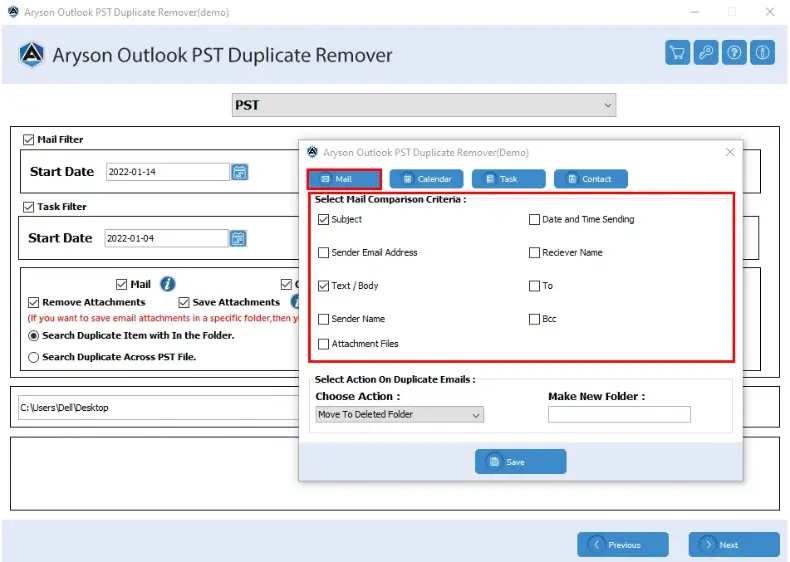
- Apply the desired comparison filters such as Subject, Date, Body, Category, or Status, to detect duplicates accurately.
- Choose how you want to handle the duplicates — Move to Deleted Items, Delete Permanently, Create a New Folder, Mark as Expired, or Put a Flag.
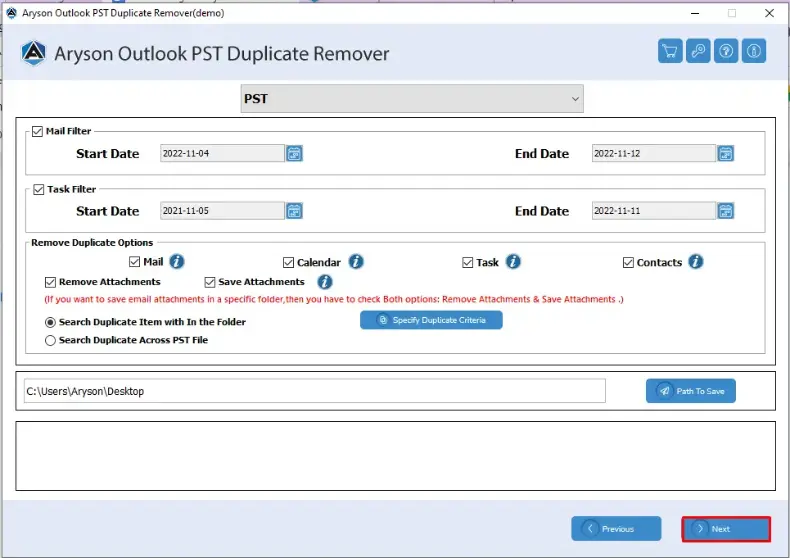
- Finally, select a destination path to save the cleaned file and click Next to begin the duplicate removal process.
Conclusion
Duplicate emails can make Outlook messy and slow. While free methods like the Clean Up Tool and manual sorting can help, they often take time and don’t guarantee complete removal. To ensure an efficient and safe cleanup, using a dedicated tool like Aryson Outlook Duplicate Remover is the smarter option. It saves time, protects your data, and keeps Outlook running smoothly. Free Outlook duplicate remover can remove duplicate emails Outlook without any cost.
Frequently Asked Questions:
Q1. Which is the easiest way to remove duplicates from Outlook for free
Ans: The easiest free method is to use Outlook’s built-in Clean Up tool for removing duplicate messages within a folder. However, for a more accurate and bulk cleanup, using a professional utility like Aryson Outlook Duplicate Remover is recommended.
Q2. How can I automatically remove duplicates across all Outlook folders?
Ans: Outlook does not have a native option to remove duplicates across all folders automatically. For complete automation and accuracy, you can use Aryson Outlook Duplicate Remover, which can scan and clean multiple folders simultaneously.
Q3. Can I use Outlook filters to find duplicate messages?
Ans: You can create custom filters using Outlook’s View Settings>>Filter>>Advanced tab. Set conditions like “Subject” or “From” to identify similar messages. However, this is only effective for small mailboxes.
About The Author:

Rohan Wiese is a Technical Content Writer at Aryson Technologies, specializing in databases, e-mail recovery, and e-mail migration solutions. He enjoys conducting research and generating information that assists database administrators, businesses, and novices in resolving issues with MS SQL Server, MySQL databases, Cloud Computing, and Microsoft Exchange.
Realted Post