-

Written By Rohan Wiese
-
Updated on September 19th, 2025
Convert MSG Emails to CSV Format – Quick Guide
Basically, MSG files store individual Outlook emails, including sender, recipient, subject, date, and message content. This format is quite useful to store the emails, but when it comes to manage or analyze the data, users generally prefer the CSV format. Because CSV makes it handle this kind of data. So, you can open a CSV file in Excel, Google Sheets, or other spreadsheet tools. This format helps to organize, sort, and analyze email information efficiently. In this blog, you will gonna to learn simple ways as Aryson MSG Converter, to convert MSG emails to CSV quickly and accurately.
Most Common Reasons Where You Think to Convert MSG Emails to CSV
Emails saved as MSG files are useful. But to check or analyze each email one by one can take a lot of time. Converting them into CSV format makes the data easier to manage and use for different purposes.
- You can open a CSV file in Excel or Google Sheets. As a result, you can sort, filter, and analyze email information quickly.
- Moreover, the Organizations generally need structured email data for audits, reports, or documentation.
- Along with that, you can handle hundreds of MSG files with ease when they are combined into a single CSV file.
- Also, CSV files are widely supported to share email information without Outlook.
- Apart from that, CSV files are lightweight and easy to store or archive safely.
After understanding these common reasons, it becomes clear why converting MSG emails to CSV is often the most practical and efficient solution. Now, it’s time to move to the verified methods to convert .msg files to Excel.
How to Convert MSG to CSV Format
You can convert MSG emails to CSV using two main methods. There are both manual and automated ways to convert MSG files, depending on the number of emails you have and the level of accuracy you need. Next, we will look at these methods step by step so you can choose the one that works best for you.
Manual Method to Convert Outlook MSG to CSV
As Outlook supports the CSV format, so you can use the MS Outlook application to export MSG to CSV. Maybe you should have to follow multiple steps, but you will get what you want. But keep in mind that there is no multiple data transfer option. So, you have to convert a single MSG file at a time. Don’t waste your time and just proceed with the steps:
- Open Microsoft Outlook on your computer.
- Locate the MSG file you want to convert.
- Double-click the MSG file to open it in Outlook.
- Select the email details such as Sender, Recipient, Date, Subject, and Message Body.
- Right-click the selection and click Copy.
- Open Microsoft Excel and create a new blank workbook.
- Paste the copied email details into Excel.
- Organize the data into columns: Date, Sender, Recipient, Subject, and Message Body.
- Navigate next and click File>>Save As.
- Select CSV (Comma-delimited) (*.csv) as the file type and click Save.
- Check the CSV file to ensure all data is correct.
Drawbacks you should consider before choosing the Manual Approach
The manual method can work for a few emails, but there are several drawbacks you should keep in mind:
- When you copy and paste each MSG file, it will become a time-consuming process.
- It’s general for users to miss details or make mistakes when they copy information.
- Moreover, it sounds very difficult when someone gives task to handle all the data manually.
- Along with that, you must have Microsoft Outlook installed to open MSG files.
- Also, the manual extraction of Attachments or metadata is quite difficult.
Because of these drawbacks, the manual method is best only for a few emails. If you have many emails or want accurate results, using the next recommended automated software is much better option.
Aryson MSG Converter: Convert MSG to CSV in Bulk
Using Aryson MSG Converter will help you to overcome the limitations of manual conversion. Your user data privacy remains safe and secure. The user can modify the specific data within the given start and end dates. Along with that, there is no place for duplicate emails. Just mark the required features and convert .msg files to Excel directly. This utility is embedded with various exclusive features with proper data accuracy. Most of expert and organizations completely depends on this software for their all type of MSG file conversion. Apart from CSV, it can also convert MSG to MBOX, OFT, PST, PDF, EML, and other formats according to your preference. Users do not need to worry about the Windows or Outlook compatibility. Now, navigate to the steps to convert MSG emails to CSV:
Follow these Simple Steps to Convert MSG to CSV Format
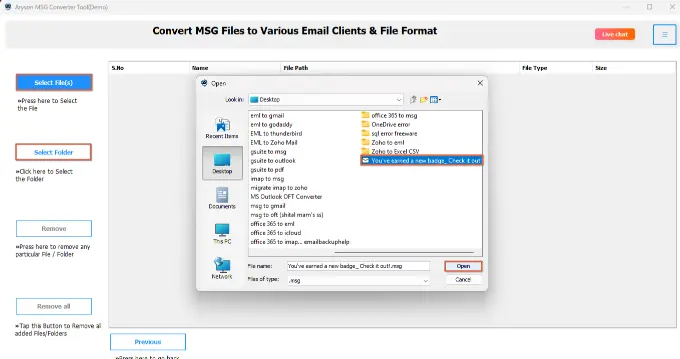
- Launch and open the Aryson MSG to CSV Converter on your screen.
- Click Select Folder to import the MSG emails you want to convert.
- Preview the imported emails to make sure all the correct files>>Next.
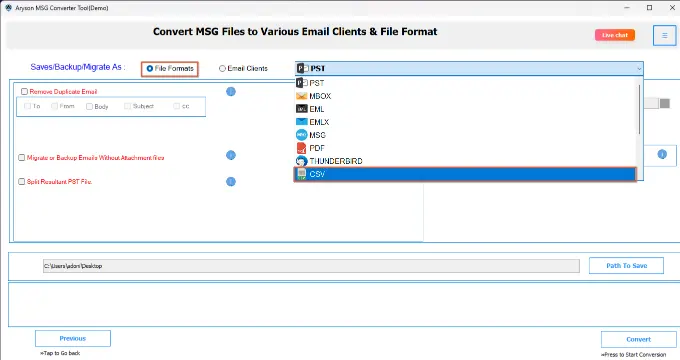
- After that, choose CSV as the output format for the resultant conversion.
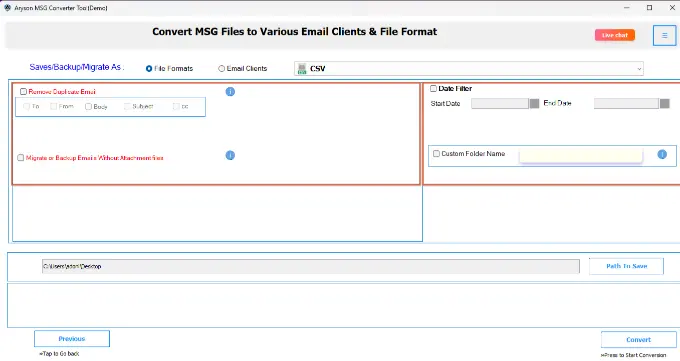
- Choose the filters to export specific emails by date, sender, or subject.
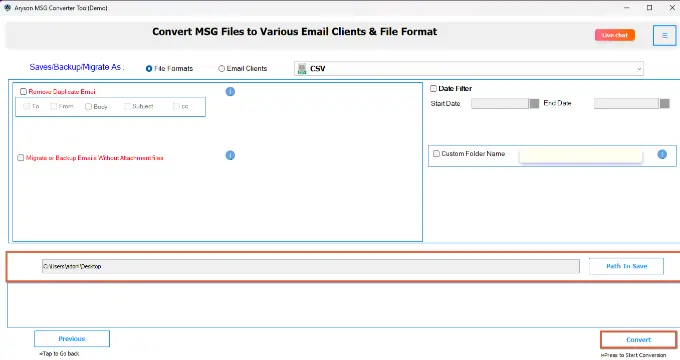
- Along with the path, click the Convert Button to convert MSG to CSV.


Conclusion
Throughout this blog, you now know how to convert MSG to CSV format with different approaches. Although the preferred method depends on your specific needs. For a small data set, you can proceed with the manual method. But when it comes to bulk data transfer, the automated tool is the recommended one. If you want a better understanding about the software, then download the demo version of the software and get your MSG data as CSV for free.
Frequently Asked Questions:
Q 1. Can I convert MSG to CSV without Outlook?
Ans: Manual conversion requires Outlook, but Aryson MSG Converter can convert emails without Outlook.
Q 2. How do I convert a single MSG file to CSV manually?
Ans: Open the MSG file in Outlook, copy the email details, paste them into Excel, organize into columns, and save as CSV.
Q 3. Can I convert multiple MSG files at once?
Ans: Yes, using the Aryson MSG Converter, you can convert hundreds of emails at once. Manual conversion is not practical for bulk files.
Q 4. Will attachments be included in the CSV file?
Ans: Manual conversion does not include attachments. But Aryson MSG Converter can export attachment information along with email details.
Q 5. Is CSV compatible with Excel and Google Sheets?
Ans: Yes, CSV files are widely supported and can be opened, edited, and analyzed in Excel, Google Sheets, and many other spreadsheet programs.
About The Author:

Rohan Wiese is a Technical Content Writer at Aryson Technologies, specializing in databases, e-mail recovery, and e-mail migration solutions. He enjoys conducting research and generating information that assists database administrators, businesses, and novices in resolving issues with MS SQL Server, MySQL databases, Cloud Computing, and Microsoft Exchange.
Realted Post