-

Written By Rohan Wiese
-
Updated on March 23rd, 2026
Quick Guide to Export Contacts from Outlook Mac OLM File
Summary:-Outlook for Mac, the repository for all user data—emails, calendars, contacts, notes, and more—stores them within a single OLM file. This consolidated storage can pose a challenge when extracting specific data, such as contacts. Many users, both personal and business, often find the need to export contacts from Outlook Mac to formats like CSV or vCard for various reasons. While the process might seem daunting, this guide offers multiple options, from free manual methods to professional software like Aryson OLM Converter. Each technique is designed to cater to your specific needs, ensuring you find the best fit for your requirements!
User Query:
BizAdmin_Neel on Spiceworks Enquired: I tried to export contacts from OLM file after migrating 30 employee accounts from Mac Outlook to a new CRM platform. Each OLM file contains contacts that need to be exported individually in CSV format, but the manual drag and drop method inside Outlook for Mac is taking long hours & is not exporting all contact fields correctly. Some phone numbers and address fields are just disappearing after export.
Is there a quick & more reliable method to bulk extract contacts from multiple OLM files at once while keeping all contact fields completely intact?
Key Reasons to Extract Contacts from an OLM File
Users often find themselves in situations where they need to extract only contacts from an OLM file or directly from Mac Outlook. These scenarios, which are common among both personal and business users, include migrating from Mac to Windows, creating a backup, transferring to other platforms, optimizing storage and migration, and better organization and management. Here are some common scenarios:
- Migrating from Mac to Windows: When switching operating systems, ensuring your contacts are transferred intact and in a usable format is crucial.
- Creating a Backup: Contacts are vital for both personal and business use. Many users create secure backups of their contacts to prevent data loss.
- Transferring to Other Platforms: Exporting contacts as CSV or vCard files simplifies the process of moving them to other email clients, mobile phones, or Customer Relationship Management (CRM) systems.
- Optimizing Storage and Migration: To save space and expedite data migration, users may choose to extract only essential data like contacts.
- Better Organization and Management: Exporting Outlook for Mac contacts allows for improved organization and management of address books.
These scenarios highlight the critical importance of contact details, prompting users to seek reliable methods for extracting only contacts from their OLM files.
How to Export Contacts from Outlook Mac OLM Files?
While multiple ways exist to extract contacts, the efficiency of the process is key. Review each procedure below and select the one that best suits your specific requirements.
1. Export Contacts from Mac Outlook to CSV (If Mac Outlook is Accessible)
If you still have access to your Mac Outlook account, this method allows you to save contacts in CSV format. Follow these steps:
- Launch Outlook for Mac.
- Navigate to the People (Contacts) view.
- Select the contacts you wish to export.
- Go to File > Export.
- Choose Contacts to a list (tab-delimited text file).
- Save the file containing your contacts.
- Finally, open the text file in Excel and then save it as a CSV file.
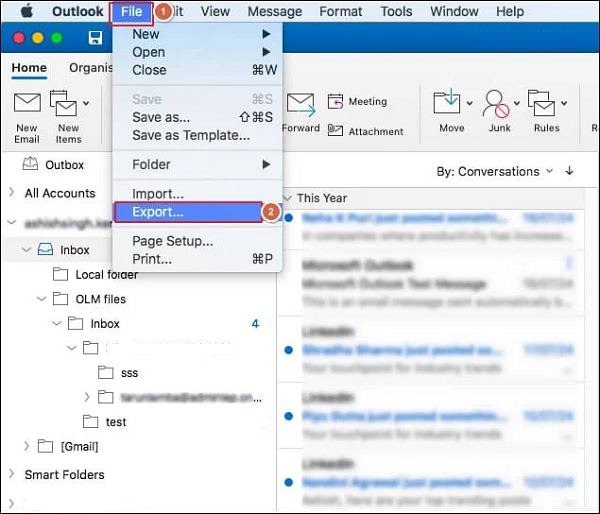
Limitations: This method is only available to users with active Mac Outlook access. Additionally, it may not ideally export all contact fields into the text file.
2. Export Outlook for Mac Contacts to VCF (vCard)
Directly exporting data to .vcf from Outlook for Mac is not supported. However, you can use the following workarounds:
- Sync with iCloud: Sync your Mac Outlook contacts with iCloud, and then export the contacts from iCloud as vCards.
- Drag and Drop (Individual Contacts): Individually drag and drop contacts from Outlook onto your desktop. This action will create separate .vcf files for each contact.
Limitations: The drag-and-drop method does not support batch export of contacts to VCF, making it very time-consuming if you have a large number of contacts.
3. Use the Apple Contacts App Synced to iCloud
This process is applicable only if your Outlook contacts are synced to your Mac’s Contacts app via iCloud. Follow these instructions:
- Open Mac Outlook Contacts on your Mac.
- Select the contacts you want to export.
- Go to File > Export > Export vCard.
Limitations: This method requires contacts to be synced to Apple Mail via iCloud first, as it doesn’t work directly with OLM files. It can make the process more complex to perform.
4. Convert OLM Contacts to CSV/VCF with a Professional Tool
If you only have orphaned OLM files (not connected to an active Mac Outlook account), using professional software is the most reliable and convenient solution. Aryson OLM Converter is a highly recommended tool for exporting contacts from Outlook Mac OLM files. This utility supports extraction from multiple OLM files simultaneously, regardless of their size. Furthermore, it ensures that contact fields and the overall structure remain intact after conversion, providing you with peace of mind.
Follow these steps to Extract Contacts from Outlook for Mac OLM File:
- Download and install Aryson OLM Converter (compatible with both Mac and Windows).
- Click on Select File and choose the OLM files containing your contacts.
- From the preview tree, select the Contacts folder.
- Choose CSV (or VCF, depending on your preference) as the output format from the available options.
- Define a saving path to store your output CSV file.
- Click on Convert to initiate the extraction of only contacts from the OLM file.
This process is reliable, secure, and user-friendly. You can download and run the free trial version of Aryson OLM Converter to test its authenticity and reliability before purchasing, ensuring that your data is in safe hands.
Conclusion
Exporting contacts from Outlook for Mac should not be a difficult task. This guide has covered various approaches, from manual methods to quicker, professional solutions. For ensuring the safety and integrity of your contacts, especially when dealing with multiple OLM files without Mac Outlook access, professional software is highly recommended. These tools offer bulk processing capabilities and are designed for ease of use, making them accessible and user-friendly for all users.
Frequently Asked Questions:-
Q. How do I extract contacts from an OLM file on Windows?
Ans– To extract contacts from an OLM file on Windows, you will need to use a professional OLM Converter Tool. This type of software allows you to specifically select the contacts section within the OLM file and export them into formats like CSV, vCard, or Excel without requiring Mac Outlook to be installed.
Q. Is there a free way to extract contacts from an OLM file?
Ans- Yes, you can extract contacts from an OLM file for free by importing the OLM file into Outlook for Mac and then manually exporting the contacts. However, this method strictly requires access to a Mac system with Outlook installed. On Windows, while some free OLM viewers might display contacts, they typically do not support exporting data without a paid upgrade.
About The Author:

Rohan Wiese is a Technical Content Writer at Aryson Technologies, specializing in databases, e-mail recovery, and e-mail migration solutions. He enjoys conducting research and generating information that assists database administrators, businesses, and novices in resolving issues with MS SQL Server, MySQL databases, Cloud Computing, and Microsoft Exchange.
Realted Post