

×

Your Aryson download task is in progress here

Screens

Video

Guide

Eula

How to Use Aryson PST Contacts Export Tool

Enhanced Outlook Duplicate Management Panel

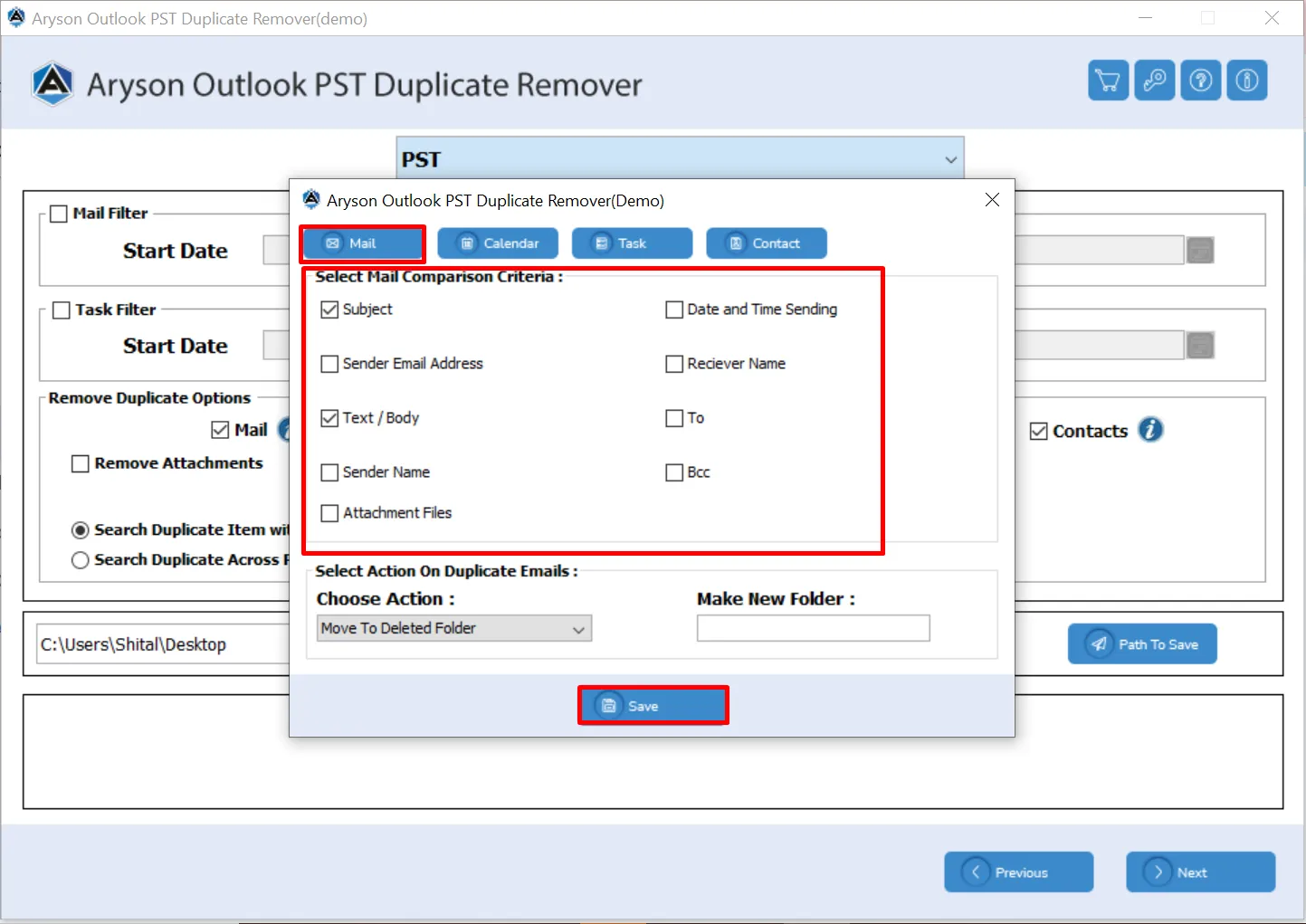
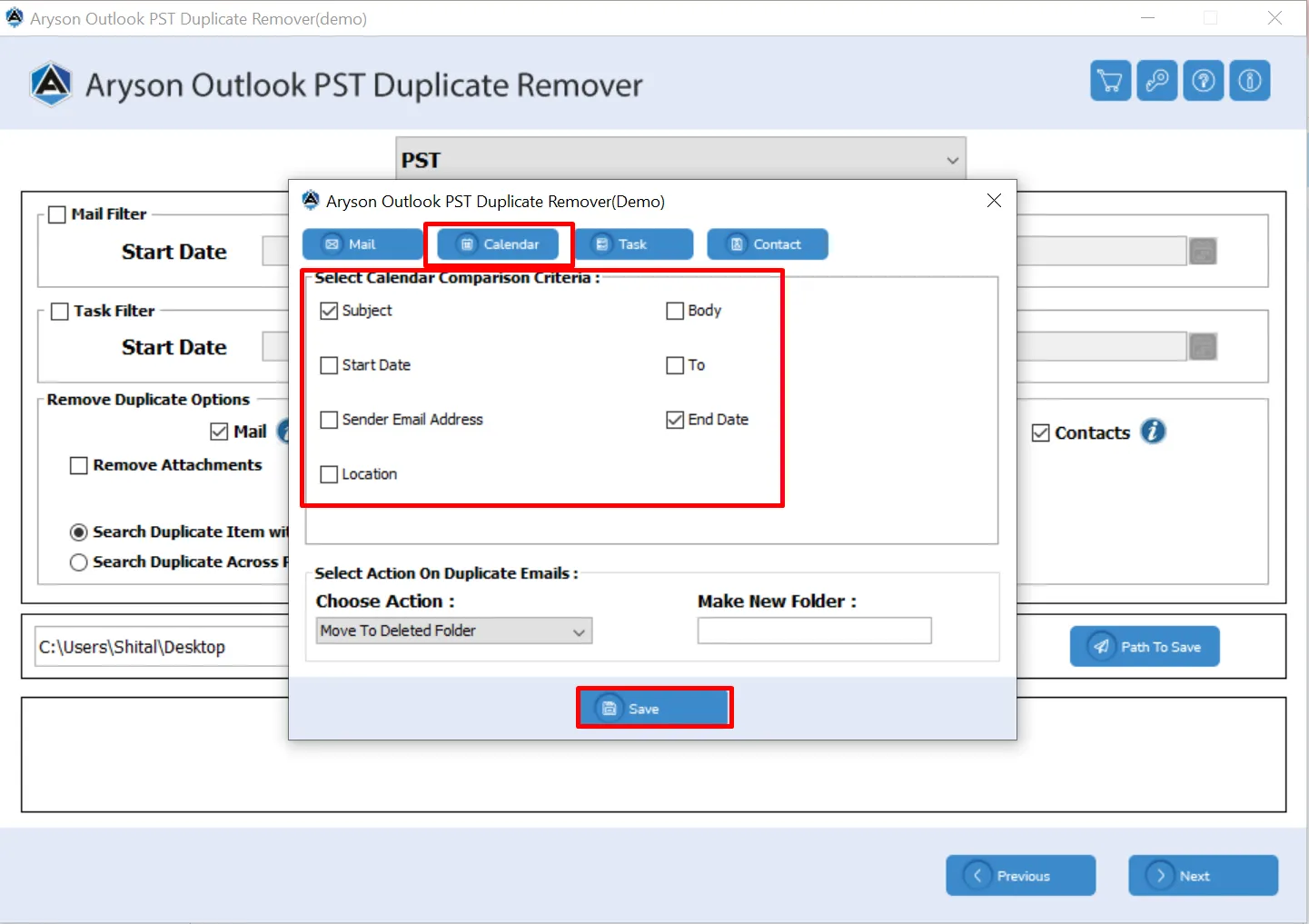
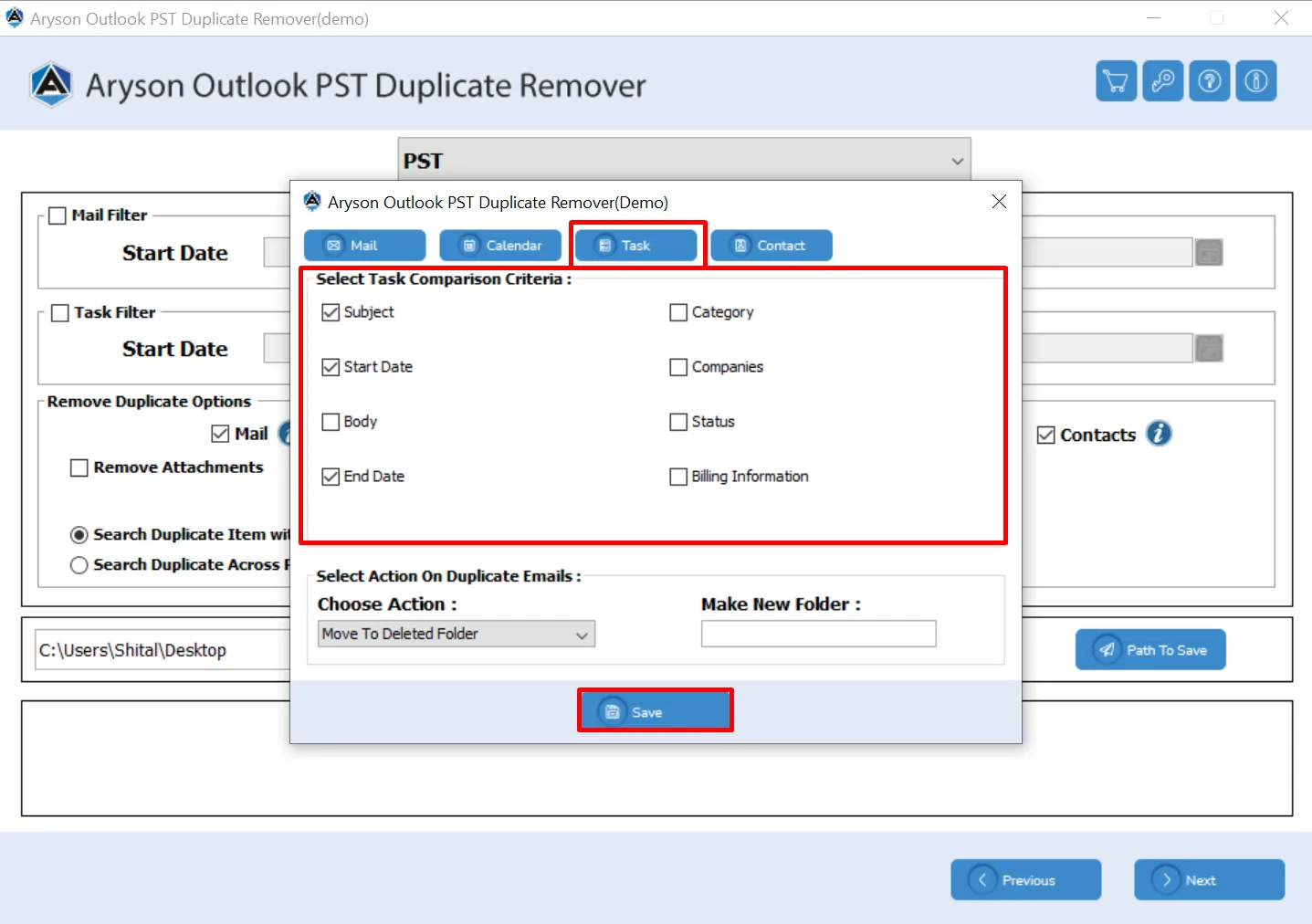
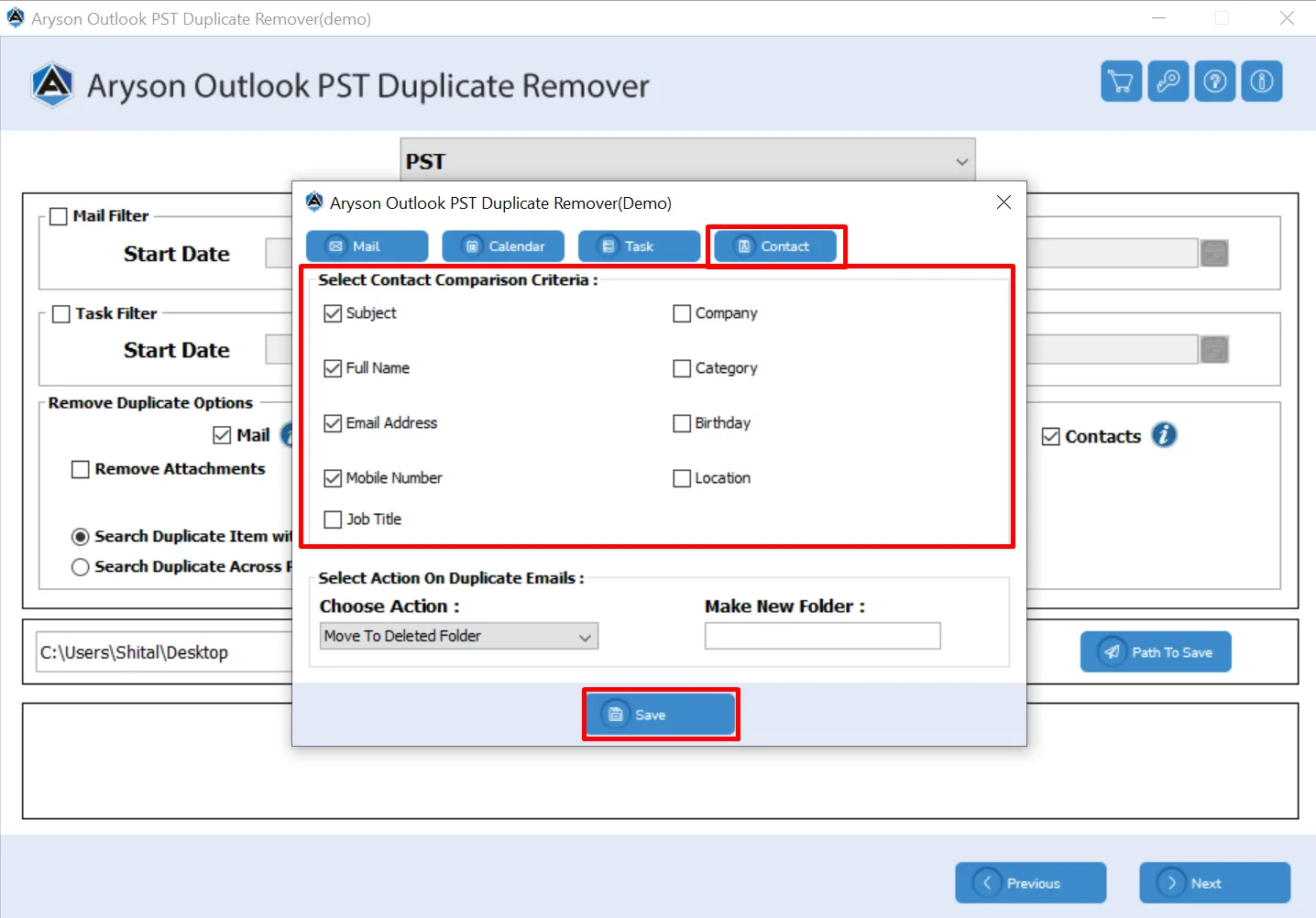
Aryson Outlook PST Duplicate Remover provides a user-friendly duplicate management panel. Users have the flexibility to choose how they want to compare, identify, and handle duplicate items in Outlook data files, such as emails, calendars, tasks, and contacts. You can select various comparison criteria like Subject, Start Date, Body, End Date, Category, Status, and more to accurately detect duplicates. There is an additional option to select action on duplicate emails, like move them to a deleted folder, delete permanently, create a new folder, mark as expired, or put a flag.

  • Select specific Outlook items such as Mail, Calendar, Tasks, and Contacts.
  • Apply multiple comparison filters like Subject, Date, Body, and Category.
  • Manage duplicates with options to delete, move, or mark as expired.
  • Create a new folder to save or organize duplicate Outlook items.

Aryson Outlook Duplicate Remover - Rating & Reviews

Aryson’s solutions are appreciated for their simple process and effective results.

Expert Reviews

Rating & Reviews

Microsoft Outlook Duplicate Remover: Multiple Item Properties

Here are the multiple item properties in Outlook to accurately detect and remove duplicates:

How to Use Aryson Outlook Duplicate Remover

How to Use Aryson Outlook Duplicate Remover

Aryson Outlook PST Cleanup Tool is an advanced software to help users easily find and remove duplicate items from Outlook PST files. It efficiently scans mailbox data, including emails, contacts, calendars, and tasks, and deletes or moves duplicates as per user preference. This utility makes sure complete data safety while keeping your Outlook clean and optimized.

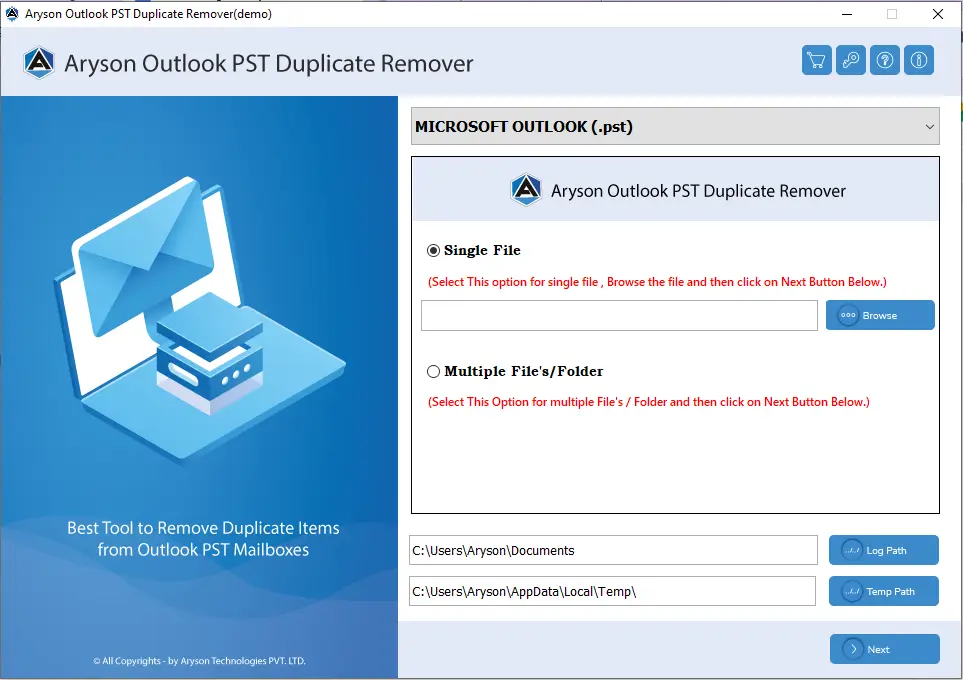
  • Step 01: Download and launch the Aryson Outlook Duplicate Remover on your computer.
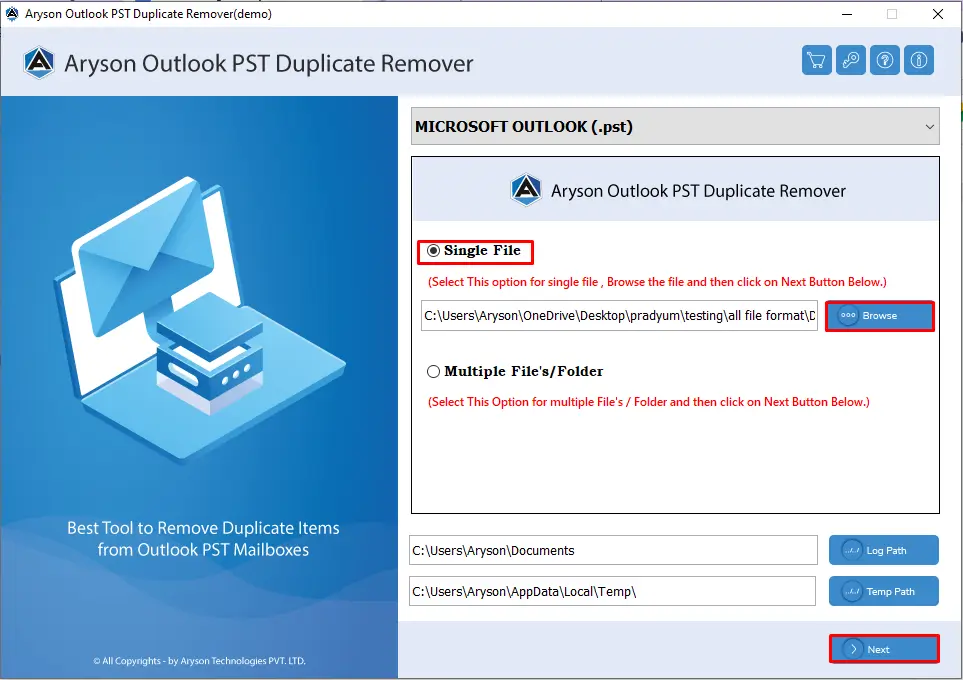
  • Step 02: Click on the Browse button to upload your single or multiple Outlook PST files.
  • Step 03: Choose the Outlook items [ Mail, Calendar, Task, or Contacts] you want to scan.
  • Step 04: Select comparison filters Subject, Date, Body, Category, or Status accordingly.
  • Step 05: Pick an action[ Move to Deleted Folder, Delete Permanently, Create New Folder, Mark as Expired, or Put Flag ].
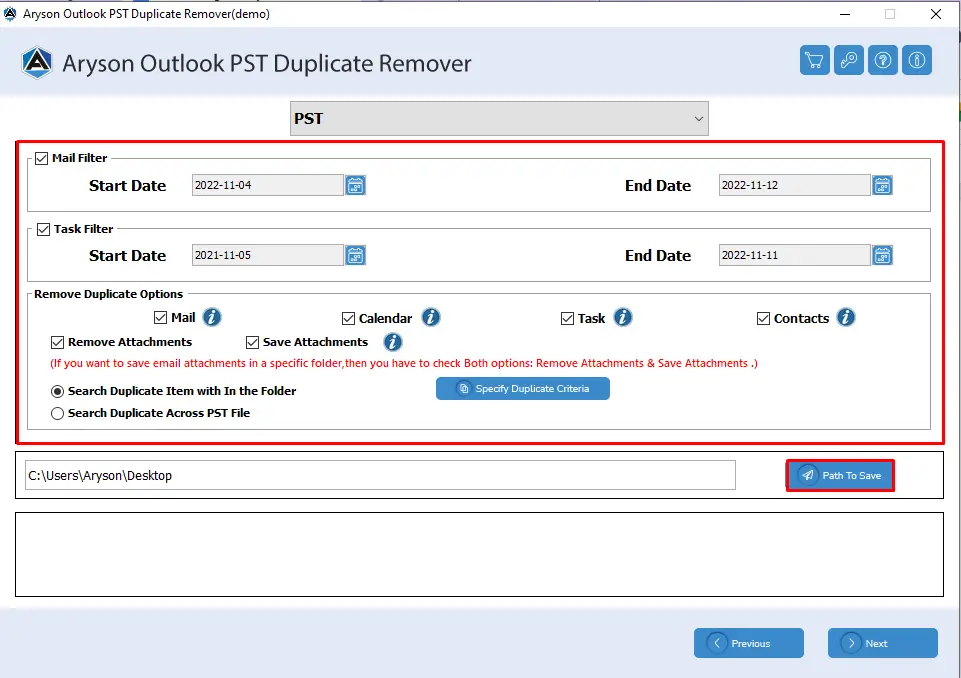
  • Step 06: Assign a Path to Save and click Next to remove duplicate Outlook files successfully.

Best Outlook Duplicate Remover with Advanced Key Features

Remove Duplicate Outlook Items Securely

Remove Duplicate Outlook Items Securely

Aryson Outlook Duplicate PST Remover efficiently scans your Outlook PST files to identify and remove duplicates across all major data types, including emails, contacts, calendars, tasks, and journals. With the assistance of this software, you can keep your mailbox clean and organized. So, it helps Outlook run smoothly.

Diverse Options to Delete Duplicate Emails

Diverse Options to Delete Duplicate Emails

Aryson Outlook PST Duplicate Remover Tool has diverse options like Select Comparison Criteria that help you delete duplicate Mail, Calendar, Task, and Contact items. It provides multiple comparison criteria, like Subject, Sender Email Address, Sender Name, Receiver Name, etc. If you have a damaged PST file, use the PST Repair Tool to fix it first, then delete duplicate items.

Delete Duplicate in Bulk

Delete Duplicate in Bulk

With the Aryson Outlook Duplicate Remover, you will have a different option to browse the Outlook data file. As it supports bulk processing, users can add single file or the complete folder according to their requirement. This feature is useful for organizations or individuals to manage multiple mailboxes and saves significant time.

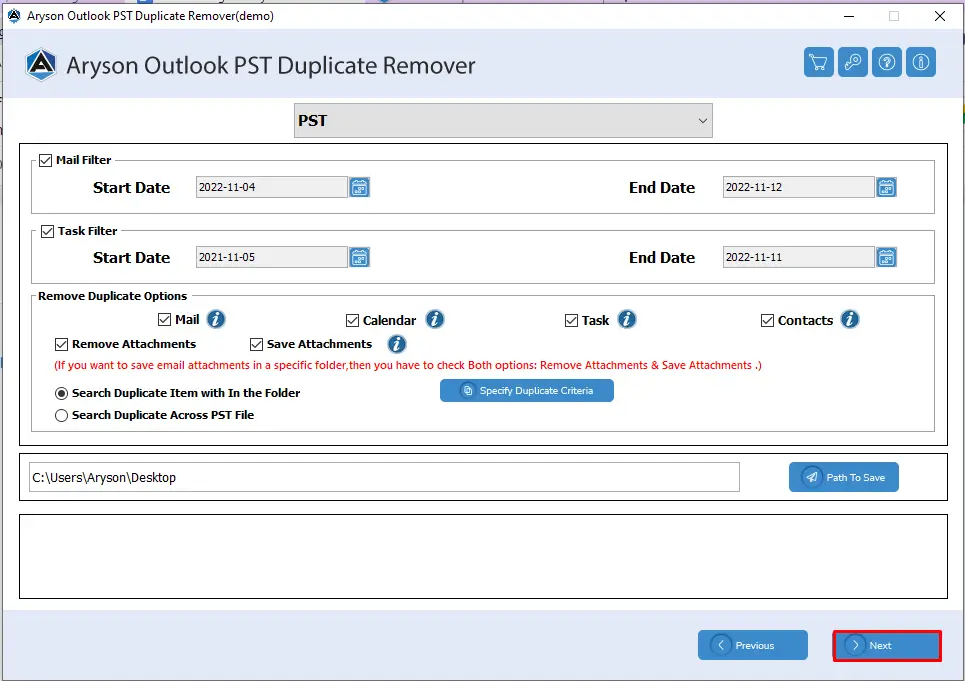
Scan Duplicates Across Folder/PST

Scan Duplicates Across Folder/PST

Users have the flexibility to choose the scope of duplicate detection:

  • Within Folder: Scans a single folder and deletes duplicate items from it.
  • Across PST File: Scans across the entire PST file, identifying duplicates that exist in multiple folders.

This dual search option enhances accuracy and efficiency in identifying unwanted duplicates.

Advance Option for Attachment

Advance Option for Attachment

The Outlook PST Cleanup Tool gives advanced options to handle attachments while removing duplicates. It keeps important attachments safe even when duplicate emails are deleted. You can manage attachments separately, decide to keep, move, or delete them, and make sure no important files are lost during cleanup.

Mail & Task Filter

Mail & Task Filter

Ayson Outlook Duplicate Remover Tool provides powerful filters to manage emails and tasks effectively. Users can filter items based on start and end dates to target specific periods for duplicate detection. With Mail and Task Filter, you can quickly narrow down your search and save time.

Specify Duplicate Creteria

Specify Duplicate Creteria

This feature defines the rules to identify duplicate items in Outlook. You can choose which fields to check, such as subject, sender, recipient, date, body, categories, or company details. With its setting-specific criteria, Aryson Outlook Duplicate Remover accurately detects duplicates without affecting important emails, contacts, tasks, or calendar entries.

Support Multiple Outlook Versions

Support Multiple Outlook Versions

Outlook Duplicate Items Cleaner Software works with PST files from MS Outlook 2021, 2019, 2016, 2013, 2010, and earlier versions. This broad compatibility ensures that users with different Outlook setups can efficiently clean duplicates. So, there is no need to worry about the version of Outlook you are using.

Demo Version with Simple GUI

Demo Version with Simple GUI

The free demo version allows users to remove up to 50 duplicate items from PST files for free. With this way, users get the opportunity to test the software and gain the better understanding of the Aryson Outlook Duplicate Remover. Along with the free version, you will get the quite simple interface of the software.

Compatibility with All Mac Versions

Compatibility with All Windows Versions

Aryson Duplicate PST File Remover Software can run smoothly on all Windows operating systems. As an outcome, it is versatile for different PC environments. Users can rely on this software for consistent performance to remove duplicate emails and other items.


Aryson Outlook Duplicate Remover: System Specifications

Software Download

(Windows)

Download Now


Size: 166MB Version: 23.01

Trial Limitations

Free Outlook Duplicate Remover Tool allows users to remove only 50 duplicate items from per PST folder. Download Outlook Duplicate Remover full version to delete bulk of duplicate items within a few clicks.

Requirements & Supported Versions

Processor:Intel® Core™ 2 Duo CPU E4600 @ 2.40GHz 2.39GHz

Hard Disk Space: 500 MB of free hard disk space required

RAM: 4 GB of RAM (4 GB is recommended)

Supported Platforms

Windows OS: 11/ 10/ 8.1/ 8/ 7/2008/ 2012 (32 & 64 Bit), and other Windows versions.

Outlook Versions: Office 365, 2021, 2019, 2016, 2013, 2010, 2007, 2003, 2002, 2000, 98, and 97.

Software Prerequisites

  • If you are operating Windows OS 11, 10, 8, or 7 (32-bit or 64-bit) then you must launch the tool as an Administrator.
  • Turn off the Windows Firewall for proper installation.
  • Disable the Antivirus programs.

FAQ

Request For Software Customization

If you need to customize Aryson Software or need some additional specific features, then provide the software customization Request Quote.

Aryson Outlook Duplicate Remover: Free & Premium Version

Get an Overview of Aryson Outlook Duplicate PST Remover Features - Demo and Full Version

Product Features Free Version Premium Version
Remove Duplicate Items from PST files 50 items per Folder Complete Mailbox
Support Batch Processing
Comes with the Previews Panel
Mail & Task Filter
Remove Duplicate Outlook Data
Built-in Search Feature
Preserve Folder Hierarchy
Specify Duplicate Creteria
Wide Compatibility with Windows & Outlook
Technical Support
Money Back Policy

Frequently Asked Questions:

Ans.You can quickly get rid of duplicate emails from Outlook PST files by following the steps below:

  • Download and run Aryson Outlook Duplicate Remover Software.
  • Then, select Outlook PST files from your system and click Next.
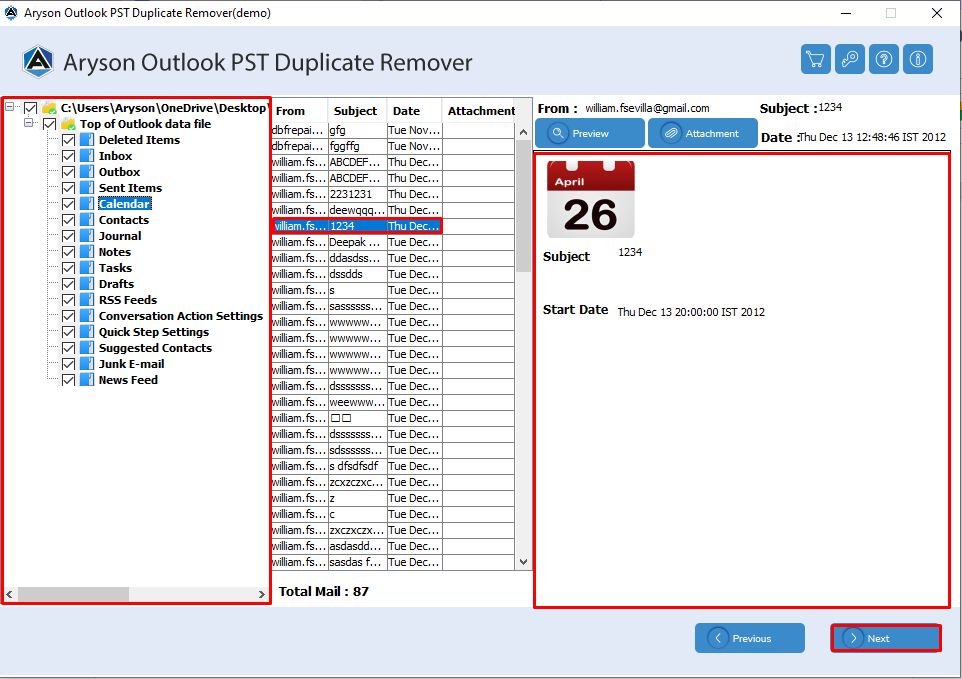
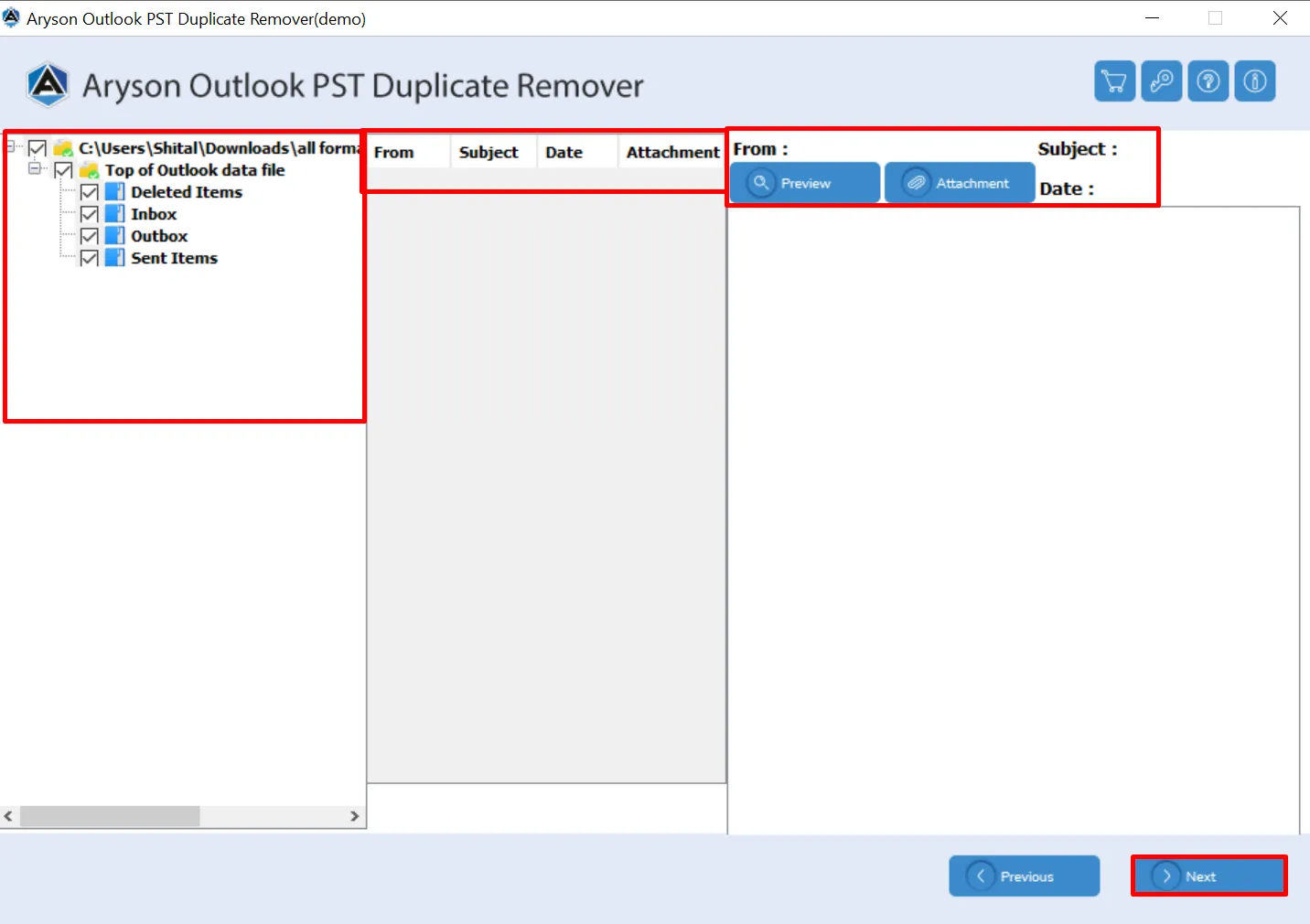
  • Check and preview the required folder and email details >>Next.
  • Choose the different built-in features of the software accordingly.
  • Click the Next button to start the process to remove duplicate items.

Ans. Yes, the Aryson Outlook Duplicate Remover works with both ANSI and Unicode PST formats without any issues.

Ans. This software is optimized for speed and can scan and remove duplicates from large PST files in a short time. Although it depends on file size and system performance.

Ans. Yes, Aryson Outlook Duplicate Contacts Remover safely removes duplicates while preserving attachments, notes, reminders, and all essential information.

Ans. Absolutely. You can choose which folders or data types (emails, contacts, tasks, calendars) to scan and clean, and also select specific criteria for duplicates.

Ans. It supports all major Outlook versions, including Outlook 2010, 2013, 2016, 2019, and Outlook 2021, both 32-bit and 64-bit.

Ans. Yes, the Aryson Outlook Duplicate Remover comes with 24/7 customer support and a free trial for evaluation.

Preferred Choice of IT Experts and Businesses Globally

See what our IT professionals and businesses say about their experience with our Outlook PST Cleanup Tool

review-rating