Screens

Video

Guide

Eula

Backup Gmail Emails in 10+ File Formats with Aryson Gmail Backup Tool

  • PST: Export complete Gmail mailbox data into PST format for seamless access in Microsoft Outlook.
  • MBOX: Save Gmail emails in MBOX format to migrate data to MBOX-supported email clients.
  • EML: Download individual Gmail emails in EML format for easy sharing and compatibility with multiple email applications.
  • EMLX: Convert Gmail emails into EMLX format to make them readable and accessible in Apple Mail.
  • MSG: Export selected Gmail emails as MSG files to open emails directly.
  • PDF: Save Gmail emails in PDF format for secure archiving, documentation, and compliance requirements.
  • DOCX: Convert Gmail emails into DOCX format to edit and manage email content using Microsoft Word.
  • DOCM: Export Gmail emails as DOCM files while preserving macro-enabled Word documents.
  • TEXT (TXT): Backup Gmail emails in plain text format for lightweight storage and simple readability.
  • HTML: Export Gmail emails into HTML format while keeping the original structure, formatting, and hyperlinks intact.
  • CSV: Save Gmail email data in CSV format to sort, analyze, and manage email details using spreadsheet tools.
  • JPEG: Convert Gmail emails into JPEG images for visual reference and offline viewing.
  • PNG: Export Gmail emails into PNG format with high image quality and clear layout preservation.

Aryson Gmail Backup Tool - Rating & Reviews

See what our users have to say about the Aryson Gmail Backup Utility

Expert Review

Rating & Reviews

Best Gmail Backup Software with Advanced Functionalities

Explore This Trusted Utility as the Safe and Complete Gmail Backup Solution

Backup Complete Gmail Mailbox Securely

Backup Complete Gmail Mailbox Securely

Aryson Gmail Backup Tool allows users to back up the entire Gmail mailbox in one process. It includes all default and custom folders such as Inbox, Sent, Drafts, Spam, and Trash. Users can back up Gmail emails to an external hard drive, local drive, PC, or computer system. It helps maintain offline access to emails.

Save Gmail Emails in Multiple Formats

Save Gmail Emails in Multiple Formats

This software supports multiple saving formats, including PST, MSG, MBOX, EML, EMLX, HTML, PDF, CSV, DOCX, JPEG, DOCM, TEXT & PNG. This flexibility helps users choose a format that best fits their email client, compliance needs, or storage preferences. So that user can easily add Gmail to Outlook and other email applications with their default file format.

Direct Migration to Email Clients

Direct Migration to Email Clients

Aryson Gmail Backup Tool enables direct migration of Gmail emails to Office 365, Thunderbird, and other supported email clients. The user can directly migrate Gmail data into Gmail, Office 365, HostGator, Hotmail, IMAP, iCloud Mail, Zoho Mail, Yandex Mail, and Google Workspace. Hence, you do not need manual import steps and ensures smooth email accessibility after migration.

Batch Backup of Multiple Gmail Accounts

Batch Backup of Multiple Gmail Accounts

With batch processing support, users can back up multiple Gmail accounts simultaneously. This feature is useful for IT administrators and organizations managing several Gmail mailboxes. Instead of logging in and exporting emails one by one, you can process several accounts together. As a result, it saves time and makes large-scale email backup tasks easier for teams and businesses.

Incremental Backup with Fast Mode

Incremental Backup with Fast Mode

The incremental backup feature of this Gmail Mail Backup Tool saves only newly added Gmail emails after the initial backup. As a result, it reduces backup time, avoids duplicate data, and optimizes storage space. The Fast Mode option speeds up the Gmail backup and migration process. It is especially useful for large mailboxes where faster performance is required.

Skip Duplicate Emails Using Filters

Skip Duplicate Emails Using Filters

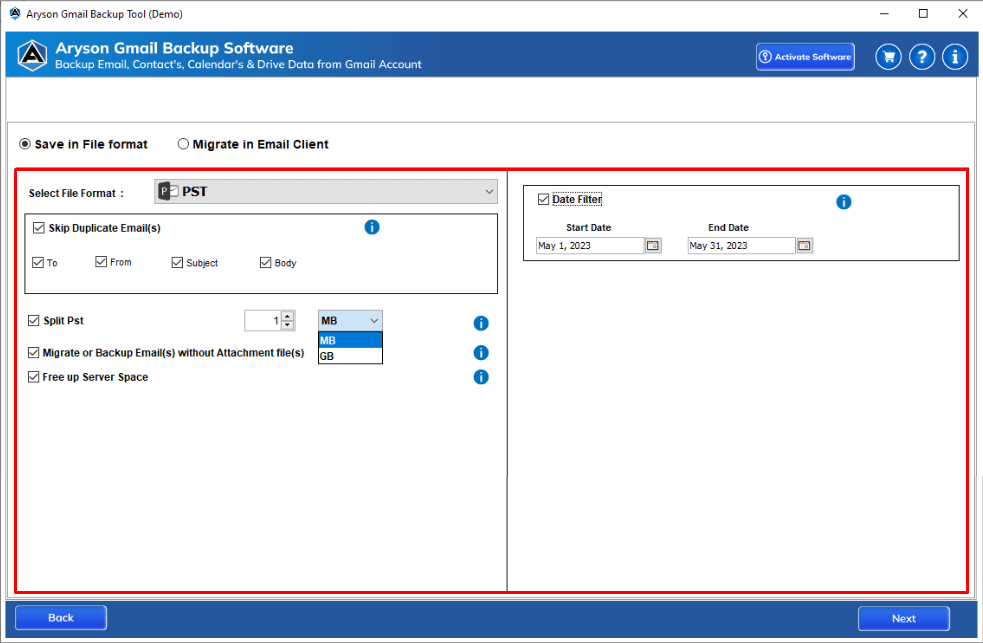
This software provides advanced filters such as To, From, Subject, and Body to skip duplicate emails. It helps maintain clean backup data and prevents repeated email storage. With this option, it automatically avoids downloading duplicate emails during the backup process. Therefore, storage space stays optimized, and you get a clean backup without unnecessary copies.

Date-Based Email Backup Filter

Date-Based Email Backup Filter

Users can back up Gmail emails between a specific start and end date. This feature is helpful for archiving emails from a particular time period. So, you can backup emails from a specific time period only. You can choose a start date and an end date as needed. Because of this, you avoid exporting unwanted old emails.

Backup Emails Without Attachments

Backup Emails Without Attachments

Aryson Gmail Backup Tool offers the option to back up or migrate emails without attachments. This is useful when users want to delete large attachments in Gmail or focus only on email content. Along with that, it is embedded with another feature to save the email attachment separately. Simply mark this option, save the attachment on preferred location.

Split PST File Option

Split PST File Option

The Split PST feature helps manage large PST files by dividing them into smaller parts. This improves file handling, performance, and compatibility with Outlook. So that you can easily proceed with PST data. Also, it maintains original email metadata, including sender, receiver, subject, date, and time. This ensures data authenticity and keeps emails intact after backup.

Free Up Gmail Server Space

Free Up Gmail Server Space

After a successful backup, users can free up Gmail server space. It helps improve Gmail performance and manage storage limits. By downloading emails to your local system, you can remove them from the Gmail server later to reduce mailbox size and prevent storage limit warnings. Hence, your Gmail account continues to work smoothly without constant space issues.

Secure Google OAuth Authentication

Secure Google OAuth Authentication

Best Gmail Backup Software uses Google OAuth authentication, which means users do not need to share or store Gmail passwords. This ensures a secure and privacy-focused backup process. This means your Gmail password is never stored or shared. As a result, account access remains fully secure while meeting Google’s security standards.

Compatible with All  Windows Versions

Compatible with All Windows Versions

This software works smoothly on all major Windows versions, including Windows 11, 10, 8.1, and earlier. It ensures wide compatibility across different systems. Aryson Gmail Backup Tool comes with an easy-to-use interface suitable for both technical and non-technical users. The step-by-step workflow makes Gmail backup simple and hassle-free.

How to Use Aryson Gmail Backup Tool: Complete Guide

Aryson Gmail Backup Tool Guide

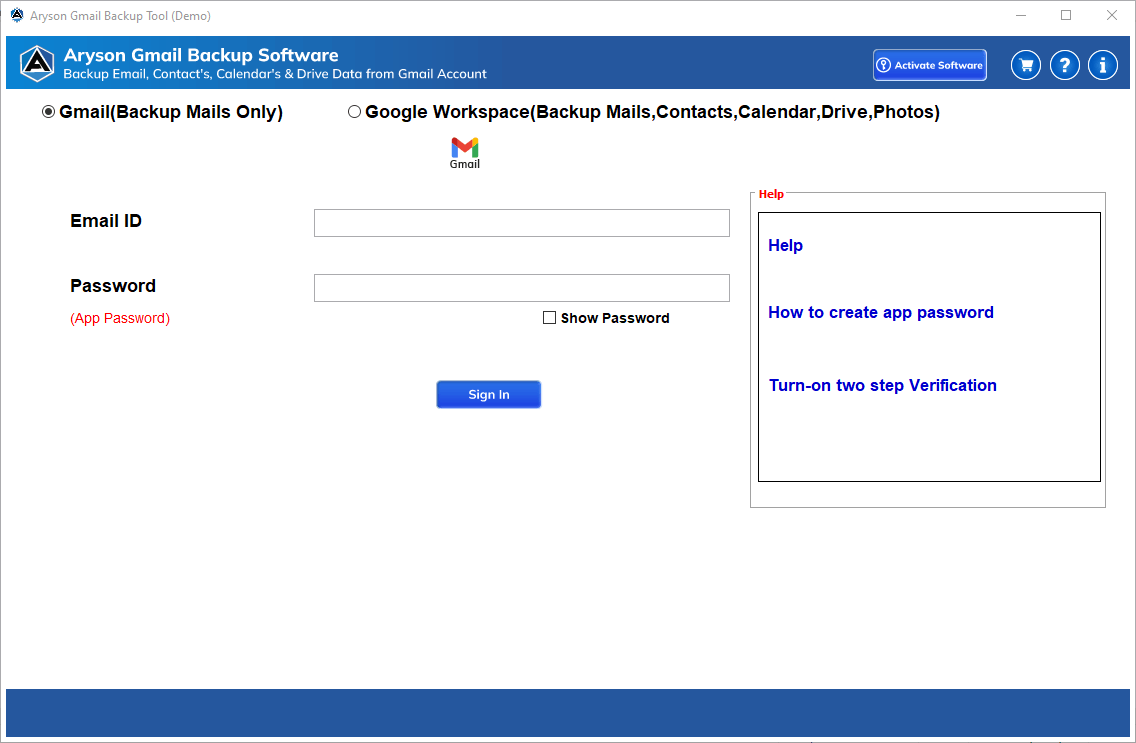
Aryson Gmail Backup Software helps you securely back up, export, and migrate Gmail emails without any technical complexity. With a simple interface and powerful filters, users can download complete or selective Gmail data into multiple file formats or email clients. Follow the steps below to back up your Gmail mailbox easily:

  • Step 01: Download and install the Aryson Gmail Backup Tool on your system.
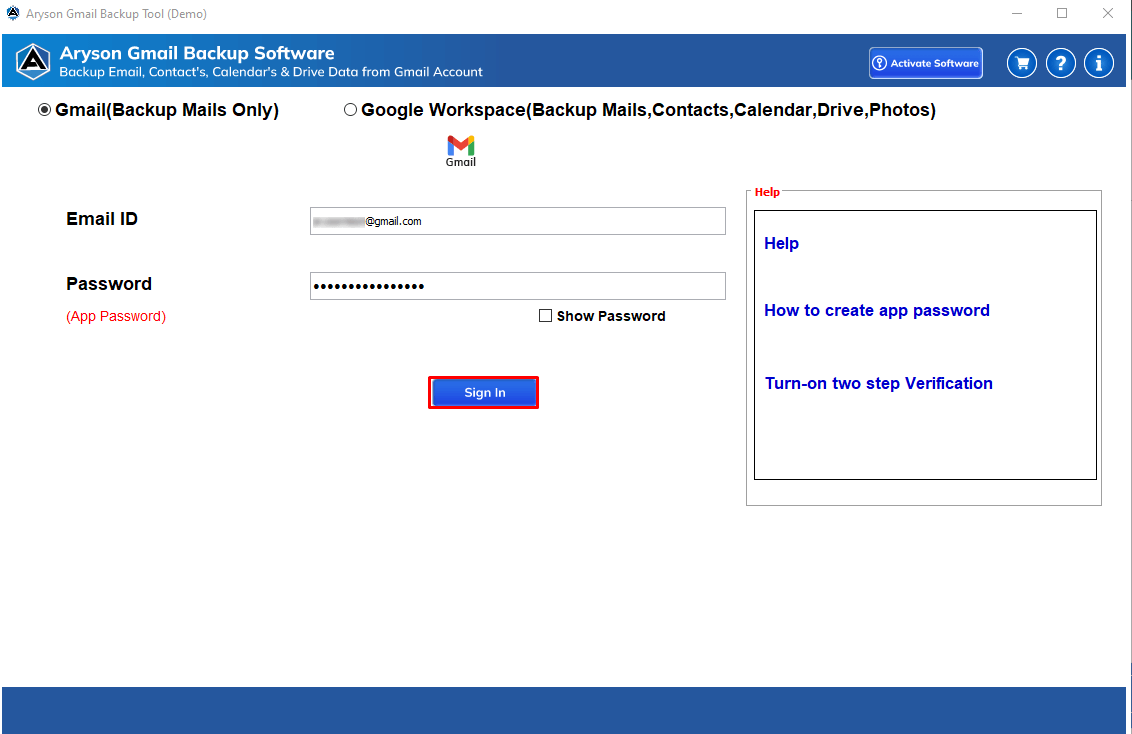
  • Step 02: Sign in to your Gmail account using secure Google OAuth authentication.
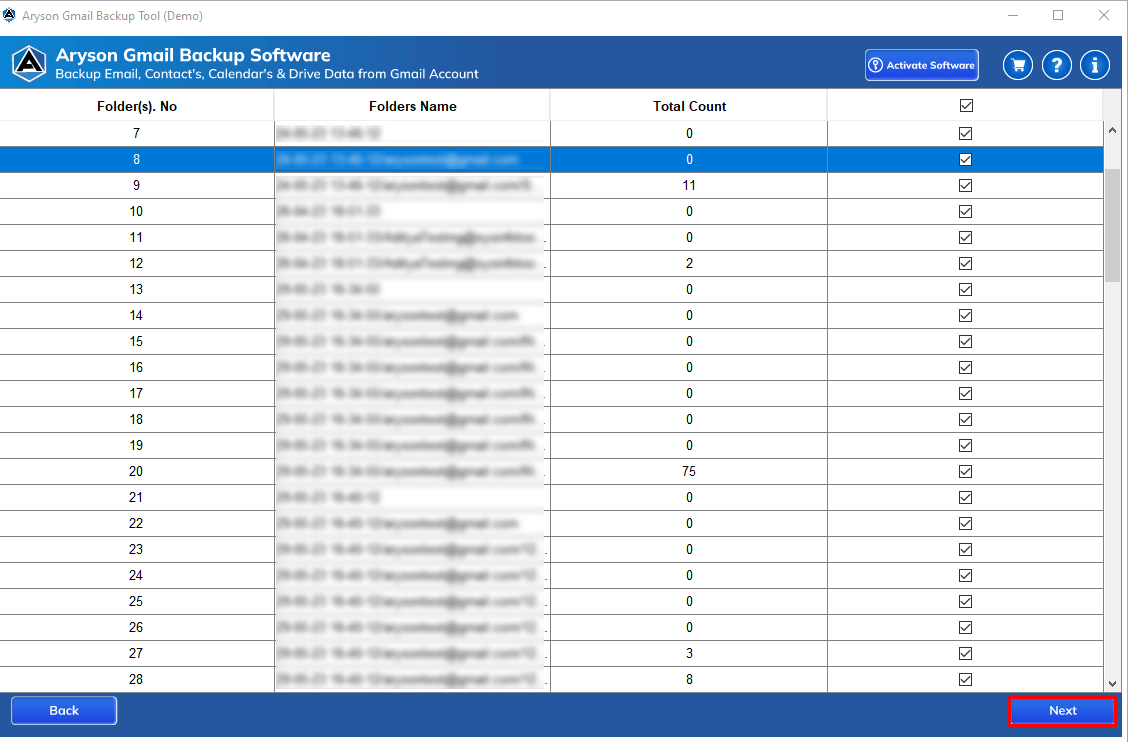
  • Step 03: Preview all Gmail folders (Inbox, Sent, Drafts, Spam, etc.) in a tree structure.
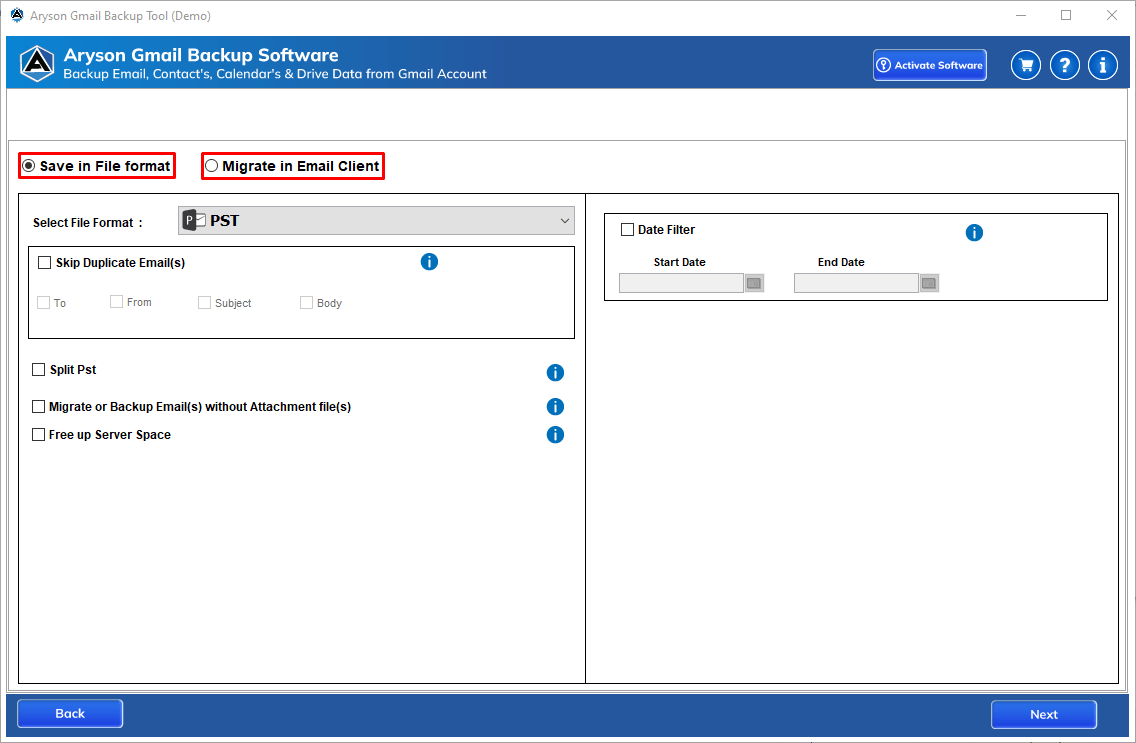
  • Step 04: Choose the desired output format or email client for backup or migration.
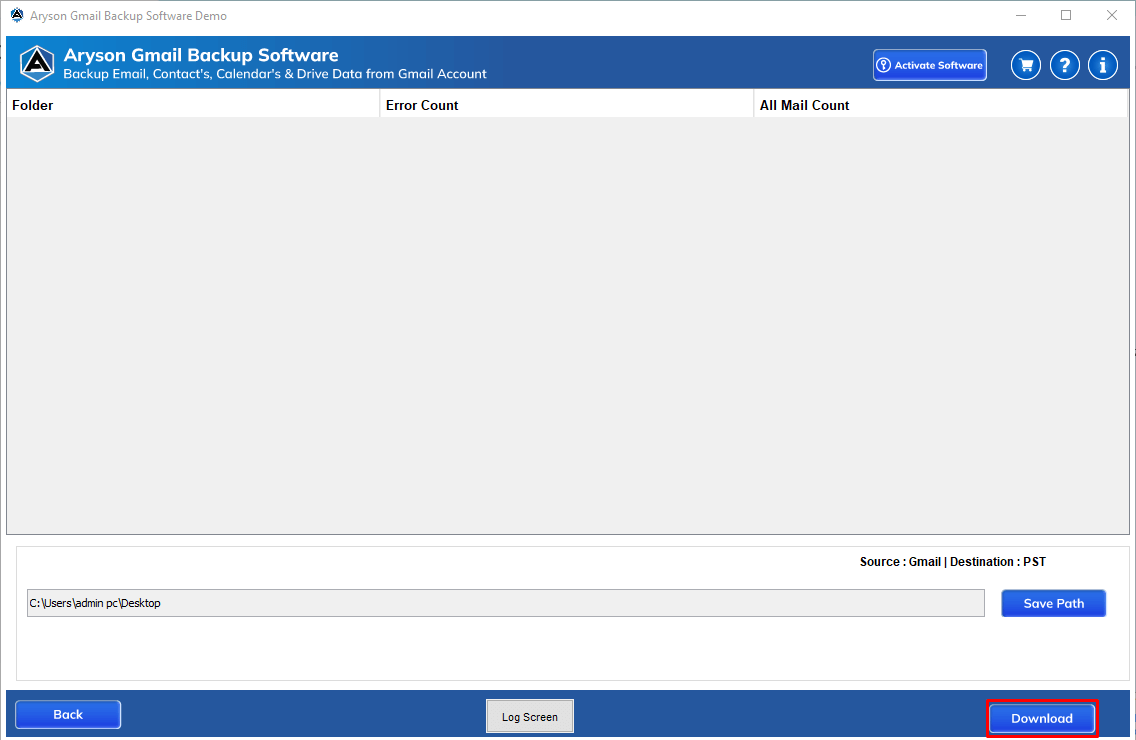
  • Step 05: Opt for additional filters and click on the Download Button to start backup.

Aryson Gmail Backup Software: System Specifications

Software Download

(Windows)

Download Now


(Linux)

Download Now


Size: 241MBVersion: 25.8

Trial Limitations

The free trial lets you back up up to 50 Gmail emails at no cost. To back up more than 50 emails and access the complete mailbox with all advanced features, you will need to purchase the licensed version of the software.

Requirements & Supported Versions

Processor: Intel® Core™ 2 Duo CPU E4600 @ 2.40GHz 2.39GHz

Hard Disk Space: 500 MB of free hard disk space required

RAM: 4 GB of RAM (4 GB is recommended)

Supported Platforms

Windows OS: Windows 11, 10, 8.1, 8, 7, Vista, XP, 2000, 98, NT, and 95.

Software Prerequisites

  • If you are operating Windows OS 11, 10, 8, or 7 (32-bit or 64-bit) then you must launch the tool as an Administrator.
  • Turn off the Windows Firewall for proper installation.
  • Disable the Antivirus programs.

FAQ

Request For Software Customization

If you need to customize Aryson Software or need some additional specific features, then provide the software customization Request Quote.

Aryson Gmail Mail Backup Tool: Free & Premium Version

Get an overview of the Free and Premium versions of the Gmail Data Backup Software:

Product Features Free Version Full Version
Backup Complete Gmail Mailbox 50 items per folder Complete Mailbox
Save Gmail Emails in Multiple File Formats 50 items per folder Complete Mailbox
Migrate Gmail Emails to Email Clients 50 items per folder Complete Mailbox
Date Filter & Skip Duplicate Emails
Incremental Backup
Free Up Gmail Server Space
Backup Without Attachments
Compatible with All Windows Versions
Technical Support
Price Free $49
Money Back Policy

Frequently Asked Questions:

Yes, the Aryson Gmail Backup Software allows you to back up the entire Gmail mailbox, including Inbox, Sent, Drafts, Spam, Trash, and custom folders.

Yes, you can choose specific folders, emails, or date ranges to back up only the required data.

Ans. Yes, Aryson Gmail Backup Tool supports batch backup, allowing you to back up multiple Gmail accounts simultaneously. To use this software, users need Gmail login credentials and a password (Create App Password) for Gmail.

Yes, the incremental backup feature saves only newly added Gmail emails after the first backup, helping save time and storage space.

Yes, the Gmail Backup Software provides filters such as To, From, Subject, and Body to avoid saving duplicate emails.

Yes, the Gmail Backup Wizard allows you to back up or migrate Gmail emails without attachments if required.

Yes, Aryson Gmail Backup Wizard uses secure Google OAuth authentication, so your Gmail password is not stored or shared.

Yes, you can back up Gmail emails to a local drive, external hard drive, PC, or computer system.

Yes, the software preserves original email metadata, including sender, receiver, subject, date, and time.

Aryson Gmail Backup Tool works smoothly on all major Windows versions, including Windows 11, 10, 8.1, and earlier.

Admin consent is required if the application requests permissions beyond an individual user’s data, such as organization-wide or multi-user access. In these cases, only a Microsoft 365 administrator can approve the login for security reasons.

Yes. User sign-in must be enabled for Modern Authentication. If sign-in is disabled, the authentication token cannot be generated, and the Gmail Mailbox Backup Tool or application will not be able to access the account or its data.

Trusted by IT Professionals & Enterprises Worldwide

See what our IT professionals say about their experience with the Aryson Gmail Backup Tool Software:

review-rating