-

Written By Rohan Wiese
-
Updated on September 19th, 2025
Best Ways to Import MBOX to Outlook 2021, 2019, 2016 Easily
Most of the email clients, like Thunderbird, Apple Mail, and Eudora, store emails in the MBOX file format. However, MBOX is widely used but it is not compatible with Microsoft Outlook. If you want to switch to Outlook or consolidate your emails in one place, you need a reliable method to import MBOX to Outlook. We are here with this blog to guide you with easy and effective ways to import MBOX files into Outlook 2021, 2019, 2016, and 2013. We will cover the most efficient approach using Aryson MBOX to PST Converter to import MBOX to Outlook on Mac & Windows.
Some of the Key Scenarios to Import MBOX into Outlook
Outlook is one of the most popular email clients globally. It provides a wide range of features that MBOX-supported clients often lack. Here is why you should your MBOX file into Outlook:
- With your Outlook application, you can organize emails with folders, categories, and rules.
- Users can easily integrate with Calendar and Tasks. It helps to schedule meetings and track tasks easily.
- As you are aware, Outlook stores emails in a PST file which is secure and easy to back up.
- Outlook is widely used in businesses. As an Outcome, this application makes easy collaboration between the users.
Now, you know that MBOX does not provide these advanced features. To get these features, simply import and open MBOX file in Outlook and utilize the efficient experience.
How to Import MBOX to Outlook 2021, 2019, 2016 & 2013
If you are in search of the manual process, then you should keep in mind that the manual method to import MBOX files into Outlook is not only long but also confusing. Also, it requires additional software, multiple steps, and still doesn’t guarantee accuracy. Because of this, it’s not a direct or reliable solution.
Keep data accuracy in mind and use Aryson MBOX to PST Converter to import MBOX to Outlook directly. This software helps you convert MBOX files into Outlook data files. Then you can easily import those files in Outlook 2021, 2019, 2016, and 2013. The best part is that it supports bulk conversion. So you can import multiple MBOX files at once. In case, the output PST is too long then you can easily split those files into small file sizes. Along with bulk conversion, users also get the various built in features of the software. As an outcome, the output is specific and free from duplicate files. To perform the free MBOX to Outlook import method, you can download the demo version of the software. Go through the given steps to accomplish the import process:
Following Steps to Import MBOX to Outlook Data File
- Install and run the Aryson MBOX to PST Converter on your Windows system.
- Click on the Select File or Select Folder button to add the specific MBOX file.
- You can click on any email to preview its content and attachments. Click Next.
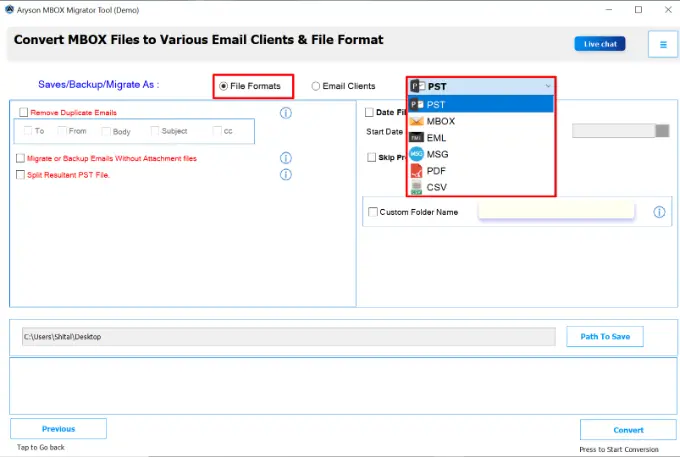
- From the saving options, select PST if you want to import MBOX into Outlook.
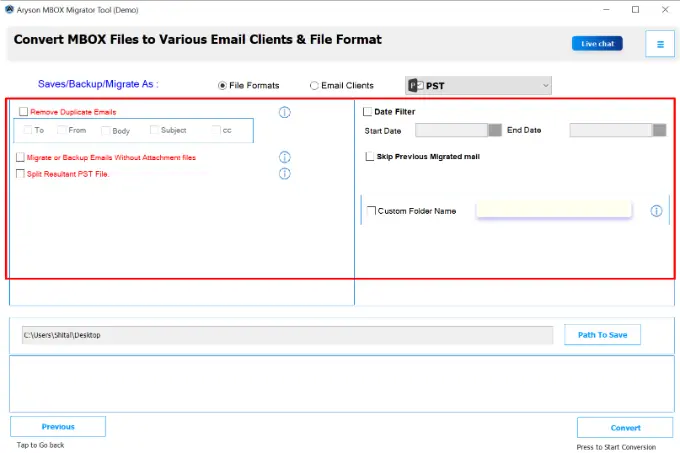
- Use the date filter, sender, or subject filters to export only the emails you need.
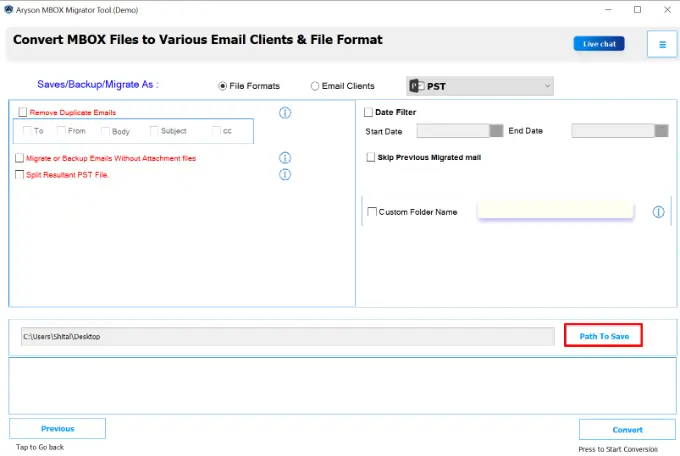
- Browse and set the folder location where you want to save the converted file.
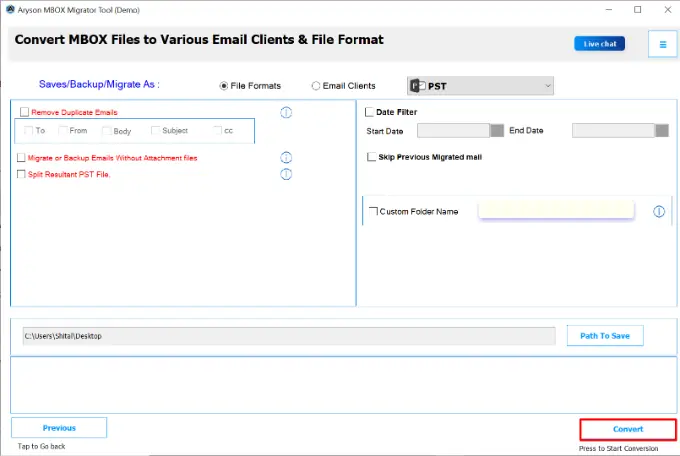
- At last, click on the Convert button to import MBOX to Outlook data file(PST).
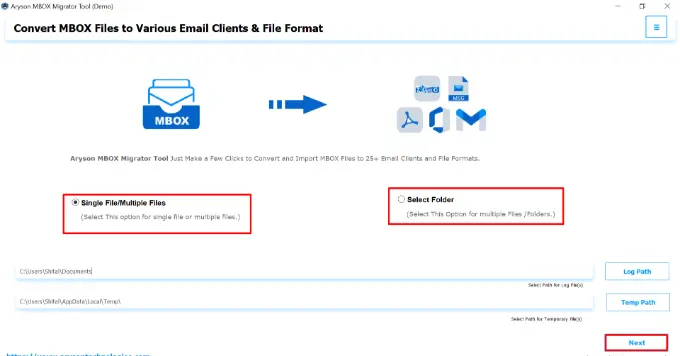
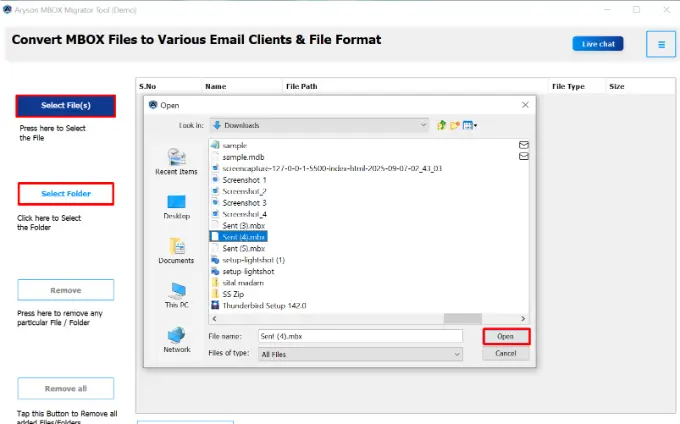
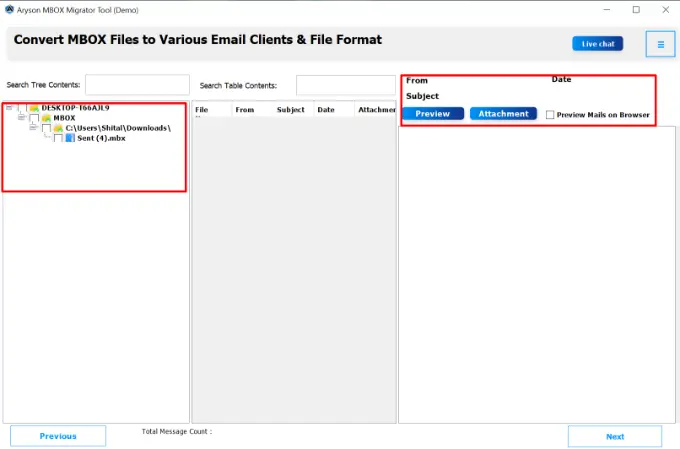
Note: Once the process finishes, open Microsoft Outlook. Go to File > Open & Export > Open Outlook Data File and select the converted PST file.
Additional Key Pointers Associated with the Automated Software
Here are some of the most useful feature of the software which helps you to perform the conversion process accurately:
- This software has a simple interface which is convenient even for beginners without technical knowledge.
- It supports MBOX files from multiple email clients like Thunderbird, Apple Mail, Eudora, and Opera Mail.
- Moreover, it preserves the original folder structure. As a result emails remain in their proper formatting.
- Also, it can process both small and large MBOX files without any limitations.
- Users can apply filters [date range, sender, or subject] to save only the required emails.
- Besides PST, this software also allows export MBOX to PDF, MSG, and HTML formats.
- Oversized PST files can be split into smaller parts to improve Outlook performance.
- The preview option lets you check emails and attachments before finalizing the process.
- Additionally, it runs flawlessly on both the latest and older versions of Windows.
Manual Alternative to Import Thunderbird MBOX to Outlook
The manual method uses Thunderbird as an intermediate email client. Although it works, it is time-consuming and involves multiple steps. Here is how you can import MBOX to Outlook:
Stage 1: Install Thunderbird and Import MBOX File
- First of all, download and open Mozilla Thunderbird.
- For now, you can easily create a dummy email account.
- Install the ImportExportTools NG add-on from Thunderbird’s add-on store.
- Open Thunderbird, go to Tools>>ImportExportTools NG>>Import MBOX file.
- Now, import MBOX to Thunderbird account.
Stage 2: Export Emails from Thunderbird to EML
- After the import process, pick the specific emails which you want to migrate.
- Right-click the folder>>ImportExportTools NG>>Export all messages in EML format.
- After that, assign a destination folder on your computer to save the EML files.
Stage 3: Import Exported EML Files to Outlook
- Now, open any of the Outlook versions 2021, 2019, 2016, or 2013.
- Then, create a new folder in Outlook to import MBOX files.
- Lastly, select all EML files. Then, drag and drop them into the Outlook folder.
Conclusion
After following this guide, you can make sure to complete and organize email migration. If you completely depend on manual methods to import MBOX to Outlook 2021, 2019, 2016, or 2013. The process is not direct, also it involves multiple steps. Also, it can easily confuse non-technical users. On the other hand, users can pick the Aryson MBOX to PST Converter to make the task simple and fast. It not only ensures that your data remains intact but also provides extra features for accurate import processes.
Frequently Asked Questions:
Q1. What is the easiest way to import MBOX to Outlook 2021?
Ans: The easiest way is to use the Aryson MBOX to PST converter tool, which allows quick and accurate migration without extra steps.
Q2. Is the manual method safe for large MBOX files?
Ans: Not really. The manual method is slow, requires multiple steps, and may miss attachments or emails if the file is large.
Q3. Do I need Thunderbird to import MBOX to Outlook manually?
Ans: Yes, Thunderbird is used as an intermediate application in the manual process because Outlook doesn’t read MBOX files directly.
Q4. Can I import multiple MBOX files into Outlook at once?
Ans: Yes, but only with the Aryson MBOX to PST converter tool. The manual method does not support bulk MBOX import.
Q5. Will attachments be preserved during conversion?
Ans: Yes, if you use Aryson MBOX to PST Converter, all attachments, formatting, and metadata are preserved.
About The Author:

Rohan Wiese is a Technical Content Writer at Aryson Technologies, specializing in databases, e-mail recovery, and e-mail migration solutions. He enjoys conducting research and generating information that assists database administrators, businesses, and novices in resolving issues with MS SQL Server, MySQL databases, Cloud Computing, and Microsoft Exchange.
Realted Post