









Screens

Video

Guide

Eula

Easily Migrate MBOX Files from Any MBOX-Based Email Client

thunderbird

Mozilla Thunderbird

google

Google Takeout

apple-mail

Apple Mail

eudora

Eudora

opera

Opera Mail

seamonkey

SeaMonkey

pegasus

Pegasus Mail

horde

Horde Mail

bat-file

TheBat!

sylpheed

Sylpheed

MBOX to PDF Converter - Rating & Reviews

Aryson Software is top-rated and highly trusted among users for its user-friendly interface and compatibility.

Expert Reviews

Rating & Reviews

Best MBOX to PDF Converter- Exclusive Features

Explore the comprehensive features of the MBOX File to PDF Converter for a better understanding.

Convert MBOX Emails to PDF Format

Convert MBOX Emails to PDF Format

The Aryson MBOX to PDF file converter facilitates conversion of the MBOX emails as well as their properties to PDF files. The converter guarantees that all email properties, including email headers, attachments, hyperlinks, and inline images, are saved in the resultant file. Hence, providing easy solutions for archiving emails, legal documentation, and offline access in original formatting.

Supports Batch MBOX File Conversion

Supports Batch MBOX File Conversion

When converting MBOX to PDF manually, you need to convert each file individually. However, this MBOX to PDF conversion software supports bulk conversion, processing unlimited MBOX files at once. Especially, businesses and professionals handling large amounts of email data can select and convert all MBOX files in one go. This not only saves time but minimises the risk of loss.

Preview MBOX Emails & Other Data

Preview MBOX Emails & Other Data

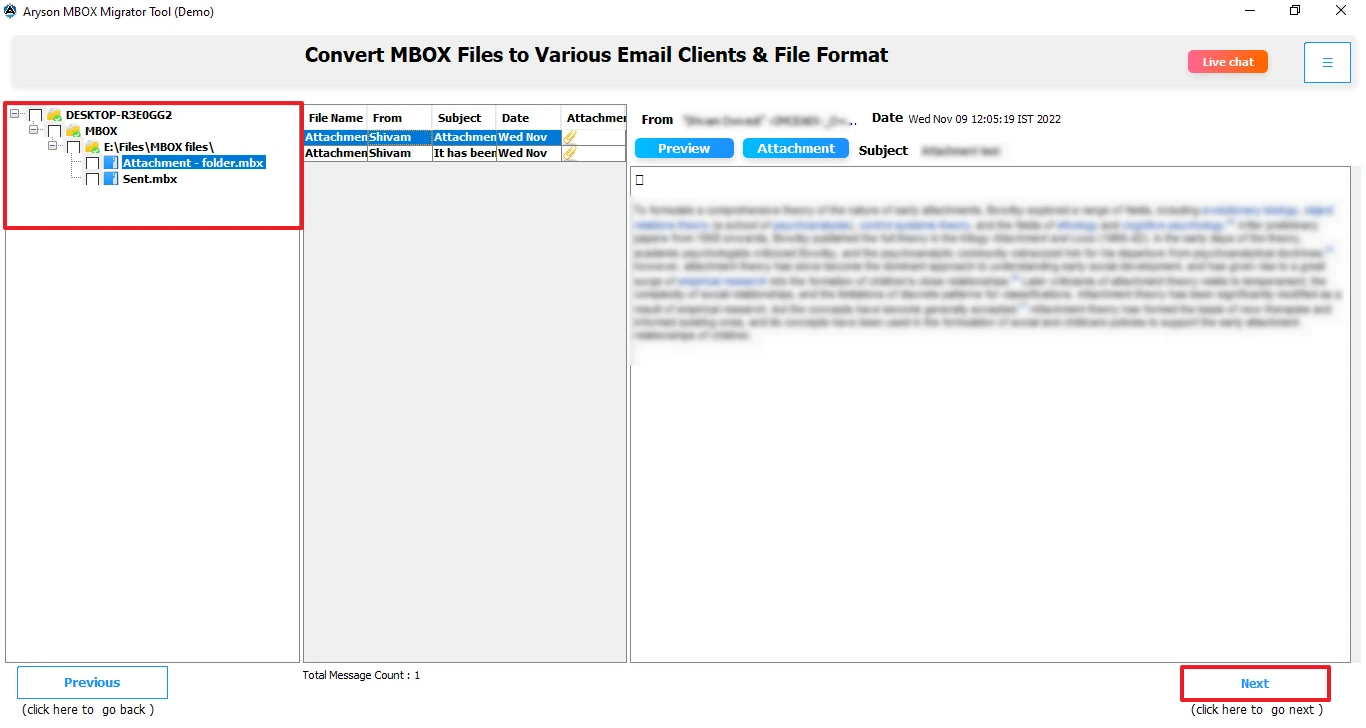
The Aryson MBOX to PDF conversion software provides a built-in preview feature, allowing users to see the MBOX file content before conversion. You can view and read MBOX email messages, attachments, and metadata including HTML body, plain text, header, MIME, and raw HTML within the tool’s interface. It lets users verify and make selections to convert only the required ones, preventing unnecessary data export.

Save MBOX Emails into Other Formats

Save MBOX Emails into Other Formats

n addition to MBOX to PDF conversion, the utility can also convert MBOX emails into several file types. These include MBOX conversion to Outlook PST, EML, MSG, CSV, MBOX, and Mozilla Thunderbird formats. Therefore, MBOX emails can be converted to any other format of choice.

Remove Duplicates and Date Filter

Remove Duplicates and Date Filter

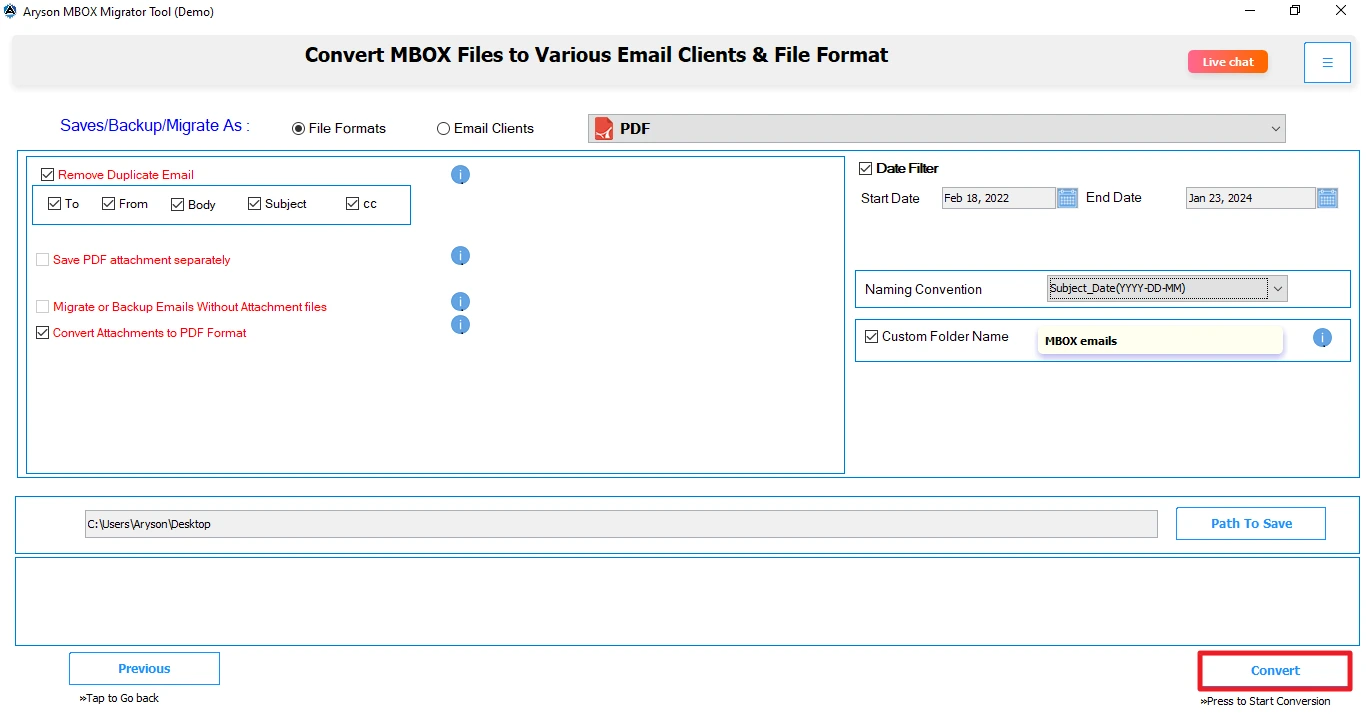
One of the important features of Aryson MBOX to PDF File Converter is the Duplicate Email Removal feature. This eliminates the conversion of similar emails based on to, from, body, subject, and CC, preventing unnecessary PDF file clutter. Moreover, the Date Filter feature allows the conversion of emails based on a specific date range. Thus, users can migrate only the emails that are required.

Windows Compatible and Simple GUI

Manage Saving Attachment Files

With this MBOX to PDF exporter tool, you can manage how attachments are saved along with their emails. It provides options to either embed attachments within the PDF file or save them separately in a designated folder. Keep your important documents images, and files accessible, keeping the PDF emails structured. Also, one can choose to save emails without attachment files.

naming-convention

File Naming Policy & Custom Naming

File Naming filter name migrated emails based on subject, date, and from to easily search and access PDF files after migration. Custom folder naming allows users to assign their own names to migrated folders. It helps them to easily locate folders in the destination.

size-limitation

PDF Size Restriction

Users can limit the size of the PDF output file with the help of the PDF Size Restriction Filter. You can set a size limitation of a maximum of 500 MB on the merged PDF files.

skip

Skip Previously Converted Files

Aryson MBOX to PDF File Converter Tool allows you to skip MBOX files that were already migrated. It helps prevent duplicate migrations and save time for the further migration process. This option is useful during incremental or repeated migration processes. As a result, you get the migrated PDF files without any duplicates.

save-mbox-different-formats

Migrate MBOX into Multiple Email Platforms

The Aryson MBOX to PDF Exporter tool allows migration of MBOX files to Office 365, Google Workspace, IMAP servers, Hotmail, Gmail, and GoDaddy. It helps users move their emails across platforms without any compatibility issues. This feature offers a reliable migration with complete email integrity.

Supports Different MBOX Types

Supports Different MBOX Types

Best MBOX to PDF Exporter offers support for many types of MBOX files, such as .mbox, .mbx, .mbs, and also extensionless MBOX files. Furthermore, it allows processing of MBOX files created using Gmail Takeout as well as Thunderbird, Apple Mail, Eudora, and other applications. This wide range of compatibility means that you can use MBOX files from different sources without any format problems.

Widely Compatible & Simple Interface

Widely Compatible & Simple Interface

The software is available for use on both Windows and Mac-based operating systems, ensuring maximum convenience for all kinds of users. The program is highly versatile and has a user-friendly interface that makes it easy to perform the conversion, even for new users. The simple design of the program ensures that anyone can do MBOX to PDF conversion in a few simple clicks.


How Does the Aryson MBOX to PDF Converter Tool Work?

Step 01: Download & install the Software

Download and install the Aryson MBOX to PDF Migration Tool on your device and run the software.

Step 02: Select & Preview MBOX Files

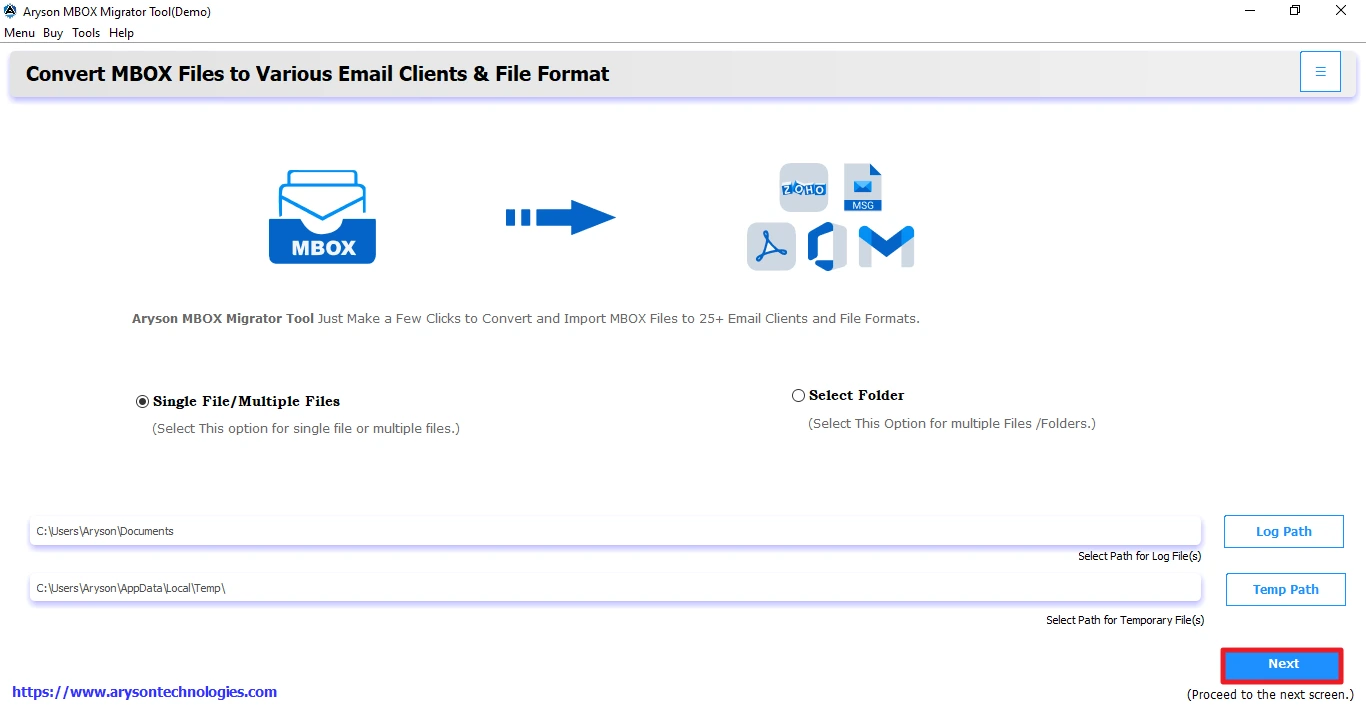
Select MBOX files using either select files, folders, or profiles. After that, preview email metadata, including attachments, HTML body, headers, etc.

Step 03: Choose PDF as the destination
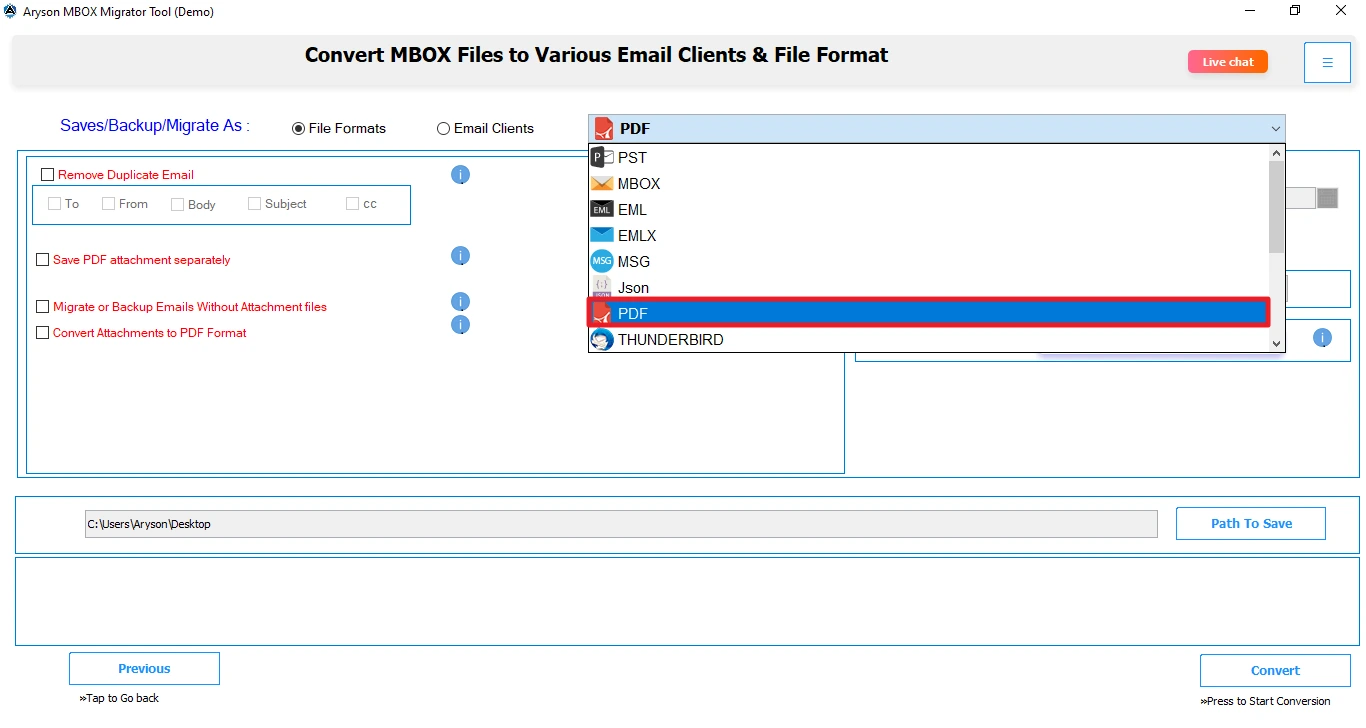
Select PDF as the destination from the file format drop-down. You can also choose multiple file formats, including PST, EML, MSG, etc.
Step 04: Apply Filters & Start Migration
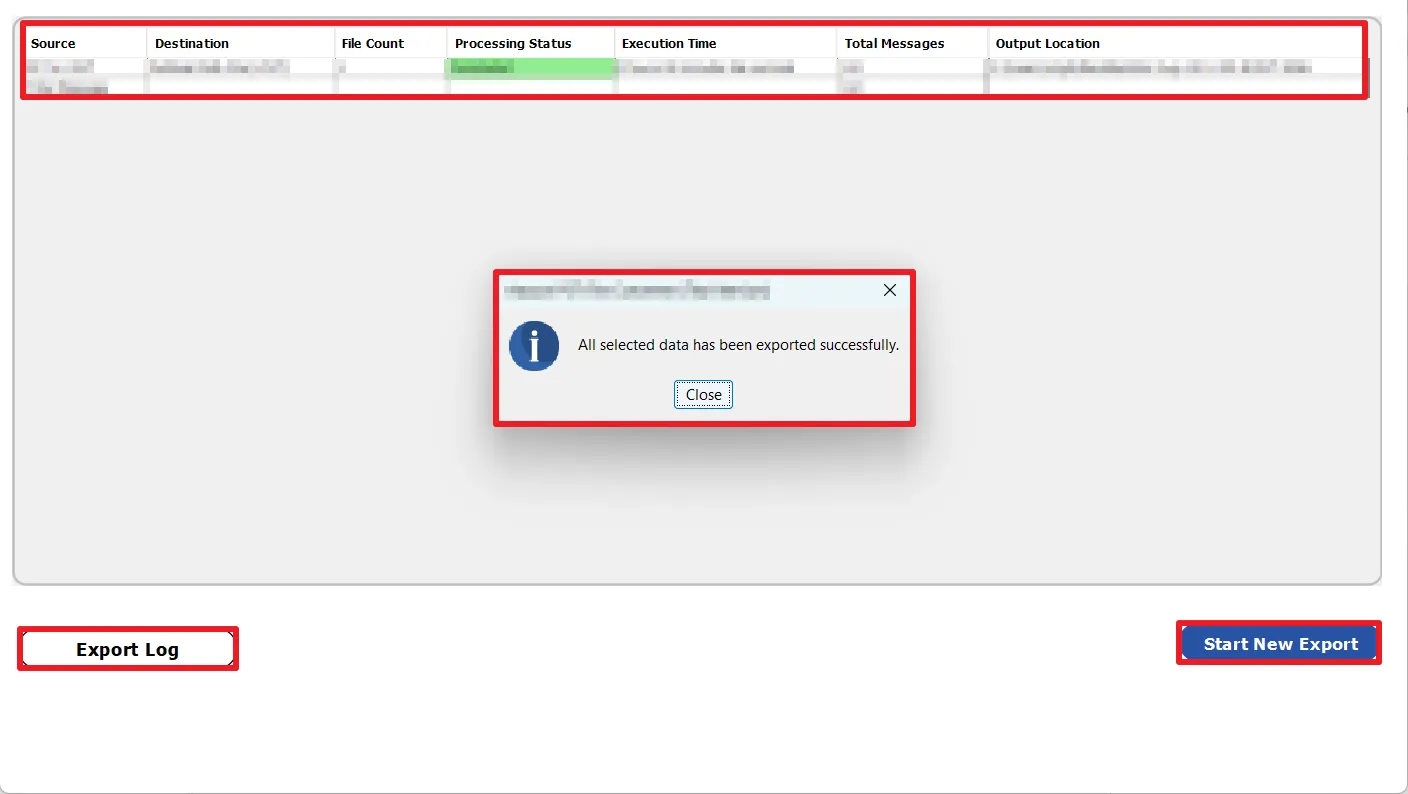
Apply advanced migration filters, including skip existing exports, duplicate detection, date range filter, and others. Click Start Export to begin migration.

Aryson MBOX Converter to PDF- Software Requirements

Make sure that all the requirements of the software mentioned below are fulfilled to operate it smoothly

Software Download

(Windows)

Download Now


Size: 243 MBVersion: 26.08

Trial Limitations

The Free MBOX to PDF Converter enables users to convert MBOX emails into PDF format without any cost. It can only convert 50 emails per MBOX file for free.

Requirements & Supported Versions

Hard Disk Space: 500 MB of free hard disk space required

RAM: 4 GB of RAM (4 GB is recommended)

Processor: Intel® Core™ 2 Duo CPU E4600 @ 2.40GHz 2.39GHz"

Supported Platforms

Window OS: Win 7 / 8 / 8.1 / 10 (32-bit & 64-bit), Windows 11 (64-bit) & Windows Server 2008 / 2012 R2 / 2016

MBOX-based email clients: Mozilla Thunderbird, Google Takeout, Apple Mail, Eudora, Entourage, Opera Mail, SeaMonkey, Claws Mail, KMail, Postbox, Mulberry, PocoMail, Sylpheed, Evolution Mail, Zimbra Desktop, Horde Webmail, Roundcube, & others.

Software Prerequisites

  • If you are operating Windows OS 11, 10, 8, or 7 (32-bit or 64-bit) then you must launch the tool as an Administrator.
  • Turn off the Windows Firewall for proper installation.
  • Disable the Antivirus programs.

FAQ

Request For Software Customization

If you need to customize Aryson Software or need additional some specific features then, provide the software customization Request Quote

MBOX to PDF Converter Free Version vs Paid Tool—Comparison

Get an overview of the Features of the Free and Paid Version of the Software

Product Features Free Version Full Version
Convert MBOX Files to PDF Format Migrate 50 Email Items Complete Mailbox
Save MBOX to multiple file formats & email clients Migrate 50 Email Items Complete Mailbox
Save MBOX to PST, EML, MSG, EMLX, HTML, CSV, PNG, JSON, PNG, DOC, DOCX, and more Only 50 Emails All
Supports Multiple MBOX Files in SIngle Processing
No Limits on File Size for Conversion
Preview Email, Attachments, and Metadata
Prevent Duplicate Emails based on To, From, Subject, Body, and CC
Convert Emails From Specific Date Range Only
Skip Previously Migrated Items
PDF Size Restriction
Save Attachments Separately
Naming Convention & Custom Folder Name Feature
Compatible with Windows OS
24*7 Tech Support & 100% Secure
Price Free $49
Money Back Policy

Queries Related to Aryson MBOX Converter to PDF

Ans. Using Aryson MBOX to PDF Converter Software, one can convert unlimited MBOX files at a time. Also, it supports large MBOX files. Here is a quick procedure:

  • First download and complete the installation of the software.
  • Run it as an administrator and click Continue to begin.
  • Use Select Files/Select Folder/Select Profiles and browse for MBOX files on your system.
  • Select MBOX files, click Open to add, and tap Proceed.
  • Preview MBOX file data and select files. Click Proceed.
  • Choose PDF for output, and apply built-in features.
  • At last, define a saving path on your system and click Start Export.

Ans. To migrate MBOX files to Mozilla Thunderbird, all you have to do is select Thunderbird from the saving options. Thunderbird must be installed on your system and properly configured. You can also go for the Aryson MBOX Migrator Tool.

Ans. Yes, the Aryson MBOX to PDF Exporter supports MBOX from various platforms, including Google Takeout. One can also migrate MBOX emails from Thunderbird, Apple Mail, Opera Mail, and more.

Ans. This MBOX Converter to PDF advanced software has various optional features that users can utilize for precise data transfer. You can apply a date filter to choose emails from a specific date range and convert them. Importantly, if your MBOX is cluttered by unwanted emails, use the Remove Duplicate Emails feature. Hence, these features help users get more accurate outcomes.

Ans. To run the software on macOS, you need to download MBOX to PDF Exporter Mac Tool. This software is available for both Windows OS and Mac OS. Simply, you need to install the right one.

Yes, the Aryson MBOX to PDF Migration Tool has a PDF size restriction filter that can be used to limit the PDF files to up to 500 MB per MBOX file.

You can use the Exclude Attachments filter of the Aryson MBOX to PDF Migration Tool to exclude email attachments from migration. Additionally, there are options to embed attachments and export attachments separately also.

What Our Customers Are Saying About Us

Verified Purchase Reviews about the Aryson MBOX File to PDF Converter

review-rating