

-

Written By Rohan Wiese
-
Updated on December 9th, 2025
How to Bypass PDF Password? Working Methods for 2025
PDF files often contain important information, so many people use passwords to secure them. However, situations change, and users sometimes forget the password or receive a locked PDF from someone who also does not remember it. Because of this, many people search for simple ways to bypass PDF passwords without damaging the file.
This detailed guide explains every working method for 2025 in an easy and practical way. You will learn manual techniques along with the reliable Aryson PDF Unlocker to bypass password protected PDF file without any data loss.
Understanding PDF Password Types
Before you remove any protection, you should understand the two types of passwords used in PDF security. This helps you select the correct method and avoid confusion.
1. User Password [Open Password]
A user password blocks access to the PDF. You cannot even open the file without entering the correct password. If you forget this type of password, many manual methods will not work. You will need either a strong automated solution or some official permission from the document owner.
2. Owner Password [Restrictions Password]
An owner password allows you to open the PDF but restricts specific actions. Because of this, you cannot:
• Print the content
• Copy text
• Edit the file
• Extract pages or data
Owner passwords are easier to remove, and several manual methods work smoothly for them.
Why Users Need to Bypass PDF Password Protection
There are many situations where users need to unlock their PDFs. Some of the most common reasons include:
- Sometimes the original password gets forgotten after securing the file long ago.
- Important pages may need printing, but restrictions block the action.
- Content might be required for work, study, or research, yet copying is disabled.
- Editing or extracting data becomes necessary, but the file does not allow it.
- Workflow slows down when restrictions prevent quick access to essential information.
Because of these everyday situations, it becomes essential to know safe and reliable methods.
Safe & Effective Automated Solution to Bypass PDF Password
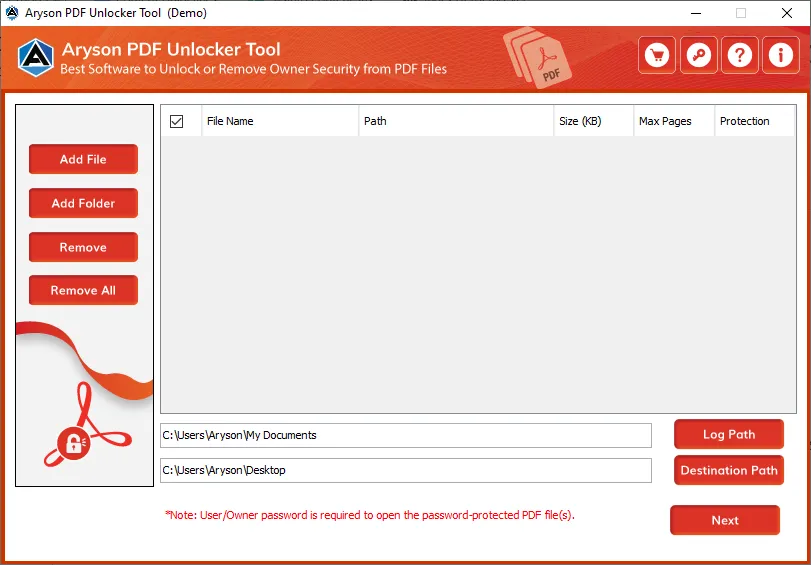
If your main concern is data privacy, then Aryson PDF Unlocker provides a quick and secure way to remove all types of PDF restrictions. It supports advanced encryption and unlocks files without losing data, formatting, images, fonts, or structure. It removes both open and owner-level passwords and lifts restrictions such as printing, copying, editing, and text extraction. Its interface is easy to understand, so even new users can unlock their files without confusion. Users can remove restrictions from PDF file even if Adobe Acrobat DC is not installed. Also, it can download attachments from the PDF and store them in a separate folder. This utility can work smoothly on all major Windows versions, including Windows 11.
Simple Steps to Bypass PDF Password Within a Few Clicks
- Install and launch Aryson PDF Unlocker on your existing system.
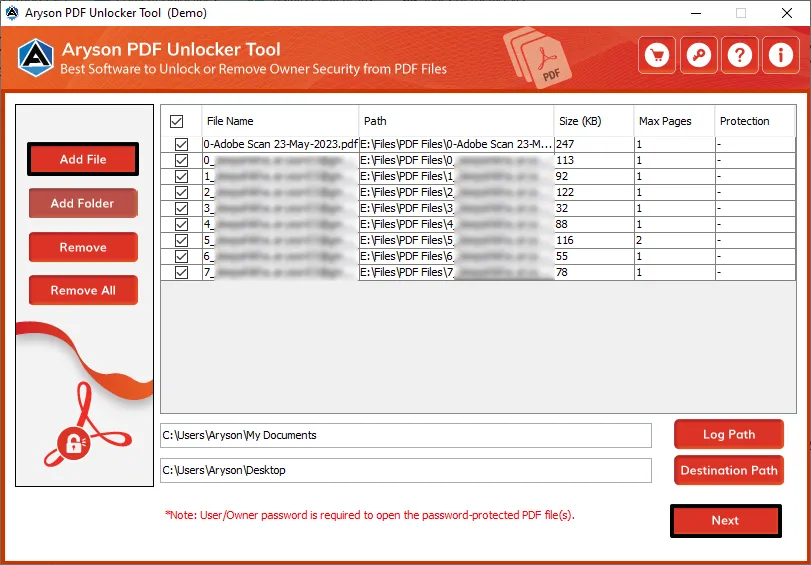
- Click the Add File button and choose the locked PDF you want to unlock.
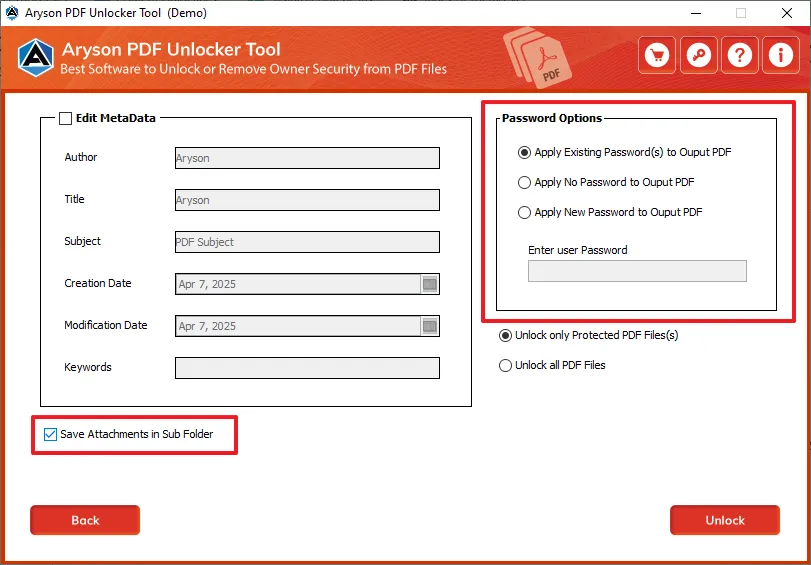
- Here, you can modify the metadata of your PDF files based on what you need.
- Now, pick the apply password option according to your requirement.
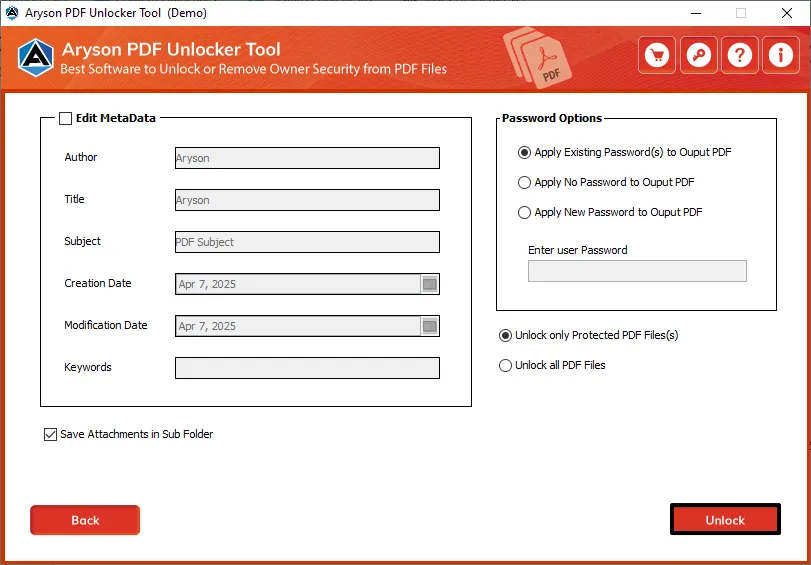
- Click Unlock PDF to start the PDF password-removal process.
Manual Methods to Bypass PDF Password in Different Ways
These methods are free and suitable for common files. But you should keep in mind that users with technical expertise can proceed with these methods easily.
1: Bypass PDF Password Using Google Chrome
This method is simple, user-friendly, and works well for removing printing or copying restrictions when you can open the PDF but cannot perform certain actions.
- Open Google Chrome on your system to access its built-in PDF viewer.
- Drag and drop the locked PDF into the Chrome window. This quickly opens the file without extra clicks.
- Enter the password if prompted, because Chrome needs it to display the document.
- Press Ctrl + P to open the Print dialog, which allows you to save the PDF in an unrestricted format.
- From the Destination dropdown, choose “Save as PDF” to create a new PDF.
- Click Save and select a location on your computer to store the unlocked file.
Once saved, the PDF opens freely without printing or copying restrictions.
2: Bypass PDF Password Using Microsoft Edge
Microsoft Edge provides a similar print-to-PDF option. It is especially useful when Chrome fails or does not respond.
- Open the locked PDF in Microsoft Edge using its built-in viewer.
- Enter the password if the file asks for it.
- Press Ctrl + P or click the Print icon to open the Print dialog.
- Select “Save as PDF” from the printer options to generate a new unrestricted PDF.
- Click Save and choose a destination on your computer.
This method works well for most standard PDFs with owner-level protection.
3: Bypass PDF Password Using Adobe Acrobat
Adobe Acrobat allows you to remove all security settings if you know the password. This method is reliable and preserves the original layout of the PDF.
- Launch Adobe Acrobat on your system.
- Open the locked PDF within Acrobat.
- Enter the password to gain full access to the document.
- Go to File>>Properties>>Security tab to view current restrictions.
- Select “No Security” from the Security Method menu to remove all restrictions.
- Save the PDF to store the unlocked version safely.
Important Note: Manual and online methods work in many cases, but they often fail with highly encrypted or fully locked PDFs. At this stage, using the above-recommended professional solution becomes the most reliable option. Because it removes both open and owner passwords, handles strong encryption, and unlocks files without damaging the formatting.
Conclusion
This complete guide explained every working method to bypass PDF password in 2025. You learned about browser tricks, manual options, free online unlockers, and a reliable professional recommended solution for complex or encrypted files. You can now pick the method that fits your requirement, file sensitivity, and security needs.
Frequently Asked Questions
Q1. Is it legal to bypass a PDF password?
Ans: Yes, it is legal when the PDF belongs to you, or you have permission from the owner.
Q2. Can I open a password-protected PDF without knowing the password?
Ans: Yes, you can use an Aryson PDF Unlocker Tool to unlock strongly protected or encrypted PDFs.
Q3. Which method is safest for confidential PDFs?
Ans: Aryson PDF Unlocker Tool is the safest because your file never leaves your computer.
About The Author:

Rohan Wiese is a Technical Content Writer at Aryson Technologies, specializing in databases, e-mail recovery, and e-mail migration solutions. He enjoys conducting research and generating information that assists database administrators, businesses, and novices in resolving issues with MS SQL Server, MySQL databases, Cloud Computing, and Microsoft Exchange.
Realted Post



