




LiveChat

Aryson PDF Unlocker
A Secure way to Remove User/Owner Password from PDF Documents

Aryson PDF Unlocker Software is one of the best and smartest solutions to unlock secured PDF files and to remove security from them. It allows you to remove the owner password from the PDF file. PDF Password Unlocker tool creates a separate PDF file with no restriction, security or password in a safe manner without altering the data of the document. It's a safe solution that contains an interactive and easy-to-use interface, and requires no prior technical knowledge making it a cake walk for any technical or novice user to use it and unlock PDF files for later use.

Note: You have to enter the existing PDF password while selecting the file to unlock.

  • Safe and quick way to remove security from PDFs.
  • Remove Password from single and multiple PDF files at a time.
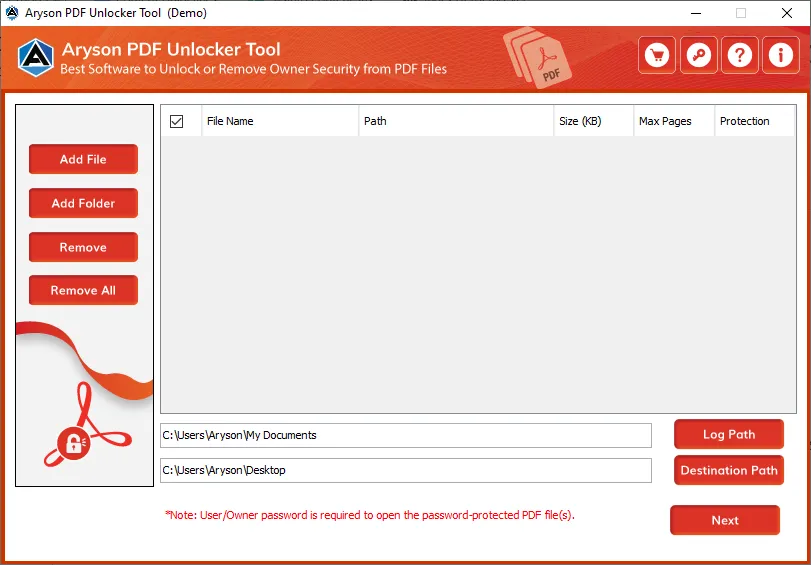
  • Displays file name, path, size, no. of pages, and protection of selected PDF files.
  • Decrypt PDF files without using Adobe Acrobat DC.
  • Disable User and Owner password from PDFs.
  • Remove PDF security restrictions of multiple types with ease.
  • It allows you to define a custom Destination path to the Output file.
  • Supports all versions of Adobe Acrobat PDF documents.
  • Simple and interactive user interface.
  • Highly compatible with all major Windows OS versions.
select  
 Download Now100% safe    Purchase Now

Remove Password Protection from PDF file without using Acrobat Reader

Aryson PDF Password Remover is the best tool to remove user password and owner password from the PDF document. You can disable security parameters from the PDFs without altering the original file.

Note: Enter the Password Once to Remove the PDF Password.

Steps to Remove Password Security from PDF:

  • Step 1. Install Aryson PDF Unlocker, and run it as administrator.
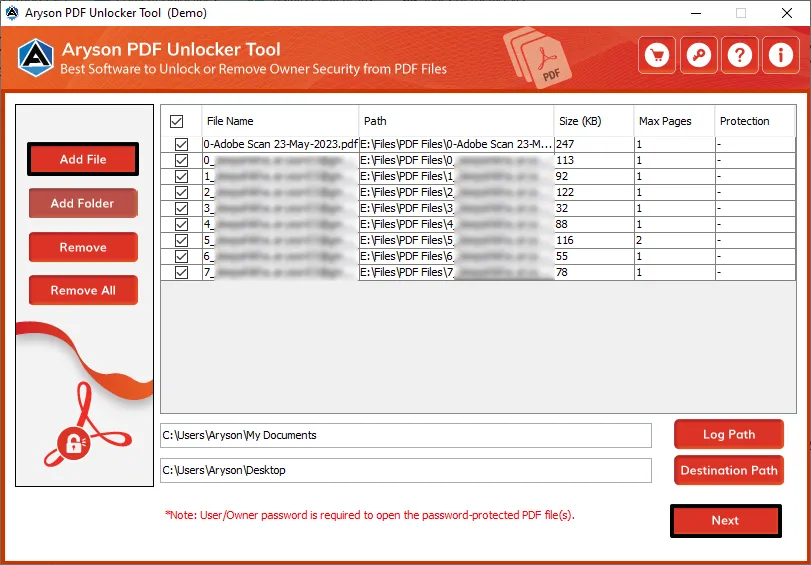
  • Step 2. Press Add Folder or Add Files button to add PDFs.
  • Step 3. Now, enter the existing PDF Password and press OK.
  • Step 4. After that, assign a custom Destination Path and press Unlock.
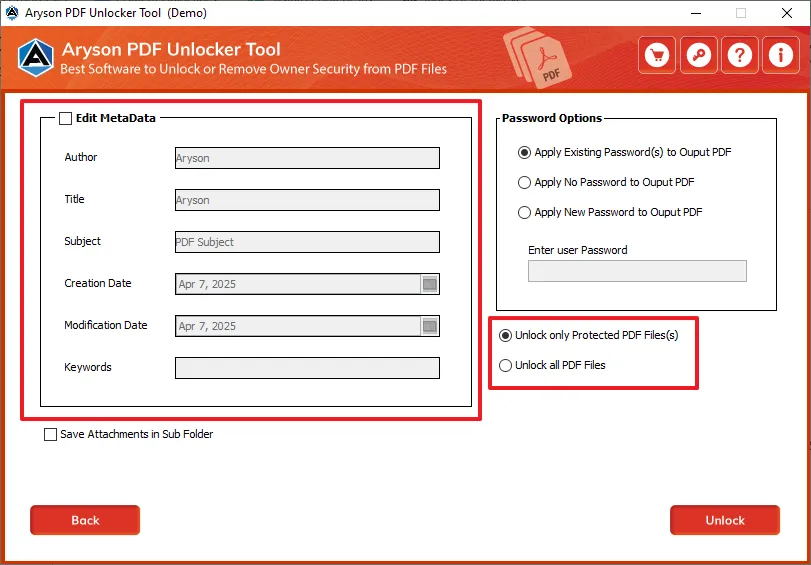
  • Step 5. Now, choose other PDF options as per your requirements.
  • Step 6. At last, click on the Unlock button to remove password protection.
PDF Unlocker

Key Features of Aryson PDF Unlocker

Remove Security from PDF Files

Remove Security from PDF Files

Using the Aryson PDF Unlocker, you can successfully remove security from PDF files. The software helps you to disable user password and owner password from PDFs. Therefore, you can easily access and edit the file. However, it does not make any change in the original file.

Unlock PDF Files

Unlock PDF Files

The PDF Password Remover tool helps you to unlock a PDF file that is protected with the User/Owner password. Also, it supports different encryption levels in the PDF files, such as 40-bit, 128-bit RC4, 128-bit AES, 256-bit RC4,&256-bit AES. So, no issue regarding the password level or encryption level.

Fast and Effective Software

Fast and Effective Software

The software is fast and effective in removing password protection from PDF files. It does not take much time in unlocking any password protected file. Although it efficiently unlocks the PDF, it does not damage the file content. It maintains the data integrity and keeps the data intact.

Unlock Multiple PDF files at a Time

Unlock Multiple PDF files at a Time

The utility allows you to choose multiple PDF files at a time. So, if you need to remove security restrictions from multiple PDFs, you can easily do that. You can also select a complete folder to unlock. By using this feature, you can save your time and effort as well that it would have taken to unlock files one by one.

Remove Password without Acrobat DC

Remove Password without Acrobat DC

As you download the Aryson PDF Unlocker, you can unlock your password protected PDF file without using Adobe Acrobat. Also, using Adobe Acrobat to remove password from a PDF is quite difficult. Therefore, the PDF unlocker is an ideal option to remove password protection from PDF.

Save Attachments Separately

Save Attachments Separately

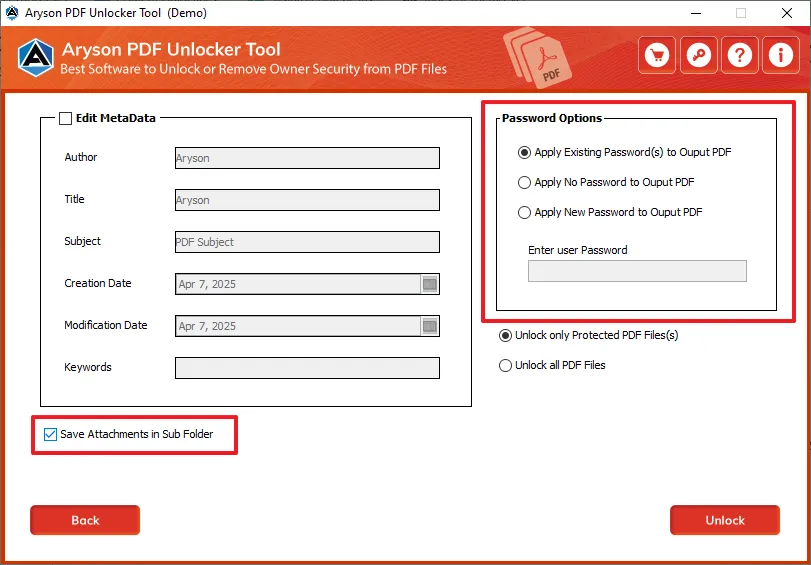
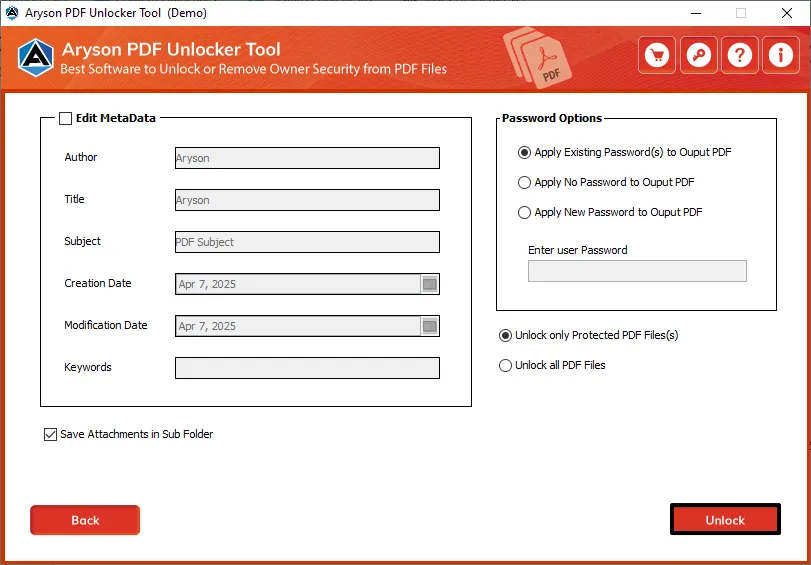
The PDF Unlocker also provides you a feature to save the PDF attachments in a separate folder. Using this feature, you can create different folders for the main file and attachments. The tool supports all types of attachment files whether it is an image or document. You can save all attachments.

Display File Information

Display File Information

Once the PDF file is successfully scanned, it displays all the Metadata and other information of the selected document, such as file name & path, title, subject, author, creator, producer, keywords, date of creation & modification, number of pages, etc. that lets you explore more about the PDF file.

Customize Destination Path

Customize Destination Path

Aryson PDF Unlocker gives you an option to customize the destination path of the Output PDFs. You can choose any location from your system so you need not search for the resultant file. Also, if you do not assign any location, the output file will automatically get saved at the desktop by default.

Easy to Use Application

Easy to Use Application

If you're a novice user having less or almost no technical expertise, even then, you can use this PDF Restriction Remover software. It contains an interactive user-interface that requires no prior technical knowledge. Any technical or non-technical user can use this software with ease.

Support & Compatibility

Support & Compatibility

PDF File Unlocker tool supports PDF files created by Adobe Acrobat 3.0 and later versions, including the latest Adobe Acrobat DC. Also, it runs smoothly with all major Windows-based operating systems, including the latest Win 10 (32 & 64-bit).

Technical Overview

The Adobe Acrobat allows you to create PDF documents for large or small level institutes, businesses & industries. It allows you to share them for notification and other useful information. Using Acrobat, you can set restrictions on PDF files. Therefore, no one can access the data without authorization. However, if you have to share the PDF file, you need to give permissions to other users. It can be unsafe. So, the ideal option is to remove password protection from PDF files through Aryson PDF Unlocker.

It allows you to remove the owner password from the PDF files. Also, it helps you to remove multiple types of restrictions from the PDF files. You can unlock PDF files having encryption like 40-bit, 128-bit RC4, 128-bit AES, 256-bit RC4,&256-bit AES without any issue. So, the best way to unlock secured PDF files is Aryson PDF File Unlocker Tool.

Software Specification

Comparison of Demo & Full Version

Product Features Free Version Full Version
Add PDF files and folder to remove password protection
Remove both user and owner password
Show different file properties like name, path, size, number of pages, and protection
Save unlocked PDF files at specified destination path. With Watermark Save as original
Save PDF attachments at a separate location
Customize the saving location of the output file
Widely compatible with all versions of Windows OS.
24*7 Tech support
Price Free $29
Money-Back Guarantee
Rating & Review
cinet

Aryson PDF Unlocker deserves a 5-star rating as it offers advanced features with a simple and interactive user-interface. It removes the PDF passwords without causing any damage to the PDF file. Read More..

Informer

It is the most preferred tool by users. They reviewed the tool as the best software available online. It is an easy to use software with advanced features. Therefore, it is an ideal solution for beginners or novice users.  Read More..

softonic

While removing password from a PDF file, there are chances of file corruption or data loss. Aryson PDF unlocker is a safe and reliable software that can easily disable various security parameters without damaging the file.  Read More..

Softonic

The Aryson PDF Password Remover provides you the most advanced and exclusive features. It is an incomparable tool at an affordable price. If you are looking for easy to use software, it is the best option for you.   Read More..

Frequently Asked Questions

Steps to unlock a PDF file using the Aryson PDF Unlocker tool.

  • Download the Aryson PDF Unlocker. Run it as administrator.
  • Click on the Add files or Add Folder button to select the desired PDF files.
  • Enter the existing PDF password to add PDFs to the list.
  • After that, click on the Destination Path button to give custom saving locations.
  • Press the Unlock button to proceed further.
  • Now, choose the desired PDF properties for unlocking.
  • At last, click on the Unlock button to initialize the decryption.

Yes, this software allows you to remove the owner level password from a protected PDF file. You can also remove passwords from protected PDF files.

Yes, PDF File unlocker software is able to remove every possible restriction or security from all versions of Adobe Acrobat PDF file.

Aryson PDF Unlocker can disable the Owner password from PDF files. As a result, it gives you the owner access to the PDF file. So, you can easily edit, copy, print, and extract text from the PDF.

Yes, you can successfully remove security or restriction from PDF files without Adobe Acrobat installation to unlock PDF for editing.

Yes, you can save the PDF attachments at a separate location using the Aryson PDF Unlocker. It provides you an option through which you can unlock the PDF and save its attachments at a separate location.

The software is designed considering the requirements of all the users. Therefore, it is compatible with all versions of Windows OS. You can install and run the software whether you are using Windows 7 or Windows 10. It will run smoothly on all OS.

You can download the demo version of Aryosn PDF Unlocker. It allows you to check all the features of the complete software without purchasing it. However, it has some limitations. So, you need to buy complete software if you want to use the tool without restrictions.

  • capgemini
  • moto
  • ibm
  • county
  • oreilly
What Our Customers Are Saying About Us
 Submit Your Review
You Might Be Interested in These Products Too

Aryson PDF Manager

Aryson PDF Manager

Read More 

Aryson PDF Recovery

Aryson PDF Recovery

Read More 

Aryson PDF Protection

Aryson PDF Protection

Read More 

Aryson PDF Merge

Aryson PDF Merge

Read More 
Service

At Service Since
2010

Trusted

Trusted by
Millions

SSL Secure

SSL
Secure

McAfee

McAfee SECURE
100% Secure

Aryson Technologies

united states

2880 Zanker Road, Suite 203, San Jose, CA - 95134, USA

india

A-58 , 2nd Floor A Block Sector 57, Noida, Uttar Pradesh 201301, India

Find Us on

Subscribe to our newsletter to get the latest News & Update

© Copyrights 2014 by Aryson Technologies Private Limited - All Rights Reserved

DMCA.com Protection Status