

-

Written By Rohan Wiese
-
Updated on February 14th, 2026
How to Recover Data From Hard Disk that is Not Detecting
When a hard disk is not detected, it often creates stress and confusion, especially if important files are stored on it. However, this situation does not always mean your data is lost. In many cases, the hard disk still contains all the data, but system errors, connection issues, or logical problems prevent it from appearing on your computer. Therefore, understanding the right recovery approach becomes essential. This guide explains how to recover Data from Hard Disk not detecting using safe and effective methods, including Aryson Windows Data Recovery. So you can restore access to your valuable information without causing further damage. Download Now Purchase Now
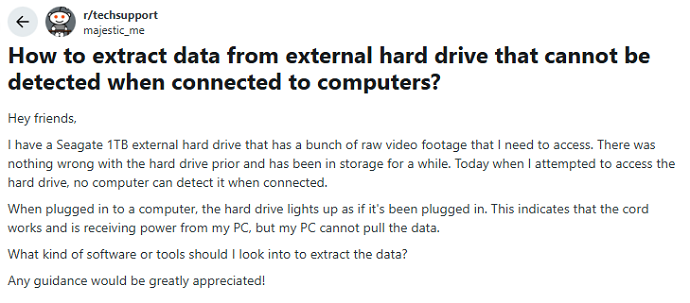
Asked on Reddit: Recover Data from an Undetected External HDD
Common Signs of Hard Disk Failure
- The hard disk does not detect in the system or disappears frequently.
- The computer becomes very slow while accessing files or folders.
- Unusual clicking, grinding, or buzzing sounds come from the drive.
- Files become corrupted or fail to open properly.
- Frequent system crashes, freezing, or blue screen errors occur.
- Error messages appear while copying, saving, or accessing data.
- The hard disk shows as unallocated or RAW in Disk Management.
Why do you Need to Recover files from Undetected Hard Drive?
A hard disk may stop detecting due to several reasons. People wonder why is my hard drive not detecting. Therefore, understanding the cause helps you choose the right recovery method:
- Important files may still exist on the hard drive, even if the system does not detect them.
- Undetected drives often fail due to logical errors, not actual data deletion.
- Moreover, personal data like photos, videos, and documents can become inaccessible without recovery.
- In addition, business and work-related files may be at risk if recovery is delayed.
- Also, ignoring the issue can lead to complete drive failure over time.
- Therefore, timely file recovery helps prevent permanent data loss.
- Recovering files allows you to secure valuable information before fixing or replacing the drive.
Can Data Be Recovered From a Not Detecting Hard Disk?
Yes, data recovery is possible in many situations. If the disk shows up in BIOS or Disk Management, recovery chances are high. Even if the disk is not accessible in File Explorer, professional recovery tools can still recover Data from Hard Disk not Detecting:
However, recovery becomes difficult when:
- The disk makes clicking or grinding sounds.
- The platter is damaged.
- The drive is completely dead.
Important Checks Before Data Recovery
Before starting recovery, perform these basic checks. These steps often resolve detection issues.
- Check if the hard disk is visible in BIOS or UEFI settings.
- Open Disk Management to verify the disk status and allocation.
- Connect the hard drive to another USB or SATA port.
- Try using a different system to rule out OS-related issues.
- Replace the USB or SATA cable to fix possible connection faults.
- Listen for unusual sounds that may indicate physical damage.
- Avoid formatting or initializing the drive before recovery.
Methods to Recover Data from Hard Disk not Detecting
Once you understand the possible causes and complete the basic checks, the next step is to choose the right recovery approach. Depending on the condition of the hard disk and the type of issue involved, you can use these best methods to recover data from dead hard drive:
Method 01: Manual Method to Recover Data from Hard Drive Not Recognized
You can try manual recovery methods when the hard drive is not recognized due to minor system or connection issues. These steps focus on making the drive accessible so you can copy your data safely.
- First, connect the hard drive to another computer to check whether the issue is system-related.
- Next, replace the USB or SATA cable and try a different port to fix possible connection faults.
- Then, open Disk Management and assign a new drive letter if the disk appears but is not accessible.
- After that, update or reinstall the hard drive drivers from Device Manager.
- Also, check BIOS settings and make sure the hard drive is enabled.
- Finally, once the drive becomes visible, copy important files immediately to a separate storage device.
These manual methods work only in simple cases and do not guarantee complete data recovery.
Method 02: Automated Method to Recover Data from Hard Disk not Detecting
Aryson Windows Data Recovery Software is an automated solution to recover data from a hard disk that is not detecting or accessible in Windows. It scans the drive at a deep level and retrieves lost, deleted, or inaccessible files without modifying the original data. It supports recovery from internal and external hard drives, USB drives, SSDs, and other storage media affected by corruption, formatting, or file system errors. Moreover, this software allows users to preview recoverable files before saving them, which helps ensure accurate recovery. With its simple interface and advanced scanning capabilities, it makes the data recovery process safe and reliable for both technical and non-technical users.
Simple Steps to Recover Data from Inaccessible Drive
- Install Aryson Windows Data Recovery Software on your PC.
- Select the drive or volume you want to recover and click Next.
- Choose the recovery mode: Standard, Advanced, or Deep Scan.
- After that, select the files or folders you want to restore.
- Choose a location on your PC to save the recovered data.
- Click OK to finish and save the recovered data successfully.
Conclusion
Hopefully, this blog will help you with all the above mentioned solutions to recover Data from Hard Disks not detecting. In many cases, the problem is caused by connection issues, driver errors, or minor logical faults, which can be fixed using manual methods. However, when the drive remains inaccessible, using a reliable Aryson Windows Data Recovery Software ensures safe recover Data from Hard Disk that is not detecting. Following proper checks and best practices helps protect your data and increases the chances of a successful recovery, whether the issue is logical or physical.
FAQs – People Also Ask:
Q1. Can I recover data from a hard disk that is not detecting in Windows?
Ans: Yes, data can often be recovered using recovery software even if the drive is not visible in Windows Explorer.
Q2. Why is my hard disk not detected in BIOS or Disk Management?
Ans: This can happen due to faulty cables, power issues, corrupted drivers, or physical damage to the drive.
Q3. Is it safe to use Aryson Data Recovery software on an undetected hard disk?
Ans: Yes, using Aryson Windows Data Recovery Software is safe and does not overwrite original data.
Q4. What should I avoid before recovering data from an undetected hard disk?
Ans: Avoid formatting, initializing, or trying repeated manual fixes, as they may overwrite existing data.
About The Author:

Rohan Wiese is a Technical Content Writer at Aryson Technologies, specializing in databases, e-mail recovery, and e-mail migration solutions. He enjoys conducting research and generating information that assists database administrators, businesses, and novices in resolving issues with MS SQL Server, MySQL databases, Cloud Computing, and Microsoft Exchange.
Realted Post



