LiveChat

Aryson Windows Data Recovery Software
Recovers Lost or Deleted Documents, Emails, Files, Photos, Videos, and More from Corrupt Windows Drive & Partitions.

Aryson Windows Data Recovery is an efficient software capable to restores any types of deleted or lost documents, photos, videos, emails, and many more files or data from corrupted partitions of Windows, and removable storage media devices like USB Drives, External Hard Drives, Micro SD cards, SD cards, and more. Best Data Recovery Software for Windows recovers all types of deleted or lost data from corrupt, damaged or inaccessible FAT16, FAT32, NTFS, and NTFS5 partitions. It helps to get back corrupt or deleted images, videos, documents, and other crucial files of corrupt Windows Hard Drives.

  • Recover & Restore maximum possible data from corrupt or damaged disk partitions & hard drives.
  • Restore Windows Data from any types of storage devices like SD Card, USB, DVD, CD, Physical Drives, and other media storage.
  • Supports recovers deleted files from accidental formatted Windows Hard Drives.
  • Restore lost data from FAT file systems like FAT12, FAT16, and FAT32 of Windows.
  • Supports to restore data from the NTFS file system with ease.
  • Recovers multiple lost or deleted files at a single go.
  • Recover and restore files from a crashed Windows operating system.
  • Support both master boot record and GUID partition table.
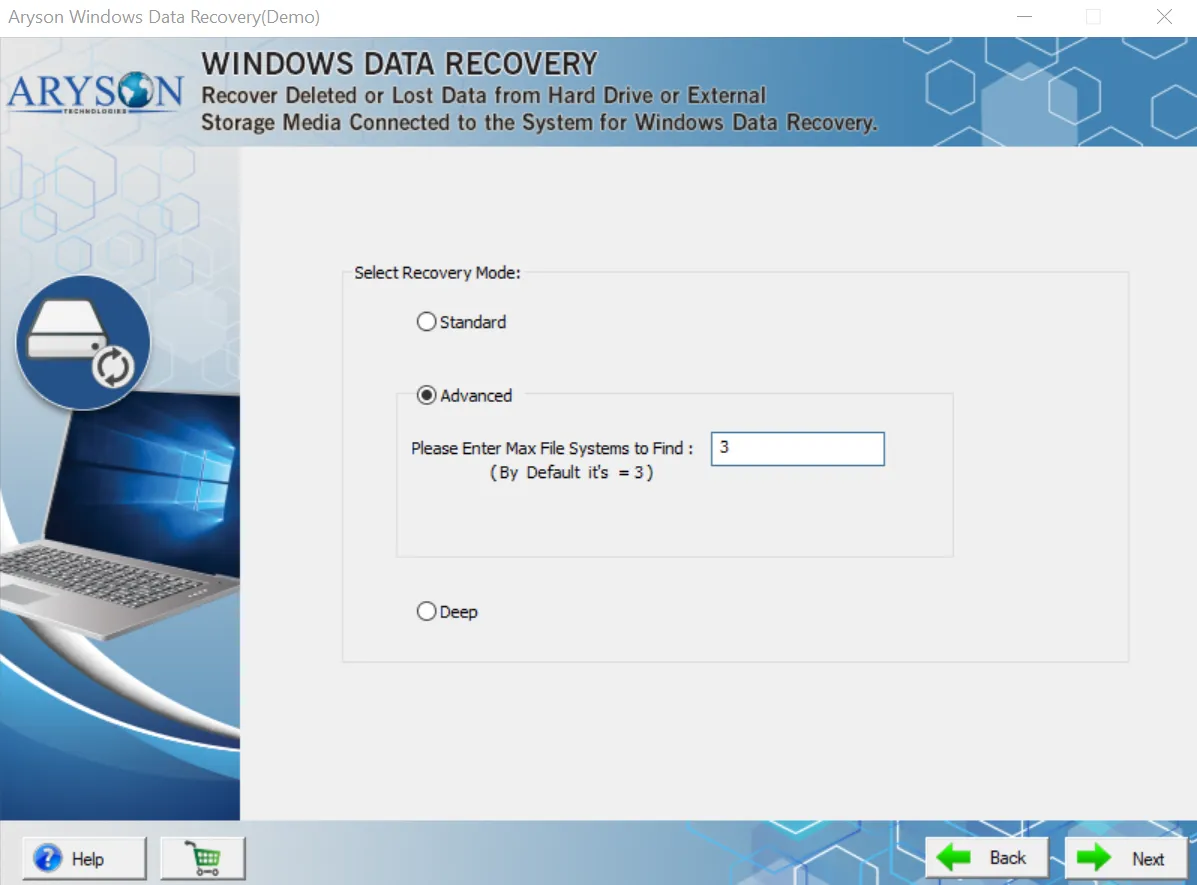
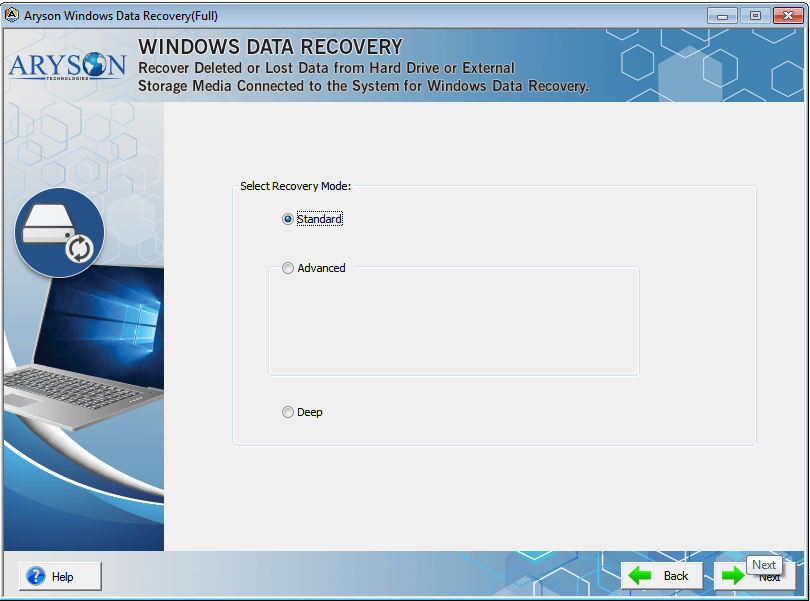
  • Data Recovery Software for Windows has Standard, Advanced & Deep scanning options to restore deleted data from bad sectors of Hard Drives.
  • It is equipped with the preview feature to see files and folders in a tree-structure format.
  • RAW recovery mode for recovery of maximum possible data.
  • Simple & easy to use GUI to recover lost Windows Data.
  • Runs smoothly on all versions of Windows operated operating systems.
 Download Now100% safe    Purchase Now

Demo versions of Data Recovery for Windows allow us to save up to 2GB for free.

Recover Deleted Data from Windows with High Accuracy

DIY Windows Data Recovery software to perform the recovery of data in any data loss situation from Windows PC, Internal & External HDD, laptop, or from any External Media Storage.

  • Data recovery from corrupt or damaged disk partitions.
  • Get back all possible deleted data from files and folders.
  • Supports FAT16, FAT32, NTFS, and NTFS5 for recovery.

Steps to Recover Lost or Deleted Data on Windows

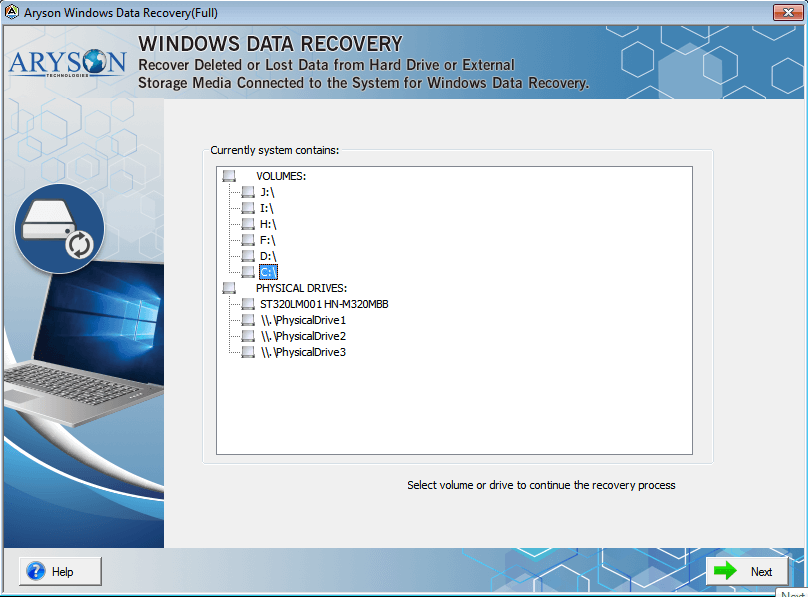
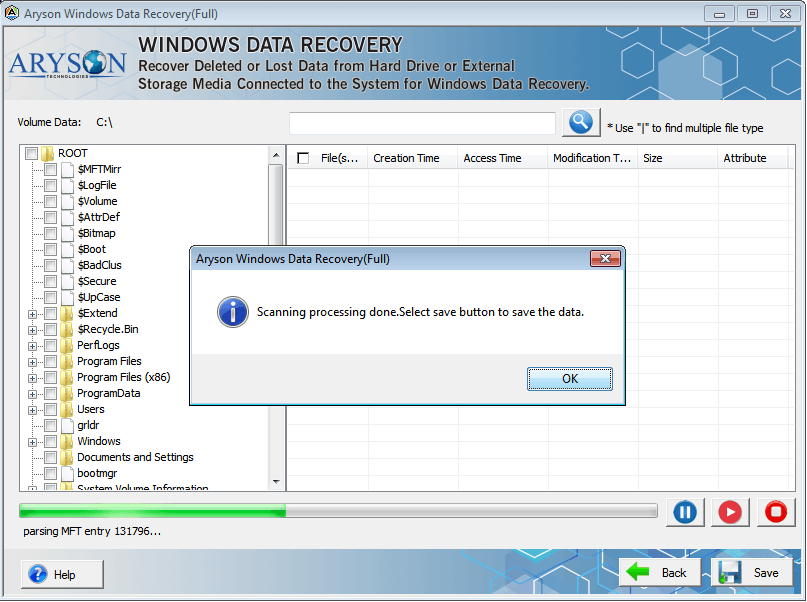
  • Step 1. Install Aryson Windows Data Recovery Wizard.
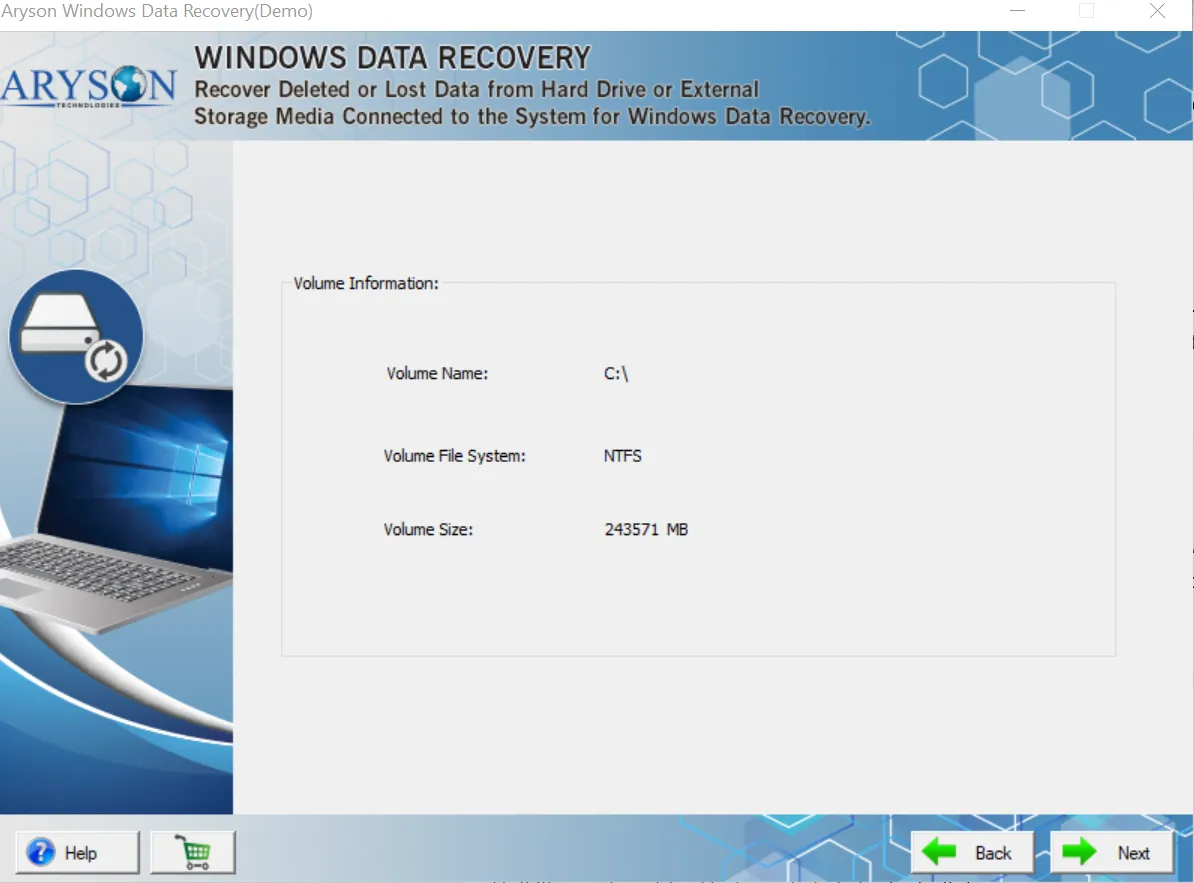
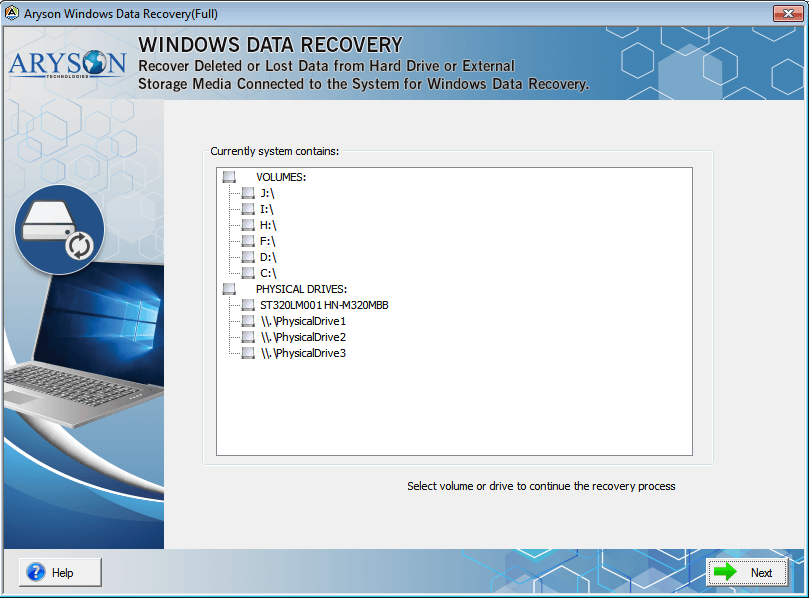
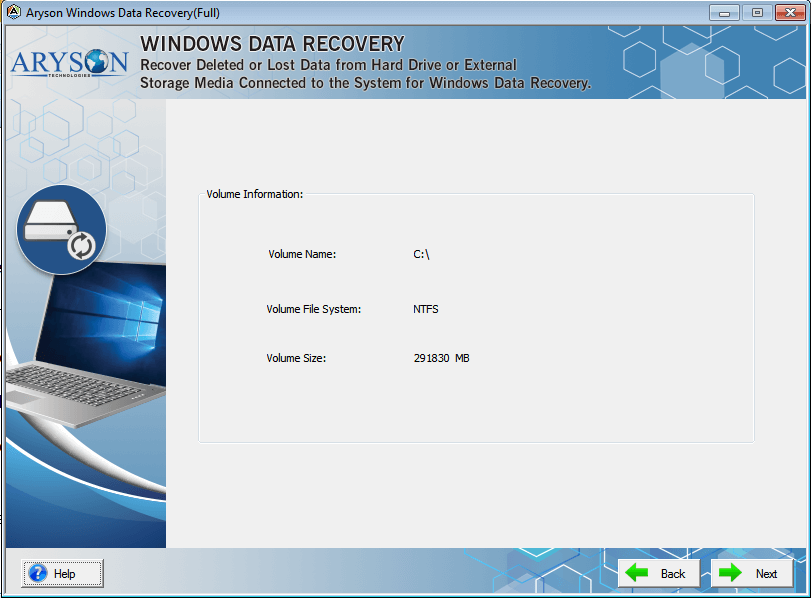
  • Step 2. Select the volume or drive and hit the Next button.
  • Step 3. Choose the data recovery mode i.e. Standard, Advanced, or Deep Mode.
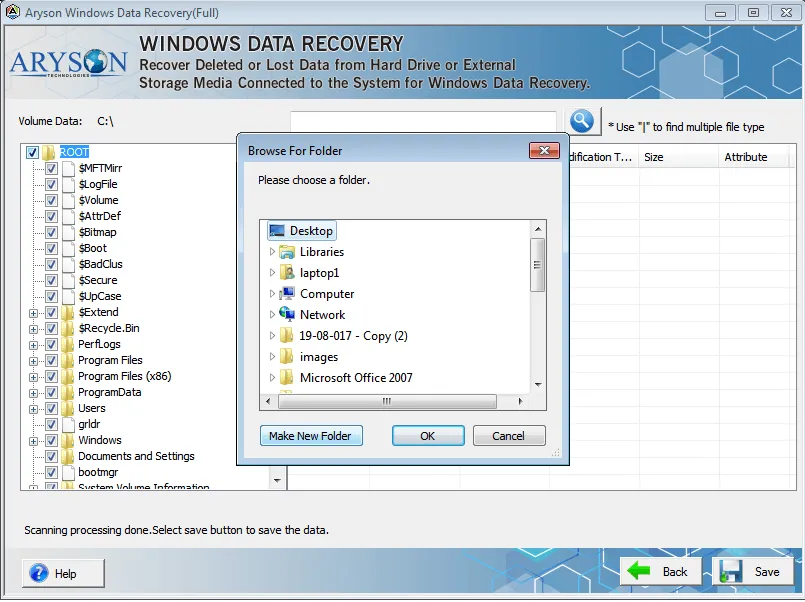
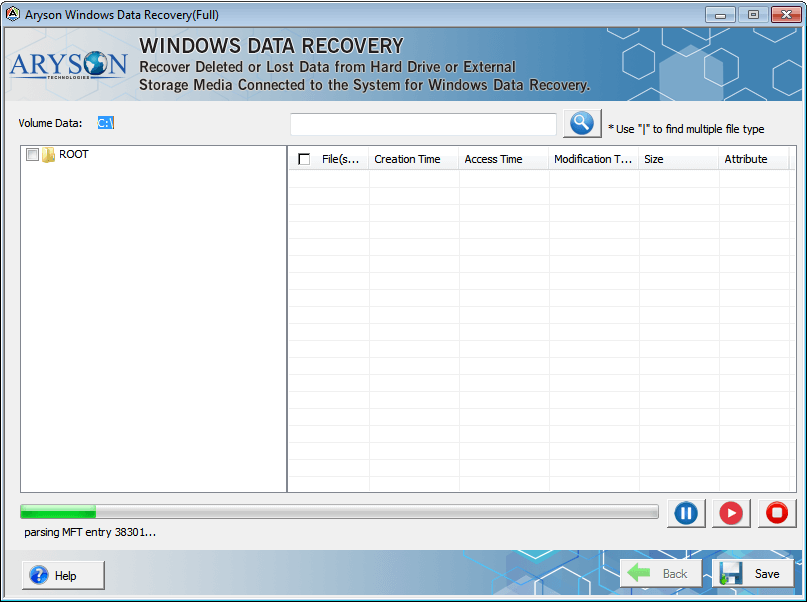
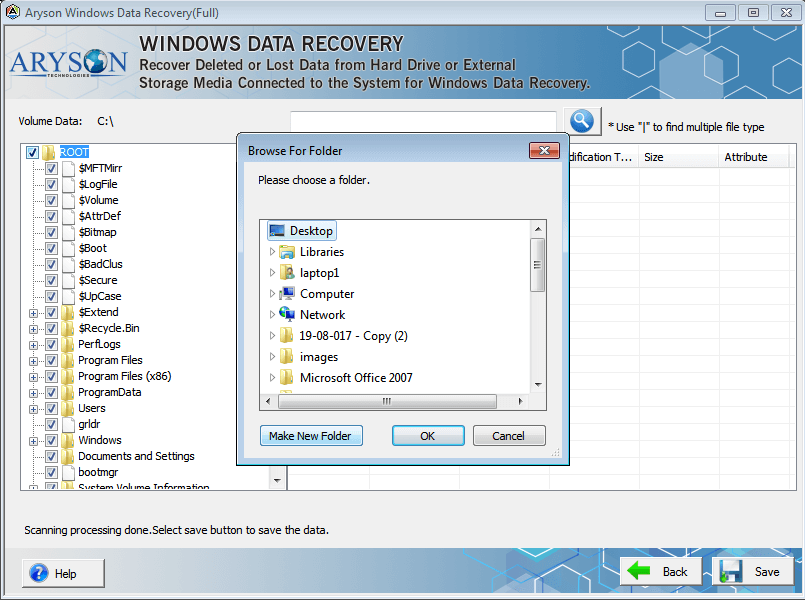
  • Step 4. Opt for the folders or files to recover after the scanning process and click on the Save button.
  • Step 5. Browse for the system location to save recovered Windows data.
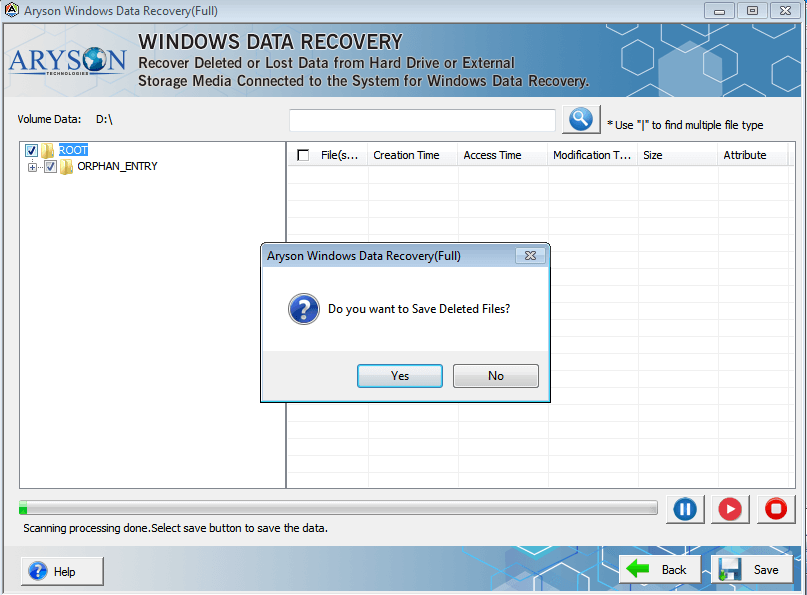
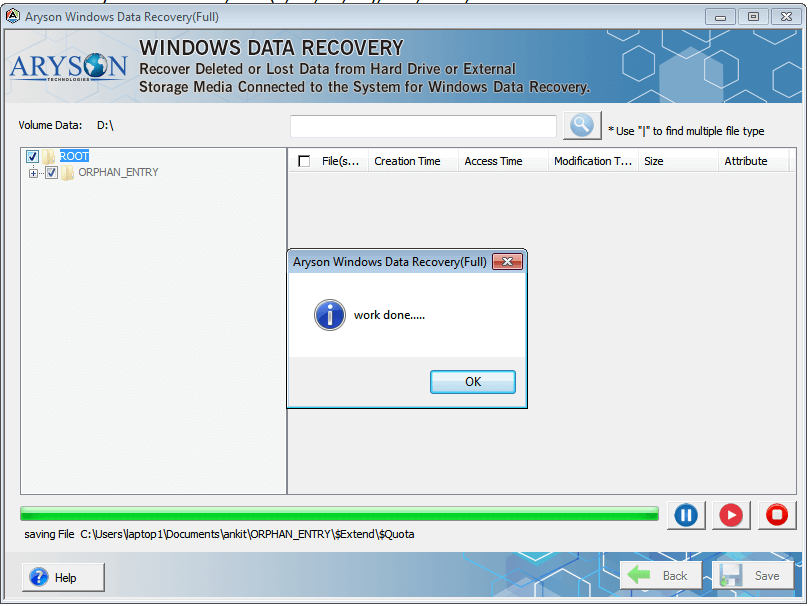
  • Step 6. Click on the OK button to successfully recover and save data.
Access Database Repair Tool

Best Tool to Recover All Windows Based Storage Devices

Data Recovery for Windows software performs data recovery from each kind of internal and external data storage device over Windows.

  • Retrieve data from Internal and External HDD & SSD.
  • Get back data from SD card, USB, and other storage media.
  • Recover inaccessible and damaged RAW storage drives.

Recover Multiple File Formats Without Limitation

Windows Data Recovery Software restore most of the deleted and inaccessible files and folders of multiple formats at high speed and without any size limitation.

  • Recover images, photos, videos, and PDF files with ease.
  • Repair corrupt files of all the Windows compatible formats.
  • Regain the backups, databases, and other files from HDD.

Detailed Features of Aryson Windows Data Recovery Software

Lost & Deleted File Recovery

Lost & Deleted File Recovery

Data Recovery Software for Windows from Aryson Technologies is a magnificent tool which helps to recovers lost Windows data files from corrupted or inaccessible Hard Drives. It can also retrieve data from accidental deletion on Windows. Data Recovery software supports to recover or restore entire files from both physical and logical drives.

FAT Data Recovery

FAT Data Recovery

Windows Data Recovery software designed based on high algoritham to comprehensively recover data from corrupt or dead hard drives. The data recovery software for Windows supports to restores files from FAT16, FAT32, and FAT64 (exFAT) partitions of Windows Hard Drives. It helps the user to restore all files that were present in the FAT file system.

NTFS Data Recovery

NTFS Data Recovery

Software for Windows to restores lost data or deleted files from corrupted NTFS partitions of Windows. The NTFS (New Technology File System) is a newly developed file system by Microsoft, and it stores entire data of Windows including image, video, text, photo, and other folders. If the user has having a corrupt NTFS file, then he can successfully repair & restore Windows data it with the help of this tool.

Advanced Search & Preview

Advanced Search & Preview

The Data Recovery Windows software has dual scanning mode options advanced and standard to scans the corrupted partitions of Windows hard drives and search and preview deleted files. The application lets the user search files and previews all of its contents after scanning. One can also save the selected items into their PC in an accessible form.

Recovery from Internal & External HDD

Recovery Data from Internal & External HDD

Aryson Windows Recovery tool is a stand-alone application which can retrieve and restore data from both internal as well as external hard disk drives. The software is compatible with almost all types of hard drives and can efficiently recover file formats like documents, images, multimedia formats, emails, databases in their original forms.

Simple GUI

Simple GUI

The Windows Partition Recovery software is an advanced application. However, the tool has been designed with an easy to use interface, making it a cakewalk for users to recover Windows data and files with ease.

Windows Compatibility

Windows Compatibility

The Data Recovery software runs smoothly on all versions of MS Windows operating system to efficiently restore deleted or lost file from Hard Disk Drives. It supports Windows 10, 8.1, 8, 7, XP, Vista and lower versions Hard Disk Drives and restores deleted file successfully.

Recover Data from Storage Media Devices

Recover Data from Storage Media Devices

Data Recovery for Windows is a professional software supports to recover deleted data from all types of storage media devices. It allows to recovers lost data from magnetic storage devices like Hard Disk, Magnetic Strips, and SuperDisk.

Recover Data from Flash Memory Devices

Recover Data from Flash Memory Devices

Windows Data Recovery tool comprehensively restores the lost or deleted data from corrupted or inaccessible flash memory devices such as USB Flash Drives, SD Card, SSD, SDHC Card, and SmartMedia Card.

Get Back Data from Bad Sector

Get Back Data from Bad Sector

Data Recovery for Windows software forcefully restore or retrieve lost, or undeleted data from Bad Sector of Hard Drives on entire Windows platforms. Bad Sector is a minute cluster storage spaces in Hard Drives and won't response to write and read request. The software helps to restore the data from the Bad Sector of Drives.

Technical Overview

If you are a Windows user, you might have a good idea of how important Windows system files are. Even your data like documents, databases, images, videos, and other multimedia files are so crucial. But to the contrary, there are situations when we face corruption, and almost all our data become inaccessible. The reasons can be anything like:

  • Corrupt Windows registry files
  • Hardware failure
  • Windows system crash
  • Virus or spyware infection
  • Deletion or corruption of boot files or Windows system files and so on.

However, you can re-install your Windows and get back to standard, but re-installing Windows sometimes leads to losing your valuable data, and this is the time when you need an excellent windows file recovery tool.

Software Specification

System Requirement

Operating System:

Microsoft Windows – 7, 8, 10 (32 bit or 64 bit) 11 (64 bit), Windows Server 2019, 2016, 2008, 2012 R2,Supports Recovery for File Systems – FAT 32, FAT 16, ExFAT, NTFS File System & Cross-Formats between NTFS & Other Formats like FAT16 & FAT32Supported Partition – GPT and MBRDisk types – Basic & Dynamic

Hard Disk Space: 500 MB of free hard disk space required

RAM: 4 GB of RAM (4 GB is recommended)

Processor: Intel® Core™ 2 Duo CPU E4600 @ 2.40GHz 2.39GHz

Software Pre-Requisites

  • If you are operating the Windows OS 11, 10, 8, 7 (32 bit or 64 bit) then must launch the tool as an Administrator.
  • Turn off the Windows Firewall for proper installation.
  • Disable the Antivirus programs.
License Types
Home License
Home License
Corporate License
Corporate License
Technical License
Technical License
Software Delivery & Version
ElectronicYes
Versionv18.0

Comparison of Demo & Full Version

Product Features Free Version Full Version
Recover Data from Hard Drives or Volume
Recover Data from Inaccessible or Lost Partitions
Restore Data File from Hard Drives, USB, Flash Drive, and other Removable Media
Detects and Recover Backup, Database, and other file types
Get Backup of Deleted Emails of any email clients from Hard Drives or Physical Drives
Restore All Windows Data which are corrupted due to deleted partitions or bad sector
Supports Recovery of images, videos, documents and different file format from HDD
Recover Data from all versions of Windows OS
Save Recovered Data Up to 2GB Save All Data
Technical Live Supports
Price Free $39
Money-Back Guarantee
Rating & Review
cinet

The most used Aryson Data Recovery Software for Windows on CNET Download, to restore deleted, undeleted, and lost data from Storage Media Devices.   Read More..

Softpedia

Aryson Windows Data Recovery tool is trusted, most used, and 100% clean software to restore the deleted data from Hard Drives. Softpedia guarantees it is virus-free software for Windows.  Read More..

softonic

The most trusted Windows Data Recovery software to restore deleted or lost files and folders from your office or personal Windows PC, laptop, and other storage media devices, review by Softonic. Read More..

software informer

Data Recovery Software for Windows used to recover your deleted or lost photos, videos, documents, data, and files from Internal & External Storage Media Devices, reviews by SoftwareInfrmer.  Read More..

Frequently Asked Questions

To recover lost or deleted files on Windows, follow the steps given below:

  • Step 1: Install Aryson Data Recovery Software for Windows.
  • Step 2: Select Disk Drives or Physical Drives and Click on the Next button.
  • Step 3: Now, select recovery mode Standard, Advanced & Deep to scans selected volume Disk Drives.
  • Step 4: Click on the OK button the previews the deleted or lost files after scanning.
  • Step 5: Now, Click on the Save button and define the location in your system.
  • Step 6: Click on the Yes button the successfully save your recovered deleted or lost items on Windows System.

Yes, you can. You just need to right click on that file in the preview section and click on the Recover button

Yes, you can easily recover or retrieve deleted Desktop data.

Yes, with the help of Aryson Windows data recovery tool, you can easily recover any type of data stored in exFat drives. However, it also supports any FAT and NTFS partitions.

if you have deleted your files using Shift + Delete then don’t worry because you can get them back by following the below steps:-

  • Launch Windows Recovery Software.
  • Select the drive from where the file has been deleted.
  • Select the scanning and Recovery Mode.
  • Now, you can view all the deleted files on the software.
  • Select the files which you want to save.
  • Define Saving Location.
  • Finally, you have recovered all your Deleted files in Windows.

You just have to implement the following steps to restore hard drive data:-

  • Connect your Hard Drive to PC.
  • Launch Aryson Windows Data Recovery Software.
  • Select the Hard Drive which has been crashed.
  • Choose the Scanning and Recovery mode.
  • Preview all the data and then save them in the accessible form.

The demo version of this software will help you to recover files from the hard drive for free. But you can only download the data of up to 2 GB. In order to save the data of more than 2 GB, you have to purchase the full version of the software.

Yes, Windows File Recovery Software restores all the items from a formatted hard drive, SD cards, pen drives, and Windows drives.

  • capgemini
  • moto
  • ibm
  • county
  • oreilly
What Our Customers Are Saying About Us
 Submit Your Review
You Might Be Interested in These Products Too

Aryson DBF Recovery

Aryson DBF Recovery

Read More 

Aryson Backup Exec BKF Recovery

Aryson Backup Exec BKF Recovery

Read More 

Aryson Exchange BKF Recovery

Aryson Exchange BKF Recovery

Read More 

Aryson Backup Exec BKF Repair Pro

Aryson Backup Exec BKF Repair Pro

Read More 
Service

At Service Since
2010

Trusted

Trusted by
Millions

SSL Secure

SSL
Secure

McAfee

McAfee SECURE
100% Secure

Aryson Technologies

united states

2880 Zanker Road, Suite 203, San Jose, CA - 95134, USA

india

A-58 , 2nd Floor A Block Sector 57, Noida, Uttar Pradesh 201301, India

Find Us on

Subscribe to our newsletter to get the latest News & Update

© Copyrights 2014 by Aryson Technologies Private Limited - All Rights Reserved

DMCA.com Protection Status