

-

Written By Rohan Wiese
-
Updated on December 9th, 2025
How to Merge PDF Files Without Adobe Acrobat – Verified Methods
Merging several PDFs into one document becomes simple when you use the right solution. Many users do not want to pay for Adobe Acrobat, and that is why free alternatives gain more popularity. Aryson PDF Merger Tool helps users combine multiple PDF files without any risk of data loss. You may be a business professional, or someone who wants neat document management, and these free methods save both time and effort. In this guide, you will learn the best and easiest ways to merge PDF files without Adobe Acrobat on Windows, Mac, and even online.
Major Key Reasons to Combine PDF without Adobe
When you manage many PDF files one by one, it can be difficult and take extra time. So, putting them together in one file is a better option. Below are the main reasons why people choose to merge PDF files without using Adobe Acrobat.
- This process helps you to keep related documents together in one single file.
- Additionally, it makes sharing and emailing files faster and easier.
- Moreover, it reduces the number of separate files stored on your device.
- As a result, your document organization and workflow improve.
- Furthermore, you avoid the cost of paid tools like Adobe Acrobat.
- Also, it ensures you can print all pages in one go without hassle.
- In many cases, it works well for study notes, business reports, and official records.
- Overall, it saves time because you don’t need to open multiple files separately.
With all these advantages, finding a free and easy solution to merge PDF files becomes important for every type of user.
Best Methods to Merge PDF Files Without Adobe Acrobat
Aryson PDF Merger is a powerful yet user-friendly solution that makes combining multiple PDF files simple and efficient. With just a few clicks, users can add several PDFs, whether entire documents or selected pages, reorder them as needed, and merge them into one neatly formatted file. This software preserves the original layout, text, images, and formatting, ensuring that the final document looks professional and clean. It supports password-protected PDFs, offers flexibility with batch processing, and functions on a wide range of Windows versions. Because it works independently (without requiring Adobe Acrobat) and handles large as well as small files quickly and securely.
Simple Working Steps to Merge PDF without Adobe
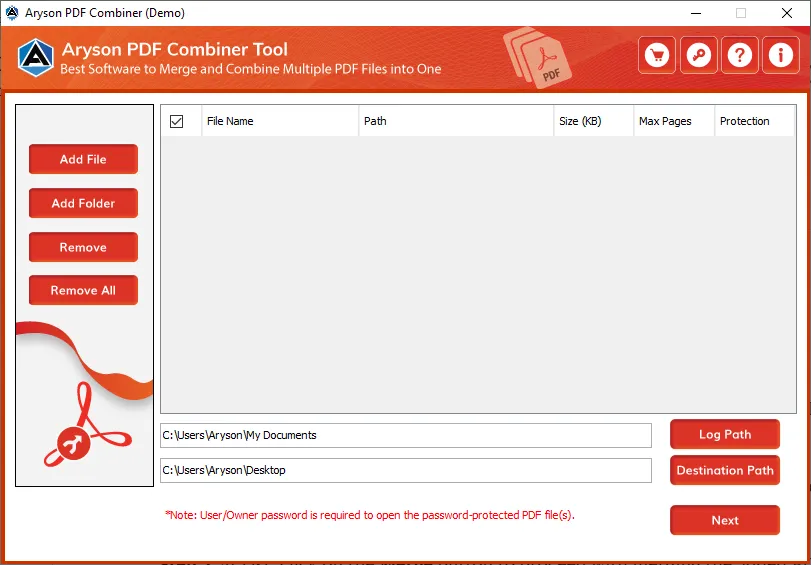
- First, install the Aryson PDF Merger on your Windows computer and launch it.
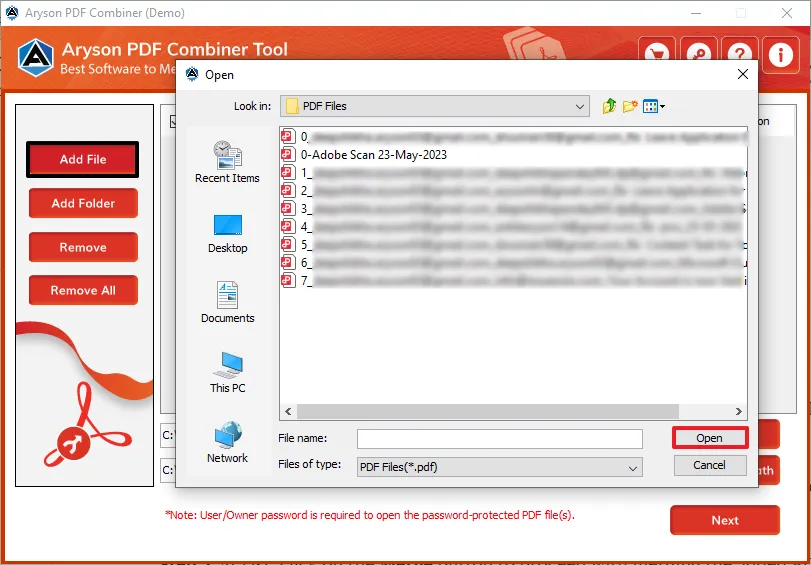
- Browse and select the PDF files you want to merge. You can add multiple files at once.
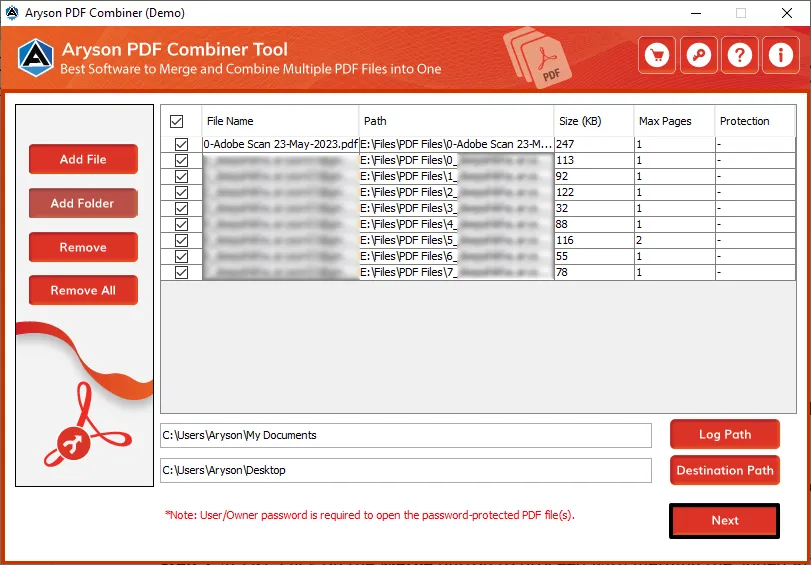
- After adding, you can select specific PDF documents and click on the Next button.
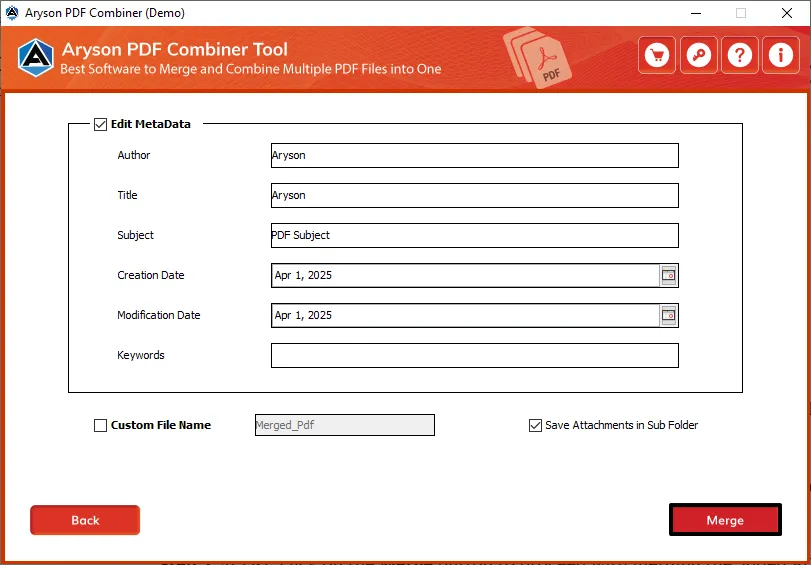
- Now, you can edit the metadata and assign the custom folder name accordingly.
- At last, click on the Merge Button to combine multiple PDFs without Adobe.
Additional Key Pointers Associated with the PDF Merger Software
- Merge Multiple PDF Files at Once: It allows users to combine several PDF documents into a single file in just a few clicks, saving both effort and time.
- Keep the Original Layout Safe: The software keeps the formatting, text, images, and structure the same after merging, so users never lose data quality.
- Merge Specific Pages from PDFs: Users can choose particular pages from different PDF files and merge only the required content into one document.
- Secure and Reliable Processing: It ensures safe merging without any risk of data loss, file corruption, malware, or unauthorized access.
- No Need for Adobe Acrobat: Also, it works independently and does not require Adobe Acrobat or any other external application for merging.
- Supports Password-Protected PDFs: Users can easily merge password-protected PDF files after entering the correct password.
- Works on All Windows Versions: Additionally, it smoothly supports Windows 11, 10, 8.1, 8, 7, and other older versions without compatibility issues.
- Simple and User-Friendly Interface: Even beginners can use it comfortably because of its easy and clean design.
- Fast and Accurate Performance: It handles large numbers of PDF files efficiently and completes the merging process quickly and accurately.
Conclusion
Free PDF merging methods make document handling simple and stress-free. Anyone can combine multiple PDF pages into a single organized file without needing Adobe Acrobat. Both online and offline solutions are available for every type of user. Windows and Mac both users can depend on the above recommended solution to merge PDF without Adobe. It also helps when you need a quick online option. So, you can choose the method that fits your needs, and your merged document will be ready within a few minutes.
Frequently Asked Questions:
Q1. How can I merge PDF files for free without Adobe Acrobat?
Ans: You can use Aryson PDF Merger to merge PDF files for free without Adobe Acrobat.
Q2. Is it safe to merge PDFs online?
Ans: Most trusted websites delete uploaded files after processing. Yet, it is better to avoid using sensitive files online.
Q3. Can I merge PDFs offline?
Ans: Yes. Aryson PDF Merger works offline without any data loss.
Q4. Will the quality of my PDFs get reduced after merging?
Ans: No, if you are using Aryson PDF Merger then you do not have to worry about the data accuracy.
Q5. What is the easiest method for beginners?
Ans: Aryson PDF Merger is the easiest because the process finishes in a few clicks.
About The Author:

Rohan Wiese is a Technical Content Writer at Aryson Technologies, specializing in databases, e-mail recovery, and e-mail migration solutions. He enjoys conducting research and generating information that assists database administrators, businesses, and novices in resolving issues with MS SQL Server, MySQL databases, Cloud Computing, and Microsoft Exchange.
Realted Post



