-

Written By Mithilesh Tata
-
Updated on November 12th, 2025
Free Method to Export Thunderbird to Outlook 2019, 2021, 2016 & 2013
This blog provides a complete, step-by-step guide on how to export Thunderbird to Outlook 2013, 2016, 2019, and 2021 using both free manual methods and an automated solution. To make the process faster and more secure, we’ll also discuss the Aryson Thunderbird Backup Tool, a professional utility that simplifies the migration process and ensures 100% data integrity. Whether you’re an individual user or part of an organization, this guide will help you move your emails, attachments, and folders from Thunderbird to Outlook with ease.
Overview of Thunderbird and Outlook Email Clients
Mozilla Thunderbird is a free, open-source email client designed for flexibility. It allows users to manage multiple email accounts, add-ons, and themes, making it great for personal use. However, it lacks native integration with business tools and cloud-based features.
Microsoft Outlook, on the other hand, is a robust email client widely used in offices and enterprises. It provides a built-in calendar, task management, and contact synchronization with Exchange and Microsoft 365 accounts. It’s reliable, secure, and designed for heavy communication workflows.
User Qureis –
Why Users Need to Export Thunderbird Emails to Outlook
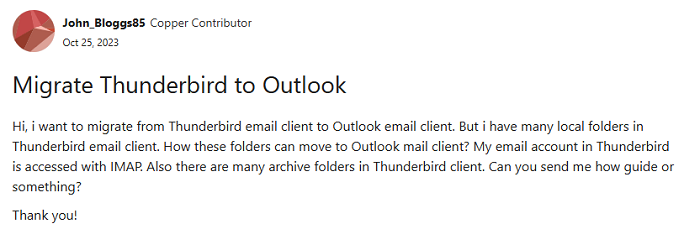
Users move from Thunderbird to Outlook for various reasons. Outlook offers better synchronization, high-level security, and an integrated experience across all Microsoft products. Businesses often prefer Outlook because it supports Exchange servers, group calendars, and advanced data backup options.
- Flawless Integration: Outlook easily connects with Microsoft Teams, Exchange, and Office 365.
- Advanced Email Features: It supports shared mailboxes, scheduling, and automatic sorting.
- Better Security: Also, Outlook offers strong spam filters and encryption options.
- Cross-Device Access: You can sync emails across PC, mobile, and web seamlessly.
Things You Should Check Before Thunderbird to Outlook Migration
Before you begin migration, a few preparation steps ensure everything runs smoothly.
Locate Thunderbird Profile Folder [MBOX Files]
Thunderbird saves data in MBOX files. To locate them:
- Open Thunderbird>>Menu>>Help>>Troubleshooting Information.
- Click Open Folder next to “Profile Folder.”
- Inside, you’ll find files like “Inbox,” “Sent,” or “Drafts” with no extension — these are your MBOX files.
Create a Complete Backup of Thunderbird Data
Also, you should always back up your profile folder before any migration. Simply copy the entire folder and save it to another drive or external location. This way, you can prevent data loss in case anything goes wrong.
Verify Outlook Installation and Version Compatibility
Along with that, make sure that Microsoft Outlook (2013, 2016, 2019, or 2021) is installed and configured. Without Outlook, the exported data cannot be opened or imported later.
Manual Methods to Export Thunderbird to Outlook
There’s no direct import option, but you can use two completely free manual methods to transfer Thunderbird emails to Outlook.
Method 01: Using Gmail as an Intermediary via IMAP Synchronization
This is one of the most popular free techniques. Here, Gmail acts as a bridge between Thunderbird and Outlook. By syncing your Thunderbird folders to Gmail and then configuring Gmail in Outlook, you can easily transfer emails.
- Log in to your Gmail account>>Go to Settings>>Forwarding and POP/IMAP>>Enable IMAP >>Save changes.
- Open Thunderbird>>Click “Account Settings”>> “Add Mail Account.”
- Enter your Gmail credentials and choose IMAP.
- After that, select your Thunderbird folders.
- Drag and drop them into the newly added Gmail account.
- Thunderbird will sync all these emails to Gmail servers.
- Open Outlook>>File>>Add Account>> Enter Gmail credentials>>Choose IMAP.
- Outlook will automatically download the same emails from Gmail.
- Once downloaded, simply drag the emails from the Gmail folders into your Outlook folders.
Method 02: Export Thunderbird Emails as EML Files
Another free way is exporting emails in .EML format. Outlook supports EML files, so you can import them easily.
- In Thunderbird, go to Menu>> Add-ons>>Search “ImportExportTools NG.”
- Thereafter, install and restart Thunderbird.
- Right-click the folder you want to export>>Choose ImportExportTools NG>>Export all messages in EML format.
- Now, you can save them in a desired location.
- Navigate next to open Outlook and create a new folder.
- Select all EML files and drag them into the new Outlook folder.
Drawbacks You Might Face in the Manual Export Process
However, the above-introduced manual methods are cost-effective. But individuals should keep in mind that they come with several limitations. You should be aware of the pointers which are as follows:
- Not all metadata, like timestamps, flags, or attachments, transfer perfectly during manual export.
- The manual process is time-consuming, especially for non-technical users who handle the large data volumes.
- Inconsistent configurations, corrupted MBOX files, or large email volumes can make the free methods unreliable.
- Along with that, there is a minor risk of data accuracy while using the manual method.
Best Recommendation Solution to Export Thunderbird to Outlook
The Aryson Thunderbird Backup Tool offers a reliable and simple way to migrate Thunderbird to Outlook PST format. It automatically detects Thunderbird data and supports batch conversion. It not only simplifies the migration process but also ensures that no data is lost during conversion. With this software, users can easily convert their Thunderbird MBOX files into PST, EML, MSG, or other file formats. Moreover, it allows users to preview emails before exporting, which helps in selecting only the required data. Additionally, it works smoothly with all versions of Windows and Outlook, including 2013, 2016, 2019, and 2021. Overall, this software provides a fast, secure, and user-friendly way to move your entire Thunderbird mailbox to Outlook without technical complications.
Step-by-Step Process to Export Thunderbird Emails Using Aryson Tool
Here’s how you can use Aryson Thunderbird Backup Tool for safe and efficient migration.
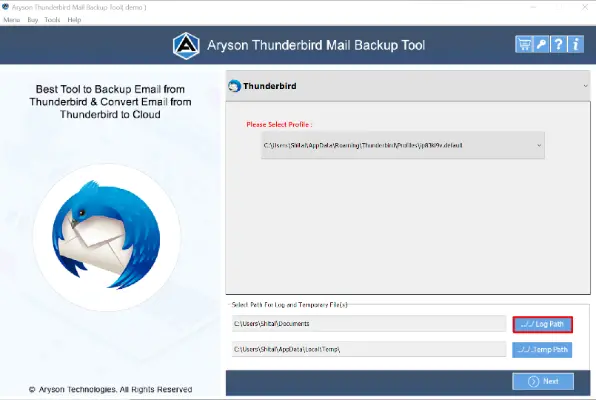
- First, download and install the Aryson Thunderbird Backup Tool on your PC.
- The software will automatically detect your Thunderbird profile from your system.
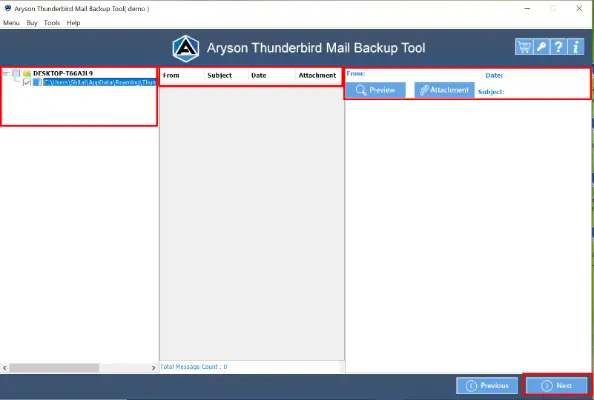
- Now, you can check email details, attachments, and other information before exporting.
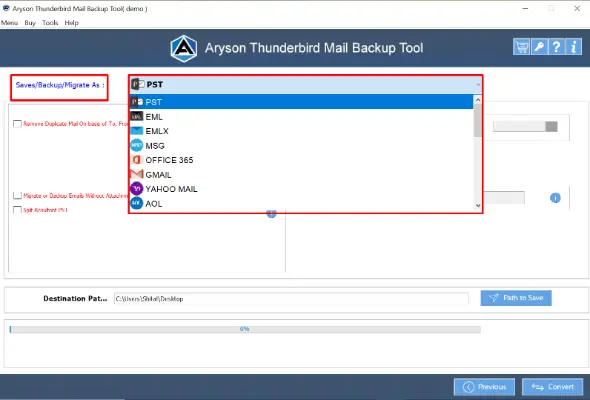
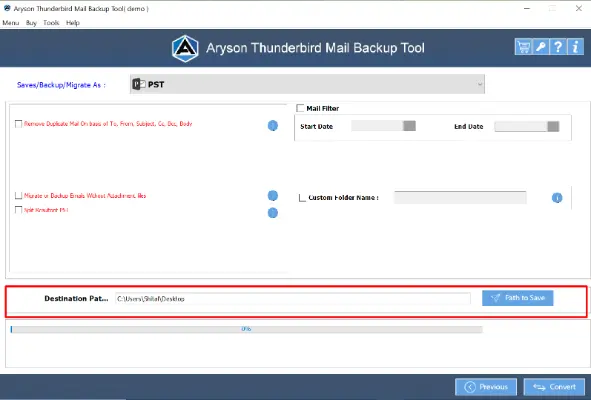
- From the Save/Backup/Migrate As option, choose PST from the list of output formats.
- Click Destination Path and select a folder location to save the converted PST file.
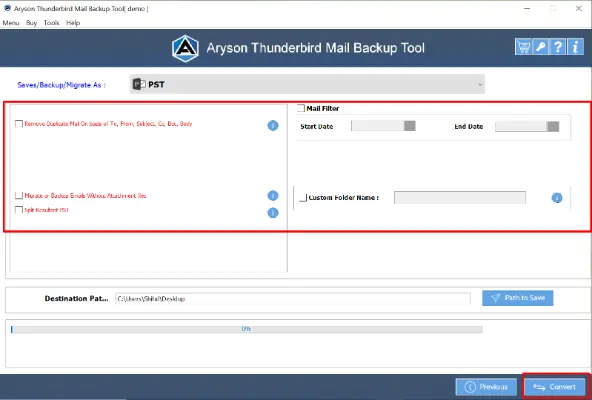
- You can apply the additional feature of the software according to your requirements.
- Once all settings are done, click the Convert button to convert Thunderbird emails to Outlook

After conversion, open Microsoft Outlook>>go to File>>Open & Export>>Open Outlook Data File, and select the PST file you created.
Conclusion
This blog serves as a complete guide for users who need to transfer Thunderbird to Outlook quickly and securely. It covers every possible method, from free manual ways to an automated professional approach, ensuring users can select what best fits their needs. Each step is explained in simple terms to make the process smooth and error-free. Additionally, the Aryson Thunderbird Converter Tool provides an advanced yet user-friendly solution that guarantees safe and accurate migration of all emails and attachments. With this, anyone can easily move their Thunderbird data to Outlook 2013, 2016, 2019, or 2021 without any technical difficulty.
Frequently Asked Questions:
Q1. Does the Aryson Thunderbird Backup Tool support all Outlook versions?
Ans: Absolutely. The Aryson Thunderbird Backup Tool supports all major Outlook versions, including 2013, 2016, 2019, and 2021. It ensures smooth conversion from Thunderbird MBOX files to PST without compatibility issues.
Q3. Is it possible to migrate only selected Thunderbird folders to Outlook?
Ans: Yes, the Aryson Thunderbird Backup Tool allows selective conversion. You can preview all Thunderbird mailbox items and choose specific folders or date ranges to export, which saves time and storage space.
About The Author:

Mithilesh Tata is dedicated to making the lives of his customers as simple as possible. He enjoys learning about new applications and utilities that can help people protect their data. Mithilesh also has a strong grasp on email migration & data recovery. He enjoys validating every component of the software, technical materials, and anything else that has to do with his working life.
Realted Post