-

Written By Rohan Wiese
-
Updated on July 31st, 2025
How to Repair InnoDB Tables in MySQL Safely and Effectively
If you’ve ever worked with MySQL databases, you already know how important they are. It will help your website or application run smoothly. But now and then, things can go wrong with the database tables. Among them, one common issue many developers and admins face is InnoDB table corruption. It can stop your site or app. So, it cannot work properly. It can even make your data inaccessible. But don’t worry, it’s not a big issue. We are here with the simple and effective ways, including the Aryson MySQL Database Repair Tool to repair InnoDB tables in MySQL. Firstly, we will look at why this issue happens, how to fix it, and what to do if nothing seems to work. Download Now Purchase Now
What Is an InnoDB Table in MySQL?
Before we proceed further and fix anything, let’s first understand what InnoDB actually is.
InnoDB is the default way MySQL stores your tables. It’s like the engine that runs your database in the background. It comes with useful features like:
- Transactions
- Foreign keys
- Crash recovery
- Row-level locking
These features can make InnoDB fast and reliable. But even with all this, things like sudden shutdowns or hardware problems can still cause the tables to get corrupted.
How Do You Know If an InnoDB Table Is Corrupted?
You don’t always get a clear message saying, “Hey, this table is broken.” Instead of that, you can also see some strange behaviour or errors like:
- MySQL refuses to start.
- You can’t run queries on certain tables.
- Error messages in logs like:
| InnoDB: Page corruption detected
ERROR 2013: Lost connection to MySQL server |
- Also, your server crashes unexpectedly.
- Along with that, you get stuck with a table that won’t open.
If you’re seeing any of the above, there is a chance you’ve got a corrupted InnoDB table on your hands.
Why Do InnoDB Tables Get Corrupted?
There could be several reasons behind this specific issue. Here, we will introduce some of the:
- The first and main reason can be the sudden server shutdowns.
- Another reason can be the system disk failures or bad sectors.
- Along with that, bugs in MySQL or outdated versions can create issues.
- If it is running out of memory or disk space, then be prepared to recover a crashed InnoDB table.
- Apart from the above pointers, improper server configuration can also lead to several corruptions in InnoDB tables.
- If you try to stop your database process when it is working forcefully, then it can be the reason for corruption in your SQL table.
So, now that we know the problem, it’s time to talk about how to fix it.
Easy Ways to Repair InnoDB Tables in MySQL
Here are the most reliable ways to recover a crashed InnoDB table. I’ve explained everything step-by-step so it’s easy to follow, even if you’re not a tech expert.
Method 1: Use innodb_force_recovery to Start MySQL in Safe Mode
If MySQL is not starting at all, you can use a special setting to start it in recovery mode. Hopefully, it will help to repair InnoDB Tables in MySQL.
- First of all, try to stop the MySQL service:
- Enter this command in your Linux system: sudo systemctl stop mysql.
- For Windows: Go to Services >> Look for MySQL >> Click Stop.
- After that, open the MySQL configuration file.
- On Linux, it’s usually located at .
- On Windows, look for my.ini in the MySQL installation folder.
- Add this line under [mysqld]:
 .
.
It helps MySQL skip certain checks and start up more quickly. If it doesn’t work at level 1, try increasing the number slowly (up to 6).
- Now, start MySQL again: sudo systemctl start mysql
- After that, take a backup of your database immediately.
- Once the backup is done, remove the innodb_force_recovery line from the config file and restart MySQL normally.
Be careful: keep in mind that levels 4 to 6 can cause data loss. So, use them only if nothing else works on your system.
Also Read: Learn How to Open FRM File in MySQL?
Method 2: Export and Rebuild the Table Using mysqldump
In case your MySQL is running but the table is acting up, then you should try to rebuild it again to repair InnoDB Tables in MySQL:
- Dump the table to a backup file with the given command:
- After that, drop the corrupted table:
- Next, re-import the table from the backup:
- So, this method again rebuilds the table. Also, it is helpful to fix minor issues.



Also Read: Complete Guides to Recover MySQL Tables Using Mysqlcheck
Method 3: Check the MySQL Error Logs to Repair InnoDB Tables in MySQL:
Sometimes, MySQL tells you exactly what went wrong—if you know where to look.
- On your Linux system:
- On your Windows system: Now, look inside the MySQL data folder for a .err file.

Search for lines that start with “InnoDB” or “corruption.” It might tell you which table or file is causing the problem and help guide your next step.
Method 4: Restore the Table from a Previous Backup
If you’ve got regular backups, restoring the table might be the simplest fix.
- First of all, you can restore a single table or the entire database.
- Also, make sure you test the backup on a staging environment. It should be before pushing it to production.
It is the cleanest way to recover your data if all else fails.
Some Limitations of Manual Methods
However, the above methods can fix many cases; they aren’t perfect. Here’s why:
- You might lose some data during force recovery.
- These steps need command-line knowledge.
- If corruption is severe, nothing might work.
- Manual fixes can take time and effort.
- If the disk is damaged, recovery is nearly impossible without tools.
Use MySQL Database Recovery Tool to Repair InnoDB Tables in MySQL
When manual repairs don’t help or feel too risky, you can use an automated Aryson MySQL Database Recovery Tool. It is a simple and helpful software that fixes damaged MySQL database files. Moreover, it works with both InnoDB and MyISAM tables. Also, it can recover things like tables, keys, views, and triggers. So, you don’t need any technical knowledge to use it. One useful feature is that it shows a preview of the data before saving. Additionally, you can save the repaired data directly to your MySQL server or as a SQL file. Because of its easy-to-use design and support for databases from both Windows and Linux, it is the best way to repair an InnoDB table.
Follow the Steps to Repair InnoDB Tables Database in MySQL:
- Step 01: Launch the Aryson MySQL Database Repair Tool to begin the recovery process.
- Step 02: Click the Open button to add your corrupted InnoDB table in MySQL and click Ok.
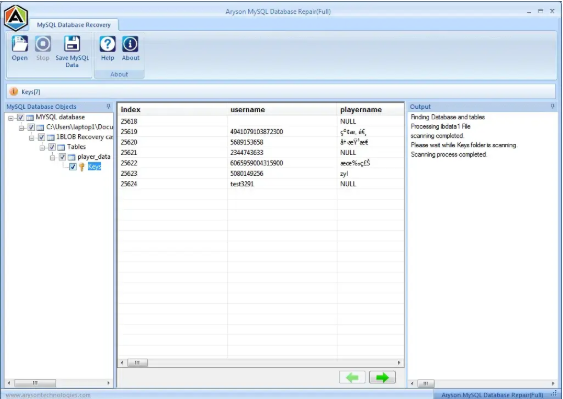
- Step 03: Now, it will begin scanning automatically to detect tables and other components.
- Step 04: View a detailed preview of all recoverable items, including tables, triggers, and views.
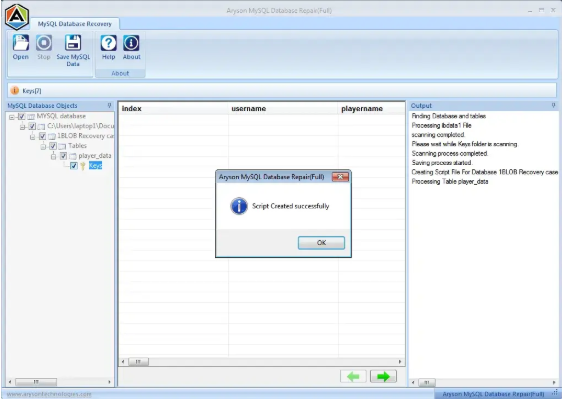
- Step 05: Click OK to export the recovered database as a script or directly to a live MySQL Server.


Concluding Words
Fixing a corrupted InnoDB table in MySQL may sound complicated, but with the right steps. However, it’s completely manageable. You can use MySQL’s built-in recovery options or the above-recommended professional tool to get your data back. The key is to act quickly and carefully. Always keep regular backups, update your MySQL version, and shut down your server properly to avoid future issues. If manual methods don’t work or seem risky, using Aryson MySQL Database Recovery Tool can save time and protect your data.
Frequently Asked Questions
Q1: What can cause InnoDB table corruption in MySQL?
Ans: InnoDB tables can get corrupted for several reasons. It happens if the server shuts down suddenly, there’s a power cut, the hard drive fails, or MySQL crashes. Running out of storage space or using an old version of MySQL can also lead to problems.
Q2: Can I fix a corrupted InnoDB table without losing any data?
Ans: Yes, in many cases you can. You can try starting MySQL in recovery mode using innodb_force_recovery, export the table and rebuild it, or use the Aryson MySQL database recovery tool. These methods often help fix the issue without deleting your data
Q3: What’s the difference between fixing InnoDB and MyISAM tables?
Ans: InnoDB tables are more advanced because they support features like transactions and crash recovery, so repairing them is harder. MyISAM table is simple. So, you can usually fix them with the REPAIR TABLE command. InnoDB often needs more steps or a special tool
Q4: Is using the innodb_force_recovery option safe?
It can help, but you need to be careful. This option lets MySQL start even if there’s corruption. But if you use higher levels (like 4 to 6), it might block changes to your data or even cause data loss. So, always back up your data first and use the lowest level that works.
About The Author:

Rohan Wiese is a Technical Writer at Aryson Technologies. He is an expert Email Forensic, Cloud Computing, and a passionate nerd with over 10 years of experience in technical content writing. He writes about Cloud Migration, Database Recovery, Email Backup, Windows, Mac, and Tech.
Related Post



