

-

Written By Rohan Wiese
-
Updated on February 4th, 2026
Convert a Scanned PDF to an Editable Word Document – A Simple Guide
If you have ever tried to edit a scanned PDF? If you did, you already know it’s not as simple as editing a normal text-based PDF. Sometimes you receive a scanned PDF that contains important text, but you can’t make any changes because it’s locked inside an image. In this kind of situation, everyone navigates to the editable word document. So, all they need to do is convert scanned PDF to editable Word document. With the right approach, you can quickly turn that scanned file into a format. Then, you can edit, format, and update with ease. In this guide, we’ll walk you through a simple method using the Aryson PDF to Word Converter to get accurate, editable results in just a few steps.
Understanding Scanned PDFs
A scanned PDF is completely different from a regular PDF. Normal PDF contains the text in each page. On the other hand, it contains an image of each page. It simply means:
- There is no Direct Text Selection: You can not highlight or copy text. Because it’s just a picture.
- Limited Search Option: If you want to search words or phrases, it is not possible without a word file.
- Format Issue Challenges: When you recreate the document manually, it can be time-consuming.
To make a scanned PDF editable, it must go through Optical Character Recognition (OCR). This process scans each image for letters, numbers, and symbols, then converts them into machine-readable text.
Key Reasons to Convert Scanned PDF to Word Document
When users are working with the scanned PDF, it is difficult to manage the PDF files. As you are aware, it’s because of the image as it does not contain a content file.
- Edit Without Limitations: You can easily fix errors, update details, or add new content.
- Easily Search Information: Along with that, find specific words or phrases in seconds.
- Reuse Valuable Content: Moreover, you can copy text, tables, or images for other documents or presentations.
- Improve Layout and Style: Also, it uses Word’s tools to improve the document’s appearance.
- Preserve and Restore Data: Digitize old printed files and make them editable for future use.
When you get your scanned PDF is in Word format, you can work with it just like any other editable document.
How to Convert Scanned PDF to Editable Word Document
Converting a scanned PDF to an editable Word file is the most difficult part. Scanned PDFs are purely images, so it is not possible to copy text or edit unless the file goes through OCR (Optical Character Recognition) technology. Even free online tools that can do this are not appropriate because they either lose the format or apply a file size limit that is not necessarily secure for sensitive documents.
In that case, Aryson PDF Converter Software provides a very accurate solution to convert a scanned PDF to an editable Word document online. This utility can convert both normal PDFs and PDFs that have been scanned equally effortlessly. Moreover, its built-in OCR engine provides that all letters, digits, and characters are read and transformed into editable text without changing the original document format. With a few clicks, you can convert any scanned PDF to an editable Word document ready for modifications or content extraction without the need for hours of retyping manually.
Steps to Convert Scanned PDF to Editable Word:-
- Step 01: Simply, Download the Aryson PDF Converter Software and open it on your system.
- Step 02: Tap on Select File/Select Folder to insert PDF file, choose PDF file and click Open.
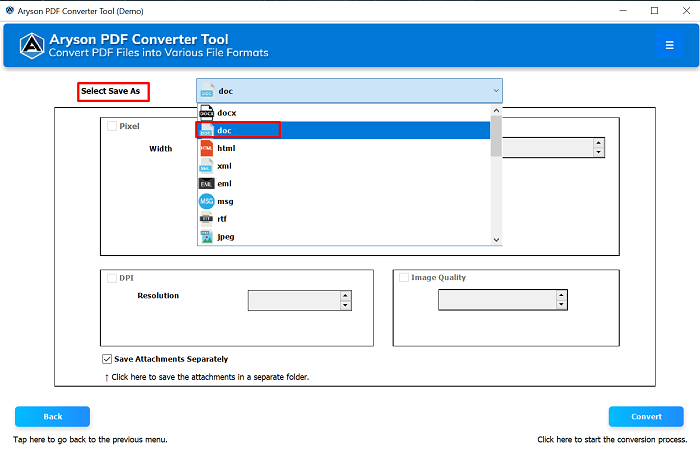
- Step 03: Now, select the save as option as the DOCX /Doc from the given list of options.
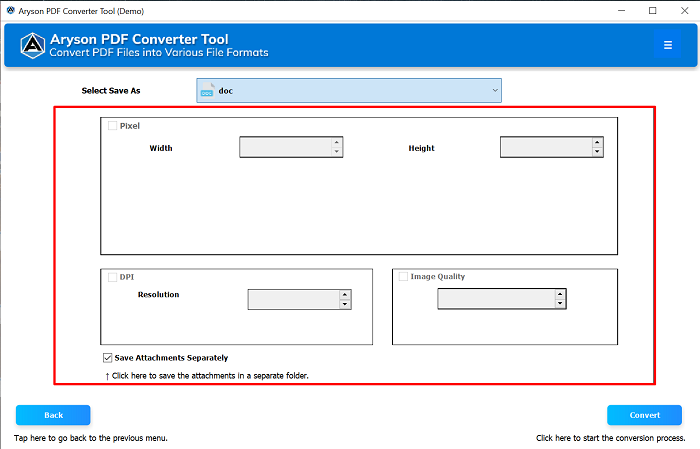
- Step 04: Here, you can choose the Width, Height and image quality according to your preference.
- Step 05: At last, click on the Convert to Convert Scanned PDF to Word format.



Explore Some Key Features Associated with this Automated Solution
The Aryson PDF Converter Tool has a wide range of features which is helpful to convert scanned documents into Word. Here, we will introduce to the some major of them:
- It recognizes text from scanned or image-based PDFs with ease.
- You can convert PDF to Word, DOCX, XLS, PPT, HTML, EML, JPEG, and more.
- Also, it maintains fonts, layouts, tables, and alignment in the Word file.
- Moreover, it processes multiple scanned or regular PDFs in a single session.
- Along with that, you can unlock and convert secured PDFs without data loss.
- Users can choose specific pages or page ranges for conversion instead of the whole file.
- The user interface is easy. Both beginners and professionals operate without technical skills.
Conclusion
Now, you are aware of the appropriate solution to convert scanned PDF to editable Word document. With the help of the Aryson PDF Converter Tool, you can get accurate results. Along with that, it maintains the original layout, fonts, and structure intact. Its built-in OCR ensures even image-based PDFs are converted into clean, editable text. No matter if you need to update contracts or reuse valuable information, this utility provides a quick and secure solution to convert OCR PDF to Word for both individuals and businesses.
Frequently Asked Questions (FAQs)
Q1. What is OCR and why is it essential for scanned PDFs?
Ans: OCR (Optical Character Recognition) is a free process that detects text within your images. Along with that, it converts it into editable and searchable text. Hence, it is essential for scanned PDFs.
Q2. Can I convert a scanned PDF without losing formatting?
Ans: You may use a professional application such as Aryson PDF Converter Software if you want to modify the formatting of a scanned PDF without breaking the formatting of the original document. It is going to be so simple.
Q3. Can I convert multiple scanned PDFs to Word at once?
Ans: Yes. The Aryson PDF Converter Tool is a tool that allows you to convert many files at the same time, which can help you complete the process more quickly.
About The Author:

Rohan Wiese is a Technical Content Writer at Aryson Technologies, specializing in databases, e-mail recovery, and e-mail migration solutions. He enjoys conducting research and generating information that assists database administrators, businesses, and novices in resolving issues with MS SQL Server, MySQL databases, Cloud Computing, and Microsoft Exchange.
Realted Post


