





LiveChat

Aryson Outlook PST Repair

Successfully Recovers Data or Emails from Corrupt Outlook PST Files.

Most of the MS Outlook users must be quite aware of PST files, which act as the main repository for storing entire mailbox data that is associated with each Outlook account. This file consists of data items such as emails, calendars, contacts, etc. stored within it. Since all the database files are prone to corruption, Outlook PST file is no exception. Thankfully, Aryson PST Recovery is one of the most efficient Outlook PST Repair Tools that is capable of recovering not just corrupted data but also has the ability to restore deleted emails. After the recovery process, users are allowed to save the data in multiple output formats. It is an ideal recovery solution for all kinds of PST file created by several Outlook versions including 2016. Backed up with a strong algorithm, the tool scans all the mailbox items present in PST file & recover them in order.

  • Restores all mailbox items such as Email, Calendar, Contacts, etc. from corrupt Outlook PST file.
  • There is no limitation in the size of PST file that needs to be recovered. Tested upto 80GB size.
  • Supports recovery of Encrypted & Password Protected PST Files.
  • Preview option available in Free PST file recovery tool.
  • Recovered PST files data can be saved into multiple formats- PST, MSG, MBOX, DBX, and EML.
  • Software allows to export Outlook mail messages to Windows Live Mail.
  • Recovers Non-English and right to left characters.
  • Snapshot feature present to save time & avoid re-scanning of the same file.
  • Keeps folder hierarchy intact during the recovery of Outlook PST files.
  • It supports to import or export Outlook PST mailboxes to Mac Mail.
  • Search feature supported to locate any specific email messages from any PST file..
  • Capable of recovering email attachments & embedded attachments.
  • Compatible with PST files created by MS Outlook 2016, 2013, 2010 & other lower versions.
 Download Now100% safe    Purchase Now

 *Download the free trial version to scan & preview your recoverable mail items.

Instantly Repair - Fix Inaccessible Outlook PST File Issue

How to Repair or restore deleted emails from corrupt or encrypted PST File?

Detailed Features of Aryson Outlook Recovery

Recover OST Files

Repair Corrupt/Inaccessible PST

The Aryson Outlook PST Recovery solution is one of the most effective tools that have expertise in fixing damaged or encrypted Outlook files. It has the ability to restore all the items in the Outlook user mailbox such as emails, calendars, contacts, notes, journals, etc. without losing data integrity.

Repair Encrypted Outlook file

Recover Encrypted Outlook file

This tool is smart enough to carry out the recovery process of the encrypted PST file before scanning the damaged Outlook PST file. It supports all kinds of Outlook PST files from high encryption, compressible encryption to no encryption mode.

Repair Different file formats

Recovery in Different file formats

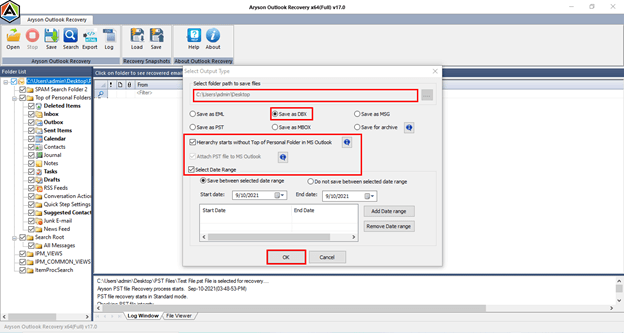
This software has the capability to recover all the data from corrupt or inaccessible PST files & save it into multiple file formats such as PST (itself), DBX, MSG, MBOX & EML. After the recovery procedure is done, theuser will be asked the desired file format on which they would like to save the recovered PST data.

Add New PST File

Adding New PST Files to Outlook

With the help of this Outlook Recovery tool, any user can add new PST files on their Outlook accounts directly using the tool. For adding PST files, users need to check the box of Attach PST file before they start the saving process. Multiple PST files can be added in MS Outlook using advanced features.

ANSI & UNICODE PST

Recovery of ANSI & UNICODE PST

Aryson PST file repair software is capable of recovering all the data items from corrupted PST files with both ANSI and UNICODE file formats. However, after recovery, the resultant Outlook file will be only UNICODE PST format where all the data will be saved.

Recovery Modes

Three Recovery Modes

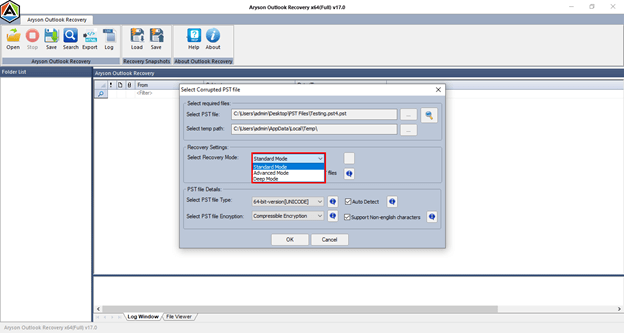
This PST Repair Tool comes with three recovery modes among which user can choose for their PST files as per the level of severity. The Standard mode is meant to fix all the minor corruption issues in the file while the second one is for resolving moderate corruption problems, which is also known as Advanced Mode. If both the above options fail to repair the PST file, last option is to use adeep mode that will recover maximum possible data.

Resolves Error

Resolves Header Alignment Errors

The tool comes with a unique feature available with all the three recovery modes: Standard, Advanced & Deep. The feature will be enabled by ticking the check box of Handle Alignment Errors that fixes all kind of issues related to media corruption as well as corruption related to header alignment found in Outlook PST files.

Non-English Characters

Recovers Non-English Characters

The tool has a feature that supports therecovery of Non-English characters present in the Outlook PST file. To enable this, users need to check the box of Support Non-English Characters before the scanning process. It will restore characters in UNICODE format PST from the corrupt file.

Auto-Detect Feature

Auto-Detect Feature

With the help of Auto-detect feature that comes with the Aryson Outlook Recovery Tool, users can easily find out the version of Outlook PST file, it's file format whether its ANSI or UNICODE and any encryption type, if present.

Log File

Creates Log File

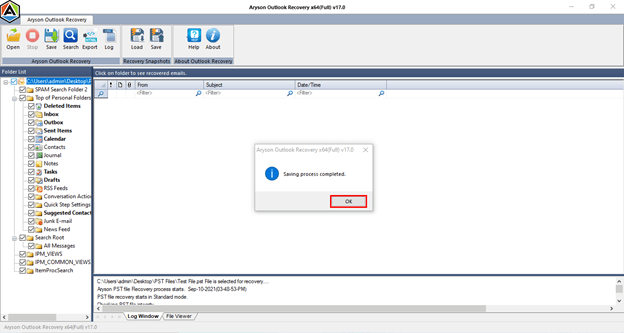
After the completion of the recovery procedure, the recovery software will generate a log file containing all the details of the recovery such as a number of items recovered from the PST file. This file can be saved in text or.txt format that can be kept for future reference.

Saves Selective Emails

Saves Selective Emails

After the recovery process of the damaged Outlook PST file, the tool helps users in saving only the desired selected mail items from the account. It maintains the folder hierarchy of the file during the whole process of recovery.

snapshot of PST

Snapshot of PST file

One important feature of the Outlook Recovery Tool is that users can save the snapshot of the PST file that has been scanned earlier at any desired location. This helps users in saving time without the need of rescanning the same Outlook file in future.

Scanning Options

Auto Scanning Options

Outlook Recovery software has stunning auto scanning options, therefore easy to scans the severely corrupt PST file created by all versions of MS Outlook. It automatically scans your damaged PST file after using recovery modes options of the software and explore the selected PST file email items.

Hierarchy Maintain

Folder Hierarchy Maintain

It is an excellent feature that allows users to save the recovered Outlook PST file email items to the same folder hierarchy as a source file. The software maintains the files and folders hierarchy after saving restored Outlook email as new PST, EML, MSG, DBX, and MBOX file format.

Saving Options

Multiple Saving Options after Recovery

Using Aryson Outlook PST Recovery Tool, users can regain access to their mailbox items from the damaged Outlook files & and saved into different file formats such as PST, MSG, EML, DBX as well as MBOX.

  • Save PST data into PST:- This Tool has the ability to save recovered Outlook mailbox items from PST to the new PST file containing all the items like emails, contacts, calendars, notes, journals, etc.
  • Restore Emails into MSG:- The Aryson PST recovery tool has enabled users to save all the recovered emails from PST file to MSG format.
  • Recover Emails into EML:- Another file format supported by the tool is EML file format that saves all the recovered mailbox items from damaged PST file.
  • Save Emails into DBX:- Among multiple saving options, DBX file format can be used to store the recovered emails from Outlook PST file.
  • Email Conversion to MBOX:- It enables users to restore the Outlook emails from PST file effectively in the file format of MBOX.
  • Migrate PST to Office 365:- If you want to migrate PST file to Live Exchange and Office 365, then use the PST Migration tool.

Technical Overview

MS Outlook is the most favorable email platform used by several organizations across the globe considering its reliable features over other email clients. With many industries depending on Outlook as their professional emailing platform, it is important to ensure that the PST files containing all the mailbox items of the employees are safe and free from damage. However, in many cases, PST files can become corrupted keeping the work to a halt. In such cases, organizations need to take help of the recovery tools available in the market today. The Aryson Outlook PST Recovery solution can effortlessly repair all the damaged or corrupted PST files and restore all the important mailbox items in several file formats. It is capable of not just recovering items from PST files but also supports therestoration of items that has accidentally deleted by users.

Types of Deletion in MS Outlook

  • Soft Deletion
    It is a kind of deletion in MS Outlook where theuser deletes unnecessary emails on a daily basis. It means the email has been deleted by clicking 'Delete' option from your mailbox. Such emails will be stored in the Deleted Items folder for the particular period of time and can be restored within the span.
  • Hard Deletion
    This kind of deletion happens when the emails have been deleted by the user using 'Shift' and 'Delete' buttons together. Such action results in permanent deletion of the Outlook email and it cannot be recovered easily. However, if the account is configured with Exchange Server, the emails will land up to Dumpster folder, where they are stored only for retention period.

Errors Associated with PST File Corruption

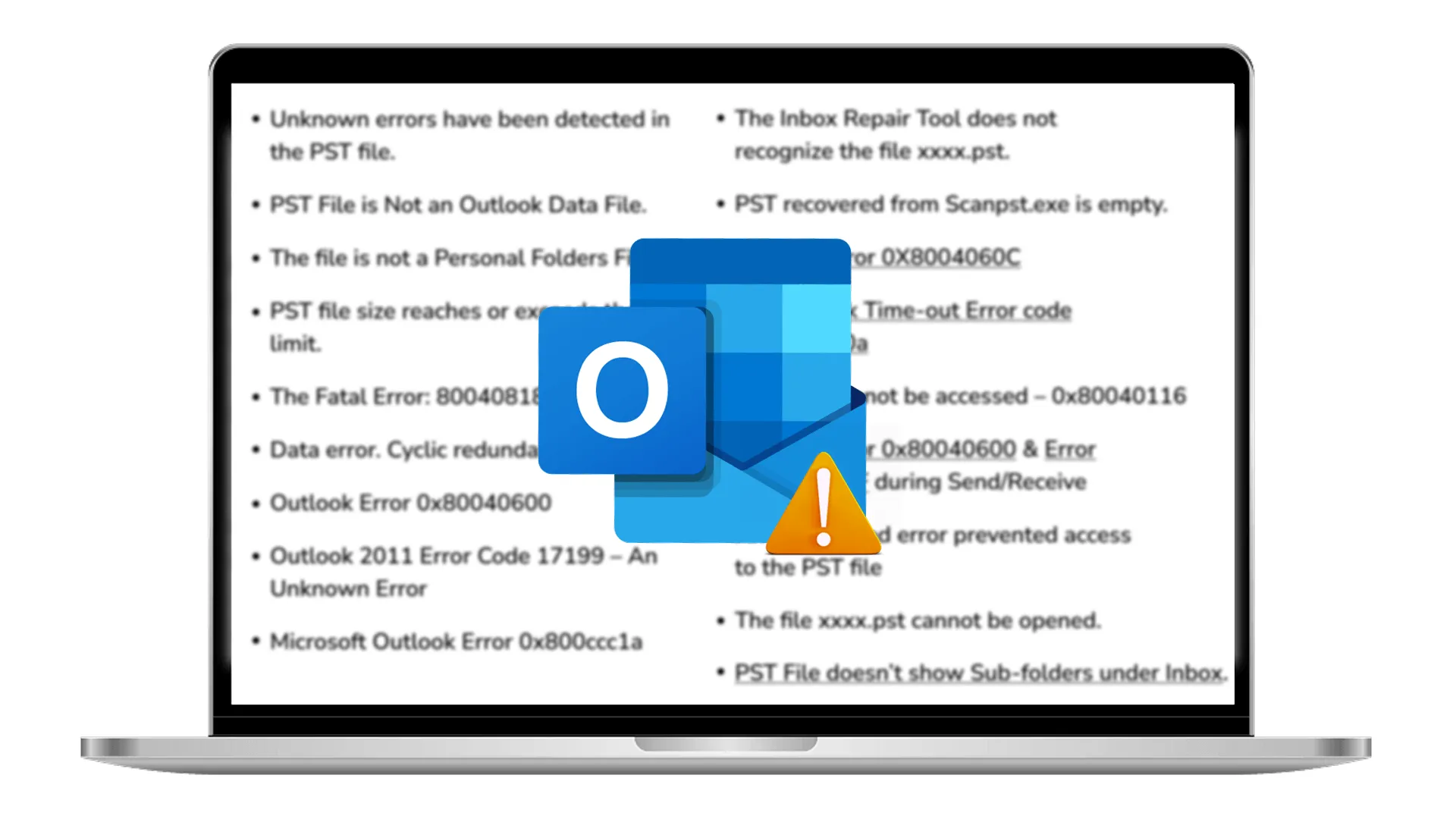
While using MS Outlook, users may encounter many error messages that are associated with PST file that is either corrupt or damaged leading to improper functioning of Outlook. Here are some of the common error messages:

  • "Errors have been detected in the PST file"
  • "The file is not a Personal Folders File"
  • "PST file size reaches or exceeds the 2GB limit"
  • "The Fatal Error: 80040818"
  • "Data error. Cyclic redundancy check"
  • "xxxx.pst cannot be accessed – 0x80040116"
  • "The Inbox Repair Tool does not recognize the file xxxx.pst"
  • "An unexpected error prevented access to PST file"
  • "PST recovered from Scanpst.exe is empty"
  • "The file xxxx.pst cannot be opened"

Software Specification

System Requirement
processor
Ram Recommended
Opreating System
License Types
Home License
Home License
Corporate License
Corporate License
Technical License
Technical License
Software Delivery & Version
ElectronicYes
Versionv19.0

Comparison of Demo & Full Version

Product Features Free Version Full Version
Select or Add PST File
Standard, Advance or Deep Scanning Option
Recovers all the mailbox items
Select Items According to Date Range
Recovery of Corrupted & Encrypted file
Compatibility Up to Windows 10
Supports All Versions of MS Outlook
Save Recovered Data into PST, EML, MSG, DBX, MBOX & Archive Preview Only Save All Items
24*7 Tech Support & secure 100%
Price Free $49
Money-Back Guarantee
Rating & Review
cinet

Outlook Recovery - The topmost downloaded and used on CNET for repairing corrupt Outlook data file (.pst) and restore mailboxes as a new PST file, review by CNET Download. Read More..

softonic

Outlook PST Recovery software allows you to fix oversized Outlook data file (.pst) and restore all emails, including contacts, calendars, notes, tasks, etc. review by Softonic Internation. Read More..

Softpedia

Softpedia assertions that Aryson Outlook PST Repair is 100% Safe, and Clean, which means it does not contain any types of malware while repairing corrupt PST files. Read More..

soft32

PST Recovery for Outlook is one such piece of a tool designed to restore email from corrupt PST files, including all email attachments and properties effortlessly, reviews by Soft32. Read More..

Frequently Asked Questions

Follow the simple procedure to successfully repair or recover

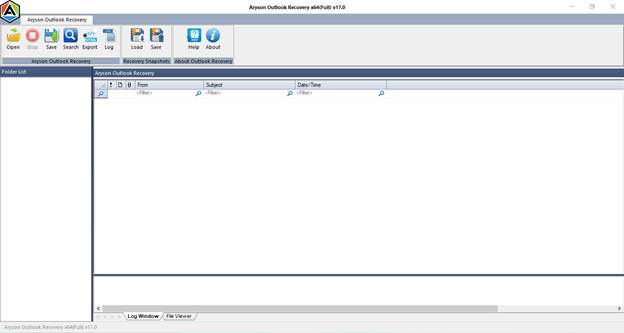
  • Run Aryson Outlook PST Repair software
  • Click on "Open" Menu and Select PST file
  • Select scanning option - Standard, Advance & Deep Mode, after that select 32bit versions or 64bit versions then click on "ok" button to start the scanning process.
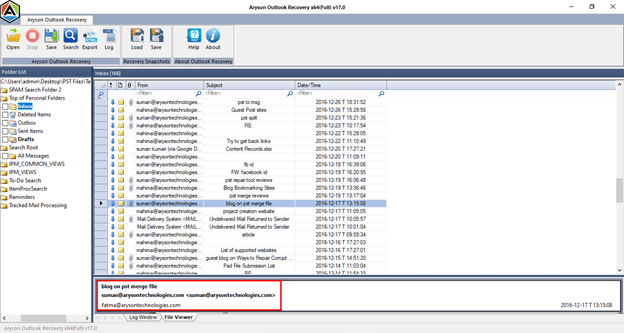
  • Select items of PST file and previews with their properties.
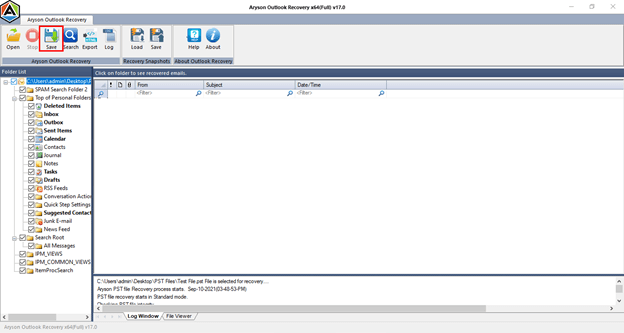
  • Click on Save Menu and Save your "PST" file into different file format.
  • Select Option "Save as PST" then save your recovered PST file at specified location in your system.

The software scans corrupt PST files and explore the items of files with meta properties in left panel then you can easily preview items and save them at specific location.

If you want to repair any version of MS Outlook PST file including Outlook 2010, 2013 & 2007, you can download and run Aryson Outlook PST Repair software to quickly scan your PST file, after repairing save them into new PST file for further use.

When Scanpst.exe fails to repair your PST file, then you can go with professional PST File Repair tool which can quickly fix any error from your PST file and save them into workable PST file. Now easily access your PST file with all versions of MS Outlook. Read More.

Outlook Not Responding is one of the most common error for Outlook email clients; you can open Windows Task Manager and close the Outlook.exe and restart the Outlook application. When an error does not resolve after restart Outlook application, then your PST file may be corrupted. In such a situation, you can try Outlook PST File Repair software to fix your PST file. Read More

If you encounter PST file error with MS Outlook 2016, 2016 and another previous version then you can try the third party software to rebuild or repair your PST file successfully. Read More

To repair a corrupted PST file in MS Outlook 2013 using Aryson Outlook PST Recovery software. It also fixes corruption issue from any version of MS Outlook PST file.

When your PST file does not work with MS Outlook application or not open by default, then you can rebuild PST file without Outlook application using Outlook PST Recovery software. Read More

With the help of Aryson PST File Repair tool, users can save the recovered emails from old PST file toseveral file formats like PST, MSG, RTF, EML, HTML, & PDF that they can choose as per their requirements.

Yes, this PST file repair software is compatible with PST files created from all the versions of MS Outlook including 2016,2013, 2010 & other lower versions.

Yes, the Aryson PST Recovery is well-equipped to restore PST from both the formats i.e. ANSI as well as UNICODE PST files. However, the format of the resultant PST file will be in UNICODE.

Yes, you can use Aryson Outlook Recovery Tool to repair corrupt PST & recover all the deleted emails or contacts that were permanently deleted from your Outlook account.

No, the corrupt PST repair solution does not impose any limitation on the size of Outlook PST file. Thus, it works effectively for any size of Outlook PST files.

  • capgemini
  • moto
  • ibm
  • county
  • oreilly
What Our Customers Are Saying About Us
 Submit Your Review
You Might Be Interested in These Products Too

Aryson OST Recovery

Aryson OST Recovery

Read More 

Aryson Outlook Email Recovery

Aryson Outlook Email Recovery

Read More 

Aryson OST to PST Converter

Aryson OST to PST Converter

Read More 

Aryson MBOX to PST Converter

Aryson MBOX to PST Converter

Read More 
Service

At Service Since
2010

Trusted

Trusted by
Millions

SSL Secure

SSL
Secure

McAfee

McAfee SECURE
100% Secure

Aryson Technologies

united states

2880 Zanker Road, Suite 203, San Jose, CA - 95134, USA

india

A-58 , 2nd Floor A Block Sector 57, Noida, Uttar Pradesh 201301, India

Find Us on

Subscribe to our newsletter to get the latest News & Update

© Copyrights 2014 by Aryson Technologies Private Limited - All Rights Reserved

DMCA.com Protection Status