-

Written By Shivam Rathore
-
Updated on May 22nd, 2026
Open MS Access Database (.MDB & .ACCDB): Expert Guide 2025
User Query: I had Office 2002 on my old PC. I created a database to manage my home items. I got a new PC. I have an Access database from an old pc that had Office 2002. I got a new PC and don’t have Office for it. Is there any way I can access the Access database?
Summary: In this blog, we will discuss two free methods to open MS Access database without any issues. ACCDB is the default database file format used by modern versions of Microsoft Access and is widely used to store tables, queries, forms, reports, and macros. Many users need to access ACCDB or older MDB files on systems where MS Access is unavailable. In the guide below, we will discuss a manual approach and the use of Aryson MDB Viewer to access Access files efficiently.
Quick Way to Open Access DB
- Install and run Aryson MDB Viewer on your Windows PC.
- Click Open and browse to your MDB or ACCDB file.
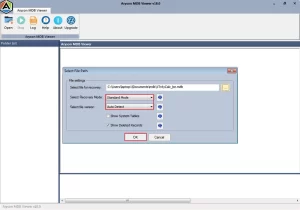
- Choose scanning mode—standard for minor and deep scan for corruption.
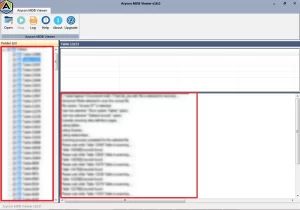
- Preview tables, queries, forms, and relationships in the object tree.
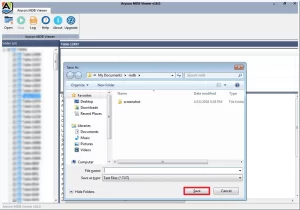
- Click on the “Log” menu to create a .txt file of recovered data.
Common Causes of “Cannot Open MS Access Database” Error
- File corruption: A sudden shutdown or power cut mid-save.
- Version incompatibility: An ACCDB built in Access 2019 can’t open in Access 2010.
- 2 GB size limit hit: Once the database crosses Microsoft’s hard 2 GB cap, open errors start appearing.
- Damaged file header: If the header breaks, Access has no way to recognise the file.
- Invalid backup restored: Restoring from a bad backup doesn’t fix anything.
Symptoms That Tell You Something Is Wrong
- Access may display the error “Cannot open database.
- Tables, forms, or queries load completely blank after the database appears to open.
- Error 3049 displays every time an action query or data import is attempted.
- The application crashes when the user selects the database file to open it.
- The file opens as read-only, blocking all edits, new records, or updates entirely.
Proven Methods to Open an Access Database File
In this section, we will primarily focus on the two most suitable approaches in accordance with the frequent queries asked by the real-time MS Access users.
- Use MS Access to Open MDB Files
- Aryson MDB Viewer
Method 1: Open MS Access Database From Inside Microsoft Access
Prerequisite: Microsoft Access must be installed on your system.
Microsoft Access has a built-in Open dialogue that lets you launch any MDB or ACCDB file directly from within the application. If Access is already installed on your system, this is the fastest native route—no third-party software needed.
The steps to Open Microsoft Access database are as follows:
- Launch Microsoft Access on your Windows PC.
- Click the File tab on the top-left ribbon.
- Select Open from the left-hand column.
- Find your file under Recent, or click Browse to locate it manually.
- Select the file, click the dropdown arrow next to Open, and choose your mode—Open Exclusive for corrupt files or Open Read-Only for safe inspection.
Method 2: Access Database Viewer to Open MS Access Database
There are various other methods to open the Access database file, but here is the best automated method: Aryson MDB Viewer. With this utility, users can open Access database files that are corrupt or damaged and get a preview of all their MDB/ACCDB files without MS Access installation. This software can allow users to backup MS Access database. Even users do not need to be concerned about data loss, as it includes a quick scanning feature and support for all Windows operating systems with an intuitive GUI.
Simple Steps to Open Corrupt Access Database
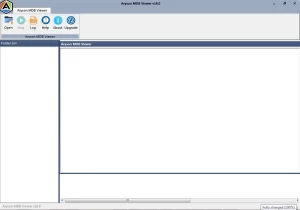
- Download and install Aryson MDB Viewer, then launch it as an administrator.
- Click Open, select your MDB or ACCDB file, and choose the scanning mode.
- Expand the tree structure to preview the required data, like tables, queries, etc.
- After recovery, click on the “Log” menu to create a .txt file of recovered data.
Why Aryson MDB Viewer Outperforms Manual Methods
- Opens MDB and ACCDB files from all Access versions -2003 through 2019 & beyond.
- Previews deleted records and system tables – unavailable in any manual approach.
- Handles corrupt, damaged, and oversized files that MS Access itself refuses to load.
- Auto Detect identifies the exact Access version of any selected file instantly.
- Dual scan modes fix both minor and major structural corruption without data loss.
Sam’s Success Story
Sam, a data analyst, needed records from a retired 2003 MDB file. Access 2019 threw a version error; Excel fetched only two of eleven tables. She ran Aryson MDB Viewer to fix cannot Open Access Database error, loaded the file, and recovered all eleven tables within minutes and met her deadlines.
Conclusion
In short, the Access database file is an important file. If it gets corrupted, it becomes impossible to Open MS Access database. Therefore, you need to always keep a backup of the MS Access database. But sometimes the user has no backup idea. So, in the above blog, we discussed two free methods to open an Access DB (database) file. Choose them according to your need, but I would suggest an Access database viewer, which can be used easily by novice users as well.
Frequently Asked Questions
Q.1 How do I open an MS Access database file?
Double-click the MDB or ACCDB file in File Explorer – Access launches and opens it automatically.
Q.2 What is the difference between an .mdb file and an .accdb file in MS Access?
Double-click the MDB or ACCDB file in File Explorer – Access launches and opens it automatically.
Q.3 How do I open an MS Access database without Microsoft Access installed?
Use Aryson MDB Viewer — opens and previews both MDB and ACCDB files with no Access installation required.
Q.4 Why does my Access database say it is locked and won’t open?
A crashed session left a .laccdb lock file behind — close all Access instances, delete the lock file, then reopen.
Q.5 Why does my Access database say it is locked and won’t open?Can MS Access handle the scale of an enterprise-level database?
MS Access caps at 2 GB and 255 concurrent users — it is not built for enterprise scale; use SQL Server or Azure instead.
Q.6 Is MS Access GDPR-compliant for enterprise use involving personal data?
Access can store personal data compliantly only with added encryption, strict access controls, and documented data handling policies — it has no built-in GDPR tooling.
About The Author:

Meet Shivam, a Microsoft-certified expert who has helped many people fix problems with Outlook and Office 365. He likes writing about email tools and moving data. He’s always happy to share easy tips, clear guides, and useful updates to help people solve tech problems.
Related Post



