-

Written By Harshita Sachdeva
-
Approved By
Shivam Rathore -
Updated on May 23rd, 2026
Convert Outlook PST to JSON: Safe Export Guide 2026
Fact-checked and reviewed in accordance with our
Editorial Policy
Alina’s Query : Our team needs to integrate JSON with a custom application. Since we have a large number of PST files saved, can anyone suggest a quick and reliable way to convert Outlook PST to JSON in bulk without affecting the data integrity?
Summary: Organizations store their emails, contacts, calendars, and attachments in Microsoft Outlook. Now, the PST format works well inside the Outlook ecosystem, but as soon as the user switches, processes get complicated. Developers integrating email data into web apps, analysts uploading data into CRM systems, or IT admins building automated workflows all face the same issue: PST is proprietary. JSON, on the other hand, is the universal language of APIs and data exchange.
So if you’re looking to convert PST to JSON and want to do it without losing a single email or metadata field, this guide walks you through manual workflows, and you will learn how to use the Aryson PST Converter effectively to avoid any kind of data loss.
Why Convert Outlook PST to JSON?
Due to various reasons, organizations and IT admins prefer to convert PST to JSON. Here’s why users make this switch:
- Integrate Outlook email data directly into web or cloud applications.
- Users can share structured email metadata among developers and data analysts.
- Quickly upload email logs into CRM tools, ticketing systems, or dashboards.
- Turn on the machine-learning pipelines & AI analytics on email content.
- Easier to use email data in serverless environments like AWS Lambda or Google Cloud Functions.
- Also, IT users can archive legacy PST files in a lightweight, platform-independent format.
Can you open a PST file as JSON directly?
No – not natively. PST is a binary, privately developed file format owned and controlled by Microsoft. JSON is a plain-text, open data structure. There is no built-in Outlook feature that exports directly to JSON. You either write a script around it, use Outlook as an intermediary client, or use the dedicated PST converter discussed below. Each approach is covered with its advantages and disadvantages in the upcoming sections of the blog.
Manual Methods to Convert PST File to JSON
Considering the above-discussed reasons for PST to JSON conversion, it is a must to convert PST files to JSON format. In this section, we will primarily focus on the manual methods of this process. Choose one method based on the time consumption, email clients, and performance.
Method 1: Convert Outlook PST to JSON via Outlook
In this manual approach, you just have to install Outlook on your system, export it to CSV format, and then transform it into JSON using a Python script. It requires a bit of technical knowledge, but it gets the conversion task done.
Steps to Change PST to JSON are as follows:
-
-
- Run MS Outlook and go to File >> Open & Export >> Import/Export.
- Select Export to a File >> click Next.
- Choose Comma Separated Values (CSV) >> click Next.
- Select the PST folder >> enable Include Subfolders >> click Next.
- Set the destination path >> map fields >> click Finish to export the CSV.
- Open a Python environment and run the following script:
import csv, json
with open(‘outlook_export.csv’, ‘r’) as f:reader = csv.DictReader(f)
data = [row for row in reader]
with open(‘output.json’, ‘w’) as f:
json.dump(data, f, indent=4)
- Now, the resultant JSON file will have structured email data only.
Method 2: Convert Outlook PST to JSON Using Command Prompt
For developers who can efficiently use a terminal to convert PST to JSON, this method is a suitable approach to proceed with. Here, you can convert PST to JSON without even installing Outlook on your system.
Simple Steps to Perform PST to JSON Conversion
-
-
- Download the EXE for Windows from the pst_to_json GitHub releases page.
- Open Command Prompt >> go to the folder that contains the tool.
- Run the following command:
pst_to_json -s /path/to/file.pst -d /path/to/output.json -v - The -v in the above command will enable the verbose output to track conversion.
- The resulting JSON file will contain the email content and available metadata.
Limitations of the Hands-On Approach
- Outlook must be installed for the CSV-based method to work.
- Python scripting requires technical knowledge that most end users don’t have.
- Metadata fields like attachments and nested folder structure may not transfer cleanly.
- Large PST files take significant time to process manually.
- Command-line tools offer a limited preview; errors are only visible after conversion completes.
Professional Method to Convert Outlook PST to JSON
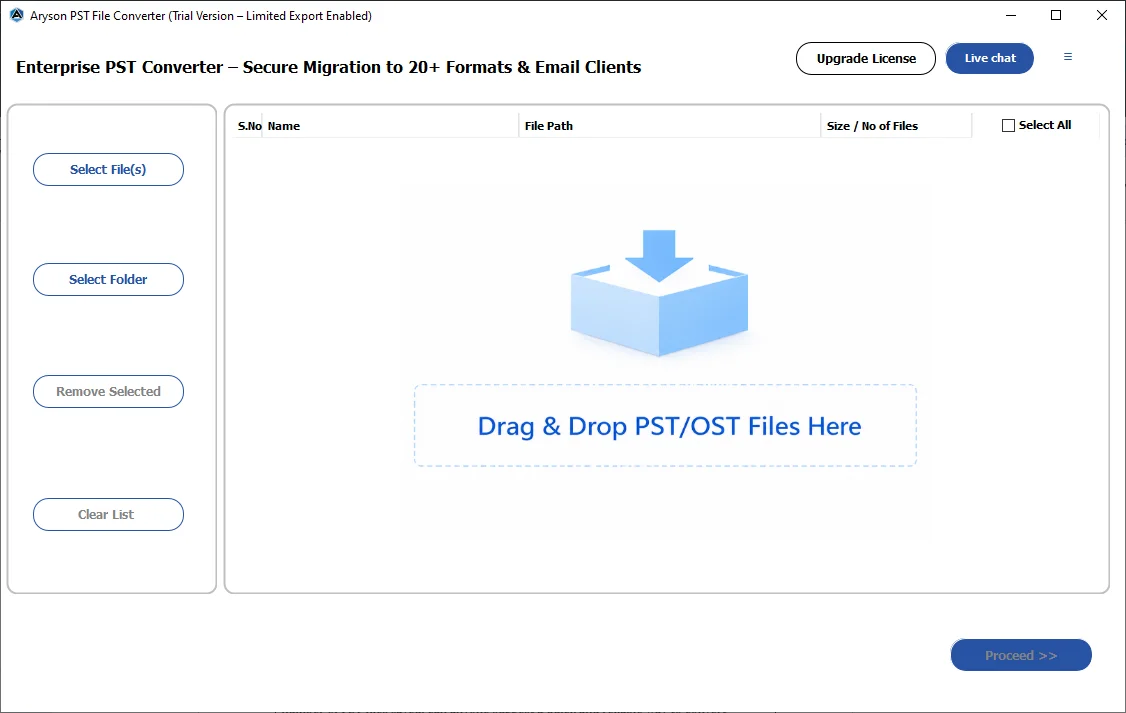
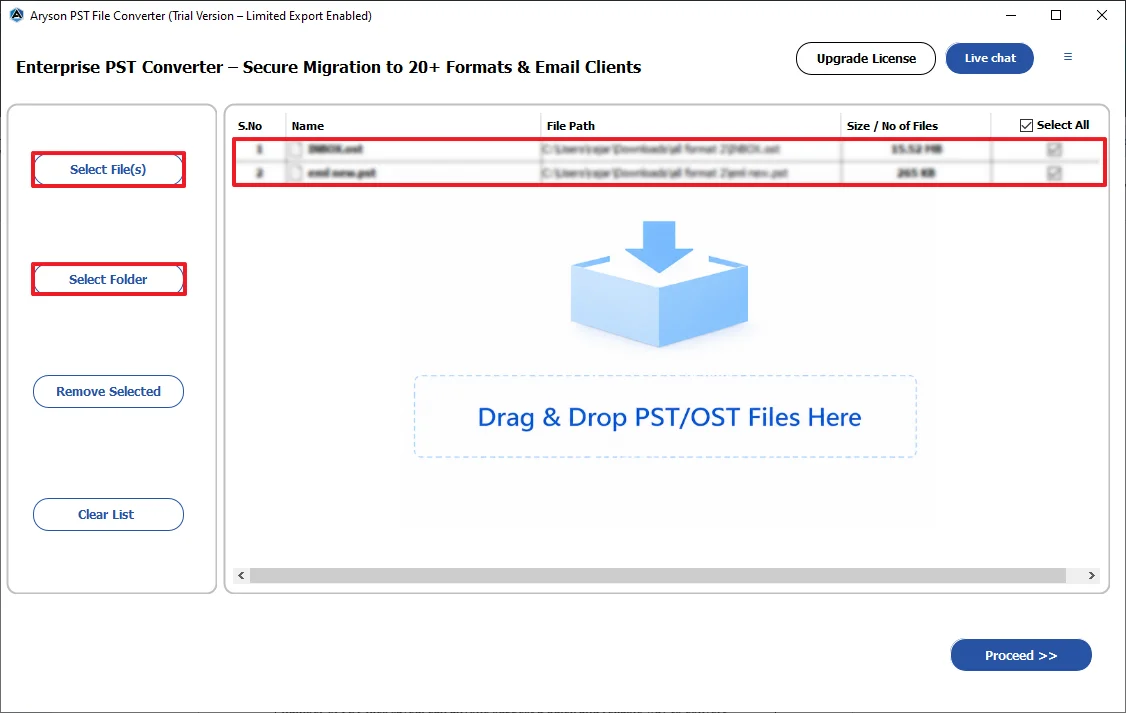
Aryson PST Converter is a no-code method specially designed for both technical experts and beginners. This software can load single and multiple PST files via the Select Files button and drag-and-drop functionality. Moreover, the auto-detect feature lets users know of their corrupt, blank, and invalid PST files loaded. You can use the advanced features like date-range filter, remove duplicates, MBOX segmentation, etc., to convert specific Outlook data files. Apart from PST, it can also convert PST files to MBOX, PDF, MSG, EML, etc. formats. Even if a beginner uses this software, they can convert their Outlook data without any errors.
Step-by-Step Guide to Export Outlook Emails to JSON
- Download & install the Aryson PST Converter on your Windows system.
- Click Select Files or drag and drop your required PST files >> Next.
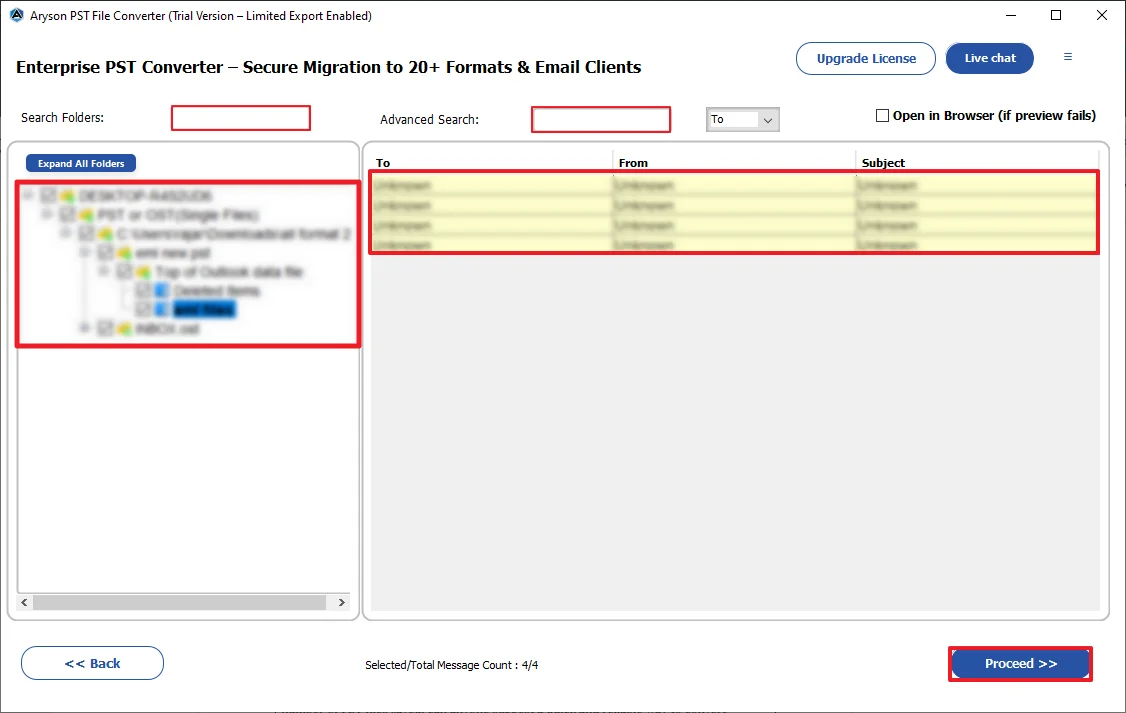
- Select specific PST emails and preview their HTML, MIME, plain text, etc. >> Next.
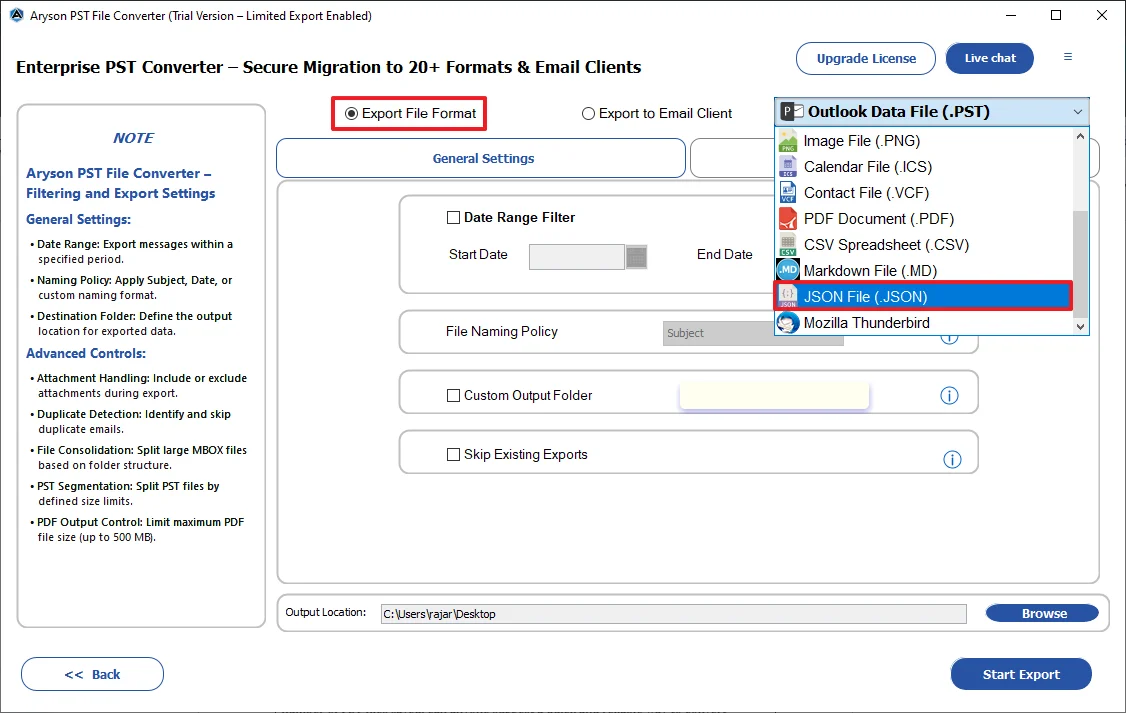
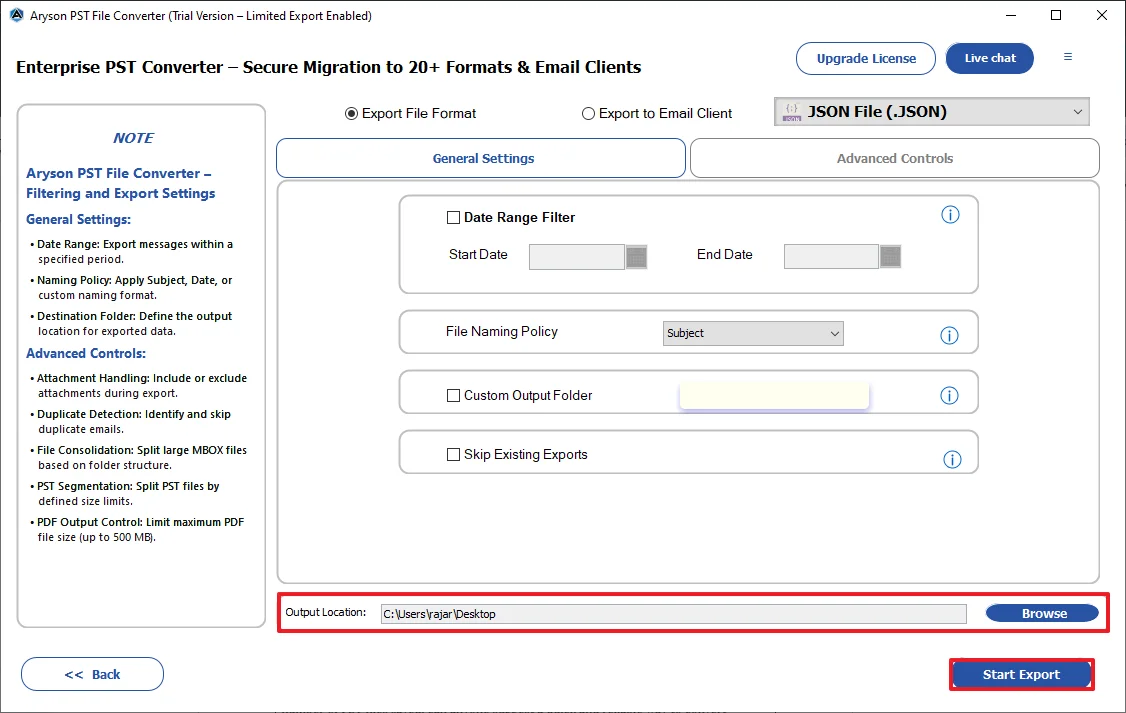
- Mark the File Formats radio button and select JSON under the dropdown list.
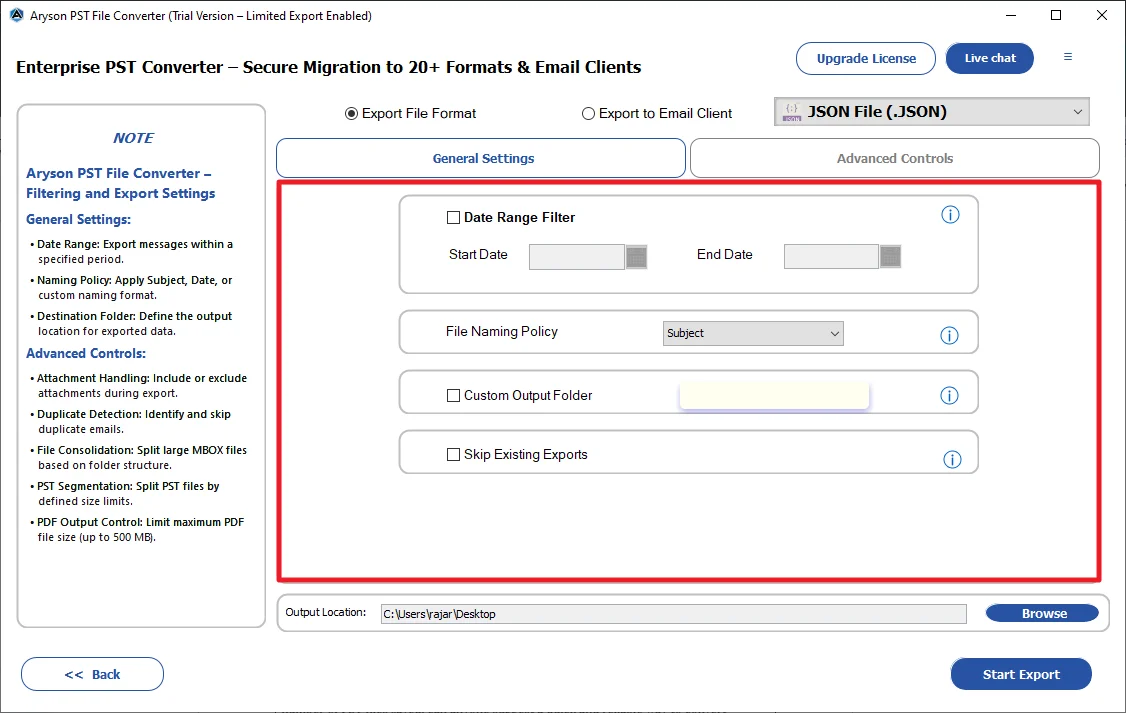
- Use the required features of the software as per your requirements.
- Set the destination path for the resultant JSON file >> click Start Export.
What Makes Aryson PST Converter Better than Manual Methods?
- Import PST File to Apple Mail on Mac, Google Workspace, IMAP, etc..
- There is no need to install Outlook on your system.
- Built-in preview panel to validate the email content before conversion begins.
- Perform selective conversion using the date range or folder filters.
- The free demo version of the Aryson software converts up to 50 items per folder.
- You can download the conversion report to review the results & check data integrity.
Conclusion
In short, there are multiple ways to convert Outlook PST data to JSON format. But the choice of method still depends upon the user’s expertise, size of datasets, time consumption, and user requirements. For small datasets, the manual method may work well, but for converting a large number of organizations’ Outlook data, using the automated software is the most appropriate approach. Opt for the demo version of the software, evaluate its performance, and if it fulfills your requirements, you may switch to the premium version.
Frequently Asked Questions
Q.1 Why is JSON preferred over PST for data exchange?
Ans: JSON is preferred over PST for data exchange because it is lightweight, structured, human-readable, and easily supported across platforms and APIs.
Q.2 How to convert PST file to JSON file?
Ans: With the help of the Aryson PST Converter, you can quickly convert any number of Outlook emails without any issues.
Q.3 What email metadata is preserved when converting PST to JSON?
Ans: PST file is converted to JSON using the same process as extraction tools that parse PST content and export it into structured JSON format.
Q.4 What is the cost of Aryson PST Converter, and is there a free trial?
Ans: The demo version is free of cost and can convert upto 50 emails per folder for free.
Q.5 How do large organizations manage version control and integrity of converted JSON email archives?
Ans: Large organizations manage JSON email archives using version control systems, checksum validation, and centralized storage to maintain data integrity and tracking.
-
-
About The Author:

Harshita Sachdeva, a professional technical writer at Aryson Technologies, specialize in delivering clear, hands-on documentation for data management, migration, and recovery solutions. With a meticulous, reader-first approach, I break down complex technical processes into simple, actionable content - helping IT professionals and decision-makers tackle challenges efficiently.
Related Post