-

Written By Harshita Sachdeva
-
Approved By
Shivam Rathore -
Updated on May 26th, 2026
Microsoft 365 Tenant to Tenant Migration: Expert Guide in 2026
User Query: Our company just acquired another firm. How do we migrate all Microsoft 365 data—mailboxes, SharePoint, OneDrive, and Teams—from their tenant to ours without downtime or data loss?
Summary: Corporate mergers, acquisitions, and IT consolidations compel organizations to perform Microsoft 365 Tenant to Tenant Migration. They require cross-tenant migration to unify all emails, files, and collaboration tools into a single system. But it is complex and risk-prone to move mailboxes, SharePoint sites, and OneDrive data between tenants. Therefore, this blog covers the pre-migration planning phases and manual methods to perform tenant-to-tenant migration. Along with that, you will also learn the effective use of the Aryson Microsoft 365 Migration Tool for both technical and non-technical users.
Instant Solution to Perform Microsoft Tenant to Tenant Migration
- Download, install & run the Aryson Microsoft 365 Migration Tool on Windows.
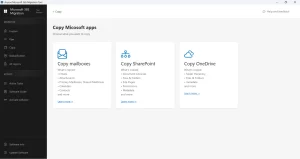
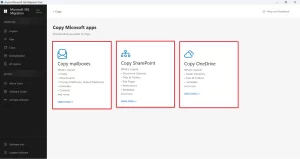
- Select among SharePoint, Copy mailboxes, or OneDrive cards.
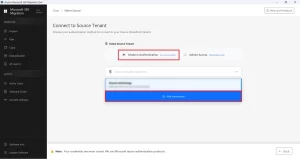
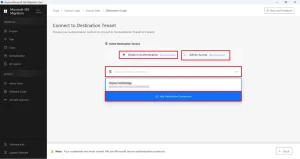
- Enter credentials of source tenant >> click Add connection.
- Use modern OAuth or impersonation & add the destination tenant.
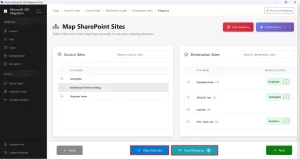
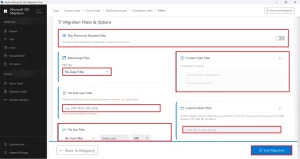
- Map the source and destination account data >> apply filters.
- Click the Start Migration button to begin migration.
Users Who Need to Perform Microsoft 365 Tenant to Tenant Migration
- IT admins who consolidate email infrastructure after a company merger.
- Legal teams that preserve compliance records during organizational restructuring.
- Business owners who split subsidiaries into separate Microsoft 365 environments.
- MSPs and consultants are managing tenant transitions for clients after ownership changes.
- Enterprises rebranding and moving all users to a new Microsoft 365 tenant.
- Business owners who split subsidiaries into separate Microsoft 365 environments often first evaluate Office 365 single tenant vs multiple tenants to choose the right structure
Important Steps to Complete Before Migration
Before executing the migration, complete all pre-migration planning phases to prevent data loss and downtime.
Phase 1: Pre-Migration Planning
- List all mailboxes, SharePoint sites, OneDrive accounts, Teams rooms, & shared resources.
- Delete inactive accounts, expired licenses, & old data to shrink migration volume.
- Choose cutover migration for small orgs or phased batches for large enterprises.
- Notify all users about the migration schedule, downtime windows, and post-migration actions.
Note: The cutover steps require you to carefully move a Domain Between Office 365 Tenants.
Phase 2: Target Tenant Preparation
- Add a temporary routing domain (e.g., target.onmicrosoft.com) for initial mail synchronization.
- Pre-create all user accounts in the target tenant and assign required Microsoft 365 licenses.
- Map source UPNs to target user IDs so data lands in the correct accounts.
- Replicate all security policies, DLP rules, and compliance settings from source to target.
Phase 3: Identity & Permissions Setup
- Enable cross-tenant access settings in Azure AD on both source and target tenants.
- Establish trust between tenants using Microsoft Entra ID (Azure AD B2B).
- Assign Exchange, SharePoint, and OneDrive admin permissions to the migration app.
- Verify all service accounts have full access before starting any data transfer.
Manual Methods for Microsoft 365 Tenant to Tenant Migration
In this section, we will discuss the most effective methods to perform Tenant to Tenant Migration. Carefully follow the steps of each method to achieve successful migration.
Method 1: Microsoft 365 Admin Center – Migrate Tenant to Tenant
Microsoft provides a native cross-tenant mailbox migration feature via the Exchange Admin Center. Admins configure organizational relationships between source and target tenants, then migrate mailboxes using PowerShell migration batches. Best suited for small mailbox sets with experienced administrators available.
Steps to Perform are as Follows:
- Open Microsoft 365 Admin Center on both source and target tenants.
- Navigate to Exchange Admin Center >> Migration >> Add Migration Batch.
- Configure cross-tenant organizational relationships in Azure AD for both tenants.
- Grant mailbox import/export permission to the migration application.
- Create a CSV file mapping source mailboxes to target mailboxes.
- Run the New-MigrationBatch cmdlet in PowerShell with the CSV and endpoint.
- Execute Start-MigrationBatch >> monitor progress in the Admin Center.
- Verify migrated mailboxes in target >> run Complete-MigrationBatch to finalize.
Method 2: PowerShell – SharePoint & OneDrive Migration
Microsoft’s SharePoint Migration Tool (SPMT) or PowerShell cmdlets handle SharePoint and OneDrive data transfer between tenants. Admins must pre-configure site mappings and user mappings manually before initiating the transfer.
Steps to perform Microsoft 365 Tenant to Tenant Migration:
- Download the SharePoint Migration Tool (SPMT) from Microsoft’s official site.
- Launch SPMT >> sign in with source tenant admin credentials.
- Select SharePoint sites or OneDrive accounts to migrate.
- Enter the target tenant URL >> authenticate with the destination admin account.
- Upload the user mapping CSV to align the source and target user identities.
- Configure migration settings >> select incremental migration if needed.
- Click Migrate >> monitor the real-time progress report inside SPMT.
- Verify all content in the target SharePoint and OneDrive after completion.
Drawbacks of Manual Methods
- Complex Azure AD cross-tenant configuration required.
- Risk of migration failures and timeouts.
- Loss of metadata and version history possible.
- No unified dashboard for all workloads.
- DNS and cutover steps are error-prone.
Method 3: Aryson Microsoft 365 Migration Tool – Enterprises’ Choice
Organizations prefer the Aryson Microsoft 365 Migration Tool for migrating large, complex tenant environments. The software migrates mailboxes, SharePoint, and OneDrive in one unified workflow—no PowerShell expertise needed. It is a Graph-API-based solution that passes data from source to destination over TLS-encrypted HTTPS. Moreover, the advanced filters and manual mapping options make it convenient for users who prefer a smooth cross-tenant migration process.
Step-by-Step Tutorial to Perform Tenant-to-tenant Migrations for Enterprise
- Download and install Aryson Microsoft 365 Migration Tool >> run as administrator.
- Select migration scope: mailboxes, SharePoint, OneDrive.
- Enter the source tenant admin email and password >> authenticate via OAuth.
- Authenticate destination tenant admin credentials >> validate connection.
- Map the source and destination tenant accounts >> apply filters.
- Click Start Migration >> monitor real-time progress logs per user.
Features of Aryson Microsoft 365 Migration Tool
- Migrates mailboxes, SharePoint, and OneDrive in a single unified interface.
- Preserves all email metadata—headers, attachments, folder hierarchy, and timestamps.
- Delta migration support captures newly arrived data without re-migrating existing items.
- Automatic user mapping eliminates manual CSV creation for large user sets.
- Advanced filters allow selective migration by date range, folder, or item type.
- Free demo version available to evaluate performance before purchasing a license.
Andrew’s Success Story
Andrew James, an IT director at a mid-sized law firm in Chicago, faced a 3,000-mailbox tenant migration after a merger. PowerShell batches kept failing at 40% completion. She switched to the Aryson Microsoft 365 Migration Tool, mapped all users automatically, applied date filters for active data, and completed the full Microsoft 365 Tenant-to-Tenant (T2T) migration. It kept the mailboxes and SharePoint lists intact—in under 48 hours with zero data loss.
Conclusion
Microsoft 365 Tenant to Tenant Migration is one of the most complex IT operations any organization can perform. Manual PowerShell and Admin Center methods work for small setups but fail to migrate data at enterprise scale—metadata loss, permission gaps, and domain cutover errors become serious risks. The Aryson Microsoft 365 Migration Tool removes all those obstacles, delivering a fast, complete, and reliable migration without requiring deep technical expertise from your team.
Frequently Asked Questions
Q.1 What is a tenant-to-tenant migration?
It is the process of moving Microsoft 365 data—mailboxes, SharePoint, OneDrive, and Teams—from one organization’s tenant to another, typically triggered by mergers, acquisitions, rebranding, or IT consolidation.
Q.2 How to migrate users from one tenant to another tenant?
With the help of the Aryson Microsoft 365 Migration Tool, you can migrate users from one tenant to another.
Q.3 Do I need technical expertise to perform a Microsoft 365 Tenant Migration?
Manual PowerShell methods require strong technical knowledge. However, the Aryson Microsoft 365 Migration Tool provides a simple GUI-based workflow—no scripting or advanced admin expertise is required to complete the full migration.
Q.4 How long does a tenant-to-tenant migration take?
The time taken depends on the volume of data you need to migrate. However, the Aryson Microsoft 365 Migration tool takes relatively less time to perform migration.
Q.5 What is the best tenant to tenant migration tool?
Aryson Microsoft 365 Migration Tool is a top choice—it migrates mailboxes, SharePoint, OneDrive, and Teams in one workflow, supports delta migration, user mapping, and selective filters without requiring any PowerShell expertise.
Q.6 How secure is data during a Microsoft 365 Tenant Migration?
Aryson Microsoft 365 Migration Tool uses secure OAuth-based authentication and encrypted data transfer. No data is stored locally during migration, ensuring full confidentiality, integrity, and compliance throughout the entire tenant-to-tenant migration process.
About The Author:

Harshita Sachdeva, a professional technical writer at Aryson Technologies, specialize in delivering clear, hands-on documentation for data management, migration, and recovery solutions. With a meticulous, reader-first approach, I break down complex technical processes into simple, actionable content - helping IT professionals and decision-makers tackle challenges efficiently.
Related Post