-

Written By Harshita Sachdeva
-
Approved By
Shivam Rathore -
Updated on June 3rd, 2026
Open VDI File without VirtualBox: Easy Guide 2026
User Query: I have an old VirtualBox VDI file from a decommissioned server. VirtualBox throws an error every time I try to attach it, and I can’t afford to lose the data inside. What are the safest methods to open VDI file?
Summary: In this blog, we will explore methods to open a VDI file in VirtualBox using manual and professional methods. Generally, opening a VDI (VirtualBox Disk Image) file requires virtualization software like Oracle VirtualBox. Here’s a step-by-step guide to open a VDI file using VirtualBox and Aryson VDI Recovery Software. Let’s go through the details of all the possible solutions.
What is a VDI File?
VirtualBox is an open-source application used in virtualization. It is created by Innotek GmbH.It was then acquired by Sun Microsystems in 2008 and later by Oracle in 2010. Nowadays it is called Oracle VM VirtualBox.VirtualBox can be installed in Windows, Linux, macOS, Solaris, OpenSolaris, etc.VDI, or Virtual Drive Format, is used for saving the Virtual Drive Image(.vdi) file. It is one of the few disk image files supported by Oracle VM VirtualBox.
VDI is a virtual drive file that is used to be mounted as a separate hard disk on Linux, Windows, and other operating systems. These files can allow the user to run programs written for different Operating Systems on a single hard drive. To open the VDI file, you need to follow the steps given below in the sub-topic.
Instant Solution to Open VDI File without VirtualBox
Try Aryson VDI Recovery Tool and repair & open a corrupted Virtual Disk Image (VDI) file and recover data as a new VDI file. It recovers data from lost, deleted, or missing partitions of VDI files without VirtualBox.
Who Needs to Open a VDI File?
- IT administrators recovering data from decommissioned virtual servers.
- Developers accessing archived project environments stored in old VDI images.
- System engineers migrating virtual machines between different host computers.
- Organizations extracting compliance records locked inside legacy VDI archives.
- Security teams forensically examining virtual disk contents for audit purposes.
Proven Methods to Open a VDI File
The sections below cover both manual approaches and their real limitations. If neither manual method works reliably for your scenario, opt for the professional solution in the next section to resolve all issues without data loss.
Method 1: Manual Way to Open VDI File in VirtualBox
- Copy the VDI file into VirtualBox’s virtual hard disk repository
- Launch VirtualBox and create a new virtual machine. Choose an operating system among the choices given and click on the Next button
- Under Virtual Hard Disk, select Use existing hard disk and then click on the folder icon on the right
- Now, a Virtual Media Manager window is opened. In that, click on the Add button and then select the VDI file that you want to open
- Again, a Virtual Hard Disk window is opened in which your new VDI is shown, and then click on Next
- Now, your new virtual machine is started.
In this way, you can open VDI files in VirtualBox very easily.
Drawbacks of Manual Methods
- Requires VirtualBox installation on your system.
- Only works with compatible VDI file versions.
- No preview before full VM setup.
- Corrupted VDI files cause complete boot failure.
- Time-consuming process for non-technical users.
- No built-in repair for damaged VDI files.
- Manual steps risk misconfiguration and data loss.
Method 2: Professional Solution to Open VDI File without VirtualBox
What if your VDI file gets corrupted? What will you do then? At such times, you need to repair your file, but such a thing is not possible without professional help. A very simple approach to repair such files yourself is by using Aryson VDI Recovery. This software will repair any type of glitch to open a VDI file. Even if you are a beginner, you can extract files from VDI file without VirtualBox. It recovers and restores the maximum content from the VDI file.
Follow the Steps to Open VDI File and Extract Data
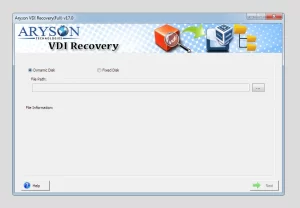
- Install VDI Recovery Software and Run.
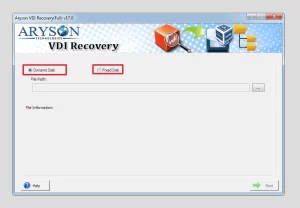
- Select either “Dynamic Disk” or “Fixed Disk” and click on the Browse button.
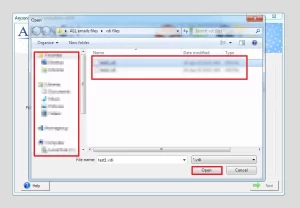
- Now, select the VDI file and click on the Open button.
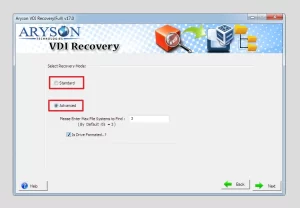
- Select either “Standard” or “Advanced” recovery mode options.
- Now click on the “Next” button then the scanning process start.
- Choose a location path to save the recovered VDI file.
- Click on the “OK” button to successfully save the VDI file.
- Now, import the VDI file into VirtualBox.
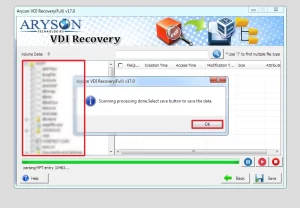
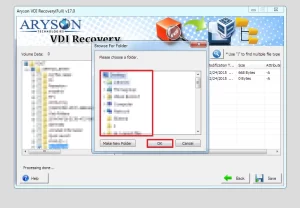
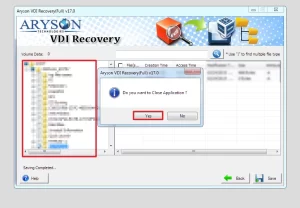
Even if your VDI file is part of a larger virtual machine failure, you can use the same software to recover data from Virtual Machine after disaster helpful.
Benefits of Automated Methods
- It repairs corrupt VDI aka virtual disk image files and recovers data from them.
- You also don’t have to panic about your deleted files; Aryson VDI Repair Tool quickly recovers deleted files from Virtual Machines back to their Original forms.
- It supports recovery from both disk types, i.e., Fixed and Dynamic disks.
- Features two scanning modes for different levels of corruption, i.e., Standard and Advanced modes.
- It supports both MBR (old) and GPT (new) partition tables.
- Supports all file formats for various major operating systems, i.e., FAT, FAT16, FAT32, FAT64, NTFS, HFS+, and EXTX.
- It allows users to add new custom volumes and customize the settings.
- It has RAW recovery mode as well as provides an option for adding new file signatures.
- Features three recovery modes for recovering the maximum possible data: Standard, Advanced, & Deep.
- Smart tree-structure preview for recovered files and folders before saving them.
- Auto-search feature for searching specific file names in the tree-structure.
- Free online VDI Recovery tool available to preview repaired VDI files.
James’s Success Story
James, a senior IT administrator in Chicago, had a 120GB VDI file from a decommissioned server holding three years of critical project data. VirtualBox kept throwing UUID mismatch errors every time he tried to attach it. After trying VirtualBox reattachment, he ran Aryson VDI Recovery Tool’s Advanced Scan, previewed all recovered folders intact, and exported every file to his local drive within the hour – zero data loss.
Conclusion
In the above blog, we explained all the possible methods to open a VDI file. If you want to use the manual methods to open VDI file then you have to install the VirtualBox software in your system and have good technical knowledge. But if you don’t acquire technical knowledge, then you need to use the Aryson VDI Recovery software.
Frequently Asked Questions
Q.1 What is a VDI file and how do I open it?
Ans. A VDI file is a virtual disk image used by VirtualBox. It can be opened using VirtualBox or compatible virtualization software.
Q.2 Can I open a VDI file without installing VirtualBox?
Ans. Yes, you can use Aryson VDI Recovery Software to open a VDI file without installing VirtualBox.
Q.3 How do I open a VDI file in Windows 11 without any data loss?
Ans. You can use the Aryson VDI Recovery tool to open a VDI file in Windows 11 without any data loss.
Q.4 Is it safe to open a VDI file using third party software?
Ans. Yes, if you are using the Aryson VDI Recovery tool, it is safe to open a VDI file using third party software.
Q.5 How long does it take to open and extract data from a large VDI file?
Ans. However, it depends on the mailbox size, the Aryson VDI Recovery software can be used to open and extract data from a large VDI file in few minutes.
Q.6 What kind of support is available if I face issues opening my VDI file?
Ans. Aryson provides the users with live chat, phone and email support if the users face any issues opening their VDI file.
Q.7 Can I customize how the software scans and recovers data from a VDI file?
Ans. Yes, Aryson users can customize how the software scans and recovers data from a VDI file.
About The Author:

Harshita Sachdeva, a professional technical writer at Aryson Technologies, specialize in delivering clear, hands-on documentation for data management, migration, and recovery solutions. With a meticulous, reader-first approach, I break down complex technical processes into simple, actionable content - helping IT professionals and decision-makers tackle challenges efficiently.
Related Post



