-

Written By Harshita Sachdeva
-
Approved By
Shivam Rathore -
Updated on June 10th, 2026
Convert PST to PNG: Batch Convert Outlook Files to Images
Fact-checked and reviewed in accordance with our
Editorial Policy
Query: Our 50GB PST archive keeps crashing Outlook every time we attempt to import. What’s the safest method to convert it to PNG format without data loss?
Summary: Organisations prefer to rely on Outlook to store years of email history inside PST files. When the need to share, archive, or preserve those emails rapidly increases, they prefer PNG format. This is because PNG files can be viewed anywhere, are tamper-proof, and are image-ready. Therefore, to help users efficiently convert PST to PNG, this blog covers a manual approach. Along with that, it provides a brief guide on the Aryson PST Converter for both technical and non-techical audience.
Quick Way to Convert PST File to PNG
- Install & run the Aryson PST Converter on your system.
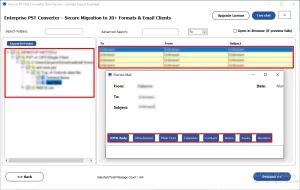
- Load the required PST files and preview them >> Next.
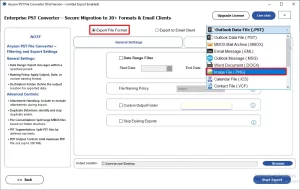
- Select PNG as the output format under the file formats dropdown.
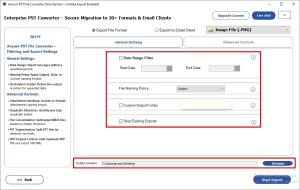
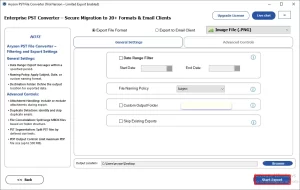
- Use essential filters >> specify the path to save >> Click Start Export.
Can a PST File Be Directly Converted into a Single PNG Image?
No, A .pst file is a database folder containing multiple emails, contacts, and calendars. It is a must to perform conversion, as it extracts each email individually & saves each one as a separate .png image file.
Why Do Users Need to Convert PST Files to PNG?
- Legal compliance: Courts and regulatory bodies require static, uneditable document formats.
- Software incompatibility: Recipients without Outlook cannot open or preview PST files.
- Long-term archival: PST format depends on Microsoft software; PNG is format-independent.
- Read-only sharing: PNG prevents recipients from altering email content.
- Visual documentation: Email images embed naturally into reports, audits, and presentations.
Methods to Convert PST to PNG
Considering the above reasons, it is a must ot convert PST files to PNG format. For the same, you may use either of the following methods.
- Outlook + Paint Method
- Aryson PST Converter Tool
Method 1: Use Outlook + Paint to Convert Outlook PST to PNG
This approach works for converting one or two emails quickly. You open the email inside Outlook, capture a screenshot, paste it into Paint, and save as PNG. There is no need to install any third-party software, but scaling it to hundreds of emails is complicated and impractical.
Steps to Perform are as Follows:
- Open Microsoft Outlook and navigate to the email you want to convert.
- Press ALT + Print Screen to capture only the Outlook window.
- Open the Paint application on Windows.
- Press Ctrl + V to paste the screenshot.
- Click File >> Save As, choose PNG as the file type.
- Name the file and click Save.
Why IT Administrators Avoid This Method?
- Converts only one email at a time.
- Cropping errors can cut off email content.
- Screenshot quality loses fine text sharpness.
- Attachments inside emails might not get saved.
- Email headers may fall outside the frame.
- Does not work well for large PST archives.
Method 2: Professional Solution to Convert PST to PNG
In order to avoid the above drawbacks, most of the IT firms and organisations prefer to use the Aryson PST Converter for better accuracy. The main purpose of this software is to provide the end users with 100% data integrity and security. Moreover, it is designed to provide users with a simple and interactive GUI to let even beginners transfer PST file to GoDaddy, Thunderbird, Yahoo Mail, etc., email clients. It even warns users about the corrupted, blank, or invalid files selected. The free demo version lets users convert up to 50 emails/folder with the basic and advanced filters.
Simplified Guide to Save PST to PNG Using Aryson Software
- Download, install & run the Aryson PST Converter on your existing system.
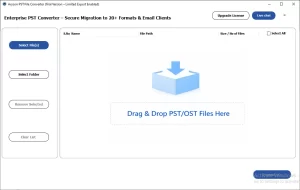
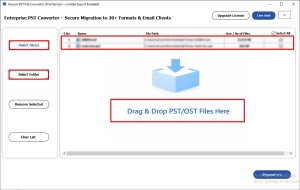
- Load the desired PST files via the file selector or drag and drop feature >> Next.
- Select the required Outlook data file >> preview its content and metadata >> Next.
- Choose PNG as the output format under the File format dropdown.
- Apply the required filters as per requirements >> specify the destination location.
- Click on Start Export to export Outlook PST as PNG format.
How Does Aryson PST Converter Outperform Manual Methods?
- Multiple Format Support — Convert PST to MD, PDF, JSON, and more.
- Metadata Preservation — Keeps headers, attachments, and formatting fully intact.
- Duplicate Detection — Filters out redundant emails before they migrate.
- Batch Processing — Handles unlimited PST files with zero size restrictions.
- Advanced Filters — Migrate selectively by folder, date range, or sender.
- Free Demo Available — Test the full transfer before buying a license.
TechNova’s Success Story
TechNova IT Solutions, a Dallas-based managed services firm, needed to convert Outlook PST to JSON and PNG formats. They migrated 12,000+ emails across 38 staff mailboxes using Aryson PST Converter. What took their team three days of failed IMAP sync attempts wrapped up in under four hours — zero data loss, folder hierarchy intact, and every attachment preserved without a single error.
Conclusion
It is a simple process to convert PST to PNG, once the user picks a suitable method as per their needs. Now, for some users, the manual method may work well. Whereas, the same approach might not work properly for technical experts. Therefore, it is advised to choose the manual method in case of small datasets, and opt for the automated software for a quick bulk conversion.
Frequently Asked Questions
Q.1 Why would I need to convert PST files to PNG format?
PST to PNG conversion helps users save Outlook emails as image files for sharing, printing, archiving, or presenting email content without requiring an email client.
Q.2 Can I convert PST to PNG without Microsoft Outlook installed?
Yes, the Aryson PST to PNG converter works independently and does not require Microsoft Outlook installation on the system.
Q.3 Is my data safe during the PST to PNG conversion process?
Yes, the reliable PST to PNG converter software maintains data integrity and securely converts emails without modifying the original PST file content.
Q.4 What types of email content are captured in the PNG output?
The PNG output usually captures email body content, images, formatting, sender details, timestamps, and other visible email information accurately.
Q.5 Is the software licensed for commercial and business use?
Yes, the Aryson PST to PNG converter tools are licensed for both personal and commercial business environments.
Q.6 Can I try the software before purchasing a license?
Yes, Aryson provides a free trial version to convert upto 50 emails for evaluation.
Q.7 Is there customer or technical support available if I face issues?
Yes, Aryson generally offers customer and technical support through email, chat, or support ticket systems.
Q.8 Does the software work on all versions of Windows and Mac?
Yes, the Aryson PST to PNG converter supports all major Windows versions, while Mac compatibility depends on the specific software version available.
About The Author:

Harshita Sachdeva, a professional technical writer at Aryson Technologies, specialize in delivering clear, hands-on documentation for data management, migration, and recovery solutions. With a meticulous, reader-first approach, I break down complex technical processes into simple, actionable content - helping IT professionals and decision-makers tackle challenges efficiently.
Related Post