-

Written By Harshita Sachdeva
-
Approved By
Shivam Rathore -
Updated on June 1st, 2026
Office 365 Tenant Migration During Acquisition Guide 2026
Fact-checked and reviewed in accordance with our
Editorial Policy
Andriana’s Query: Does anyone have any experience with any platforms that can migrate 365 mailboxes by using the users’ credentials at the source tenant?
We’ve onboarded a client who’s left a franchise, and the franchise IT support has said they can only give them their data from a 365 backup, and they can’t auth any apps in their environment. Is there any reliable way to migrate Office 365 mailboxes during an acquisition?
Summary: Andriana, an IT professional in California, needed to migrate Microsoft 365 mailboxes using user credentials because the client’s former franchise refused third-party app authentication. Such challenges generally take place during acquisitions, where restricted tenant access affects the standard migration methods. This guide explains the manual methods to Office 365 tenant migration during acquisition. Along with that, it explains how the Aryson Microsoft 365 Migration Tool provides a secure tenant migration.
Instant Way to Office 365 Tenant to Tenant Migration During Acquisition
- Install & launch the Aryson Microsoft 365 Migration Tool.
- Connect to the source tenant via Modern Auth or user credentials.
- Connect to the destination tenant via Modern Auth or Impersonation.
- Map source users to destination accounts >> apply filters.
- Click Start Migration to begin the transfer instantly.
Who Needs M365 Tenant Migration During Acquisition?
- IT teams managing acquired companies with restricted tenant access.
- Businesses separating from franchises with blocked app permissions.
- Companies merging multiple Microsoft 365 tenant accounts.
- Teams protecting email records during company ownership changes.
- Small businesses migrating limited Microsoft 365 mailboxes.
- Service providers managing franchise or tenant migration projects.
Best Methods for Office 365 Tenant Migration During Acquisition
Now that we’ve covered who typically needs this migration, let’s walk through the actual approaches. Read each method carefully before deciding. If neither manual method fits your scenario—especially when source-admin access is restricted- navigate to the professional solution.
Method 1: Microsoft Native Cross-Tenant Mailbox Migration
Microsoft’s native cross-tenant migration uses Exchange Online PowerShell and the Mailbox Replication Service (MRS) to move mailboxes between tenants. According to Microsoft Learn, target users must exist as MailUser objects with correct ExchangeGuid attributes stamped before migration begins. Both tenant admins must cooperate to register migration apps and establish organization relationships.
Steps to Migrate Office 365 Mailboxes During Acquisition Natively:
- Register a migration app in the target tenant via Microsoft Entra admin center.
- Grant the source tenant admin permission to that migration application.
- Create MailUser objects in the target tenant for every migrating user.
- Stamp ExchangeGuid and X.500 proxy addresses using CTIM.
- Create a migration endpoint and batch via Exchange Online PowerShell.
- Run New-MigrationBatch >> monitor progress >> complete the batch.
Method 2: PST Export and Manual Import Strategy
When source admins deny access, organizations export mailboxes as PST files and then import them manually. This way, they avoid avoiding licensing requirements but increase migration complexity and risks.
Steps to Microsoft 365 Tenant Consolidation After Acquisition:
- Export each mailbox to a PST file via Outlook or admin-provided backup.
- Create licensed user accounts in the destination tenant.
- Configure each account in Outlook using destination credentials.
- Go to File >> Open & Export >> Import/Export >> Import from .pst.
- Browse to the exported PST file >> map to destination mailbox folders.
- Wait for sync to complete >> verify email delivery and folder structure.
- Repeat the entire process for each migrating user individually.
Drawbacks of Manual Methods
- Native migration does not work well when admin access is blocked.
- PST export increases manual workload significantly.
- Email details like timestamps may get lost.
- Setup errors can stop the whole process.
- Duplicate emails may appear in the destination.
- Large PST imports take a very long time.
Method 3: Enterprise Solution for Office 365 Tenant Migration During Acquisition
When source tenant access is restricted & PST workarounds are too slow, IT teams opt for the Aryson Microsoft 365 Migration Tool. It supports both Modern OAuth and user-credential authentication. This solves the exact problem raised in the opening query. Whether migrating from a franchise exit, acquisition target, or restricted tenant, this software handles mailboxes, OneDrive, and SharePoint in a single workflow. With the help of the same software, users can migrate Company to new Microsoft tenant. The free demo version lets you test before committing to a full license.
Steps to Perform Microsoft 365 Mailbox Migration During Acquisition
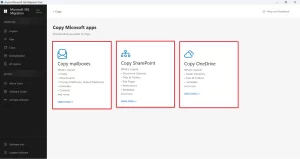
- Install & run Aryson Microsoft 365 Migration Tool as administrator.
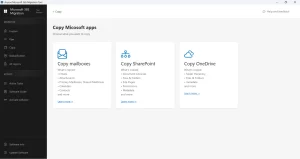
- Choose Mailboxes, SharePoint, or OneDrive from the workload selection screen.
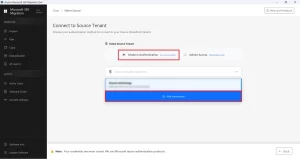
- Connect source tenant using Modern Auth or individual user credentials.
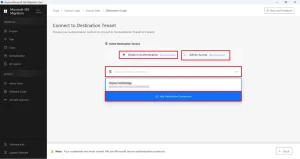
- Log in to the destination tenant via Modern Auth or Impersonation method.
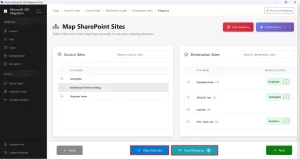
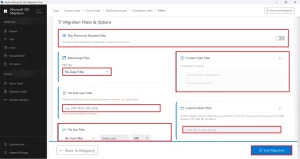
- Map source-to-destination user accounts >> apply date or folder filters.
- Click Start Migration to begin the Microsoft cross-tenant migration.
Why Organizations Use Aryson Microsoft 365 Migration Tool for Acquisitions
- Works with user-level credentials when source tenant blocks admin app consent.
- This software can be used to move a domain between Office 365 Tenants.
- Preserves mailbox folder hierarchy, metadata, and original email timestamps completely.
- Migrates mailboxes, OneDrive, and SharePoint data under a single unified interface.
- Duplicate detection prevents redundant records from appearing in the destination.
- Compliance logs verify every migrated item for audit and legal review purposes.
- OAuth 2.0 authentication keeps source and destination credentials fully protected.
Alex’s Success Story
Alex, an MSP engineer in Manchester, was onboarding a client exiting a franchise. The franchise IT team refused to grant app consent in their tenant and only handed over a 365 backup. Outlook IMAP kept timing out. Alex loaded the PST into Aryson to Microsoft 365 Tenant to Tenant Migration, pointed it at the client’s new tenant using user credentials, and completed 18 mailboxes—contacts, calendars, and folders intact- before the end of the working day.
Conclusion
In simple words, the best migration method to perform Office 365 Tenant Migration During Acquisition depends on the access you have to the source O365 tenant. If both sides cooperate, Microsoft native tools work smoothly. If access is blocked, PST export becomes the fallback, but it is slow and may lose email details. The Aryson Microsoft 365 Migration Tool can handle both situations more easily with less manual effort and more security.
Frequently Asked Questions
Q.1 What is Office 365 tenant migration during an acquisition?
It is the process of moving emails, users, and data from one Microsoft 365 tenant to another after a company acquisition.
Q.2 Why do companies need to migrate Office 365 tenants after an acquisition?
To unify communication systems, centralize data, and ensure smooth business operations under one organization.
Q.3 How to migrate Office 365 tenant during acquisition?
You can use the Aryson Microsoft 365 migration tool to migrate an Office 365 tenant during an acquisition.
Q.4 What are the biggest challenges of Office 365 tenant migration during an acquisition?
Restricted admin access, data loss risk, downtime, metadata issues, and complex user mapping.
Q.5 How do you handle user identity during Office 365 tenant migration in an acquisition?
User identities are mapped using UPN matching, domain verification, and proper mailbox linking in the target tenant.
Q.6 How do you ensure data integrity during Office 365 tenant migration in an acquisition?
By using the above-discussed software, validating pre- and post-migration data, and preserving folder structure and metadata.
Q.7 What support is available during Office 365 tenant migration for an acquisition?
The Aryson Microsoft 365 migration tool provides users with live chat, phone, and email support during Office 365 tenant migration for an acquisition.
Q.8 Can I customize the software according to my business needs?
Yes, the discussed software can be customized as per the individual business needs.
Q.9 Do I need technical expertise to use the software?
No, the Aryson Microsoft 365 migration tool does not require you to acquire technical expertise to use it.
Q.10 Is the software suitable for large enterprise migrations?
Yes, the Aryson Microsoft 365 migration tool is designed to handle large-scale mailbox and tenant migrations efficiently.
About The Author:

Harshita Sachdeva, a professional technical writer at Aryson Technologies, specialize in delivering clear, hands-on documentation for data management, migration, and recovery solutions. With a meticulous, reader-first approach, I break down complex technical processes into simple, actionable content - helping IT professionals and decision-makers tackle challenges efficiently.
Related Post