-

Written By Rohan Wiese
-
Updated on July 29th, 2025
How to Download Hotmail Emails to Computer (Hard Drive) Easily
Hotmail is now known as Outlook.com. However, many of you still use your old Hotmail accounts to store several important emails from years. Keeping all your emails online can be risky. You might lose access or run out of storage space. That’s why it’s better to save a backup of your emails on your computer. In that case, it’s better to download Hotmail emails to a Computer. So, you can access them whenever you need them. In this blog, we’ll explain simple methods, including the Aryson Hotmail Backup Tool, to help you do that.
Brief About Hotmail
Hotmail was launched in 1996. It was one of the first web-based email services in the world. With Hotmail, you can access your emails from any device. Later, in 1997, Microsoft purchased Hotmail, which it rebranded as Outlook.com in 2013. Hotmail accounts are still in use today under the guise of Outlook.com. You are using Microsoft’s Outlook service if your email ends in @hotmail.com, @live.com, or @outlook.com.
Understanding the Need to Download Hotmail Emails Offline
Downloading Hotmail emails to your computer isn’t just about storage. Also, it’s about the security and accessibility of your data. Here are some major reasons to save your Hotmail emails locally:
- The first point is that it helps you keep a secure backup of all important emails.
- Secondly, you can access your messages even without an internet connection.
- Moreover, it allows you to organise and archive your emails locally.
- In addition, downloading emails makes switching to another platform easier.
- Along with that, it ensures your attachments are safely stored for future use.
Therefore, having your Hotmail emails offline is a practical choice for both security and convenience.
Approaches to Download Hotmail Emails to a Computer
It is very necessary to have a simplified solution to accomplish the task. Also, you should keep offline access and data security in mind. Now, find the reliable methods to download your Hotmail emails to your computer.
Method 01: Backup Hotmail Emails to Hard Drive via Hotmail
With the need for offline access and data security in mind, it’s important to have a reliable way to save your Hotmail emails to your computer. Let’s explore the most effective methods to download Hotmail emails to your computer, both manually and using a professional tool.
Method 01: Backup Hotmail Emails to Hard Drive via Outlook.com
- Click on Sign In, enter your Hotmail email ID, and press Next.
- Enter your password and complete the sign-in process.
- Once your mailbox loads, click on the Gear icon (Settings) in the top-right corner.
- Then select “View all Outlook settings” at the bottom of the panel.
- In the settings window, click on General >> Privacy & data.
- Under the Privacy and Data section, locate the option “Export mailbox” and click it.


Note: You’ll see a note saying the export process may take up to 4 days, depending on your mailbox size. Once the export is ready, Microsoft will email you a download link. Click on the link and save the backup to your computer or external hard drive.
Method 02: Use Outlook to Download Outlook.com Emails to the Computer
This method can export your mailbox and backup your Outlook mailbox as a PST file on your computer or external hard drive.
- First, open the Microsoft Outlook desktop application on your PC or laptop.
- Next, hit File >> Add Account and input your Hotmail email address.
- Then, sign in to your Hotmail account and sync your emails.
- When it’s completed, tap on File >> Open & Export >> Import/Export.
- After that, choose Export to a file, then select Outlook Data File (.pst).
- After that, select the Hotmail folders you want to export.
- Now, choose a location on your computer or external hard drive to save the file.
- Finally, click Finish to download Hotmail emails to the computer.
Limitations of Manual Methods to Download Hotmail Emails
Although manual methods are free. But they comes with several limitations that can affect your downloaded data:
- Depending on mailbox size, the Outlook.com export process may take up to four days.
- When exporting manually, you are unable to select particular folders or email types.
- PST files don’t support other formats like PDF or MBOX and need Outlook to open.
- Because manual procedures are not automated, they are slow when used frequently.
- To configure and export downloaded data requires a certain level of technical expertise.
- You must download emails as soon as possible because Microsoft’s download link expires quickly.
Method 03: Automated Way to BackUp Hotmail Email Data into Multiple Formats
To overcome these issues, we introduced the Aryson Hotmail Backup Tool to accomplish the task. It is an efficient and user-friendly alternative. So, you can export your Hotmail emails directly to your computer in multiple formats. Those formats can be PST, PDF, MBOX, EML, MSG, or HTML. Also, it supports bulk email download. Along with that, provide a date-range filter. In addition to that, you can exclude duplicate or unnecessary emails. Additionally, it preserves email formatting, attachments, and folder hierarchy during the backup. Also, this utility works on all Windows versions, with or without Outlook installed.
Simple Steps to Download Hotmail Emails to a Computer
- Download and open the Aryson Hotmail Backup Tool on your existing PC.
- Choose Sign in Hotmail Account options and enter Hotmail Email Address&App Password.
- Once logged in to your Hotmail account, this utility will fetch your Hotmail mailbox folders.
- Choose the desired email format for backup as PST, PDF, MBOX, EML and others.
- Also, you can go for the advanced filters and backup or download the emails accordingly.
- Select the destination path and click Download to begin the download process.
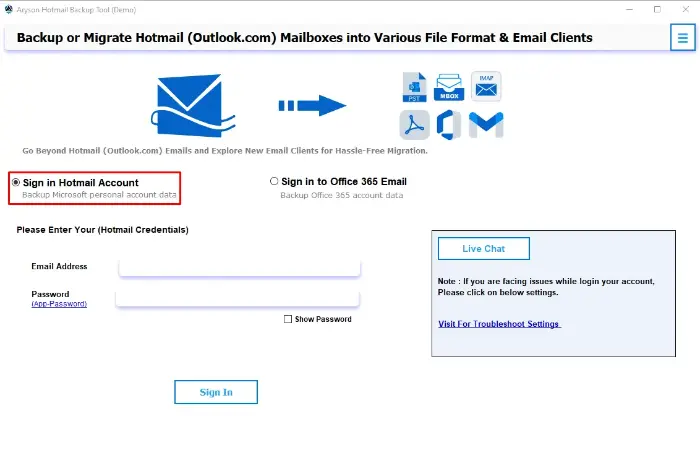
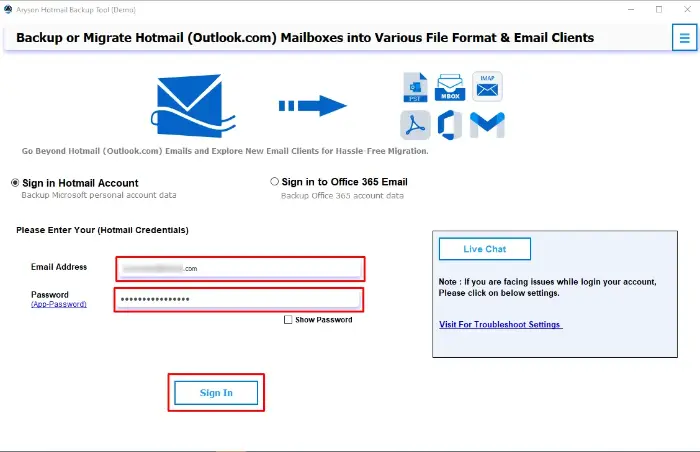
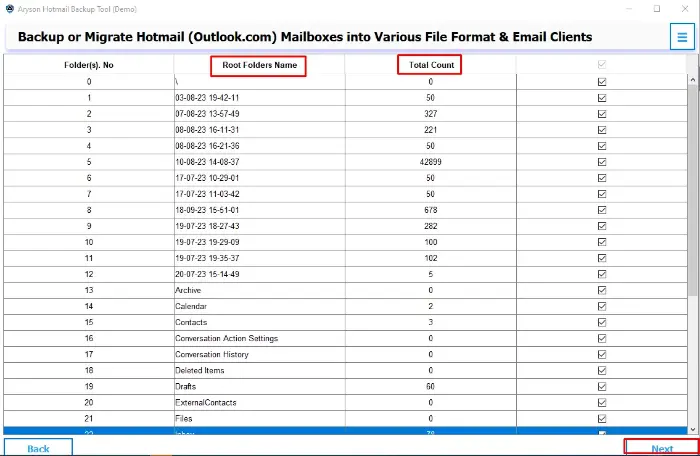
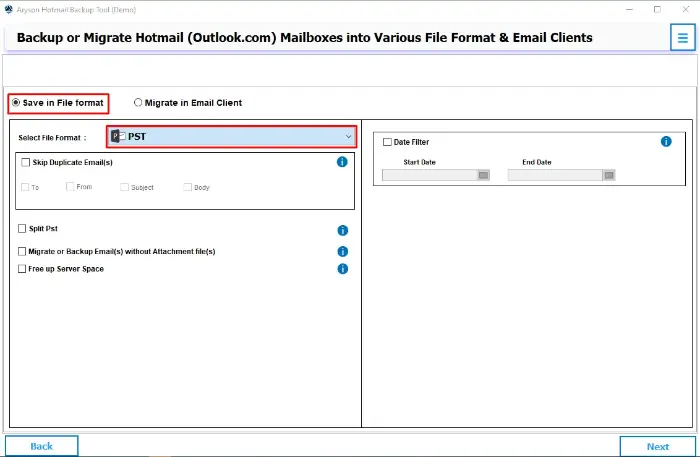
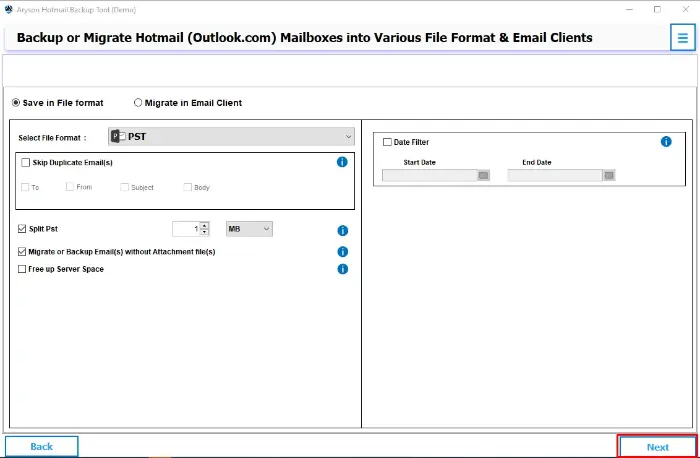
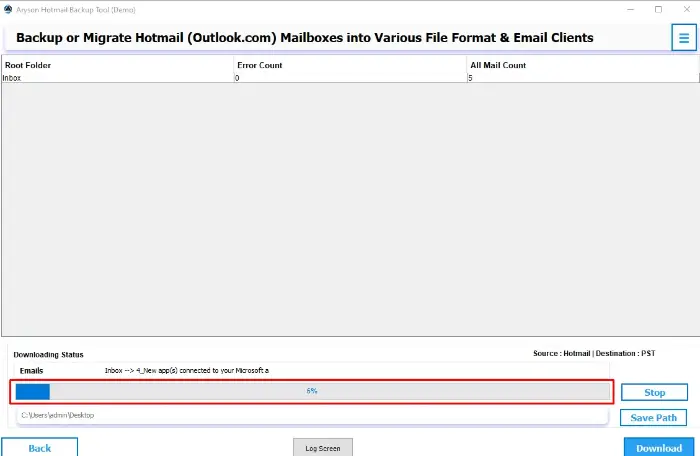
Within minutes, your Hotmail emails will be stored on your computer in the selected format. Also, it maintains the complete attachments and folder structure.
Final Words
In this blog, we explored multiple ways to download Hotmail emails to a computer. We began by understanding why it’s important to save your emails offline. Above, we provided a different solution to back up Hotmail to a hard drive. With features like multiple file formats, selective email backup, and full folder preservation, the recommended automated solution offers a complete solution for email downloading needs.
Frequently Asked Questions (FAQs):-
Q1. Can I download Hotmail emails without using Outlook?
Ans: Yes, you can use Outlook.com settings to request a mailbox export. Other than that, you can use the Aryson Hotmail Backup Tool. It does not require Outlook.
✅ Open and run Aryson Hotmail Backup Tool.
✅ Next, sign in using Hotmail credentials.
✅ Check the displayed Hotmail mailboxes.
✅ Choose the saving format and other required features.
✅ Select the resultant file path as your external hard drive.
✅ Click the Download button to move Hotmail emails.
Q2. How long does it take to export emails from Outlook.com?
Ans: The mailbox export request can take up to 4 days, depending on your account size.
Q3. In which formats can I save my Hotmail emails?
Ans: Using the Aryson Hotmail Backup Tool, you can save emails in PST, PDF, MBOX, EML, MSG, and HTML formats.
Q4. Can I also download the attachments with the emails?
Ans: Yes, the Aryson Hotmail Backup Tool downloads emails along with their attachments as it was.
About The Author:

Rohan Wiese is a Technical Writer at Aryson Technologies. He is an expert Email Forensic, Cloud Computing, and a passionate nerd with over 10 years of experience in technical content writing. He writes about Cloud Migration, Database Recovery, Email Backup, Windows, Mac, and Tech.
Related Post