-

Written By Rohan Wiese
-
Approved By
Shivam Rathore -
Updated on August 12th, 2025
Combine Multiple PDFs to a Single Document Using Quick & Free Ways
We all know how messy it can get when you have several PDF files scattered around your device. From business reports and study materials to invoices and contracts, handling multiple files one by one is both time-consuming and inconvenient. The easiest way to solve this problem is to combine all PDFs into one single document. So that it can be easy to store, share, and read. In this guide, we’ll explore several ways to merge PDF files. We will initiate with built-in options to the advanced Aryson PDF Manager Tool. Although you can choose the one that works best for you.
Understanding the Need to Combine PDF files into a Single PDF
Generally, users work with several related PDF files; in that case, they want to merge some common type of data. If they initiate the steps towards to switch between multiple windows or search the right page, it can waste your time and disrupt productivity. Hence, it is quite better option to combine multiple PDFs into a single document:
Key Reasons to Combine PDF Files into One Document:
- Easy to Share: Users can send one file instead of multiple attachments.
- Better Organization: Helpful to keep related documents together in a logical order.
- Save Your Time: Also, it avoids opening and managing several files individually.
- Improved Reading Flow: Make sure that the reader moves through content without interruptions.
- Reduced Storage Issues: Fewer files mean a cleaner, more manageable folder.
- Professional Presentation: A single document looks more polished and organized.
By understanding these benefits, it becomes clear why someone wants to join PDFs into one. It’s all about the convenience and makes your workflow smooth along with fast. Now, we will explore some of the easy ways to combine PDF files efficiently.
Methods to Combine Multiple PDFs into a Single Document
There are several ways to combine your PDF files. You can do it manually using built-in tools or opt for a professional software solution for advanced features. Go through each one step-by-step to easy way to combine PDF files:
How to Combine Multiple PDFs into One File Manually?
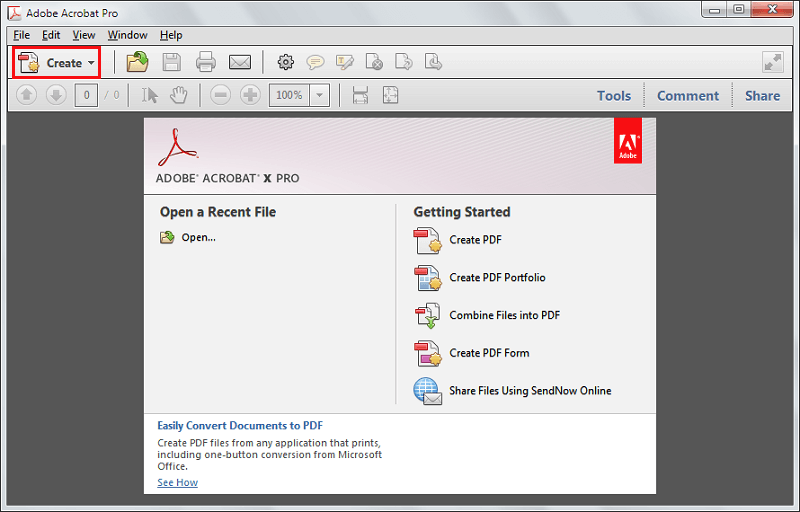
- To begin, launch the Adobe Acrobat Pro application on your computer.
- Click on the Create option from the main menu.
- From the available options, choose Combine Files into a Single PDF….
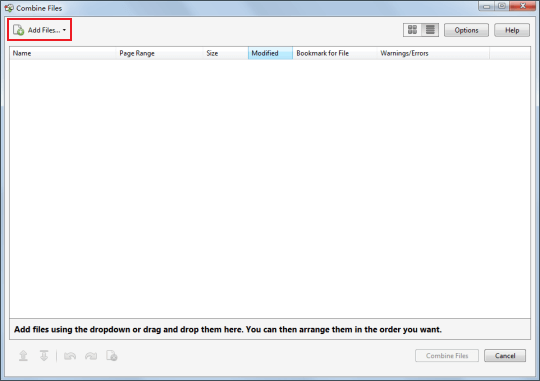
- Next, click the Add Files button and select the PDF documents you wish to merge.
- Browse your system directory, highlight the required files, and click Open to confirm your selection.
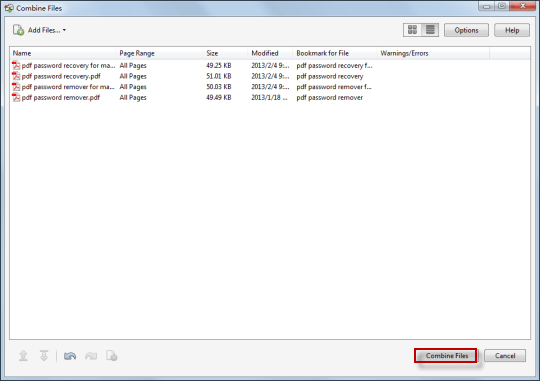
- Once the files are loaded, arrange them in your preferred order by dragging them into place.
- After arranging, click Combine Files to begin merging them into one document.
- The merging process will now run on your system. Wait for it to finish successfully.
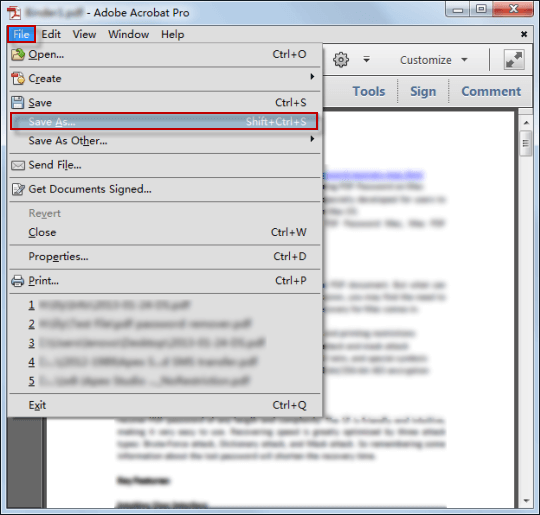
- In just a few moments, your new PDF containing all merged files will be ready.
- Finally, save this combined PDF to your desired location.

Another Alternative to Combine Multiple PDFs into One File
- First, click Select Files or drag and drop PDFs into the upload area.
- Next, choose the documents you want to merge using Acrobat’s PDF combiner.
- Then, rearrange the files in your desired sequence.
- After that, click Merge Files to combine them.
- Finally, sign in to download or share the merged PDF and organize pages accordingly.
Important Note: When you try to merge PDF files manually, it can become slow and inconvenient for large files. Hence, this method cannot merge multiple PDF files into your final document. That’s the situation where an automated tool can make things easy and efficient.
Best Way to Combine PDF Files into a Single Document: PDF Merger
Manual methods can work for small or less important files. As you are aware, it has file size restrictions and privacy risks. If you frequently work with large, sensitive, or multiple PDFs, you need a reliable and secure solution.
If you frequently work with large, sensitive, or multiple PDFs, you need a reliable and secure solution. Hence, users prefer the trusted Aryson PDF Merger Tool to accomplish the task. It can merge multiple PDF files into a single, well-organized document without losing quality. Also, make sure that all your PDF data remains private. This utility supports batch merging, which means you can combine dozens of PDFs in one go. So that you can save time and effort, too.
Key Benefits of this Automated Solution:
- There is no file size limits for large PDF files as well.
- Maintains the original layout, text, and image quality.
- Moreover, it allows you to arrange PDFs in any order before merging.
- Also, this utility supports batch processing for fast outcomes.
- It has a simple and user-friendly interface suitable for beginners.
- All-in-one utility to merge and split PDF files with ease.
Step-by-Step Procedure to Combine Scanned PDF Documents
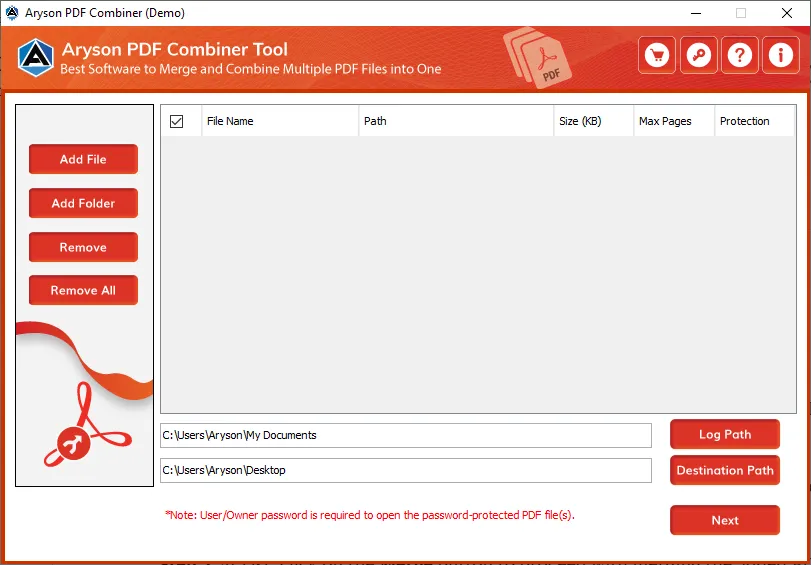
- First, download and install the Aryson PDF Merger Tool on your system.
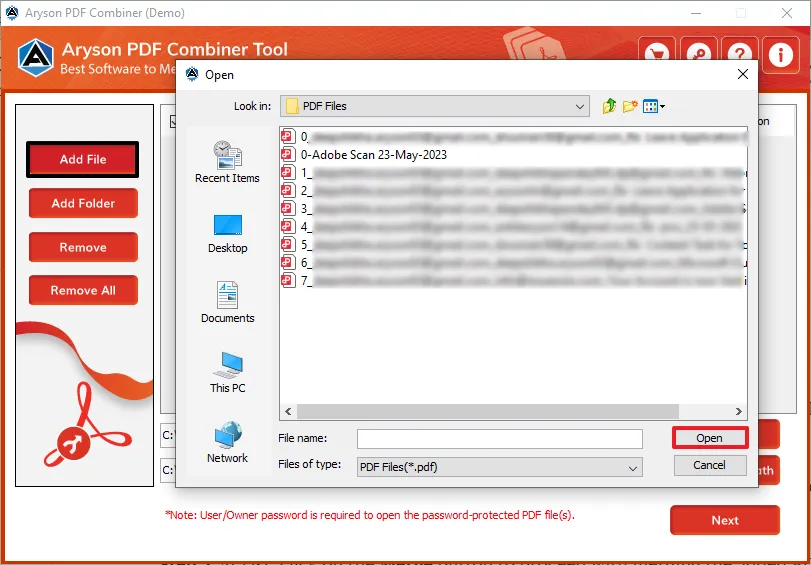
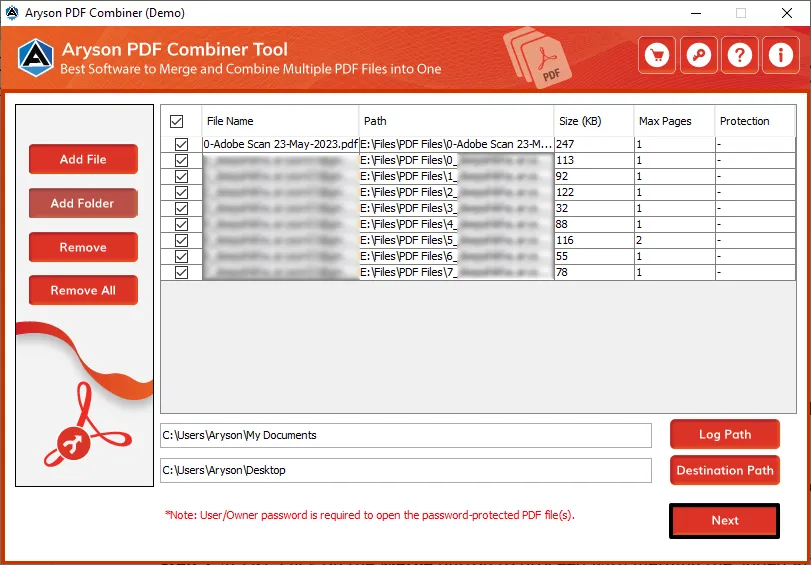
- Then, tap on Add Files to browse and select the PDF files you want to merge.
- In the next panel, it will arrange the files in your preferred order.
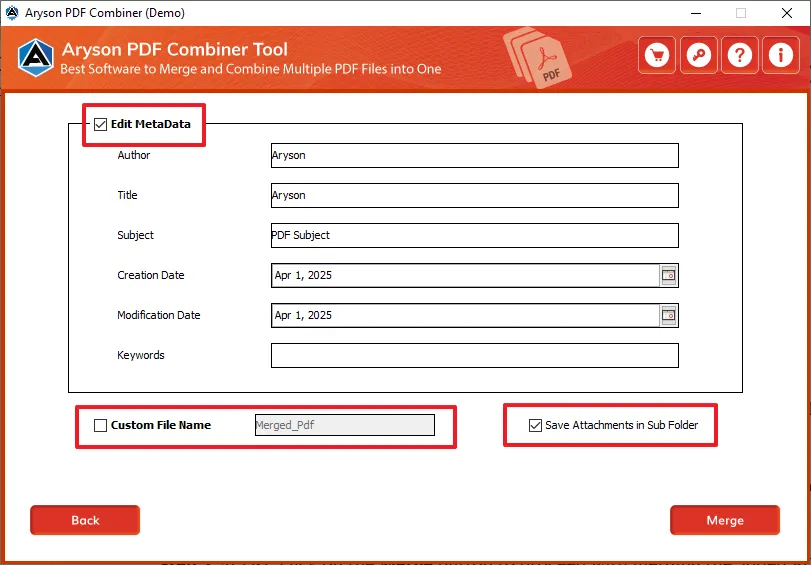
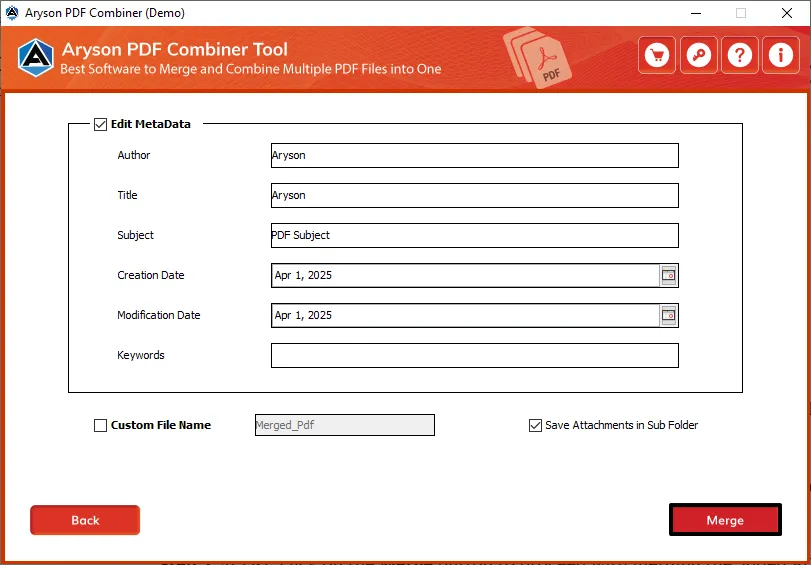
- Edit metadata, assign name, or save an attachment according to requirements.
- Lastly, tap on the Merge Button to combine multiple PDFs into a single document.
Conclusion
Now, you know how to combine PDF files into one document with the help of different approaches. Both ways are quite efficient for all types of users. If it comes to the best approach, then experts generally prefer the automated one. With its high-speed processing, quality preservation, and complete privacy, Aryson PDF Merger Tool is a beast alternative choice for professionals, students, and anyone who regularly works with multiple PDF files.
Frequently Asked Questions (FAQs)
Q1. Can I merge PDFs without Adobe Acrobat?
Ans: Yes, you can utilize the free online tools and the free version of Aryson PDF Merge to combine PDFs for free.
Q2. How do I combine PDFs for free?
Ans: Online PDF merger websites allow you to do it for free, but they may have size limits.
Q3. Is it safe to use online PDF merger tools?
Ans: See, it basically depends on the site’s privacy policy. For confidential files, offline tools are safer.
Q4. Can I merge PDFs on my phone?
Ans: Yes, some of the mobile apps, like Adobe Acrobat Reader or online tools, can merge PDFs on smartphones.
Q5. What is the best software to combine large PDF files?
Ans: Aryson PDF Manager Tool is a reliable option for large and secure PDF merging.
About The Author:

Rohan Wiese is a Technical Writer at Aryson Technologies. He is an expert Email Forensic, Cloud Computing, and a passionate nerd with over 10 years of experience in technical content writing. He writes about Cloud Migration, Database Recovery, Email Backup, Windows, Mac, and Tech.
Related Post



