-

Written By Harshita Sachdeva
-
Approved By
Shivam Rathore -
Updated on June 9th, 2026
Migrate 1000+ Mailboxes to Another Tenant: Enterprise Migration for 2026
Fact-checked and reviewed in accordance with our
Editorial Policy
Query: We are a 1,200-person organization undergoing a post-merger consolidation. Our IT team needs to migrate all employee mailboxes from the acquired company’s Microsoft 365 tenant into our primary tenant. The Exchange native tool seems to work for small batches, but we are unsure how to handle this at scale, in parallel, without disrupting live email operations. Can someone advise on the best approach to migrate 1000+ mailboxes to another tenant?
Summary: Enterprises deal with a large amount of confidential and crucial data. But when it comes to tenant-to-tenant migration, it becomes a complicated task to migrate 1,000+ mailboxes to another tenant during mergers, acquisitions, or consolidations without losing a single email. To migrate Exchange Online mailboxes at this scale, it is mandatory to properly plan the entire migration, maintain licensing, and choose the right tools. This guide covers every aspect IT professionals need and explains the use of the Aryson Microsoft 365 Migration Tool to execute a large-scale bulk mailbox migration securely and without downtime.
What Is Bulk Mailbox Migration Between Tenants?
Basically, bulk mailbox migration is the process of migrating 1000+ mailboxes between tenants (Exchange Online mailboxes from one Microsoft 365 tenant to another). According to Microsoft Learn, when organizations perform mergers or divestitures, tenant administrators can use Exchange Online PowerShell and MRS (Mailbox Replication Service) via the New-MigrationBatch cmdlet to perform cross-tenant migration.
At scale, this involves migrating user-visible content—email, contacts, calendars, tasks, and notes—while maintaining mail continuity throughout. After migration, the source mailbox is converted to a MailUser with a targetAddress pointing to the destination tenant, enabling coexistence and mail routing post-migration.
How to Quickly Migrate 1000+ Mailboxes to Another Tenant
- Download, install & run the Aryson Microsoft 365 Migration Tool.
- Pick one among Mailboxes, OneDrive, or SharePoint migration.
- Connect to the source tenant via Modern Auth and connect to the destination as well.
- Map the source and destination tenants, apply filters, and click Start Migration.
Challenges of Migrating 1000+ Mailboxes
- Mailboxes on any type of legal hold are completely blocked from migration.
- Over-quota mailboxes cause migration failures and require remediation before moving.
- Cross-Tenant User Data Migration licenses must be assigned per user before migration begins; migrations fail without them.
- Incorrect ExchangeGUID or LegacyExchangeDN stamping on target MailUser objects breaks the migration batch entirely.
- For larger numbers of users, objects must be imported using bulk CSV or Windows PowerShell in the target tenant.
- Microsoft 365 Groups migration is not natively supported in cross-tenant mailbox migration.
Top Solutions to Move 1000+ Mailboxes to Another Tenant
Now that we have discussed the challenges of cross-tenant migration, let us proceed to the actual methods to perform the migration. The two simple yet effective methods are as follows.
- Manual Cross-tenant Migration
- Aryson Microsoft 365 Migration Tool
Method 1: Manually Migrate 1000+ Mailboxes to Another Tenant
In this hands-on approach, we will use Exchange Online PowerShell and the Mailbox Replication Service. It is a must for both tenant admins to cooperate and target the tenant to be completely configured before migration. To migrate more than 10,000 users, Microsoft recommends that users create multiple mail-enabled security groups to contain the user list for optimal performance.
Prerequisites of Cross-Tenant Migration
- Licensing: Assign a Cross-Tenant User Data Migration license to every migrating user on either the source or target tenant; this license also covers OneDrive migration.
- Target User Preparation: Create each user as a MailUser object with ExchangeGUID matching the source mailbox, LegacyExchangeDN as an X500 proxy address, and ExternalEmailAddress pointing to the source.
- Migration Scope Groups: Create at least one mail-enabled security group in the source tenant to scope migrating mailboxes; nested groups are supported but not recommended.
- Tenant Trust Configuration: Establish organization relationships and verify domain ownership between both tenants before starting.
Steps to Move 1000 Mailboxes to New Microsoft 365 Tenant
- Sign in to Microsoft Entra admin centre on the target tenant and register a new Multi-tenant application with Redirect URI set to https://office.com.
- Grant the application Mailbox.Migration API permission under Office 365 Exchange Online using Application permissions.
- Generate a client secret and store it securely; it is displayed only once.
- Grant admin consent and share the consent URL with the source tenant administrator for approval.
- The source tenant administrator accepts the application via the provided consent URL.
- Create a migration endpoint in the target tenant using New-MigrationEndpoint with the application ID and client secret.
- Stamp all target MailUser objects with the correct ExchangeGUID, LegacyExchangeDN, and proxy addresses.
- Execute New-MigrationBatch from the target tenant using a CSV file containing all target tenant email addresses.
- Monitor batch progress via the Exchange Admin Centre and finalise completion.
- Verify endpoint configuration using Test-MigrationServerAvailability against the migration endpoint.
Drawbacks of the Native Method
- Requires full admin access and application consent on the source tenant.
- Legal holds completely block mailbox migration with no workaround.
- The source mailbox is permanently deleted post-migration; no recovery is possible.
- For migrations exceeding 500 users or involving large SharePoint datasets, Microsoft recommends working with a certified Microsoft solution provider.
- Microsoft 365 Groups are not supported in native cross-tenant migration.
Method 2: Expert’s Solution to Migrate 1000+ Mailboxes to Another Tenant
To perform cross tenant migration on large-scale confidential data, it is recommended to opt for the Aryson Microsoft 365 Migration Tool. Many organizations prefer to choose it for its accuracy and secure authentication. The Modern OAuth2.0 and Impersonation methods let users connect to tenants securely without any intermediary client. Moreover, the advanced features of the software make the entire process simpler for even complete beginners. Using the same software, you can efficiently perform Office 365 tenant migration during acquisition. Follow the steps below to perform migration with maximum accuracy.
Steps to Transfer 1000+ Mailboxes to Another Tenant Using the Aryson Tool
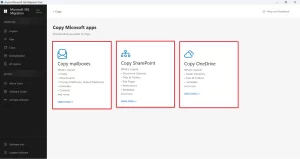
- Download, install & run the Aryson Microsoft 365 Migration Tool on your system.
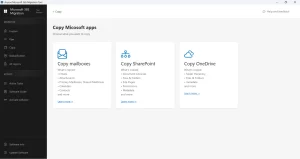
- Then, select one out of the 3 workloads: Mailboxes, OneDrive, or SharePoint.
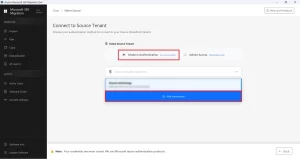
- Enter the source tenant credentials to log in via Modern Auth or Impersonation.
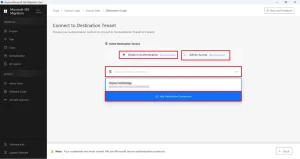
- Select the mailbox data to migrate and preview it >> connect the destination tenant.
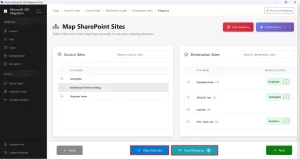
- Map the source and destination accounts using the bulk mapping feature.
- Use the additional features of the software >> click Start Migration.
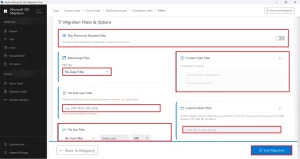
Key Features of the Aryson Microsoft 365 Migration Tool
- This software keeps the folder hierarchy, metadata, & original timestamps intact.
- The bulk user mapping eliminates the need to manually pair accounts.
- Enterprises can even migrate Company to new Microsoft 365 Tenant.
- A real-time progress bar and GUI allow IT admins to monitor migration status live.
- The OAuth 2.0 protocol makes sure to provide full credential security.
Elina’s Success Story
Elina M., an IT administrator at a 1,400-person manufacturing enterprise in London, was tasked with consolidating mailboxes following a merger. The source tenant had partial admin restrictions, and over 80 mailboxes were flagged on legal hold, making the native method unviable at scale. Elina deployed the Aryson Microsoft 365 Migration Tool, used bulk user mapping to configure all 1,320 eligible mailboxes, applied date-range filters for compliance requirements, and completed the entire migration across three business days – with zero data loss and both source and destination tenants remaining fully operational throughout.
Conclusion
When organizations migrate 1000+ mailboxes to another tenant, it demands thorough planning, correct licensing, and a reliable toolset. Microsoft’s native method works for technically equipped teams with full admin access but falls short at enterprise scale. For large-scale, restricted, or time-critical migrations, the Aryson Microsoft 365 Migration Tool delivers a structured, secure, and efficient solution—keeping source accounts active and ensuring no mailbox is left behind.
Frequently Asked Questions
Q.1 Is it possible to migrate 1000+ mailboxes to another tenant at once?
Ans: Yes, using the Aryson Microsoft 365 Migration software, it is possible to migrate 1000+ mailboxes to another tenant at once. This solution supports bulk user mapping and batch processing, making it easier to migrate thousands of mailboxes efficiently.
Q.2 How to migrate 1000 mailboxes to another tenant?
Ans: You just have to install the Aryson Microsoft 365 Migration Tool, connect the source tenant, preview its data, and connect to the destination. After that, simply map the source and destination, apply filters, and click Start Migration.
Q.3 What are the biggest challenges when migrating 1000+ mailboxes to another tenant?
Ans: Common challenges include mailbox mapping, permission management, throttling limits, data consistency, and maintaining business continuity. Proper planning and automation help reduce these risks.
Q.4 How long does it take to migrate 1000+ mailboxes to another tenant?
Ans: The duration depends on mailbox sizes, internet bandwidth, and Microsoft throttling policies. The Aryson software discussed above can migrate data quickly.
Q.5 Will there be any downtime during a large-scale mailbox migration?
Ans: The Aryson Microsoft 365 migration tool supports real-time migration tracking with the least downtime and maximum efficiency & performance.
Q.6 Is data integrity guaranteed when migrating 1000+ mailboxes?
Ans: However, there might occur some human errors during the manual migration; the Aryson Microsoft 365 Migration tool guarantees 100% data integrity.
Q.7 Is technical expertise required to migrate 1000+ mailboxes to another tenant?
Ans: Not at all. However, to perform the manual cross-tenant migration, the user must acquire technical expertise. But, to use the Aryson software, there is not need to be technically proficient.
Q.8 What support is available during a migration of 1000+ mailboxes?
Ans: Aryson provides its users with live chat, email and phone support to assist them during cross-tennant migration. This helps even beginners to perform the entire process efficiently.
Q.9 How do I verify that all 1000+ mailboxes were successfully migrated?
Ans: You can download the migration report provided by the Aryson Microsoft 365 migration tool to know the status of migration.
About The Author:

Harshita Sachdeva, a professional technical writer at Aryson Technologies, specialize in delivering clear, hands-on documentation for data management, migration, and recovery solutions. With a meticulous, reader-first approach, I break down complex technical processes into simple, actionable content - helping IT professionals and decision-makers tackle challenges efficiently.
Related Post