-

Written By Harshita Sachdeva
-
Approved By
Shivam Rathore -
Updated on June 6th, 2026
Cross Tenant Migration Step-by-Step Guide for 2026 Users
Fact-checked and reviewed in accordance with our
Editorial Policy
Alan’s Query: I am currently working on a cross tenant migration, and the downside of the Migration tool in Exchange is that once the email data is moved to the target tenant, the source email address is not accessible, while our requirement is that we need to maintain both email addresses for about two weeks or so before we terminate the source email address. Could someone suggest a solution for this or a 3rd party tool, where necessary, and is this possible?
Summary: Cross-tenant migration is the process of moving Exchange Online mailboxes, SharePoint data, OneDrive accounts, and user data from one Microsoft 365 tenant to another. Whether your company just acquired a business or divested a division, consolidating users into the right tenant without losing a single email is non-negotiable. This guide covers each aspect of cross-tenant migration that a Microsoft user needs to know, including the use of the Aryson Microsoft 365 Migration Tool. Continue reading to get more insights.
What Is Cross Tenant Mailbox Migration?
Cross-tenant migration refers to moving user mailboxes and data between two separate Microsoft 365 tenants. Microsoft supports this natively through Exchange Online PowerShell and the Mailbox Replication Service (MRS), using the New-MigrationBatch cmdlet available through the Move Mailboxes management role.
When a mailbox migrates successfully, only user-visible content transfers: email, contacts, calendar, tasks, and notes. The source mailbox is then converted to a MailUser with a forwarding address (targetAddress/ExternalEmailAddress) pointing to the destination tenant, enabling mail continuity post-migration.
One critical restriction: mailboxes on any type of hold are blocked from migration. Once migrated, the source mailbox is permanently deleted and no longer discoverable in the source tenant ( as mentioned in the query above).
Who Needs Cross Tenant Migration?
- Companies merging multiple Microsoft 365 tenants after a merger or acquisition.
- Businesses move to a new Microsoft 365 tenant with limited access to the source tenant.
- Organizations separating from a parent company, subsidiary, or franchise network.
- Service providers managing Microsoft 365 tenant migrations for multiple clients.
- Companies preserving email records and business data during ownership transitions.
- Teams preserving email records during corporate ownership transfers.
Best Methods to Perform Cross Tenant User Data migration
In this section, we will primarily discuss the most effective ways to migrate one tenant account to another tenant account. The following are the methods to perform cross-tenant migration.
- The Native Approach
- Aryson Microsoft 365 Migration Tool
Method 1: Microsoft Native Cross-Tenant Migration
Microsoft’s native cross-tenant migration uses Exchange Online PowerShell and MRS. Both tenant administrators must cooperate, and the target tenant is configured first.
Prerequisites of Manual Cross-Tenant Migration
- Licensing: Assign a Cross-Tenant User Data Migration license to each migrating user in either the source or target tenant. The license is required for mailbox and OneDrive migrations.
- Target User Preparation: Create each target user as a MailUser object. Configure the ExchangeGUID to match the source mailbox; add LegacyExchangeDN as an X500 proxy address. Then, set the UserPrincipalName and PrimarySmtpAddress, and point ExternalEmailAddress to the source mailbox.
- Migration Scope Group: Create at least one mail-enabled security group in the source tenant and add users eligible for migration. Large projects may require multiple groups.
- Tenant Configuration: Establish organization relationships, configure cross-tenant trust settings, and verify domain ownership and user identity mapping between both Microsoft 365 tenants before starting migration.
Steps to Perform are as Follows
- Register a migration application in the target tenant’s Microsoft Entra admin center via App registrations, selecting Multi-tenant account type with Redirect URI set to https://office.com.
- Grant the application Mailbox.Migration API permission under Office 365 Exchange Online using Application permissions.
- Generate a client secret and store it in a secure credential vault, as it is displayed only once.
- Grant admin consent and distribute the consent URL to the source tenant administrator.
- The source tenant administrator accepts the application via the provided consent URL.
- Create a migration endpoint in the target tenant using New-MigrationEndpoint with the application ID and client secret.
- Connect the two Microsoft 365 tenants and grant the necessary permissions so mailbox data can be transferred securely between them.
- Stamp all target MailUser objects with the correct ExchangeGUID, LegacyExchangeDN, and proxy addresses.
- Execute New-MigrationBatch from the target tenant using a CSV containing target tenant email addresses.
- Monitor batch progress, finalize completion, & update on-premises MailUsers post-migration.
Verify configuration using Test-MigrationServerAvailability against the migration endpoint.
Drawbacks of Manual Methods
- Requires full admin access on the source tenant.
- Migration fails without proper app consent granted.
- Legal holds block mailboxes from migrating entirely.
- Source mailbox permanently deleted post-migration, no recovery.
- Over-quota mailboxes fail migration and need to be fixed.
- Microsoft 365 Groups migration is not supported natively.
Method 2: Quick and Secure Way to Perform Cross Tenant Migration
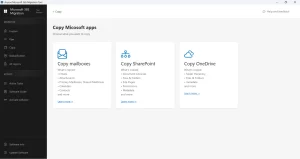
When source tenant access is restricted, with no admin app consent, no PowerShell access, and only a backup file available, Microsoft’s native method fails at the infrastructure level. The Aryson Microsoft 365 Migration Tool will work efficiently in such a situation. It supports both Modern OAuth and the impersonation login method, resolving scenarios where franchise IT administrators or acquired company admins restrict third-party application registration. Organisations use the same utility to perform Office 365 tenant migration during acquisition. Moreover, this software makes sure that even after migration, your source accounts still remain active (a solution for the opening query).
Simplified Steps to Perform Microsoft Cross Tenant Migration
- Install and launch the Aryson Microsoft 365 Migration Tool.
- Preview target workload: Mailboxes, OneDrive, or SharePoint.
- Connect the source tenant using Modern Auth or individual user credentials.
- Connect the destination tenant via Modern Auth or Impersonation.
- Map source-to-destination user accounts to maintain data integrity.
- Configure the required filters and click Start Migration.
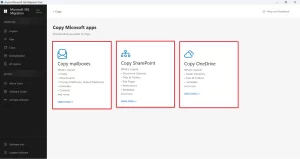
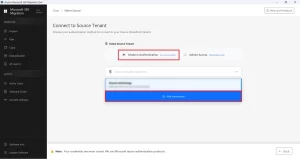
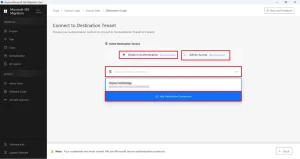
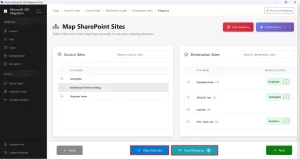
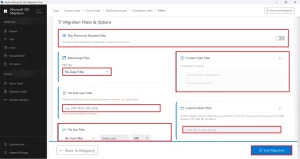
| This multipurpose software is even used by multiple organisations to migrate company to new Microsoft 365 Tenant. The software delivers accurate results and maintains security throughout the migration. |
Key Features of the Aryson Microsoft 365 Tool
- Keeps the folder hierarchy, metadata, & original timestamps intact during migration.
- The Remove duplicates option eliminates redundancy of records in the destination.
- Users can track the real-time migration process via the progress bar and GUI.
- Supports migration of mailboxes, OneDrive, and SharePoint within a single workflow.
- OAuth 2.0 protocol ensures full credential security across source and destination tenants.
Alex’s Success Story
Alex, an MSP engineer in Manchester, was onboarding a client exiting a franchise agreement. The source tenant administrator restricted application consent and provided only a Microsoft 365 backup export. Standard IMAP connectivity failed repeatedly. Alex deployed the Aryson Microsoft 365 Migration tool to perform Cross Tenant Migration without downtime. He used user-level credentials, mapped 18 mailboxes with contacts, calendars, and folder structures fully intact, and completed the full migration within a single business day.
Conclusion
Cross Tenant Migration doesn’t have to be complicated if you have followed the correct steps. Whether you’re navigating a merger, acquisition, or franchise exit, the right approach depends entirely on your admin access and business requirements. For complex, restricted environments, it is recommended to opt for the Aryson Microsoft 365 Migration Tool. This software simplifies the entire process -keeping both source and destination accounts active throughout.
Frequently Asked Questions
Q.1 What is cross tenant migration?
Ans: Cross-tenant migration is the process of transferring users, mailboxes, OneDrive accounts, SharePoint sites, Teams data, and other Microsoft 365 resources from one Microsoft 365 tenant to another while preserving business continuity and data integrity.
Q.2 Why do organizations need cross-tenant migration?
Ans: Organizations typically perform cross-tenant migrations during mergers and acquisitions, company restructuring, divestitures, rebranding initiatives, tenant consolidations, or when moving to a new Microsoft 365 environment for better management and compliance.
Q.3 How to migrate users from one tenant to another tenant?
Ans: User migration generally involves creating user accounts in the target tenant, establishing trust between source and target tenants, mapping user identities, migrating mailbox and cloud data, updating DNS records, and assigning licenses in the destination
However, this can be done using the above software within a few seconds.
Q.4 Is cross-tenant migration supported natively by Microsoft?
Ans: Yes, Microsoft provides native support for cross-tenant mailbox migration and several other migration scenarios within Microsoft 365. However, native methods often require PowerShell configuration, tenant preparation, licensing prerequisites, and manual administration.
Q.5 What is the best tool for cross-tenant migration in 2026?
Ans: Aryson Microsoft 365 Migration Tool is the best tool for cross-tenant migration in 2026. The advanced filters, preview window, and enhanced security make it a widely used software.
Q.6 Can I perform a cross-tenant migration without PowerShell?
Ans: Yes, using the Aryson Microsoft 365 Migration Tool, even if you don’t have PowerShell, you can perform a cross-tenant migration.
Q.7 Can I do a bulk cross-tenant migration?
Ans: Yes, with the help of the Aryson Microsoft 365 Migration Tool, you can efficiently perform cross-tenant migration on data in bulk.
Q.8 What support is available during Cross Tenant Migration?
Ans: Aryson provides 24/7 technical support via email, phone, and live chat to its users.
About The Author:

Harshita Sachdeva, a professional technical writer at Aryson Technologies, specialize in delivering clear, hands-on documentation for data management, migration, and recovery solutions. With a meticulous, reader-first approach, I break down complex technical processes into simple, actionable content - helping IT professionals and decision-makers tackle challenges efficiently.
Related Post