-

Written By Harshita Sachdeva
-
Approved By
Shivam Rathore -
Updated on May 23rd, 2026
Convert PST to MD: Export Outlook PST to Markdown Easily
Fact-checked and reviewed in accordance with our
Editorial Policy
Andrew’s Query: Our team has a large number of Outlook PST archives stored, and we urgently need to convert PST to MD so that there is no data loss. As data security is our biggest concern right now, can anyone suggest a reliable solution for the same?
Summary: Most of the large-scale organizations and IT firms use Microsoft Outlook to store emails in PST to maintain smooth business communication. However, a large segment of enterprises is transitioning to Markdown format for its documentation systems, AI indexing, note-taking applications, and developer workflows. This article explains the manual methods and the effective use of Aryson PST File Converter to achieve an error-free migration.
Quick Steps to Convert PST File to MD without Data Loss
- Download and install the Aryson PST Converter >> run it as an administrator.
- Click Select Files to load specific PST files >> Next.
- Preview the PST mailbox content in the advanced preview panel.
- Select Markdown (MD) from the Export File Format dropdown.
- Now, use the required filters >> choose the destination path.
- At last, click on the Start Export button to begin the PST to MD conversion.
Can I convert PST to MD without installing MS Outlook?
Yes, it is possible to convert PST to Markdown without Microsoft Outlook. Because PST is a proprietary Outlook data format, neither Windows nor Microsoft Office offers a built-in PST-to-Markdown export feature. Users generally rely on the below-mentioned tool for quick and reliable PST to MD conversion.
Manual Methods to Convert Outlook PST to MD Files
Below are the two most commonly used manual approaches to export Outlook PST data into Markdown format. Before you pick a method, go through the details of both and consider the aspects like time consumption, technical skill required, etc.
Method 1: Convert PST Files to MD Using Outlook and Copy Method
Using Microsoft Outlook is one of the simplest approaches to manually create Markdown files from Outlook emails. This method requires the users to open the required emails & copy the email content into a Markdown editor.
Simple Steps to Export PST Emails into MD Format
- To begin, open Microsoft Outlook on your existing system.
- Locate the PST mailbox that contains the required emails.
- Select the required email to export into Markdown format.
- Now, copy the complete email content from the reading pane.
- Use any Markdown editor like Typora or VS Code.
- Paste the copied email content inside the editor panel.
- Save the file manually using the .md extension format.
- Repeat these steps to perform this process for all required Outlook emails.
After carefully following the above steps, your selected PST emails will successfully get converted into Markdown files.
Method 2: Convert PST to MD Using Thunderbird and EML Workflow
In case Outlook is not available on your system, you may first convert PST emails into EML format using Thunderbird. After that, you can transform those files into Markdown. This method is especially useful for users who are working with open-source email applications.
The steps to perform PST to Markdown conversion are as follows:
- Install Thunderbird on your existing system.
- Import the PST mailbox into Thunderbird manually.
- Select the required Outlook emails from the mailbox folder.
- Save the selected emails in EML file format locally.
- Open the EML files inside any Markdown-compatible editor.
- Copy the email content into the Markdown workspace.
- Save the final file using the .md file extension.
- Repeat the process for all mailbox folders if required.
You can now access your Outlook PST emails in a Markdown-compatible format locally.
Drawbacks of Manual Methods
- Manual methods consume too much time for large PST archives.
- Users may lose metadata during the email conversion process.
- You would need multiple applications to complete the migration.
- Folder hierarchy may become inconsistent after conversion.
- Technical knowledge is necessary for successful PST processing.
Quick Solution to Convert PST to MD Files
For IT administrators and IT firms that deal with large datasets, the Aryson PST Converter is the most suitable software. Whether it be 50 or 50,000 emails, it makes sure to process them within the minimum timespan. Moreover, it allows users to convert Outlook PST to JSON, MBOX, MSG, EML, and many more formats. The main purpose of this utility is to maintain complete data integrity and allow a wide range of users to use it, irrespective of their technical expertise.
Step-By-Step Tutorial to Convert Outlook PST files into Markdown (MD)
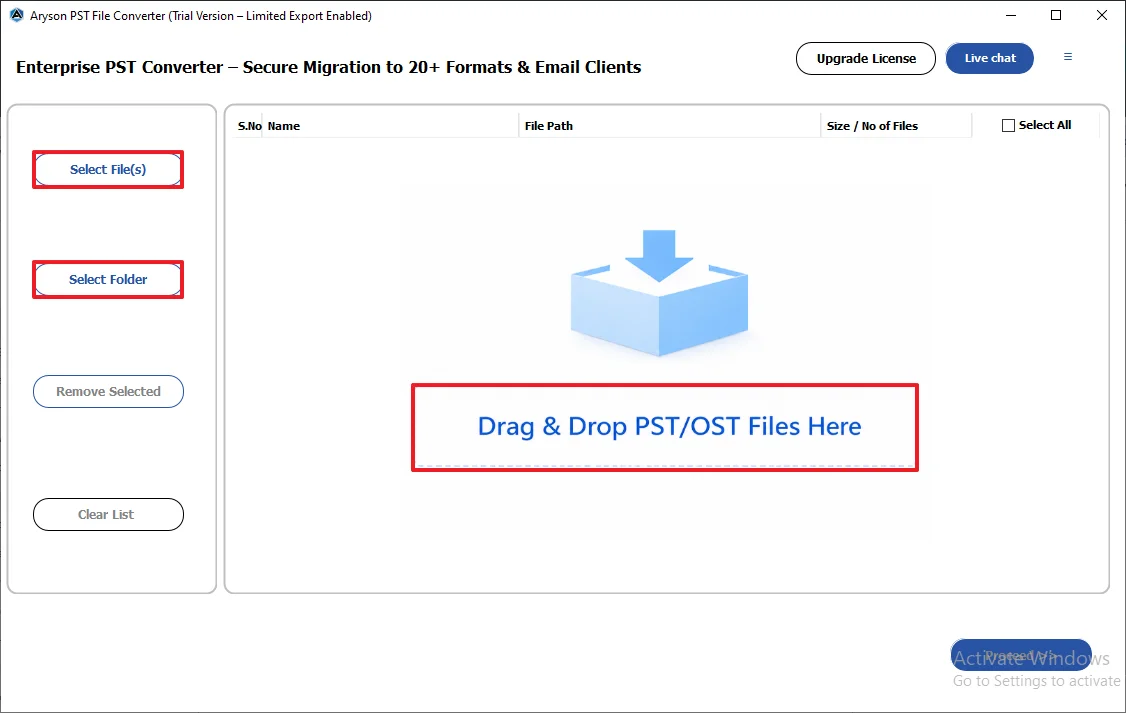
- First, download and run the Aryson Outlook PST Converter on your system.
- Load the required PST data via Select Files/Select Folders or drag & drop.
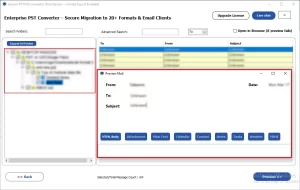
- Select the required files from the tree hierarchy and preview them.
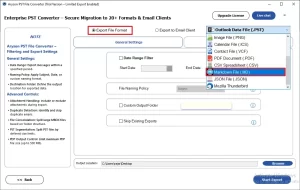
- Under the Export File Format dropdown, select the MD format.
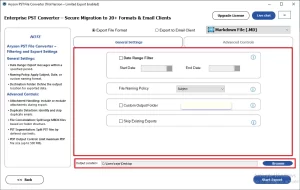
- Use the required built-in features of the software and provide a path to save.
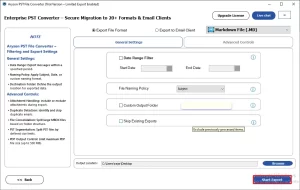
- At last, click “Start Export” to begin the PST to MD conversion process.
How Does Aryson PST Converter Outperform Hands-On Approaches?
- The software keeps the complete email metadata intact during conversion.
- It allows users to import PST files to Thunderbird, Yahoo Mail, Office 365, etc.
- Selective PST export is enabled via the advanced filters.
- Duplicate email handling prevents unnecessary data replication.
- This utility maintains the original folder hierarchy structure.
- The free demo version supports limited PST email conversion.
Conclusion
As we discussed above, for different kinds of users, the definition of a suitable method to convert PST to MD might vary. For technical experts with small datasets, the manual approaches are the best fit. Whereas, in the case of large datasets, beginners, and large organizations, the automated method discussed above may outperform. At the end, the choice of the right method determines the rate of successful conversion. Therefore, make sure to first analyze the complete details of each method and then choose one.
Frequently Asked Questions
Q.1 Why do users convert PST to MD format?
Ans: Users convert PST files into Markdown format mainly for documentation systems, searchable archives, AI indexing, and long-term email accessibility across multiple platforms.
Q.2 How to convert PST to MD format?
Ans: With the help of the Aryson PST Converter, you can efficiently convert PST files to MD format. Simply load the files into the software, preview them, select MD as the output, apply filters, and click Start Export.
Q.3 Can I convert a PST file without Microsoft Outlook installed?
Ans: Yes, with the help of the above software, you can quickly convert the Outlook PST data into MD format without even installing Outlook.
Q.4 What is the benefit of batch conversion for IT professionals?
Ans: The batch conversion capability of the software allows IT experts and individual users to convert a large amount of Outlook data within a few seconds.
Q.5 Is the 24/7 chat support available for both free and paid users?
Ans: Yes, the 24/7 chat support of Aryson is available for both free and paid users.
Q.6 What does the “Mapped with Default Mailboxes” feature do in Aryson PST Converter?
Ans: The Mapped with Default Mailboxes makes sure that the default Outlook mailbox data is migrated to the default folders (Inbox, Outbox, Sent, etc.).
About The Author:

Harshita Sachdeva, a professional technical writer at Aryson Technologies, specialize in delivering clear, hands-on documentation for data management, migration, and recovery solutions. With a meticulous, reader-first approach, I break down complex technical processes into simple, actionable content - helping IT professionals and decision-makers tackle challenges efficiently.
Related Post