-

Written By Rohan Wiese
-
Approved By
Shivam Rathore -
Updated on February 19th, 2026
Migrate Zoho Mail to Google Workspace ( G Suite ) Using Top 3 Methods
Fact-checked and reviewed in accordance with our
Editorial Policy
Zoho Mail is a reliable email service. Small businesses often choose it for its affordable pricing and professional features. However, as companies scale, many users prefer moving to Google Workspace for its advanced collaboration tools. Additionally, it enhances security and seamless integration with apps like Gmail, Google Drive, Meet, and Docs. If you are looking for a secure way to migrate Zoho Mail to Google Workspace, this guide will walk you through everything you need to know. Along with that, we will also introduce the Aryson Zoho Mail Migration Tool to directly simplify the migration process with ease.
Why Do Users Transfer Zoho Mail to Google Workspace?
There are several reasons why businesses and individuals switch from Zoho to Google Workspace. Some of the most common reasons are mentioned below:
- Google Workspace offers Docs, Sheets, Slides, and Meet. Hence, it enables real-time collaboration.
- Moreover, Google’s multi-layered security and compliance features give users peace of mind.
- Apart from that, it is more suitable for organizations that plan for long-term growth.
- Most employees are already comfortable using Gmail and other Google services.
- Along with that, Google Workspace connects easily with third-party apps and services.
Zoho Mail to Google Workspace Migration Methods Overview
There are multiple ways to migrate Zoho Mail to Google Workspace. Next, we will go through the most commonly used methods. Follow the upcoming section and proceed with the method which is according to your personal preference:
Simple and Direct Solution to Migrate Zoho Mail to Google Workspace
The Aryson Zoho Mail Migration Tool is an advanced utility that provides a flawless way to move emails from Zoho to Google Workspace without any data loss. It supports complete mailbox migration, including emails, attachments, contacts, and calendars. Along with that, it preserves the original folder structure and metadata. With features like bulk account migration, selective filters, and direct transfer to Google Workspace, it can eliminate the need for complex manual setups. It has a simple interface which is suitable for both technical and non-technical users. As a result, this software is a secure and reliable migration process. Additionally, you can migrate Zoho Mail to Office 365, Gmail, IMAP, and other email accounts as well.
Simple Steps to Migrate Zoho Mail to Google Workspace
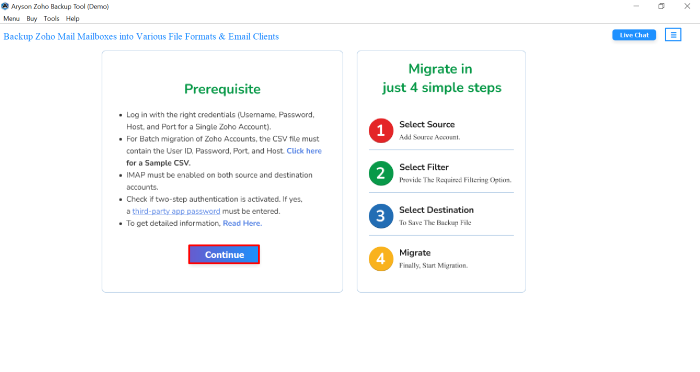
- Launch the Aryson Zoho Migration Tool on your computer and click Continue to proceed.
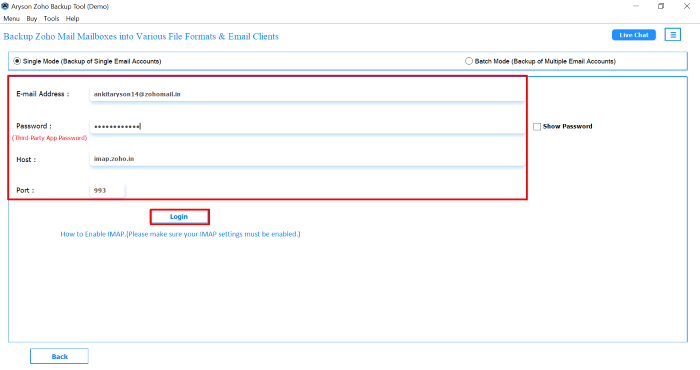
- With email Address, password, Host, and port no, sign in to your Zoho Mail account>>Login.
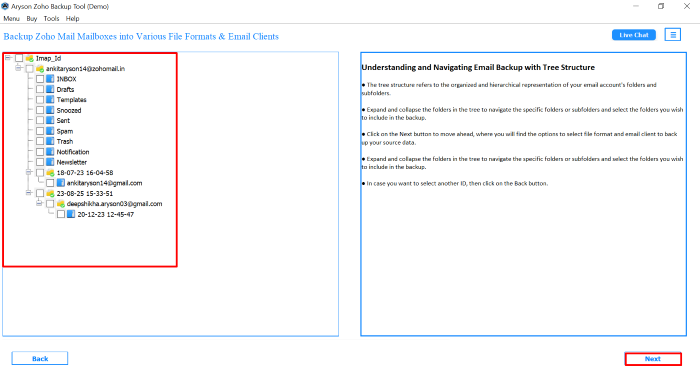
- Next, you can pick any specific mail or complete mailbox accordingly and click the Next button.
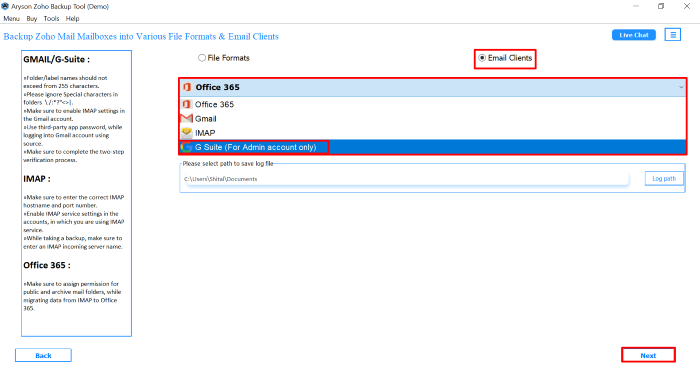
- From the list of Email clients, pick G Suite as the resultant platform to save Zoho mail data.
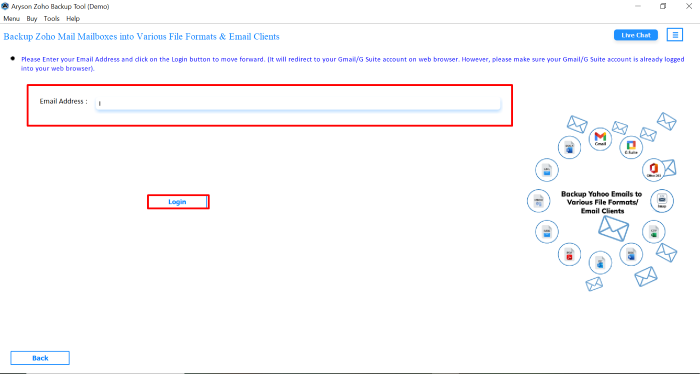
- Now, you can enter your Google Workspace login details and authenticate the account.
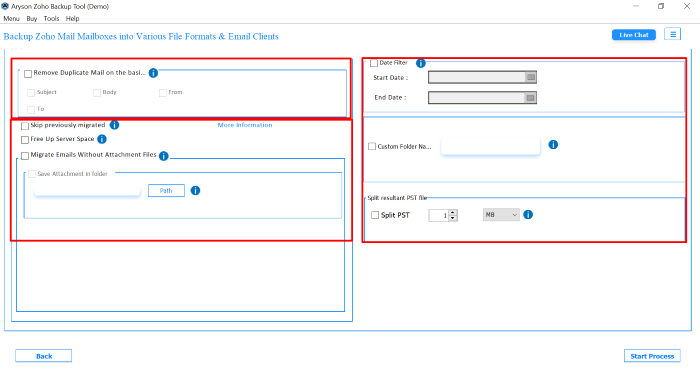
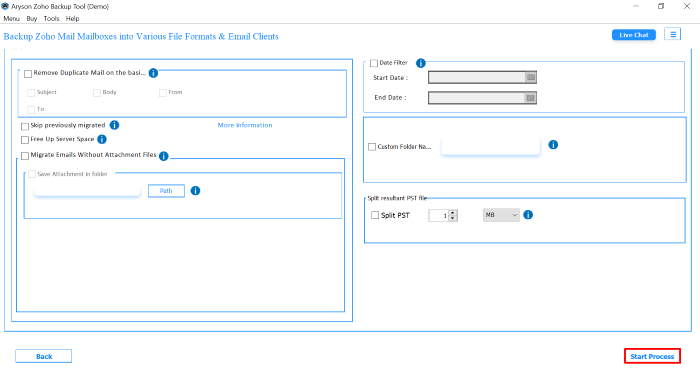
- From the next panel, utilize the additional feature of the software according to the requirement.
- Lastly, you can click on the Start Process button to migrate Zoho Mail to Google Workspace.
Additional Note: If you can migrate Zoho Mail to Gmail first, then it will be easy to proceed with the manual method.
Manual Method: Free Way to Migrate from Zoho Mail to Google Workspace
Another simple way to move your Zoho Mail data to Google Workspace is by using the free manual method. Here’s a step-by-step guide to help you set it up and migrate Zoho Mail to Google Workspace with ease:
- Log in to your Zoho Mail account and open Settings.
- In the Settings section, tap on Email Forwarding and POP/IMAP.
- In the IMAP panel, tick the Enable option to allow external access.
- Sign in to your Gmail (Google Workspace) account and go to See all Settings.
- Under the Accounts and Import tab, click on Add another email address.
- Enter your Zoho Mail address in the field provided and continue.
- Make sure to uncheck the “Treat as Alias” option before proceeding further.
- For the SMTP server details, enter smtp.zoho.com with Port 465.
- Provide your Zoho Mail username and password, then click Add Account.
- Check your Zoho inbox and open the email with the confirmation link.
- Return to Zoho Mail Settings > Email Forwarding and POP/IMAP again.
- Click on Add Email Address and enter your Google Workspace ID.
- A confirmation email will be sent to your Gmail; open it and approve the request.
- Copy the confirmation code from the Gmail message and paste it into Zoho.
- After verification, Zoho will forward all new emails to your Workspace account.
Pointers you will face while using the Manual Method
Although the manual method is free. But keep in mind that it comes with certain challenges that users should be aware of before proceeding:
- Each mailbox must be migrated separately, which is not practical for multiple accounts.
- It can be difficult for non-technical users to handle IMAP/SMTP settings
- Maybe some of your emails, attachments, or folders are not transferred correctly.
- You cannot migrate multiple Zoho Mail accounts to Google Workspace in a single attempt.
- The process requires constant confirmations and code entries, which sounds difficult.
- The migration may cause downtime. So, probably, it can affect daily operations.
When individuals consider these limitations, many of them prefer to switch to an automated solution. So that you can make sure of a smooth and error-free migration.
Conclusion
With the above-mentioned method, you can easily migrate Zoho Mail to Google Workspace. So that you can significantly improve productivity and data security for both individuals and businesses. However, the manual method is free but comes with several cons, which is quite difficult for non-technical users. That’s why we will also provide the direct solution to migrate Zoho data directly to the Google Workspace. It can preserve folder hierarchy and supports bulk migration without downtime. If you are facing any difficulty while using the software, you can frequently connect to our tech support team for further assistance.
Frequently Asked Questions: Migrate Zoho Mail to Google Workspace
Q1. Does Zoho support IMAP migration to Google Workspace?
Ans: Yes, Zoho Mail supports IMAP. But when you configure it manually, it is complex and time-consuming. Instead of that, you can use the Aryson Zoho Migration Tool to connect Zoho directly and migrate data to Google Workspace without manual IMAP setup.
Q2. How long does it take to migrate from Zoho Mail to Google Workspace?
Ans: The time depends on mailbox size and internet speed. Manual methods may take hours or days, while the professional tool significantly reduces the time.
Q3. Will my attachments also migrate to Google Workspace?
Ans: Yes, when you pick the Zoho migration tool to accomplish the migration process, you can easily migrate attachments along with the emails.
Q4. Can I migrate multiple Zoho accounts to Google Workspace at once?
Ans: No, manual methods only allow one account at a time. To migrate multiple accounts in bulk, you can use the Aryson Zoho Mail Migration Tool.
Q5. What is the safest way to migrate Zoho Mail to Google Workspace?
Ans: The safest and most reliable way is to use the dedicated Aryson Zoho Mail Migration Tool. It makes sure a secure and error-free transfer without disrupting your workflow.
About The Author:

Rohan Wiese is a Technical Writer at Aryson Technologies. He is an expert Email Forensic, Cloud Computing, and a passionate nerd with over 10 years of experience in technical content writing. He writes about Cloud Migration, Database Recovery, Email Backup, Windows, Mac, and Tech.
Related Post