























Screenshots

Video

Guide

Eula

Export Complete OLM Attributes with Aryson OLM Converter

Easily convert all OLM file attributes, including email details, sender, and attachment properties:

Emails

Attachments

Contacts

Calendar

Signature

Header

Footer

Formatting

Subject

Tasks

Notes

Journals

Convert OLM into 10+ File Formats With Aryson OLM Converter

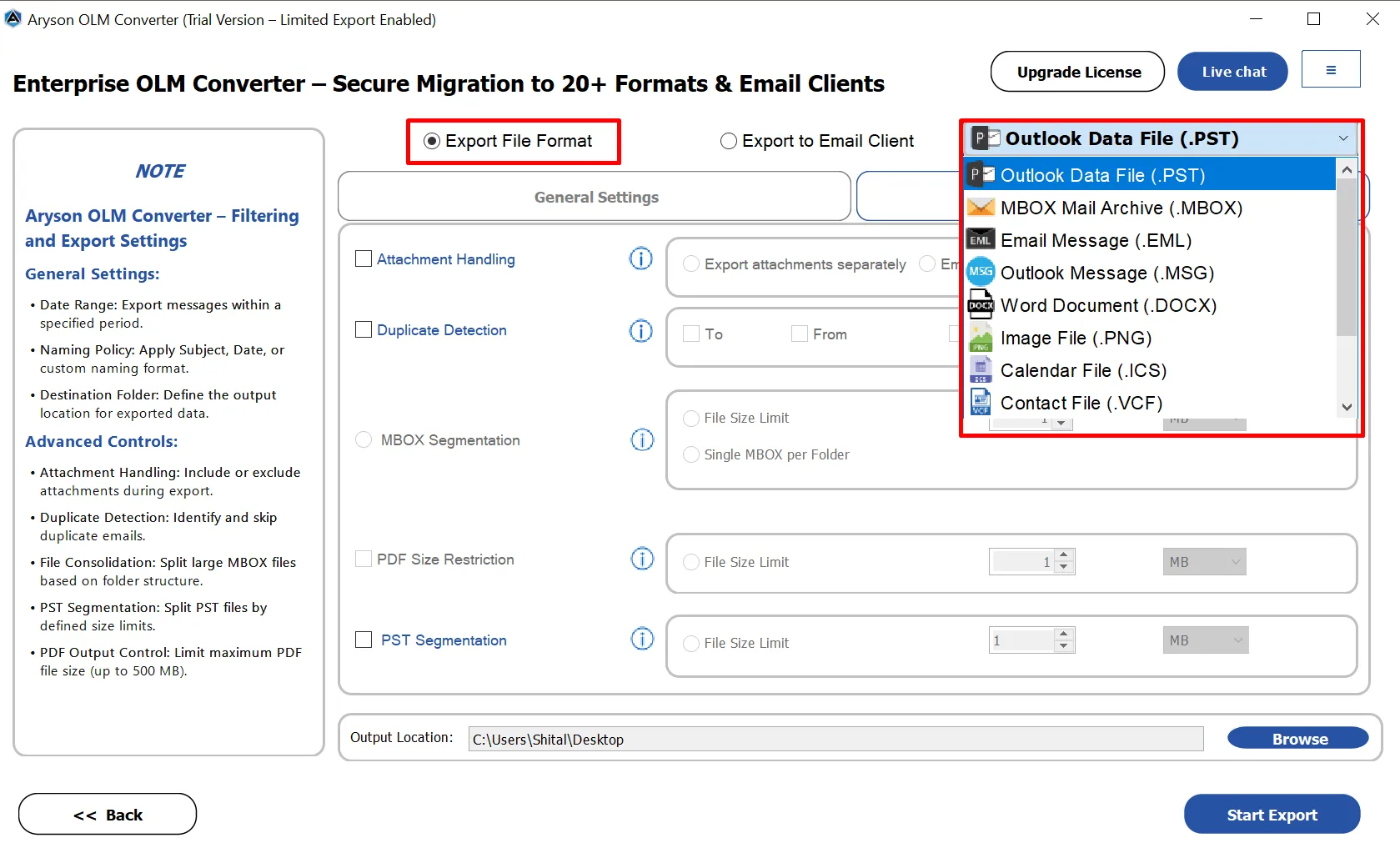
Here are the 10+ file format options that let you convert OLM files with ease and accuracy.

  • PST: Convert OLM files into PST format to access Mac Outlook data easily in Windows Outlook.
  • MBOX: Export OLM emails to MBOX for smooth migration to Thunderbird, Apple Mail, and other MBOX-supported clients.
  • EML: Save individual OLM emails as EML files for easy sharing and access across multiple email applications.
  • MSG: Store selected OLM emails in MSG format to open them directly in Microsoft Outlook.
  • PDF: Convert OLM emails into PDF files for secure sharing and long-term documentation.
  • DOCX: DOCX files can preserve formatting, images, and attachments efficiently.
  • CSV: Convert OLM data into CSV format for analysis, reporting, and spreadsheet management.
  • ICS: Export OLM calendar entries to ICS format for easy import into other calendar applications.
  • VCF: Save OLM contacts in VCF format to migrate address books across email platforms.
  • PNG: Preserves high quality without losing details, perfect for professional use

Aryson OLM Converter Tool- Rating & Reviews

See what our users have to say about the Aryson OLM Email Converter:

Expert Reviews

Rating & Reviews

Where Can You Migrate OLM Files Using Aryson OLM Converter?

Here you’ll find a brief outline to import OLM files into commonly used email platforms.

Office 365

Office 365

Gmail

Gmail

Google Workspace

Google Workspace

Hotmail / Outlook.com

Hotmail

IMAP

IMAP

Godaddy

GoDaddy

Thunderbird

Thunderbird

Best Mac Outlook OLM Converter Tool: Advanced Options

Discover the major features of the OLM Conversion Utility to convert OLM files accurately:

view pst data

Advanced Preview Panel for Email Content and Attachments

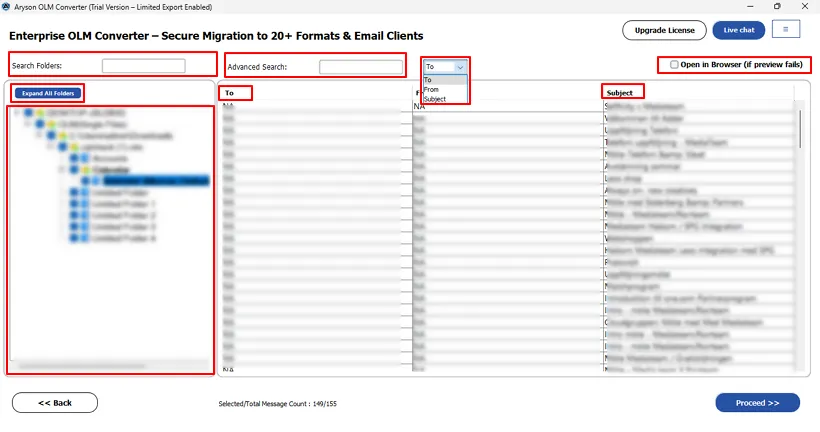
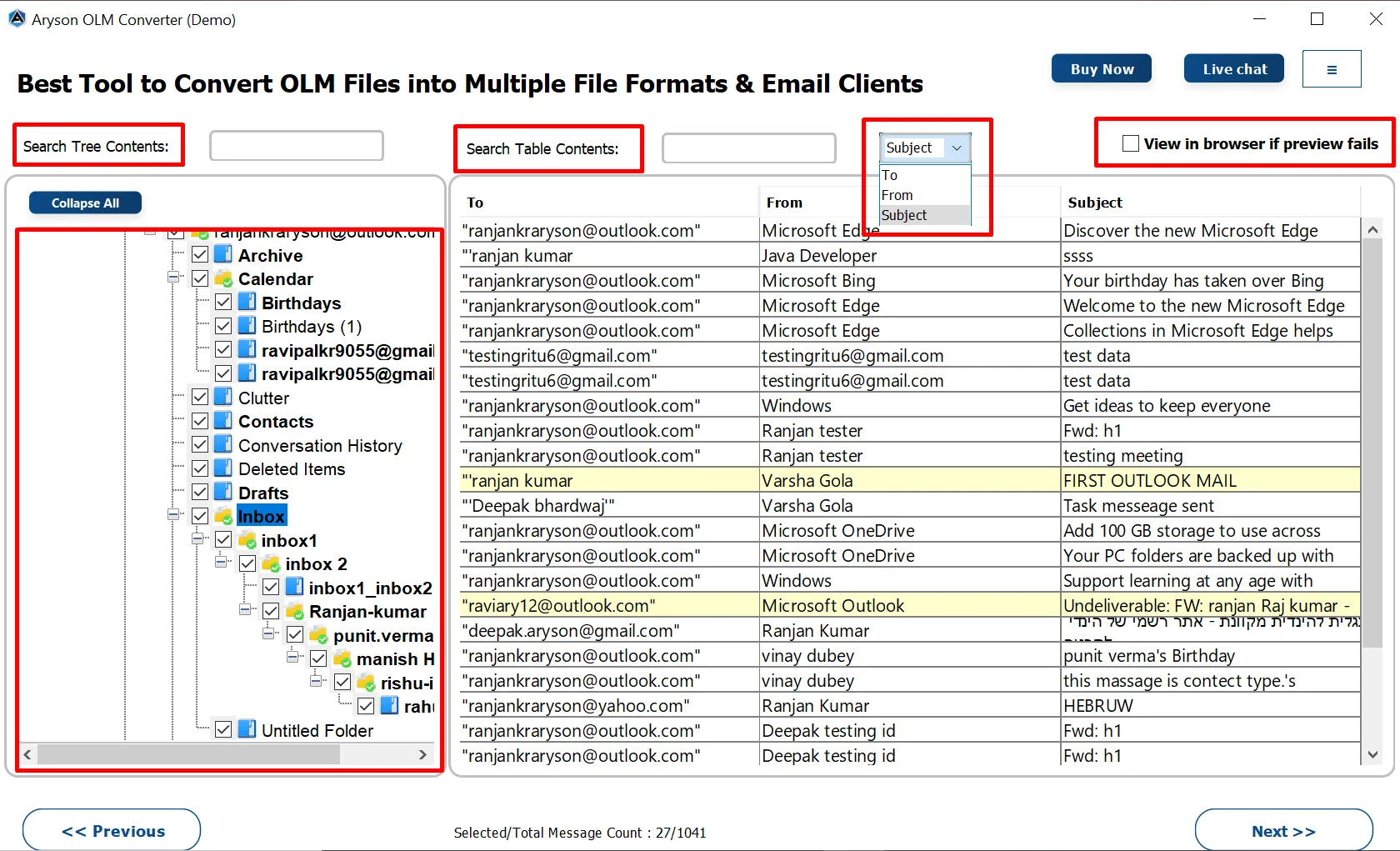
Aryson OLM Converter provides a clear and structured view of emails along with their attachments. In the highlighted (yellow) panel, users can easily identify emails that contain attachments. Moreover, users can open a detailed mail preview window where complete email information, such as From, To, Subject, and Date, is displayed. Also, it includes a “View in Browser” option in case the preview does not load properly.

  • Displays full folder hierarchy, including emails, contacts, calendars, tasks, & notes.
  • Highlights emails containing attachments in the message list for quick identification.
  • Provides a dedicated Attachment tab to preview attached files separately.
  • Preview Attachment in HTML Body, Plain Text, Headers, MIME, and Raw HTML.
  • Includes a “View in browser if preview fails” option for uninterrupted email access.
  • Enables enhanced Search Table filtering based on Subject, To, and From fields.
read all items

Customizable Attachment Export Options

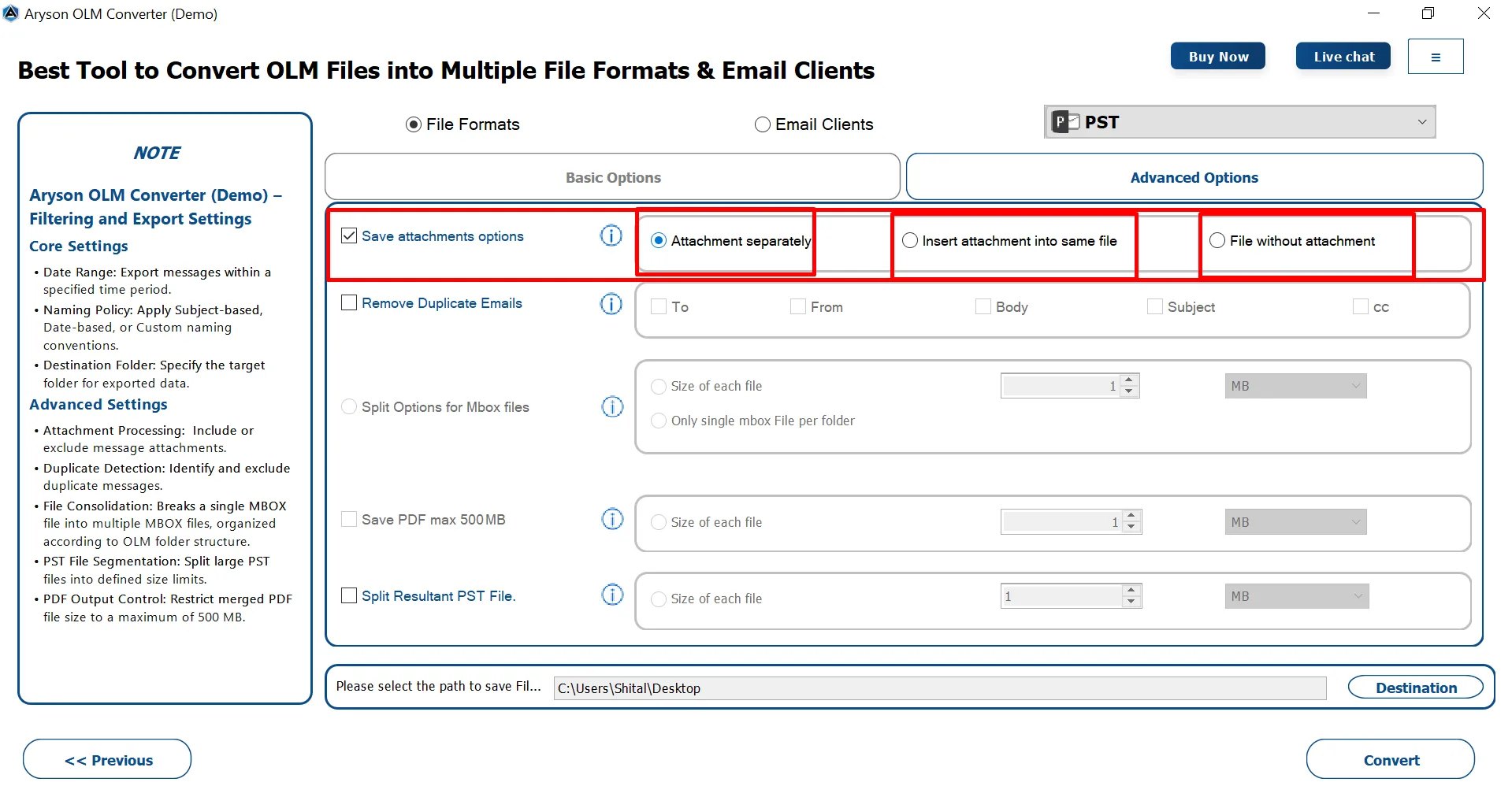
Users can choose how they want attachments to be exported, depending on their storage needs and output format preferences. This flexibility ensures better file organization and optimized output size. OLM Converter Pro provides three dedicated attachment handling options: save attachments separately, insert attachments into the same file, or export emails without attachments. As a result, users can customize the conversion process according to their specific requirements.

  • Save Attachments Separately: Extracts all attachments from emails and saves them in a separate folder for better organization and easier access.
  • Insert Attachment into Same File: Embeds attachments within the converted email file to maintain the original email structure and content integrity.
  • File Without Attachment: Converts only email messages without attachments, which helps reduce output file size and speeds up the conversion process.

Comprehensive Features of Aryson OLM Converter Software

Conversion Of Olm data

Perform Complete Conversion of OLM Data

Aryson OLM Converter is designed to perform a complete and reliable conversion of OLM data without leaving any mailbox component behind. It converts all OLM items, including emails, attachments, contacts, calendars, tasks, notes, and folder hierarchy, in a single process. Throughout the conversion, it preserves original formatting, metadata, and email properties to ensure data accuracy.

Convert OLM files

Convert OLM Files into Various Formats

OLM Email Converter can convert Mac Outlook OLM files into more than 10+ widely used file formats. These include email formats (PST, MBOX, EML, MSG), document formats (PDF, DOCX), image formats (PNG), spreadsheet format (CSV), and contact/calendar formats (VCF and ICS). This way, it helps users access their Mac Outlook data on different platforms.

Bulk conversion

Perform Bulk OLM File Conversion

Aryson OLM Email Converter enables users to convert multiple OLM files at once. Hence, it can save time and effort, too. Instead of processing files one by one, you can select a batch of OLM files and convert them all together. This feature is especially useful for businesses or users with large mailboxes, ensuring fast and efficient migration.

Mailbox preview

Support OLM Mailbox Migration

With the help of the Aryson OLM Conversion Utility, you can migrate OLM data into Office 365, Gmail, Google Workspace, Thunderbird, IMAP, Hotmail, IMAP & GoDaddy. In addition, the migration process ensures data accuracy and consistency, even for large OLM files. Therefore, users can transfer their OLM mailbox data directly without performing manual import steps.

Convert EMails

Flexible Naming Convention

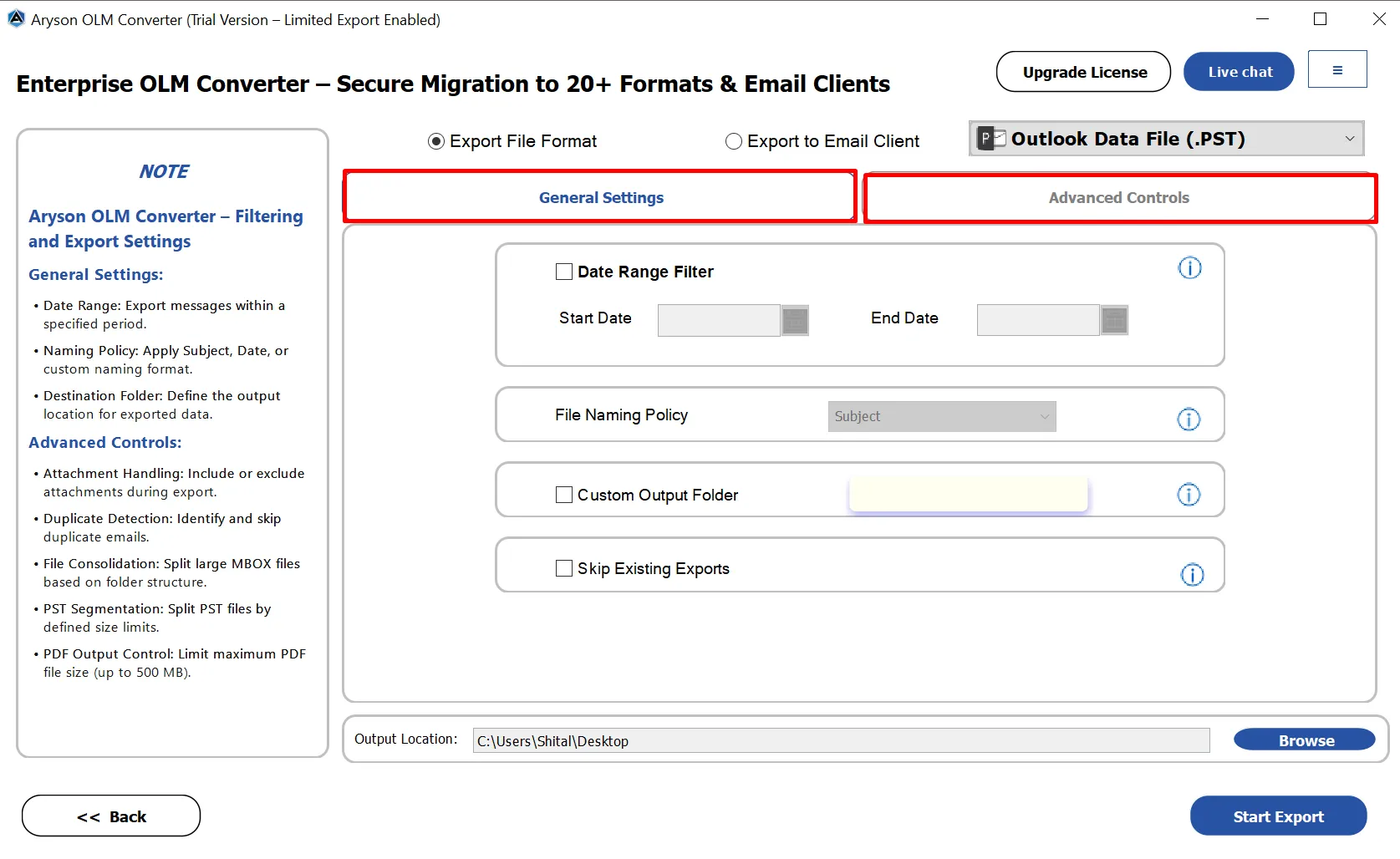
This software provides multiple Naming Convention Options: Subject-based, Date-based, From-based, or custom naming formats. Users can apply subject-based, date-based, or custom naming patterns to save output files. As an outcome, it becomes easy to organize and identify converted emails later. Instead of using default file names, users can choose different naming patterns based on their preferences.

Date Filter for Selective Email Migration

Option to Split MBOX Files

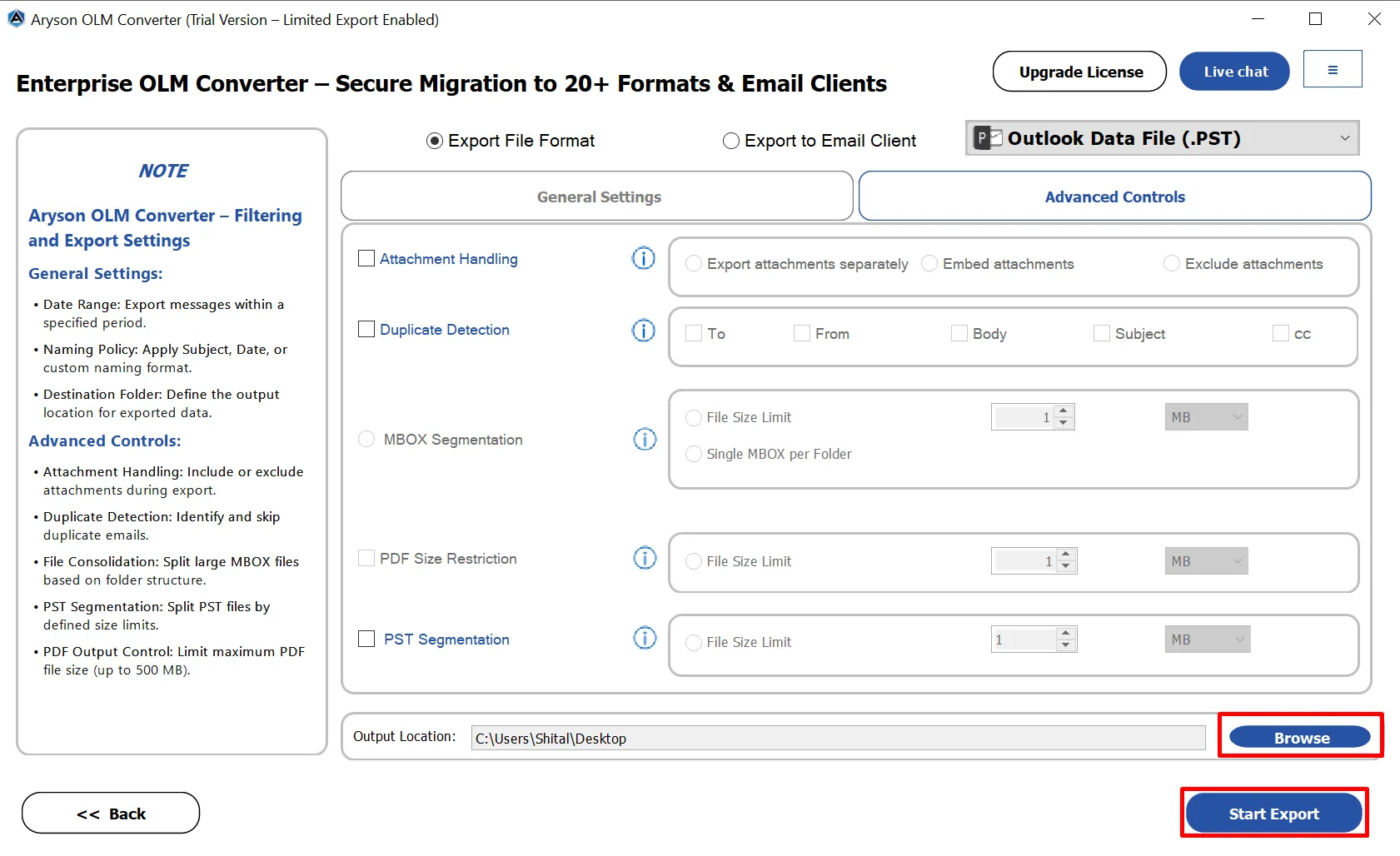
Large MBOX files are often difficult to handle and may cause performance issues. Therefore, OLM File Exporter provides an option to split MBOX files based on a defined size limit. In addition, users can choose to create a single MBOX file for each folder. As a result, mailbox data remains well organized and structured.

Custom Folder Name

Date Filter For Selective Conversion

Aryson OLM Converter offers a powerful date filter that lets you convert emails from a specific time range. Users can select a start and end date. So that they can ensure only relevant emails are processed. Hence, it saves time, reduces file size, and helps in focusing on important mailbox data during migration.

Custom Folder Name Feature

Custom Folder Name Feature

With the Custom Folder Name Feature, users can assign custom names to converted folders. This feature of the OLM Export Tool ensures organized mailbox management after migration. Users can easily identify and categorize their emails, contacts, and calendars. As a result, it makes post-conversion access simpler and more efficient.

split pst file

Manage PDF File Size

The PDF Size Management feature allows users to define the maximum size of the generated PDF files during OLM conversion. Users can set a size limit of up to 500 MB to ensure that the output PDF files remain manageable and easy to store. It is useful when converting large mailboxes into PDF format.

Compatible

Specific Option to Split PST File

When you choose OLM files to PST, users can split the resultant PST file into smaller parts based on a defined size limit. Either you can manage the resultant PST in MB or GB. It helps manage large mailboxes. Along with that, it makes sure that you can smoothly import into Outlook without size-related issues.

Free Trial

Compatible With All Outlook Versions

OLM Email Converter works smoothly with every Outlook edition. Whether you are using the latest Outlook 2021 or older editions like Outlook 2016, 2013, or 2010, this tool ensures that your converted OLM files remain fully accessible. Users can confidently open and manage their emails, contacts, calendars, and other mailbox data without worrying about compatibility issues.

Free Trial

Free Trial & 24/7 Tech Support with Simple GUI

Users can evaluate the software through a free trial. In addition, round-the-clock technical assistance is available to resolve queries and provide support whenever needed. Along with that, the interface is designed to be intuitive and easy to navigate. Even users with minimal technical knowledge can complete the conversion process without confusion or extra guidance.
How to Use Aryson OLM Converter: Complete Guide

How to Use the Aryson OML Converter Tool

Aryson OLM Data Converter helps you convert, backup, and migrate Outlook for Mac (OLM) files without any complexity. With its clean interface and advanced options, you can preview emails, contacts, calendars, tasks, and attachments before exporting them into multiple file formats or email clients. Follow the steps below to process OLM files smoothly:

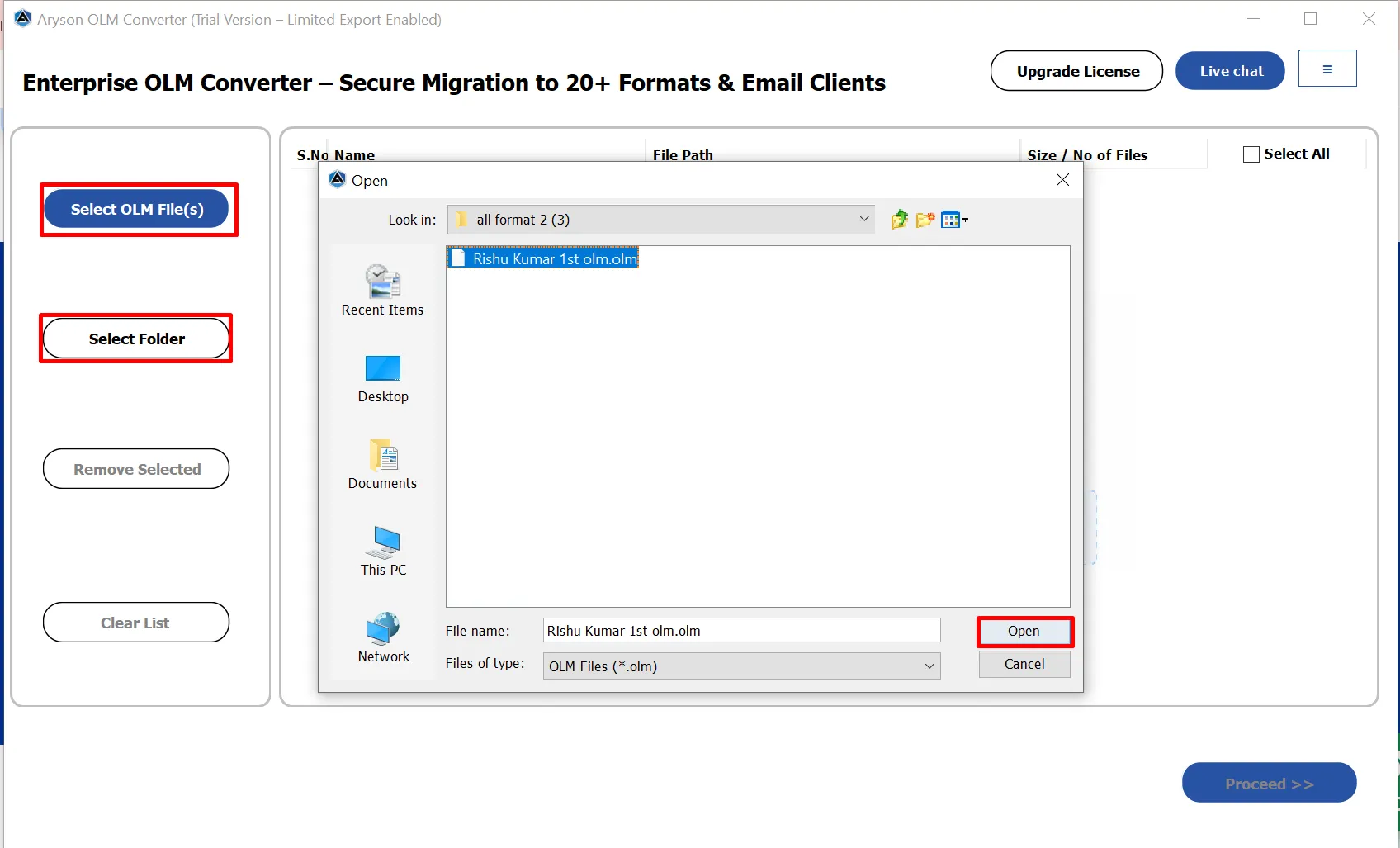
  • Step 01: Download and install the Aryson OLM Converter on your PC.
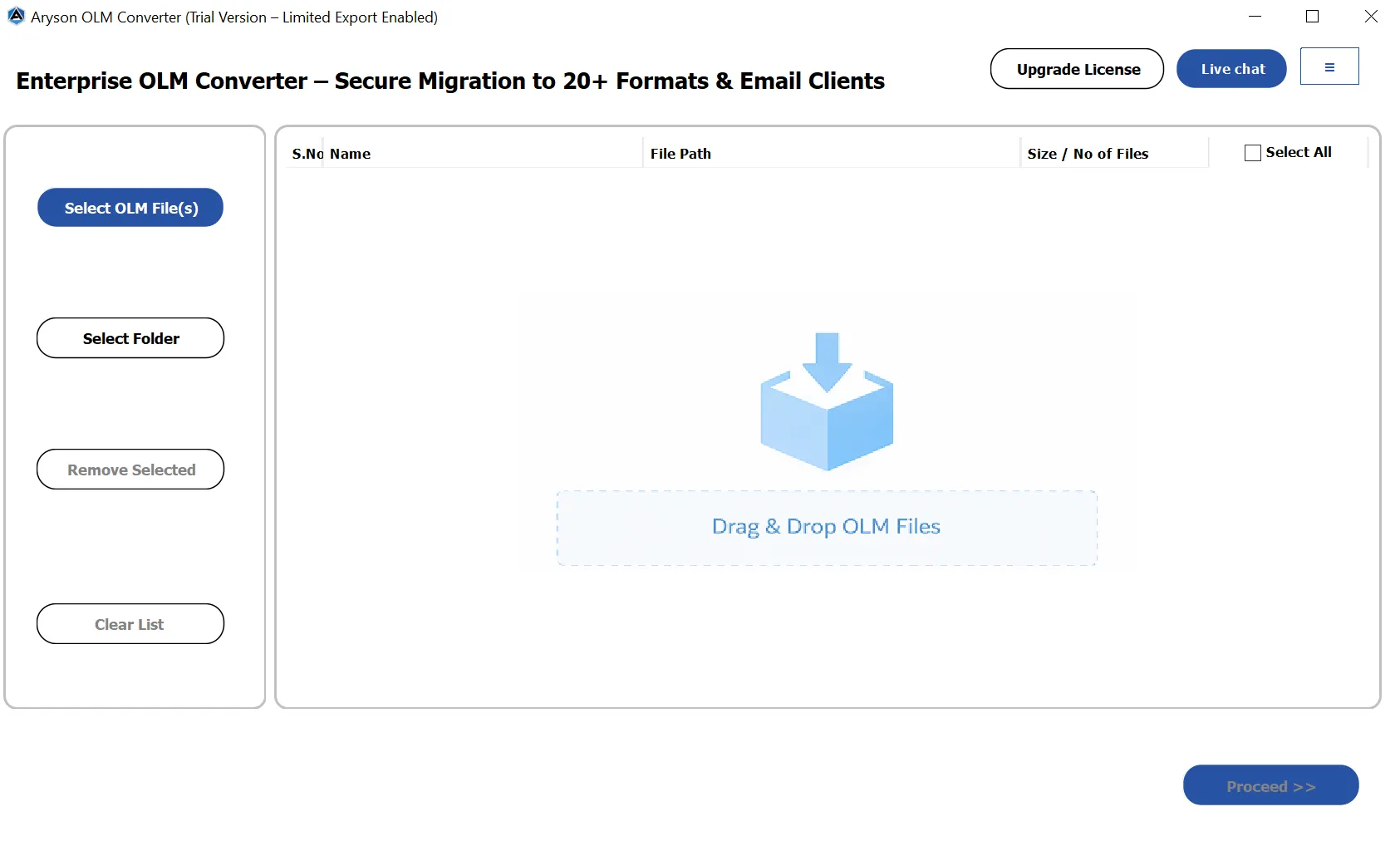
  • Step 02: Click the Select File or Select Folder button to add the OLM file.
  • Step 03: Preview the complete OLM mailbox folder structure>>Next.
  • Step 04: Choose the preferred output format or email client from the list.
  • Step 05: Apply the basic and advanced features of the software accordingly.
  • Step 06: Select the destination path and click Convert to start the process.

Enterprise-Level & Corporate Uses of Aryson OLM Converter Tool

See how securely fetch and convert Mac Outlook files without Outlook installation.

Bulk Conversion

Bulk OLM File Conversion:

Enables enterprises to convert multiple OLM files at once, which helps IT teams save time during large-scale email migrations or platform upgrades.

Support Multi Platform

Supports Multiple Target Platforms:

Allows organizations to convert OLM files to PST, Office 365, Exchange Server, Gmail, IMAP, and various file formats, ensuring seamless compatibility across environments.

Data Intergrity

Data Integrity & Compliance:

Preserves original folder hierarchy, email metadata, attachments, timestamps, and formatting to meet corporate compliance and audit requirements.

Zero Data Loss

Zero Data Loss Assurance:

Ensures complete accuracy during conversion by maintaining email properties, attachments, and structure throughout the process.

secure

Secure Conversion Process:

Uses advanced security mechanisms to protect sensitive corporate emails and attachments during conversion and migration tasks.

Scalable

Scalable for Large Organizations:

Designed to handle high-volume OLM mailboxes, making it suitable for enterprises, MNCs, and corporate IT departments.

Reliable

Minimal Downtime:

Delivers fast and reliable conversion with minimal disruption to business operations, ideal for time-sensitive enterprise projects.

User Friendly

Centralized IT Management:

Provides administrators with full control to monitor, manage, and execute OLM conversions from a single, user-friendly interface.

Selective

Selective Data Conversion:

Offers advanced filters for date range, folders, and specific email items, helping organizations meet internal policies and compliance standards.

Cost effective

Cost-Effective Enterprise Solution:

Reduces dependency on manual methods and external services, lowering overall operational and migration costs.

Aryson OLM Converter Tool: System Specifications

Software Download

(Windows)

Download Now


Size: 244MBVersion: 26.02 ( Updated On 19 February 2026 )

Trial Limitations

The Free version of the Aryson OLM Converter Tool allows users to export only 50 items per folder from each OLM file. So, if you are looking for a solution to extract all the mailbox data from the OLM file, then you need to download the Full Version of the OLM File Converter Software.

Requirements & Supported Versions

Processor: Intel® Core™ 2 Duo CPU E4600 @ 2.40GHz 2.39GHz

Hard Disk Space: 500 MB of free hard disk space required

RAM: 4 GB of RAM (4 GB is recommended)

Supported Platforms

Window OS: Windows 11, 10, 8.1, 8, 7, Vista, XP, 2000, 98, NT, and 95.

Mac Outlook Versions: Outlook for Mac 2016 16.53.1 and all previous versions.

Software Prerequisites

  • If you are operating Windows OS 11, 10, 8, or 7 (32-bit or 64-bit) then you must launch the tool as an Administrator.
  • Turn off the Windows Firewall for proper installation.
  • Disable the Antivirus programs.

FAQ

Request For Software Customization

If you need to customize Aryson Software or need additional some specific features then, provide the software customization Request Quote

Aryson Mac OLM Converter Tool: Free & Premium Version

Get an overview of the Free and Premium versions of the OLM Converter to convert OLM files:

Product Features Free Version Full Version
Convert OLM to PST, PDF, EML, & others. 50 items per Folder Complete Mailbox
Import OLM to Office 365, Gmail & more. 50 items per Folder Complete Mailbox
Preview OLM Mailbox Data
Naming Convention Option
Save without Attachments
Split Resultant PST& MBOX
Apply Date Filter
Custom Folder Name Feature
Remove Duplicate Emails
Support All Mac Outlook Versions
100% Secure & Tech Support
Price Free $49
Money Back Policy

Frequently Asked Questions

Ans. Yes, OLM Email Converter works completely independently. You do not need Outlook for Mac or any other email application installed on your system to convert OLM files.

Ans. Aryson OLM File Converter supports all major OLM data components, including emails, contacts, calendars, tasks, notes, and attachments. It also preserves metadata such as sender, recipient, subject, date, and time during the conversion process.

Ans. Yes, OLM Conversion Utility allows you to add and convert multiple OLM files in a single process. This bulk conversion feature is especially useful for IT administrators and businesses handling large volumes of mailbox data.

Ans. Yes, OLM Email Converter includes a duplicate removal option that helps eliminate repeated emails, contacts, and calendar items. Duplicates can be filtered based on fields like To, From, Subject, and Body, ensuring clean and organized output data.

Ans. Yes, Aryson OLM Conversion Utility provides a detailed preview panel. Users can view emails, message content, and attachments before starting the conversion, which helps verify data and select only the required items.

Ans. Yes, users can selectively convert specific folders, emails, or mailbox items. Advanced filters, such as date range selection, help export only relevant data, reducing file size and conversion time.

Ans. Yes, the OLM Email Converter supports direct migration of OLM files to various email clients and IMAP-based email accounts. This feature simplifies mailbox migration without needing intermediate file conversions.

Ans. Yes, OLM Export Tool maintains the original folder hierarchy exactly as it appears in the OLM file. This ensures easy navigation and a familiar mailbox structure after conversion or migration.

Ans. Yes, a free demo version is available that allows users to evaluate the software features and preview mailbox data. To convert the complete mailbox without limitations, upgrading to the full version is required.

Ans. Yes, Aryson OLM Email Converter is compatible with all major Windows versions, including Windows 11, Windows 10, and earlier editions, ensuring smooth performance across different systems.

Ans. Yes, 24/7 technical support is available with the licensed version. The support team assists users with installation, conversion issues, and any technical queries to ensure a smooth experience.

Trusted by IT Professionals & Enterprises Worldwide

See what our IT professionals and businesses say about their experience with the Aryson OLM File Converter:

review-rating