Aryson Maildir Converter Tool - Working Guides
-
Table of Content
- Software Working Process
- Activation Guide
- Installation & Uninstallation
- User Interface
Software Working Process
To convert a Maildir file into various other file formats like PST, MBOX, EML, PDF, MSG, CSV, and EMLX, and email clients like Gmail, IMAP, iCloud, Office 365, and Yahoo Mail.
Follow the listed steps for converting the Maildir file into other file formats and email clients, given below:
Step 1: Download and run the Aryson Maildir Converter Tool.

Step 2: Now, select File/Folder to add multiple Maildir files and hit the Open button. After selecting, click on Next to proceed.

Step 3: Now, preview the emails from the tree-structure and click Next.

Step 4: Select the desired file format from the drop-down menu (here, we select MBOX ).

Step 5: Apply additional filters to get specific data.
- Remove Duplicate Mail: Eliminates duplicate emails using fields like To, From, Subject, Bcc, and Body.
- Exclude Attachments: Migrates or backs up emails without attachment files.
- Keyword-Based Selection: Selects emails using specific keywords from To, From, or Subject.
- Whole Word Filter: Matches only exact keywords. Matches only exact keywords.
- Case Sensitive Filter: Filters emails based on exact letter casing.

Step 6: To get a file from a specific time period, choose the Mail filter option.

Step 7: You can give a Custom Folder Name to the converted folder.
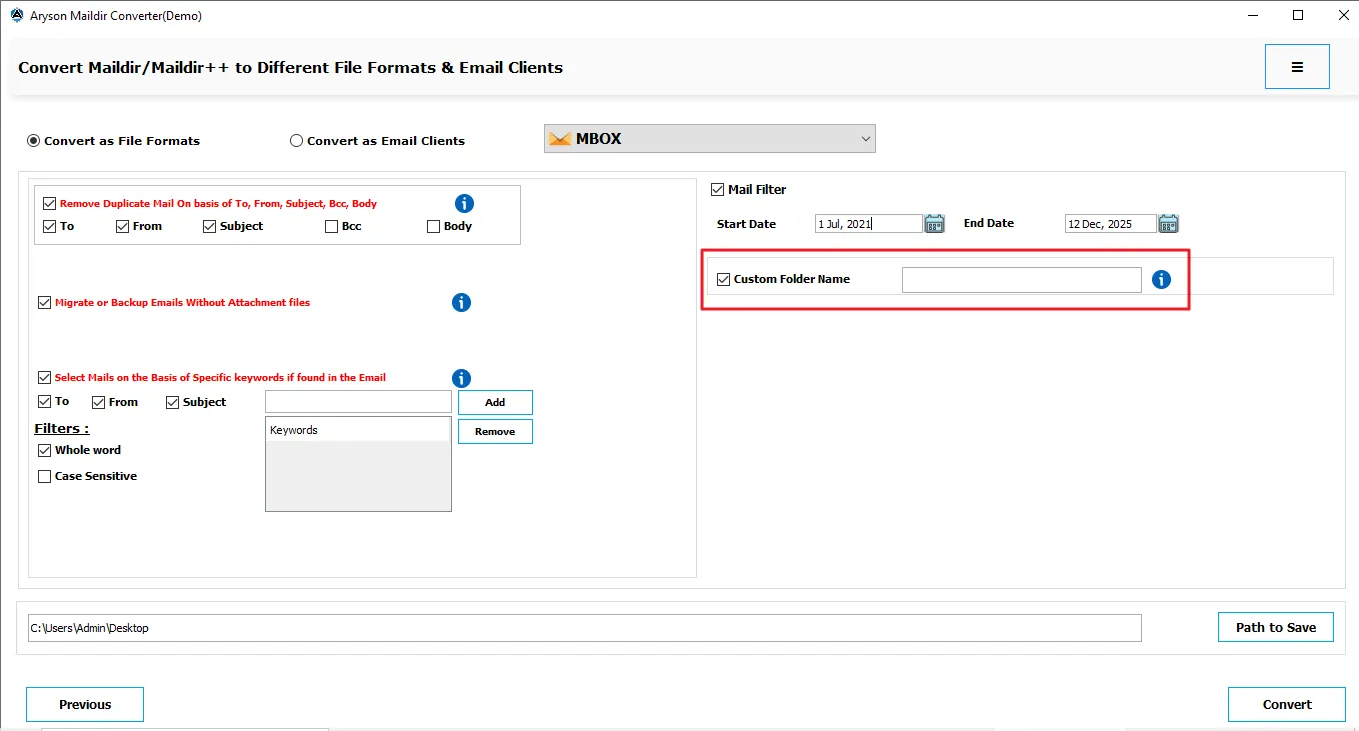
Step 8: Select the Path to save files after the conversion and click Convert.

Step 9: Lastly, you can download the report after exporting the files.

Step 10: If you want to repeat the conversion, click on the Convert Again button.

Activation Guide
Activate the Software
Installation & Uninstallation
Installation & Uninstallation of Software
User Interface
User Interface
After downloading the Aryson Maildir Converter Tool, you will find the welcome screen as played below.