-

Written By Harshita Sachdeva
-
Updated on June 5th, 2026
Migrate EML File to Office 365: Complete Migration Guide 2026
Query: I have thousands of EML files saved on my local system from my old email client — Windows Live Mail. Now I’ve migrated to Office 365 and need to import all those EML files into my Office 365 mailbox. I want all emails to land in correct folders with attachments and metadata like sent date and sender info intact. What is the easiest and most reliable way to migrate EML File to Office 365 without data loss?
Summary: If you are wondering about a solution for how to import EML to Office 365 & Outlook Web Access(OWA), then this article is for you. Here, we will discuss the step-by-step procedure to import EML files to Microsoft Office 365 or Outlook Web Access(Hotmail). However, you can also use the Aryson EML Converter, which allows users to import batch EML files to Office 365, Hotmail(Outlook.com), and other email clients.
Instant Solution: Import EML to Office 365
- Download and install Aryson EML Converter on Windows.
- Load the required EML files via Select Files or Select Folder.
- Preview these emails >> select Office 365 as the destination.
- Apply the required filters >> specify the path to save >> click Convert.
Best Methods to Migrate EML File to Office 365
There are several methods to import EML files to Office 365 accounts. To easily import emails from EML file to O365, choose the right method and follow the steps correctly:
Method 1: Import EML File to Office 365
This method won’t work if you do not have an Outlook application on your system. Or if you have, then you need to migrate emails from EML file to Office 365 in three different steps.
Step-1: Drag & Drop the EML File into Outlook
- Open Outlook on your PC.
- Go to the folder where you want to store your EML file.
- Navigate the EML file location and select the files.
- Drag & Drop your EML file in the Outlook application.
- Now, you can easily view your migrated EML file data.
Step-2: Export EML Data (PST) Locally
- Start Outlook Application.
- Go to File>>Open & Export>>Import/Export Feature.
- Select the Export to a file option and click Next.
- Choose Outlook Data File(.pst) and click Next.
- Click Browse to set the path for the resultant PST file.
- After that, enable the other required features and click Finish.
Your PST file is saved at the selected location.
Step-3: Import Saved PST to Office 365
Note:- You need to ensure your Office 365 is configured with Outlook Application.
- Run the Outlook Program on your system.
- Go to File>>Open & Export>>Import/Export Feature.
- Opt for Select from another program or file option and click Next.
- Select the Outlook Data File(.pst) and click Next.
- Click Browse to add the PST file from your PC.
- Choose the additional features and select Office 365 account from the drop-down list.
- Click the Finish button to complete the importing process.
Drawbacks of the Hands-On Approach
- The users need to install Microsoft Outlook and configure it on their system.
- You would first need to convert EML files to PST; can’t directly import them.
- The process is lengthy and time-consuming due to multiple manual steps.
- Moreover, there is a risk of data loss and corruption during the EML to PST conversion.
- It is not suitable for migrating a large number of EML files simultaneously.
Method 2: All-in-One Solution to Convert EML File to Office 365
If you want a single solution that allows you to import your EML file to Office 365 and Outlook Web Access(Hotmail), you can use the Aryson EML File Converter Software. The software allows users to migrate EML file to Office 365 mailbox, public, and Archive folder without any data loss. In addition, you can also import EML files to Outlook Web Access(Hotmail) easily and effortlessly. Using the same utility, you can also convert EML to CSV, PDF, PST, MSG and other formats . Follow the below-given steps carefully to achieve maximum accuracy.
Simple Steps to Open EML File in Office 365
- Download, Install and Launch Aryson EML File Converter Tool.
- Now, click on the Browse button to select the EML files.
- Select the folders in a tree structure and click Next.
- Choose Office 365 from the drop-down list.
- Enter your O365 ID and password to login.
- Check the necessary software features and click Convert.
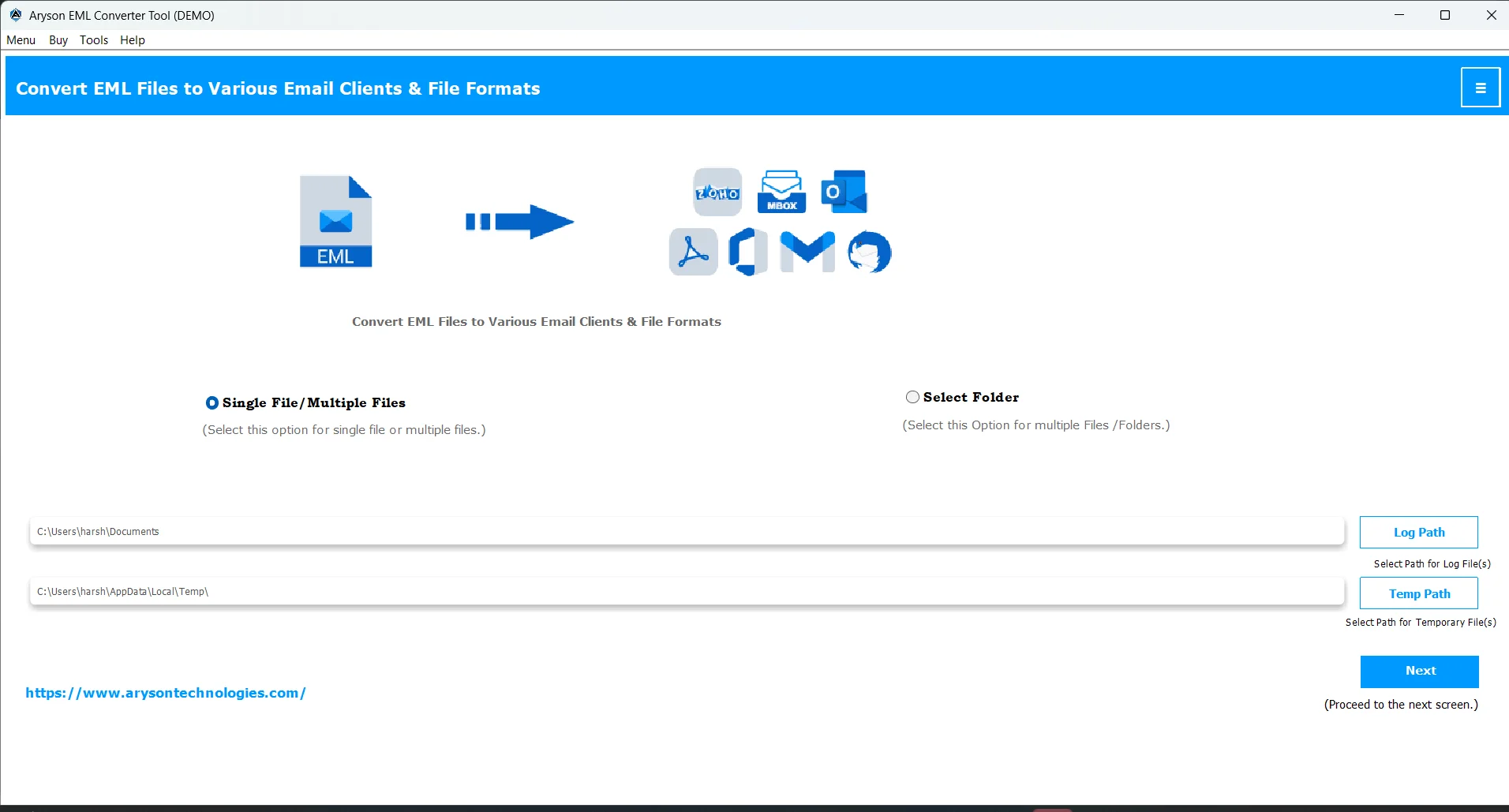
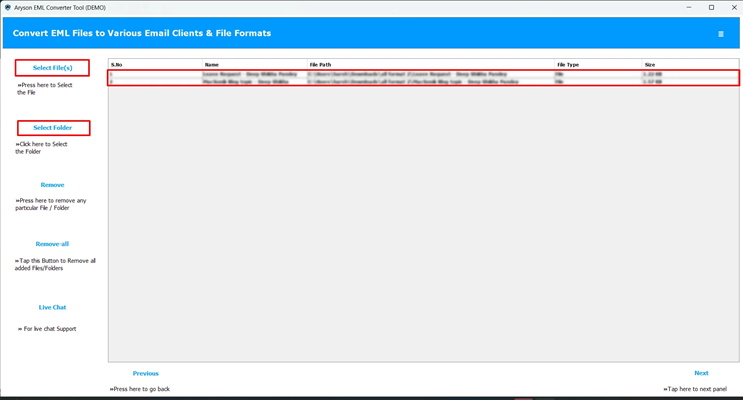
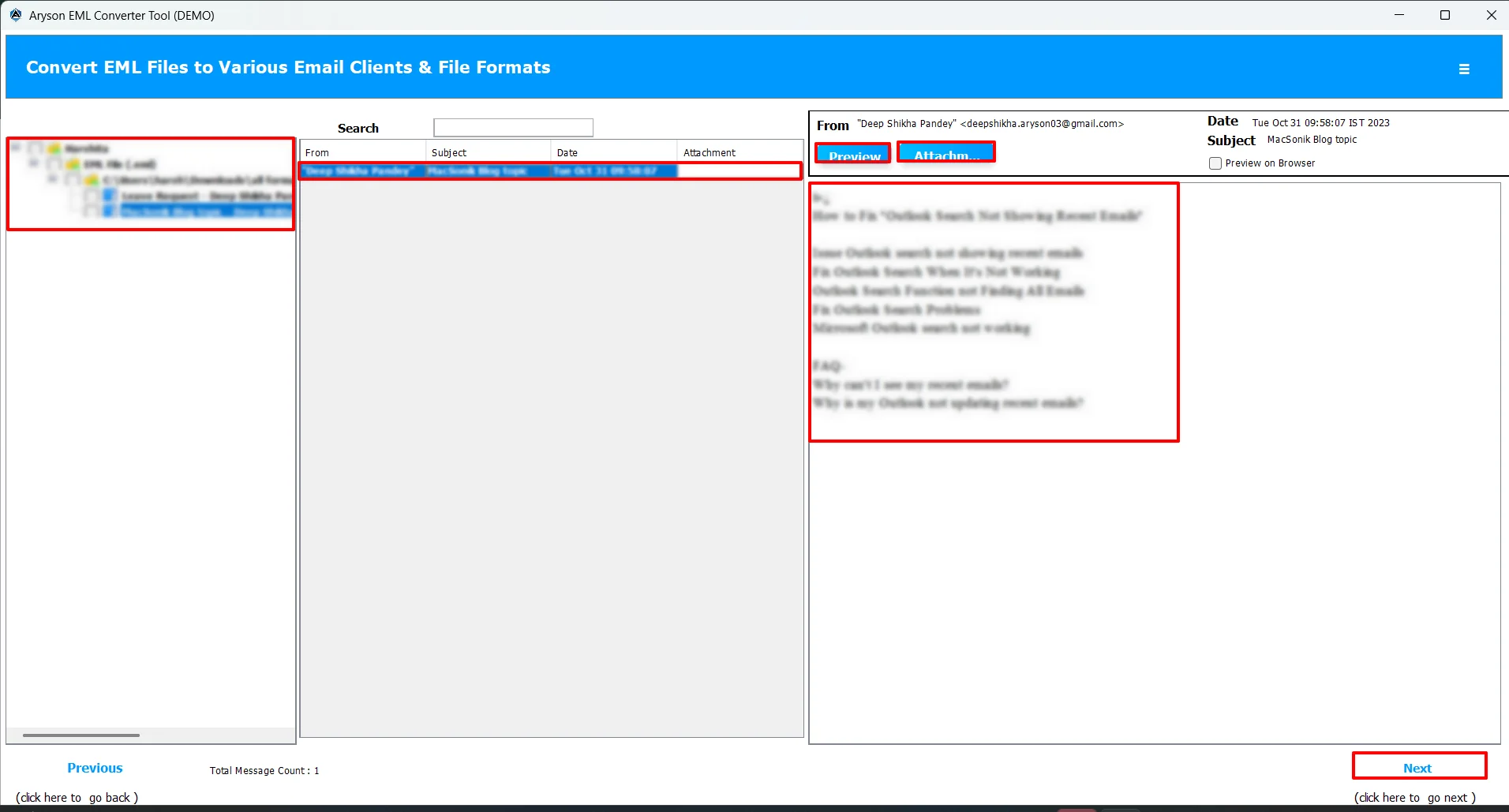
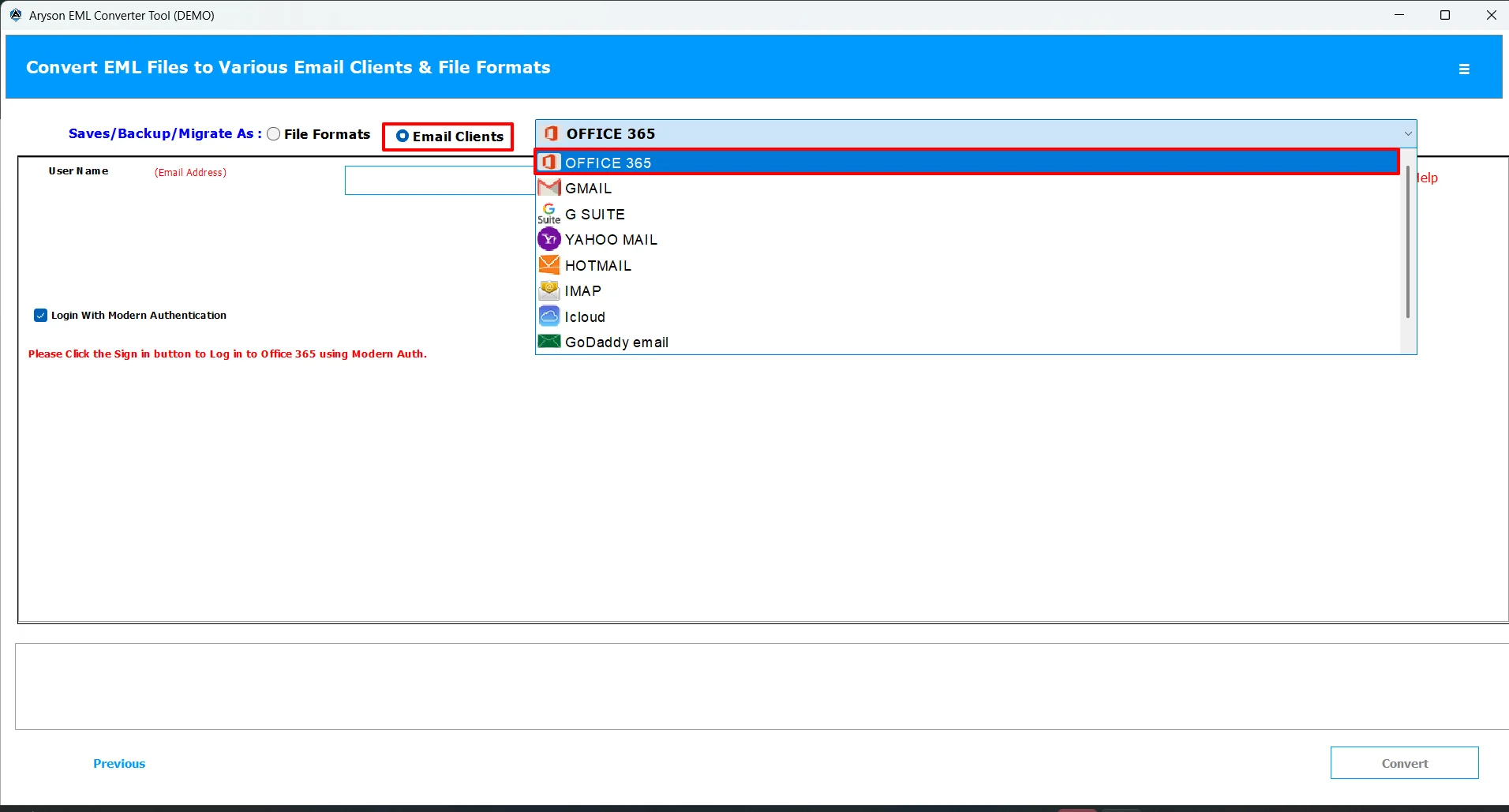
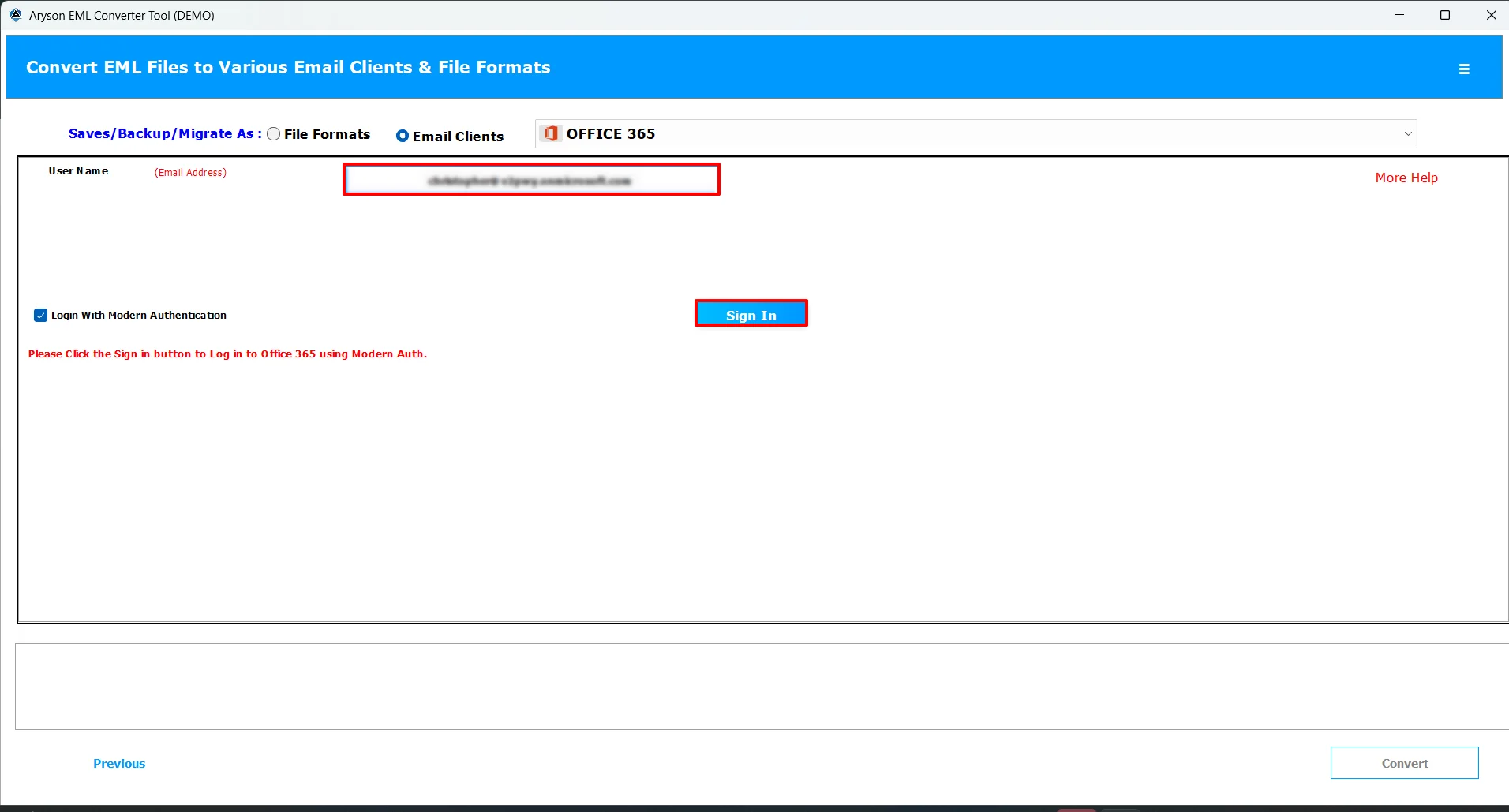
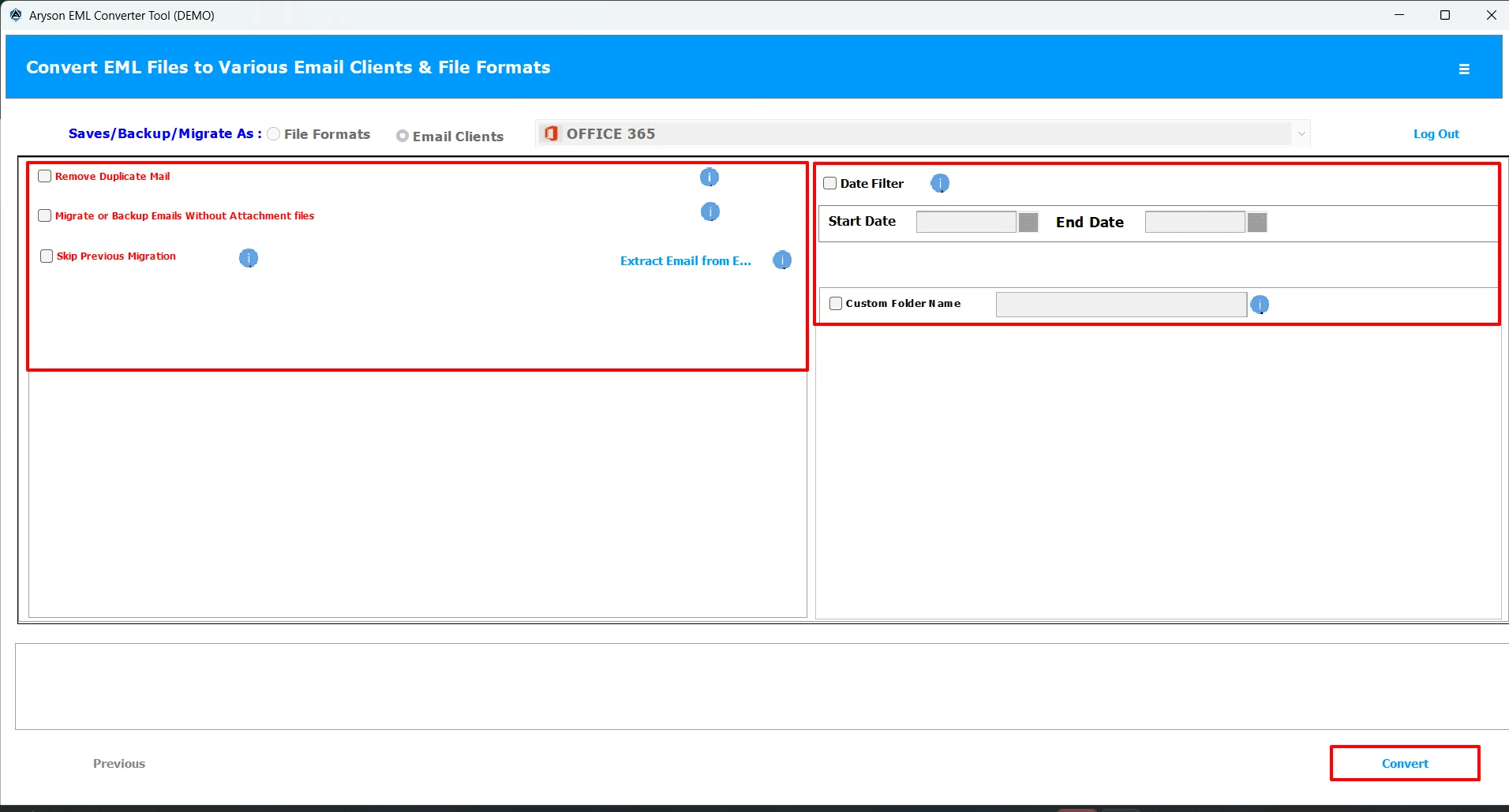
Finally, all your EML file data is imported into the O365 account.
| Note: You can even import EML to Zoho Mail, and other email clients like Gmail, Office 365, IMAP, AOL, Thunderbird, etc.. |
Rachel’s Success Story
Rachel, an operations manager, needed to migrate over 25,000 EML files from Windows Live Mail to Office 365. The manual method proved slow and complex. Using Aryson EML Converter, she successfully imported all emails with attachments, metadata, and folder hierarchy intact, completing the migration quickly and without data loss.
Conclusion
Through this blog, you understand the best and simple methods to migrate EML file to Office 365. The manual approach can be used to import small amount of data in Office 365. Whereas, for enterprise-level data, it is recommended to opt for the Aryson EML Converter. If you have any doubts in between you can reach out to the technical support team.
Frequently Asked Questions
Q.1 How to import EML to Office 365?
Ans: Users can use the Aryson EML Converter to import EML to Office 365. Simply load the EML files into the software, preview them, select Office 365 as the destination, apply filters, and click Convert.
Q.2 Will my email attachments be preserved during EML to Office 365 migration?
Ans: Yes, if you are using the Aryson EML Converter to import EML files into Office 365, all your email attachments be preserved during EML to Office 365 migration.
Q.3 Does the migration process maintain the original folder hierarchy?
Ans: However, the folder hierarchy may get disrupted in case of manual methods. If you are using the Aryson software, it will maintain the original folder hierarchy.
Q.4 Is data integrity maintained during EML to Office 365 migration?
Ans: Yes, the Aryson EML Converter provides users with a preview window that makes sure of data integrity during the EML to Office 365 migration. This makes the software suitable for the enterprises that have large amount of confidential and important data.,
Q.5 Does the software support large-sized EML files?
Ans: Yes, even if you have large-sized EML files, you can import them to O365 with the help of the Aryson EML Converter efficiently. Moreover, the accuracy of the migration will not be affected irrespective of the no. of emails.
Q.6 What Office 365 account permissions are required for migration?
Ans: For Office 365 migration, the source and destination accounts typically require Global Administrator or Exchange Administrator permissions. The migration application must also have the necessary Microsoft 365 API permissions granted with admin consent.
Q.7 Does the software provide technical support during migration?
Ans: Yes, Aryson provides 24/7 technical support to its users via live chat, email, and phone support. Even you can opt for the free demo version to evaluate the performance of the software before purchasing it.
Q.8 Does the software support incremental migration?
Ans: Yes, in order to eliminate redundancy, the software supports incremental migration. This eventually helps in improving the speed of processing and deliver accurate results.
About The Author:

Harshita Sachdeva, a professional technical writer at Aryson Technologies, specialize in delivering clear, hands-on documentation for data management, migration, and recovery solutions. With a meticulous, reader-first approach, I break down complex technical processes into simple, actionable content - helping IT professionals and decision-makers tackle challenges efficiently.
Related Post