





LiveChat

Aryson EML Converter
Converts EML File into MBOX, PST, MSG, PDF, EMLX, Gmail, Yahoo, IMAP, Thunderbird, Opera Mail and so on.

Star Image(4.8/5 Rated)

EML to PST Converter tool is surprising free EML File Converter software for converting EML files to PST when email clients need to switch mailbox from Windows Live Mail to MS Outlook. Aryson EML Converter is one of the most efficient and reliable software that enables the users to export their mailbox data items from EML file format to Outlook PST. It is a useful tool for the users seeking to migrate from EML email clients such as Windows Live Mail, Outlook Express, Mozilla Thunderbird, etc. to MS Outlook and other email applications such as PDF, MBOX, MSG, HTML, Opera Mail, etc. This software converts entire data from EML to Outlook PST without any loss or corruption of data. Also, it maintains entire folder hierarchy and data integrity during the whole process. It performs EML to PST conversion easily by facilitating the users to import EML to Outlook 2019, 2016, 2013, 2010, and other previous editions.

  • Performs conversion of EML file to various other file formats such as EMLX, MBOX, HTML, PDF, MSG, PST, and MHT.
  • Exports EML (messages) into Gmail, Yahoo, Outlook, IMAP, Thunderbird, and Opera Mail successfully.
  • Allows us migration of batch/multiple EML files into other email clients & file format at a time.
  • Save EML file emails as a TXT file format.
  • Exports EML files along with the attachments.
  • The search feature option helps to search out the EML files from the local system before conversion.
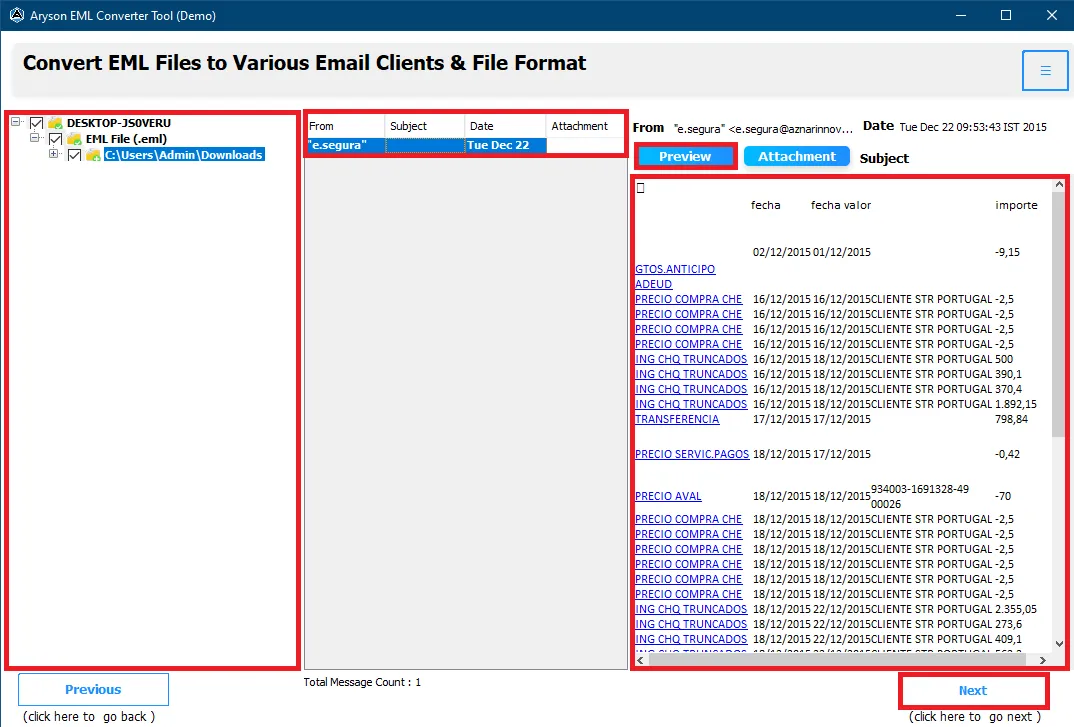
  • Facilitates us to previews all items, including emails, contacts, attachments, etc. of the EML file before converting.
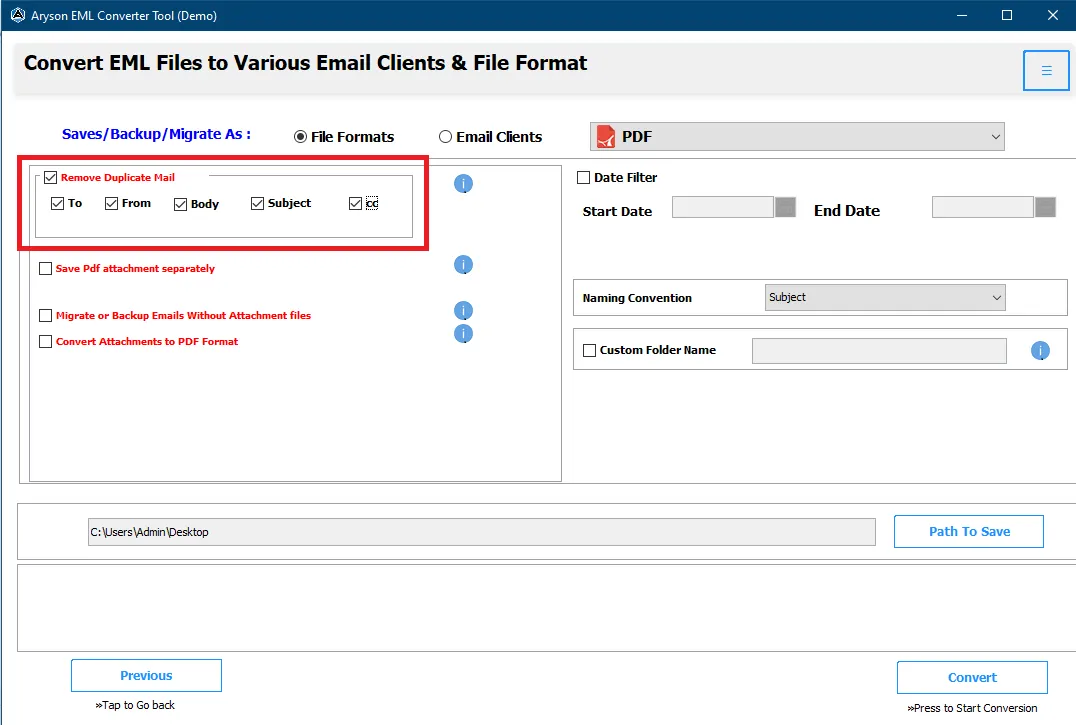
  • Offers Date Range saving options us to filter the messages of EML file according to date & year then perform the conversion.
  • Easy to use and interactive interface for the convenience of users.
  • Demo Version allows users to export up 25 emails from EML file for free.
select  

Download Live Demo - Aryson EML Converter Free Version Fully Secured Download to Freely Convert Up to 25 Email Items.

Remarkable Tool to Convert EML File with Ease

Aryson EML Converter tool is a remarkable software allows users to convert EML file with ease into 4+ file format (PST, EMLX, MSG, MBOX, PDF, etc.) & email clients (Yahoo, Gmail, Hotmail, Thunderbird, IMAP, etc.).

Follow the Five Steps to Convert EML (Message) File Easily:-

  • Step1: Download Aryson EML File Converter & Install.
  • Step2: Run Software & Click on the "Add File" button to Open EML File.
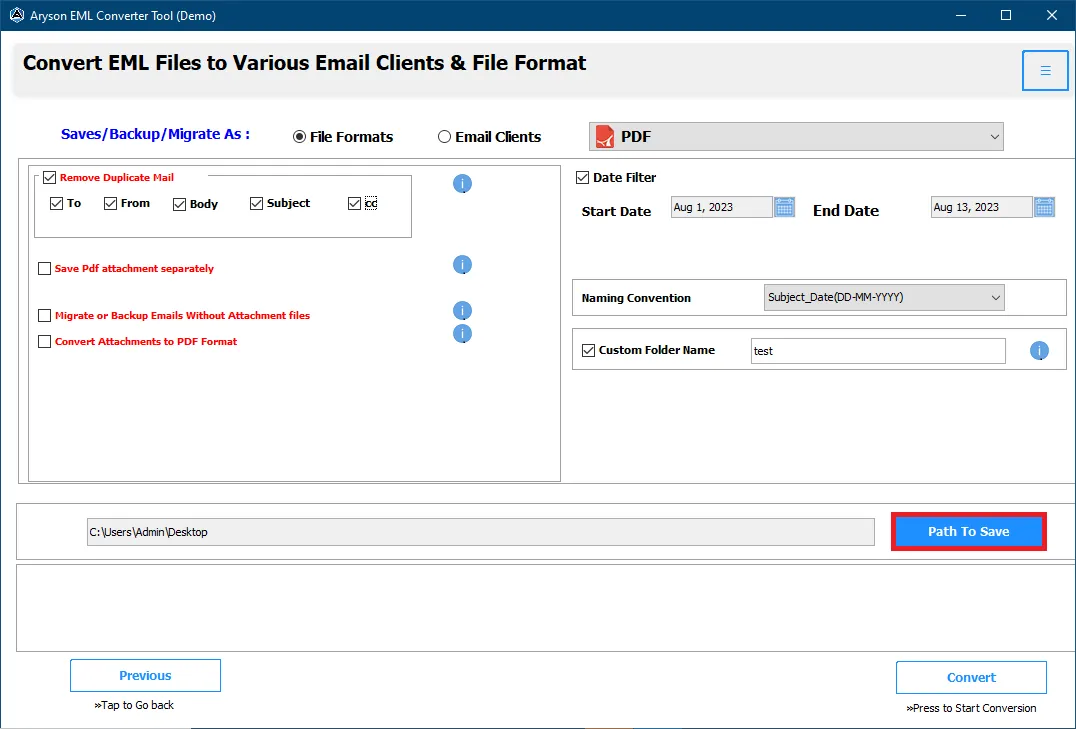
  • Step3: Choose the Destination Path to Save Message After Conversion of EML File.
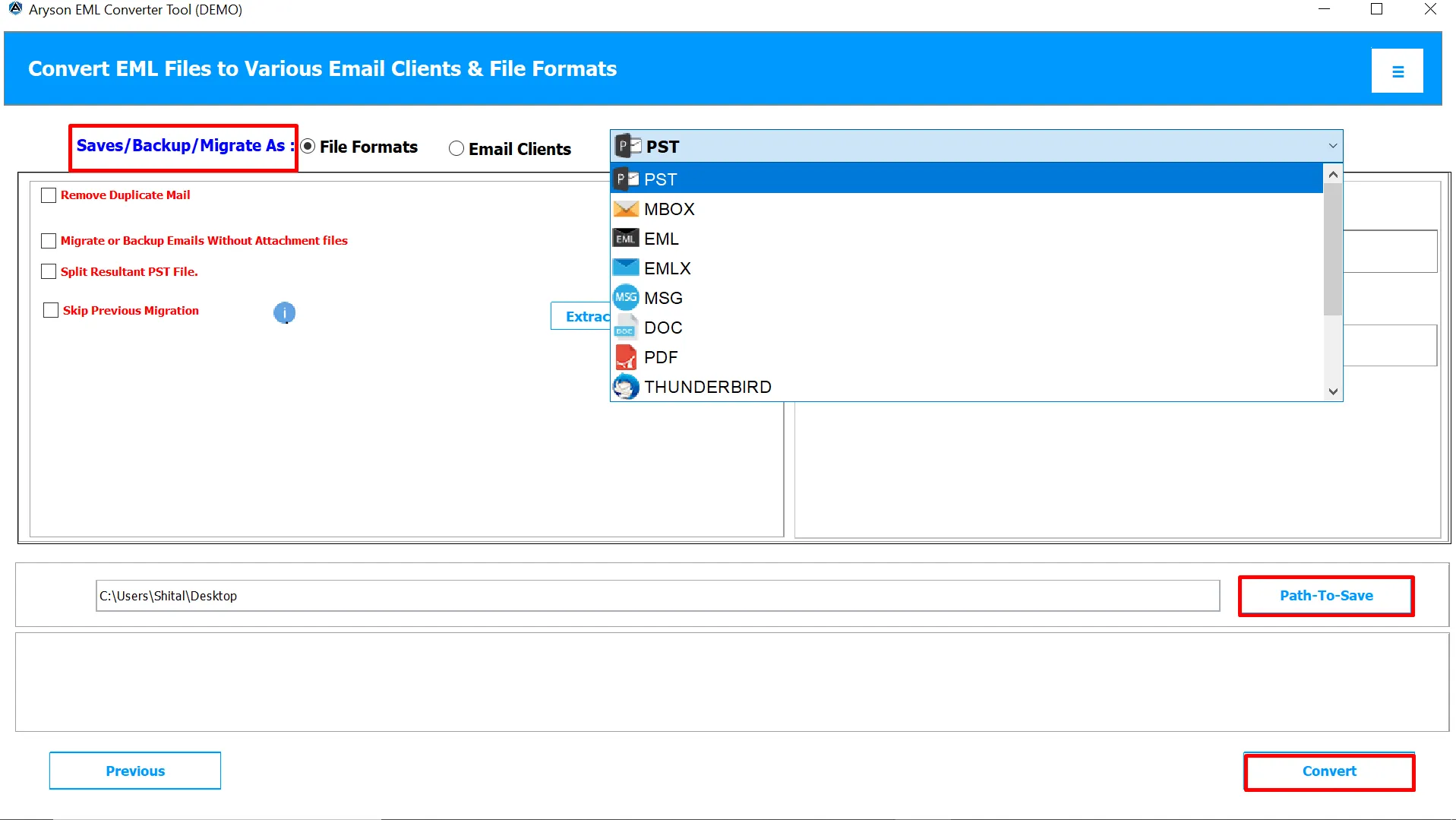
  • Step4: Now, select the file format from Select Saving Options.
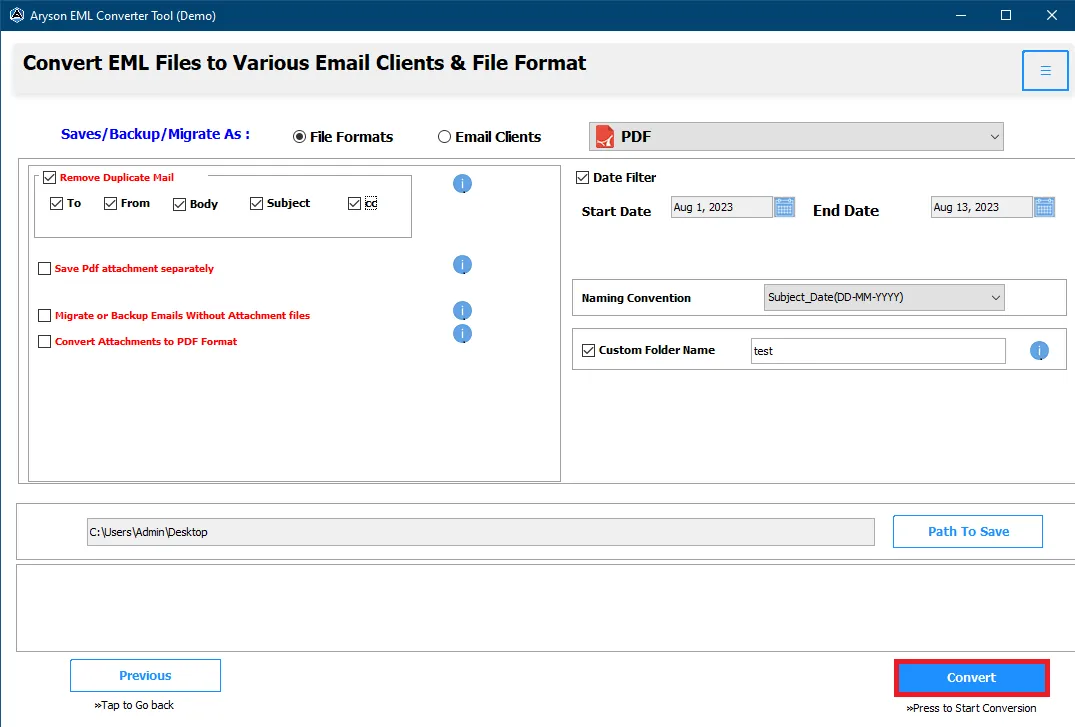
  • Step5: Click on Save button to Convert EML file to the selected file format successfully.
EML Converter

When to Use Aryson EML Converter Software?

Use When Need to Convert EML File to PDF File

EML to PDF Converter tool always helps you to convert the EML file to PDF file format when you need to print the messages from Windows Live Mail (EML) as a PDF file. If you need to print single as well as multiple EML files in PDF file, then use it.

When Outlook Clients Need to Convert EML as PST

With the help of EML to PST Converter software, Microsoft Outlook email clients easily search out EML files from the local pc and may convert them into PST file format. After that, users can easily access the converted EML as PST in MS Outlook.

When Need to Import EML File into Thunderbird

Aryson EML Converter is an efficient tool that allows us to import eml files into Thunderbird & Opera Mail. When Thunderbird email clients have to need to access messages from the EML file, then with the help of this software, users can import EML files into Thunderbird directly.

Use When Need to Convert EML File into Gmail

EML File Converter software allows us to migrate or converts EML file into web email clients such as Gmail, Yahoo, Hotmail, IMAP etc. When you need to access EML file into Gmail, then use this software.

Quick Converter Solution - Saves & Exports EML File into Various Email Clients & File Format

EML to PST Converter is 100% safe, free, and quick EML Exporter software to converts EML file into various email clients online, as well as save eml file into different file format on Windows platforms without any data loss.

Convert EML to PDF File Format

Convert EML to PDF File Format

Import EML File into Gmail Account

Import EML File into Gmail Account

Migrate EML File into Yahoo Mail

Migrate EML File into Yahoo Mail

Save EML Messages to Outlook

Save EML Messages to Outlook

Convert EML File to MSG File

Convert EML File to MSG File

Convert EML File as EMLX on Mac

Convert EML File as EMLX on Mac

Import EML File to Thunderbird

Import EML File to Thunderbird

Migrate EML File into IMAP

Migrate EML File into IMAP

Open EML File into Outlook

Open EML File into Outlook

Migrate EML File into Office 365 Account

Migrate EML File into Office 365 Account

Import EML File into Live Exchange Server

Import EML File into Live Exchange Server

Import EML File into Hotmail Account Online

Import EML File into Hotmail Account Online

Prominent Features Of Aryson EML Converter Tool

Safe and Quick conversion

Safe and Quick conversion

The EML File Converter tool is well equipped with an advanced and sophisticated algorithm that makes it efficient enough to carry forward quick EML conversion in a fast manner. It keeps in focus data integrity so that all the email properties and folder hierarchy remains intact without any loss of data.

Export EML files to multiple file formats

Export EML files to multiple file formats

With Aryson EML Converter software you can export EML files of Windows Live Mail & Outlook Express into other different email clients and file format. It makes a swift and fast EML Conversion into various file formats such as PST, PDF, EMLX, HTML, MSG, MBOX, MHT, TXT, Gmail, Yahoo, Outlook, IMAP, Thunderbird, and Opera Mail.

Batch Conversion of EML files

Batch Conversion of EML files

Aryson EML Converter facilitates the users to perform conversion of single as well as multiple EML files at a time to save a lot of effort and time. It is inbuilt with an advanced algorithm so that it can convert multiple files at a time without any alteration or data loss in minimal time.

Advanced Search Feature

Advanced Search Feature

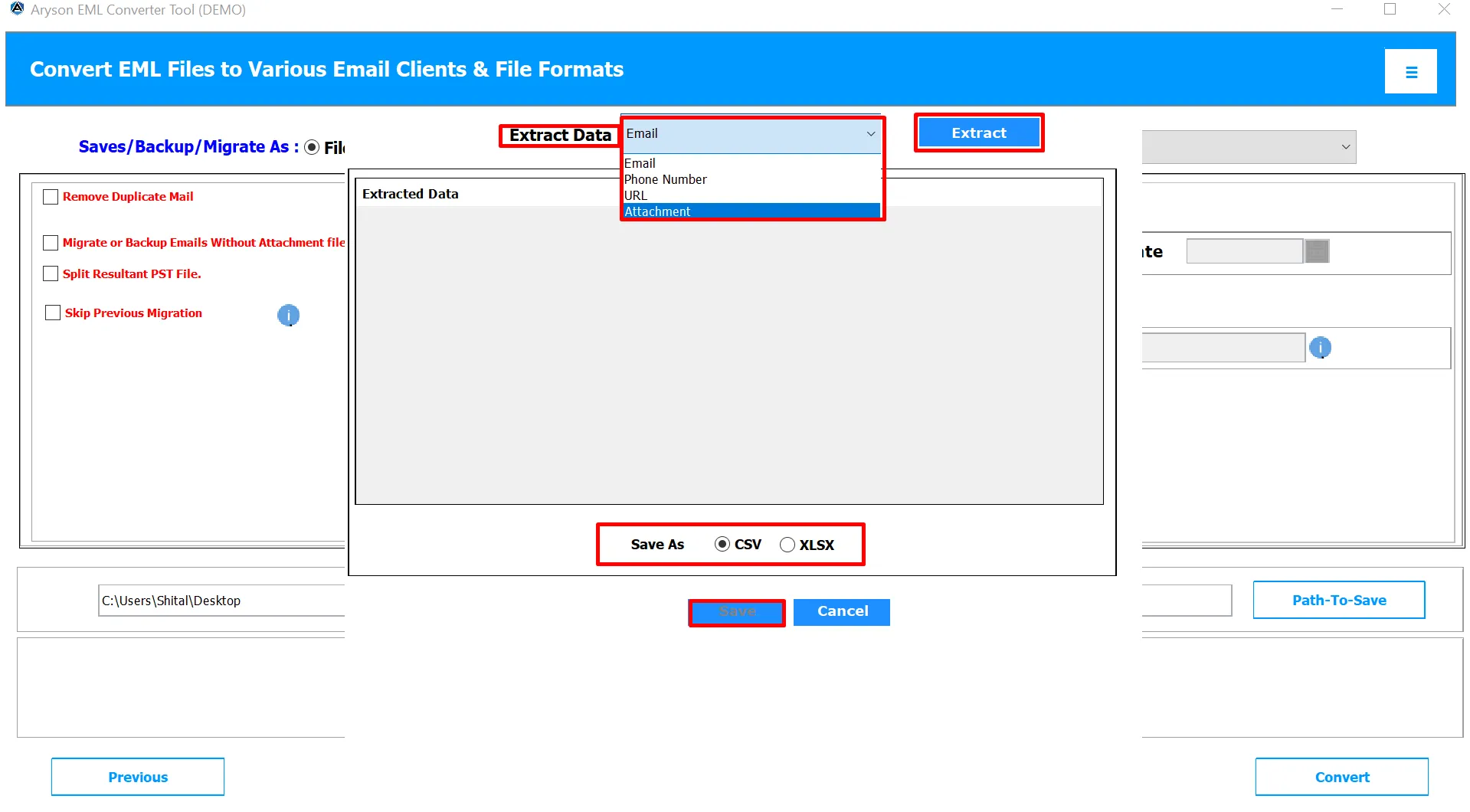
This software tool is featured with an Auto-Search Option that allows the users to search for a particular EML file from the local system if the user are not able to find. Using this feature, you only need to enter the name of the folders & file, and it will search out the eml file from the local pc.

Resume option during connection break

Resume option during connection break

This tool is featured with an option to resume the process if there is a break in connection. Users do not have to start the process from scratch if there is a sudden connection problem. They can resume the process where they’ve left before connectivity issue.

Date Range Filter Option

Date Range Filter Option

EML to PST Converter has essential features data range that enables the users to select the emails as per a specific date range of EML file and export them successfully. In this feature, users can filter the unnecessary emails and can choose only the relevant and particular emails by putting a variety of date.

Simple GUI

Simple GUI

It is a useful software tool having simple, user friendly and easy to use graphic user interface. Both technical and non-technical users can handle it by utmost ease. There is no need to have the technical expertise or prior domain knowledge to operate this software.

Wide Compatibility and Support

Wide Compatibility and Support

This EML migrate tool widely supports all the versions of Windows OS. It has been developed in such a way that users can download and access this application easily on Windows 10/ 8.1/ 8/ 7/ Vista/ XP and other previous versions without any hassles and restrictions.
Technical Overview

EML is an email format used by email programs such as Windows Live Mail, Outlook Express etc. EML files are structured in a way that they contain header and body messages. There are many email clients that stores email with .eml file extension as a default file format. But, every individual and organization prefers a particular email application as per their convenience and suitability. Some users wish to migrate from Windows live mail or from Outlook Express to some other email clients such as MS Outlook. For that, they need to export EML files to different file formats. Aryson EML Converter is a convenient software that allows users to converts EML into PST and other important formats such as PDF, MSG, MBOX, EMLX, MHT, etc. therefore, after conversion users can access the EML (message) into different email clients.

You can also export EML files to some important email clients such as Yahoo, Gmail ,Outlook and IMAP. For doing this, you need to make sure that “Two step authentication” has been turned Off. Also, you need to turn on the access to “Less secure apps”.

Aryson EML Converter Software
Used for Exporting EML File into Various File Format & Email Clients.

The EML File Converter is the best EML to PST Converter tool helps to export single or multiple EML files into PST file and other different file formats like PDF, MSG, HTML, MBOX, and EMLX File. It also supports to directly upload multiple EML files into Yahoo, Gmail, and Hotmail at time.

Let's Know Ways to Convert EML File to PST and other file formats.

Use the following steps for Converting EML file:-

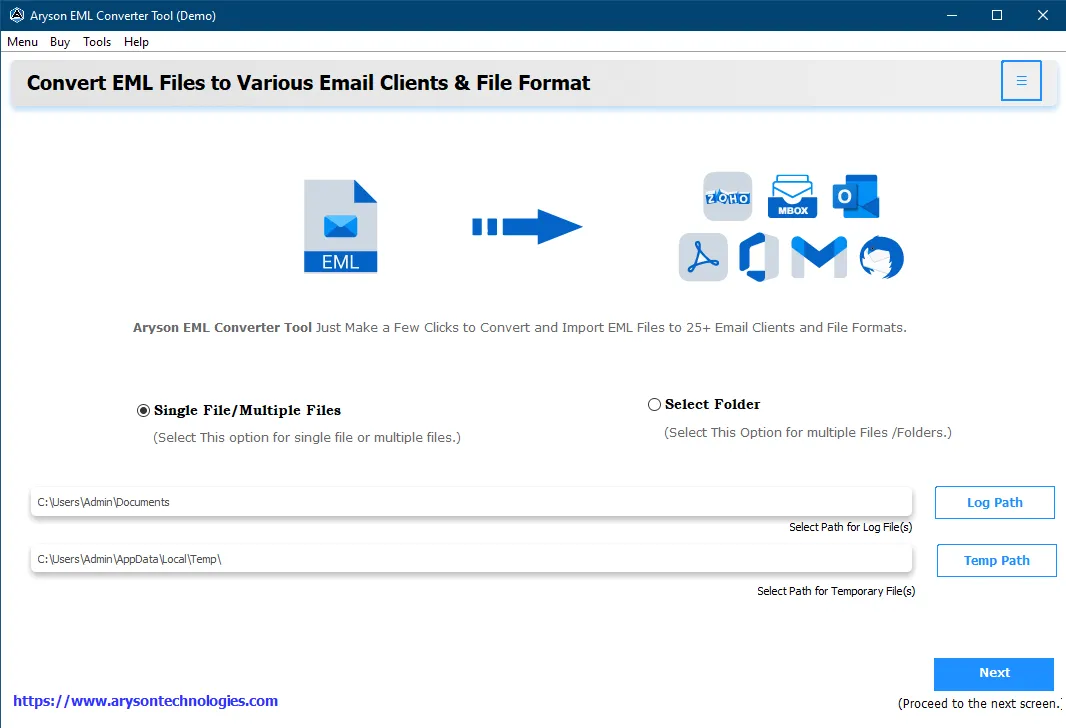
  1. Run Aryson EML Converter Software.
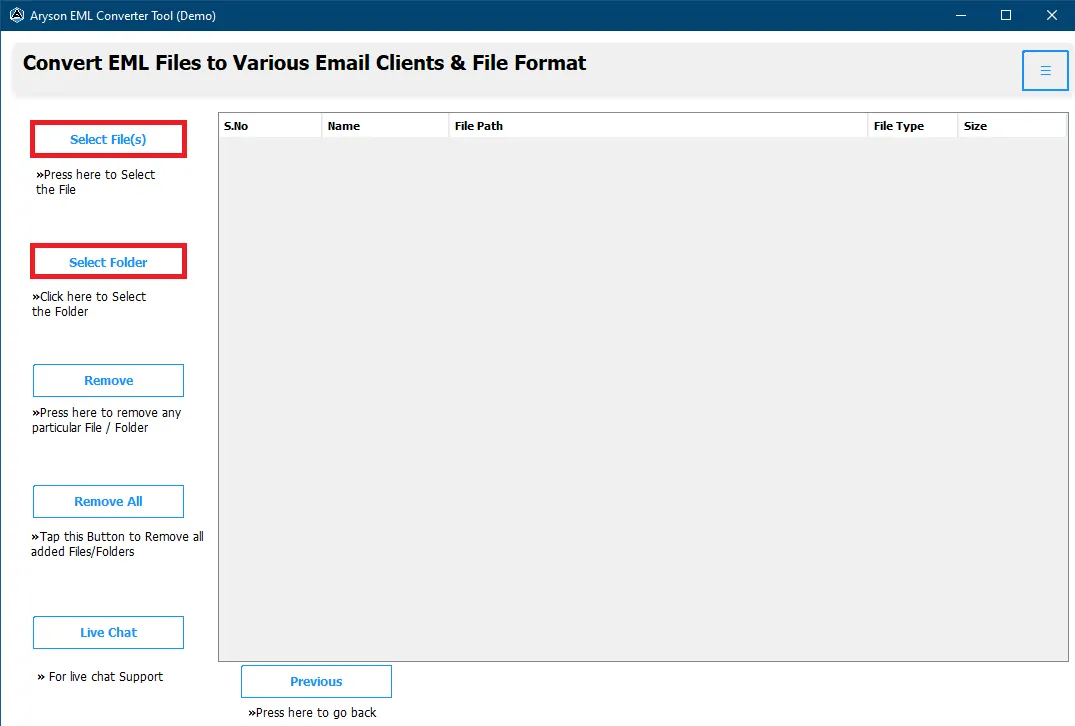
  2. Select your single or multiple EML files from 'Browse' options.
  3. Click the 'Export' button to start the loading process.
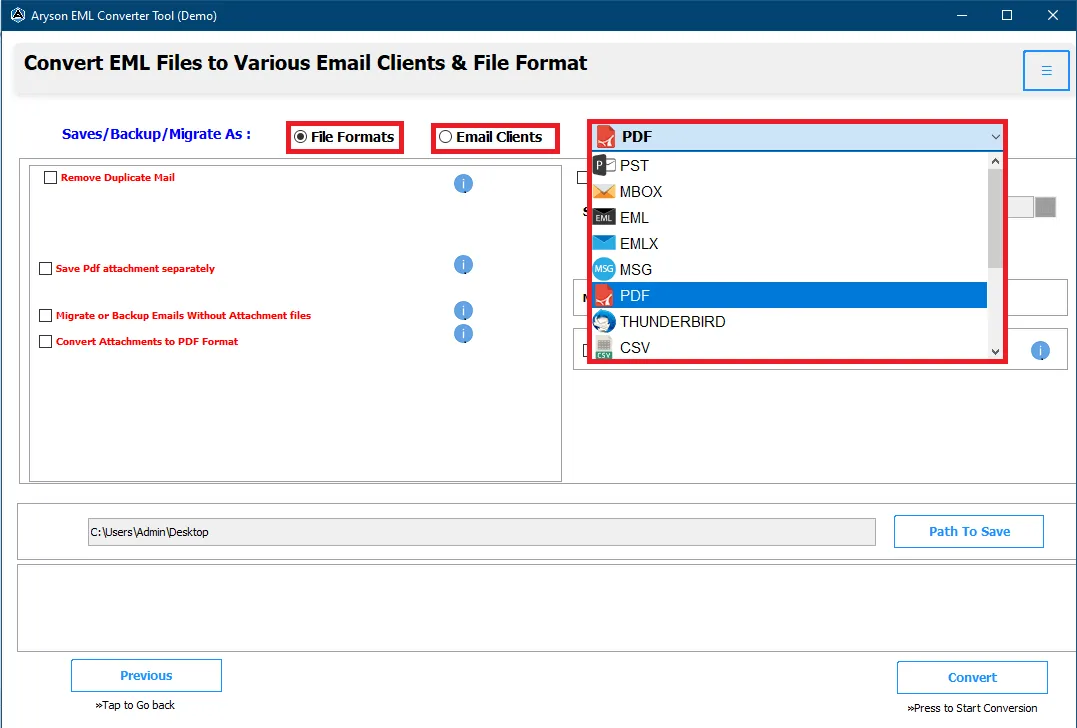
  4. Click 'Save File' button to Save EML file into a different file format.
  5. Choose 'PST' file from Save File Option to Convert EML file to PST format.
  6. Click the 'Browse' button to select destination path an click on 'OK' button.
  7. Welcome, your resultant PST file saved at your selected path folder.

The software will add single or multiple EML files and list the email folder in the wizard. Click on the selected folder to previews its content of items and save them at a destination folder path.

Let's Know Ways to Import EML File into Yahoo, Gmail, and Hotmail.

Use the following steps for importing EML file:-

  1. Run Aryson EML File Converter Tool.
  2. Open single or multiple EML files from 'Add File' options.
  3. Choose Yahoo or Gmail option from 'Select Saving Option' options.
  4. Click the 'Save' button to start the loading process.
  5. Enter the Yahoo or Gmail credential and Click on 'Login' button.
  6. Exports email according to date range from 'Date Filter' options.
  7. Congratulation, your EML file successfully import into Yahoo or Gmail.

The software will add your single or multiple EML files at a time and click on Save button to successfully import EML file into Gmail, Yahoo, and Hotmail account according to your needs.

Software Specification

System Requirement
processor
Ram Recommended
Opreating System
License Types
Home License
Home License
Corporate License
Corporate License
Technical License
Technical License
Software Delivery & Version
ElectronicYes
Version 22.1

Comparison of Demo & Full Version

Product Features Free Version Full Version
Select and open EML files
Supports Batch EML Conversion
Date Range saving option
Multiple file saving option First 25 emails only
Resume option when there is a break in connection
Strong compatibility with all Windows OS
24*7 Tech Support & secure 100%
Price Free $39
Money-Back Guarantee
Rating & Review
cinet

EML to PST Converter - The most trusted & downloaded software on CNET that allows users to migrate emails from EML file into a different file format and email clients. Read More..

Softpedia

Softpedia guarantees that Aryson EML Converter is 100% Clean, which means it does not contain any form of malware; therefore, you can install & run in their system and perform EML Conversion process. Read More..

soft32

EML File Converter tool reviewed by Soft32, which allows users to import EML file into various email clients such as Gmail, Yahoo, Hotmail, Thunderbird, IMAP etc. Read More..

software informer

EMAIL Migration tool reviewed by Software.Informer that allows users to save messages from EML file into PST, PDF, MSG, EMLX, MBOX, TXT and other file formats on all Windows platforms. Read More..

Frequently Asked Questions

You need to simply follow the below procedure using this software:

  • Run EML Converter on your system.
  • Choose EML file(s) you need to export.
  • Select the file format and location where you want to convert the EML files.
  • Your EML files will be converted to desired file format.

You don’t need to restart the whole procedure if there is a break or glitch in the connection. There is a resume option using which you can carry forward the conversion where you have left.

Yes, this EML File converter is compatible with all the versions of Windows including the latest Windows 10.

Yes, using this tool you can perform batch conversion i.e. single as well as multiple files at at time.

You can follow the below steps for this process:

  • Choose Gmail in “Select saving option” and click on Save button.
  • You need to ensure that you have Turned off the “Two step authentication” and Turned on access to “Less secure apps”.
  • Enter your Gmail login credentials to login to your account.
  • File saving process will be started. Wait for a short span of time.
  • Once the process gets completed, Click on OK.

Yes, the process is almost similar to that of Gmail. The only difference is that you need to select Yahoo in place of Gmail in the File saving option. Also, you need to provide Yahoo login credentials.

Follow the below steps:

  • Run the software tool. Select file(s) and destination folder for saving.
  • Now, Choose Outlook in the saving option and hit a click on Save button ensuring that “Two step authentication” is turned off and access to “Less secure apps” is turned on.
  • Enter Outlook login email ID and Password.
  • Wait for the completion of file saving process and click OK.

Go through the below steps for this conversion:

  • After launching the software, select the destination folder and EML files.
  • Now, in the file saving option, Choose IMAP and proceed.
  • Make sure to turn off “Two step authentication” and Turn on access to “ Less secure apps”.
  • Here, you are required to enter IMAP login details. Also, enter the IMAP server and Port number.
  • Follow the further steps accordingly.

It converts EML to PST, PDF, MHT, EMLX, MBOX, HTML, MSG, yahoo, Gmail, Outlook,Thunderbird, IMAP, txt and Opera Mail. There are total 14 file formats in which it can convert EML files.

No, the software doesn’t require installation of any email application for its working.

The only limitation that you’ll face is that you can convert only first 25 emails for free using the trial version. For more, you need to purchase the full version.

EML is a file extension of an email message.EML format was developed by Microsoft Corporation. It is an Electronic Mail. Its MIME Type is message/rfc822. EML file was created to suit the industry RFC 822 standard that is the normal format for Arpa Internet text messages 1st planned in August 1982. EML is stored in a file in the format of MIME (Multi-purpose Internet mail extension). It contains plain ASCII (American Standard Code for Information Interchange) text for the headers. Its primary use at that time was Outlook Express.

This tool does not have many prerequisites. You only need to have window OS and appropriate free space for the converted files .If converting to a web based client you need internet connection

To get an idea of our tool, just install the DEMO version to check the performance and working functionality of our tool. It lets you see the entire procedure of converting eml into other file formats and web clients . However, the demo tool is restricted . It allows the processing of first 50 items per folder or 50 files.Otherwise all the processes are the same.

Yes, The software allows users to convert selective EML files by using date filters or choosing individual files from the preview section.

No, the tool only supports Windows OS.

Yes you can convert more than one eml file using the multiple files \folder option given in our tool and clicking next.

Our software does not have any such limit in full version while in demo it only converts 50 files.

Yes can see the preview of your eml file before the conversion.

Yes you can export eml to gmail using our tool the steps for multiple eml files exports are as follows

Installs EML Converter Software, and Run.

  • Select multiple Files/Folder option
  • Click on the Next button
  • Browse and Select file and folder from the option .
  • Click on Next
  • Select the files and folder from the tree
  • Click on the Next button.
  • Now, choose desired Gmail options from the dropdown list.
  • Sign in to your gmail account using email-id and application-specific password
  • Check the Mail Filter (if required).

Yes you can export eml to yahoo mail using our tool the steps for multiple eml files exports are as follows

Installs EML Converter Software, and Run.

  • Select multiple Files/Folder option
  • Click on the Next button
  • Browse and Select file and folder from the option .
  • Click on Next
  • Select the files and folder from the tree
  • Click on the Next button.
  • Now, choose desired yahoo options from the dropdown list.
  • Sign in to your yahoo account using email-id and application-specific password
  • Check the Mail Filter (if required).
  • Click on the Convert button, and export eml file

Yes you can export eml to Office 365 using our tool the steps for multiple eml files exports are as follows

Installs EML Converter Software, and Run.

  • Select multiple Files/Folder option
  • Click on the Next button
  • Browse and Select file and folder from the option .
  • Click on Next
  • Select the files and folder from the tree
  • Click on the Next button.
  • Now, choose desired Office 365 application options from the dropdown list.
  • Sign in to your Office 365 account using email-id and password
  • Check the Mail Filter (if required).

Yes you can export eml to file format using our tool the steps for multiple eml files exports are as follows

Installs EML Converter Software, and Run.

  • Select multiple Files/Folder option
  • Click on the Next button
  • Browse and Select file and folder from the option .
  • Click on Next
  • Select the files and folder from the tree
  • Click on the Next button.
  • Now, choose desired file options from the dropdown list.
  • Check the Mail Filter (if required).
  • Click on the Convert button, and export eml file
  • capgemini
  • moto
  • ibm
  • county
  • oreilly
What Our Customers Are Saying About Us
 Submit Your Review
You Might Be Interested in These Products Too

Aryson Hotmail Backup Tool

Aryson Hotmail Backup Tool

Read More 

Aryson Gmail Backup Software

Aryson Gmail Backup Software

Read More 

Aryson Office 365 Backup Tool

Aryson Office 365 Backup and Restore Tool

Read More 

Aryson PDF Manager

Aryson PDF Manager

Read More 
Service

At Service Since
2010

Trusted

Trusted by
Millions

SSL Secure

SSL
Secure

McAfee

McAfee SECURE
100% Secure

Aryson Technologies

united states

2880 Zanker Road, Suite 203, San Jose, CA - 95134, USA

india

A-58 , 2nd Floor A Block Sector 57, Noida, Uttar Pradesh 201301, India

Find Us on

Subscribe to our newsletter to get the latest News & Update

© Copyrights 2014 by Aryson Technologies Private Limited - All Rights Reserved

DMCA.com Protection Status