-

Written By Rohan Wiese
-
Updated on May 14th, 2025
How to Analyze EML Files for Forensic Investigations: Expert Guides
Summary:- In the technical era, emails are very crucial and play an important role as digital evidence. These are largely used for legal compliance, forensic investigations, and more. Several email clients have different file formats that they support, but one common one is the EML (electronic message) format. Furthermore, to find solutions on how to perform EML file forensics, first understanding the need for analysis is more important. So, this guide elaborates on reasons, technical ways, and an EML File Converter Software for detailed and successful results.
Understanding EML Files
To analyze EML files, a user must be well aware of the file format that contains crucial email information. It stores header, attachments, and hyperlinks in ASCII form and is a plain text file. You can open it with any text editor application, like Notepad or clients like Outlook, Thunderbird, Windows Live Mail, etc. It is very similar to the MIME HTML (.mht) format. Additionally, you can access the EML file content, metadata, and more on any web browser accurately.
When it comes to EML file examination in digital forensics, its components and email message structure analysis are done properly. Additionally, it gives results that the file is ideal for backup and archiving data. Moreover, EML files highly comply with the MIME RFC 822 industry standard for formats.
Why Do Users Need EML File Forensics Investigation?
The digital forensics email examination of EML files depends upon user-to-user preferences and choices. The most common reason is the email evidence extraction. Some other factors include:
- To investigate a particular case or search for a specific message in the email.
- For identifying the hidden evidence and messages in the EML files being shared across email clients.
- To recover the crucial or missed components, data from the large volume of EML files.
- Secure the data from threats by identifying phishing attacks or malicious links within it.
- To find out the spoofing sender or the details of the malware vectors, and more.
This explains how beneficial forensic analysis of EML files can be for the following:
- Corporate investigations
- Legal proceedings
- Cybercrime and Forensic Cases
Let’s proceed further to understand all the available email forensic investigation methods.
Steps and Methods for EML File Forensics Analysis
The word analysis is not limited to a specific part but to the entire email data. It includes headers, body content, attachments, metadata, and their sub-components. Users scrutinize EML files for absolute email evidence extraction by following specific procedures. This requires smart and proficient forensic solutions like a Windows Live Mail Viewer. But before that, learn some free manual techniques that can provide deep visibility into digital forensics email examination.
Manual Approaches for EML Email Header Analysis
Follow some easy, quick, and basic manual ways to investigate the EML file for effective results:
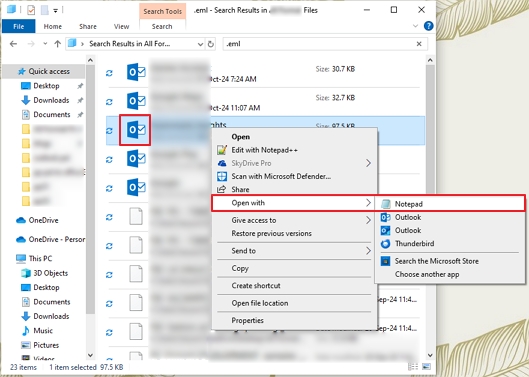
Way 1: Verify and Check EML Using a Text Editor
- First, browse the folders on your system and locate EML files.
- Select any, right-click, and choose to Open With → Notepad (or other Text Editor).
- Further, as the data is in text and MIME format, you can easily analyze the following:
- Headers: From, Subject, To, Date, ID, and more.
- Routing Details: Received
- Other Body and Message Content: by MIME parts
Way 2: Parse Email Headers for EML File Forensics
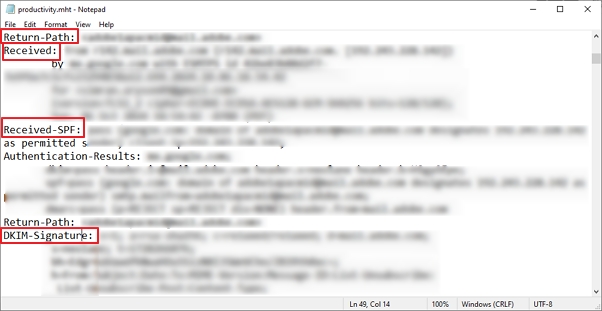
- Now, to trace the actual path of the emails, manually analyze the Received headers in the EML file.
- Then, detect the email spoofing issues with the From and Return-Path text lines.
- After that, to ensure the authenticity of the sender, check details like DKIM-Signature, SPF, and DMARC.
Way 3: Other Common Factors to Analyze EML Files
- Inspect the hyperlinks embedded in your EML file by opening them in a safe environment offline.
- Paste URLs in a Text Editor and look for redirects, IP URLs, hex encodes, etc.
- Furthermore, extract the attachments separately to inspect and analyze them. The steps are:
- Identify the beginning and end of the encoded file with MIME boundaries.
- Copy the entire encoded content into a new Notepad or file.
- Reconstruct the attachment. (Example: You can use a base64 decoder in Mac environments to test them.)
- Finally, use the command lines for a deep EML file forensics investigation.
The manual methods for the forensic analysis of EML files are completed. However, these methods are very troublesome, especially for novice users. There are many other loopholes in this free solution.
Shortfalls of the Manual Method
- Ensure to create a copy of EML and do all the work in it, or else face huge losses.
- Clicking any link without a secure and isolated environment impacts data badly.
- A malware sandbox is necessary to scan the extracted files for major issues.
- Despite the control and transparency, it is time-consuming to analyze each element individually.
- Not beneficial in a restricted environment or if the EML file for analysis is unhealthy.
Thus, the best alternative here is to use an expert EML file viewer for forensics analysis.
Recommended Approach for EML File Forensics Investigations
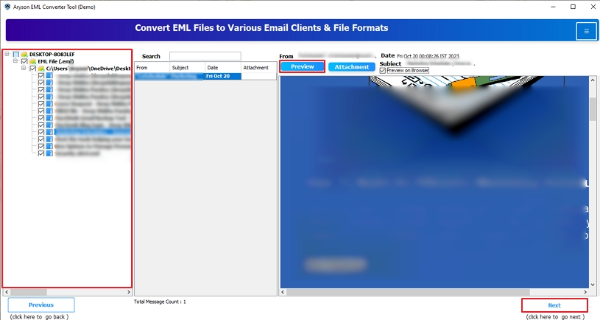
When the manual method fails and you need bulk email message structure analysis. Then, use the Aryson EML File Analysis Software for a smooth experience. It is a simple software that provides a detailed preview of the EML files’ data and attachments. One can check all the embedded information of EML files at once without any size limitations. Additionally, Open EML File in Outlook or access it in any other email client. Moreover, users can easily convert EML to PDF and many other formats.
Stepwise Guide for EML Email Header Analysis
- Download, install, and run the EML File Viewer for Forensics software.
- Then, choose any one radio selection option as per the need and press Next.
- Further, with Select File or Select Folder, add any number of EML files.
- Click Next, and the tool starts to scan the given files and folders.
- Once it finishes scanning, select folders from the tree format and click Preview.
- Afterward, analyze all the files and attachments. Click Next to proceed if you want to save the data.
- At last, pick a relevant file format/email client and filter accordingly. Click Convert.



Conclusion
EML file forensics sounds challenging, but with the right tools, even novice users can investigate. Whatever the case may be, EML forensics is great evidence. You can either go for the manual way, but there are several limitations to it that may compromise the data. Instead, utilize the professional tool and have a great and safe EML file examination.
Frequently Asked Questions:-
Q1. Can I analyze EML files without Windows Live Mail or Outlook?
Ans- Yes. Examine the EML files without any email client by using the EML File Viewer for Forensics. You can open, read, analyze, and save any number of small or large EML files without WLM, Outlook, etc.
Q2. What is the best way for an EML file forensics investigation?
Ans- Forensic analysis of EML files is best when done using an expert-recommended tool. One such tool is the Aryson EML Converter Software, as explained above. It helps uncover all the major data of the EML files with complete accuracy.
About The Author:

Rohan Wiese is a Technical Writer at Aryson Technologies. He is an expert Email Forensic, Cloud Computing, and a passionate nerd with over 10 years of experience in technical content writing. He writes about Cloud Migration, Database Recovery, Email Backup, Windows, Mac, and Tech.
Related Post