-

Written By Rohan Wiese
-
Updated on April 23rd, 2026
How to Split MBOX File into Smaller Parts Easily
MBOX is one of the most widely used file formats for storing emails in applications like Mozilla Thunderbird, Apple Mail, Eudora, Spicebird, and Opera Mail. Each MBOX file can contain thousands of email messages along with attachments. So that, it becomes useful to keep all mailbox data in one place. However, the real problem starts when these files grow too large. A single oversized MBOX file can slow down your email client and probably lead to file corruption and permanent data loss. The best way to solve this issue is to split MBOX file into smaller parts. In this blog, we will explain available solutions to perform the split process. Other than that, you can directly move to the Aryson MBOX Converter to split mbox into multiple mbox files in a hassle-free manner.
Why Users Prefer to Split Large MBOX File into Small Ones?
When MBOX files exceed a certain size, they can cause significant performance and management issues. That’s why many users choose to divide them into smaller files. Below are the key reasons to split MBOX File into smaller parts:
- Large MBOX files take longer to load and slow down email applications like Thunderbird, Apple Mail, and others.
- If you have small MBOX files, then you can easily backup, store, and transfer MBOX files between systems or servers.
- When you divide MBOX files by size, date, or sender, then it becomes easy to search and manage emails in a convenient way.
- Email clients handle smaller files more efficiently, which helps optimize storage space and system performance.
- Large MBOX files can get damaged more easily. If that happens, it is hard and risky to recover them. Smaller files are safer and help avoid data loss.
Explore the Procedures to Split MBOX File into Smaller Parts
To handle large MBOX files more effectively, it’s essential to split them into smaller parts. In the following section, we will explore the most effective procedures to split an MBOX file safely and easily.
Procedure 01: Manual Way to Split Large MBOX File
If you want to split your MBOX file without using software, you can do it using Thunderbird with the ImportExportTools NG add-on. Follow these steps:
- Open Mozilla Thunderbird on your computer.
- Install the ImportExportTools NG extension (available on the Thunderbird add-ons store).
- Once installed, create new folders in your Thunderbird account.
- Open your large MBOX file and select the emails you want to move.
- Move selected emails into different folders based on date, sender, or category.
- Right-click on each folder and select Export Folder>> click export to MBOX and split MBOX file into smaller parts.
It will create multiple smaller MBOX files from your large file.
Limitations of the Manual Method
- The process is time-consuming, especially for large files.
- Requires technical skills to manage add-ons and exports.
- No direct option to split MBOX by size (only possible by manually moving emails).
- High chances of human error leading to missing emails.
Because of these drawbacks, many users prefer an automated solution.
Procedure 02: All-in-One Best Solution to Split MBOX by Size
When it comes to split large MBOX files, the Aryson MBOX Converter Tool stands out as a complete solution. It can handle large mailbox files from email clients like Thunderbird, Apple Mail, Opera Mail, and more. Simply, you have to select PST as the output format and split the resultant file according to the preferred file size. Apart from that, you can convert MBOX to PST, PDF, EML, TXT, and others as well. Additionally, it is compatible with Mac and Windows OS. So there is no issue of compatibility when you split MBOX File into Smaller Parts:
Follow these Simple Steps to Split MBOX File into Small Size
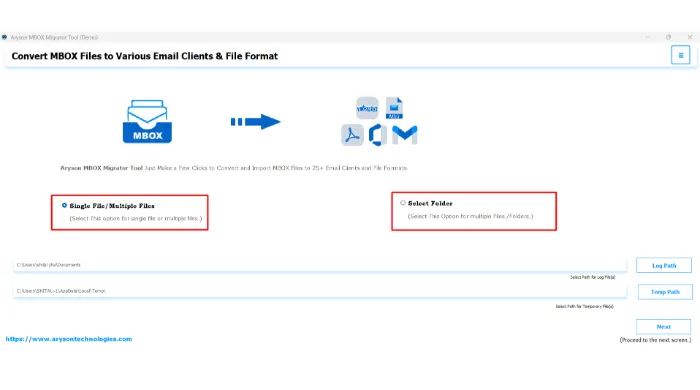
- Install and open the Aryson MBOX Converter Tool on your system.
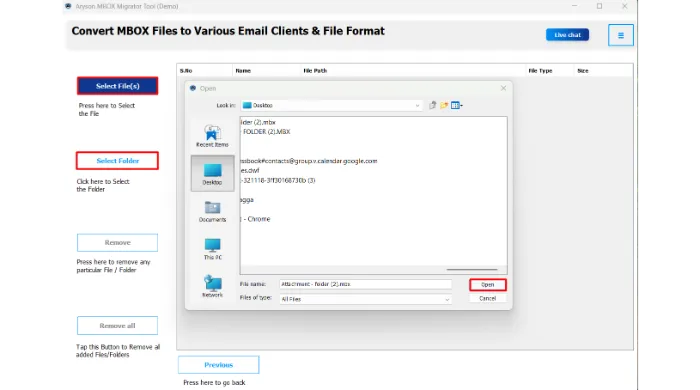
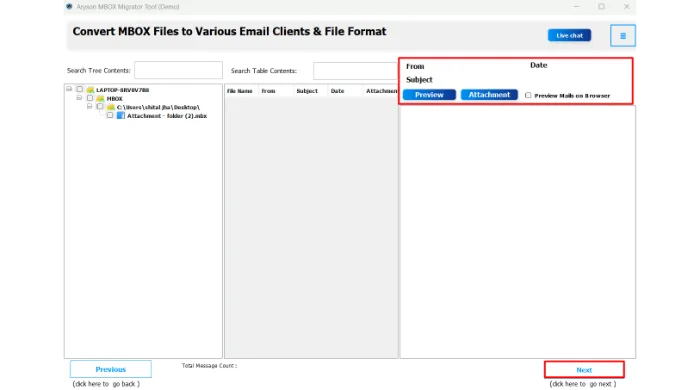
- Click on the Select File/Folder to import the MBOX file you want to split.
- Next, preview and select any specific MBOX file >>Click Next to proceed.
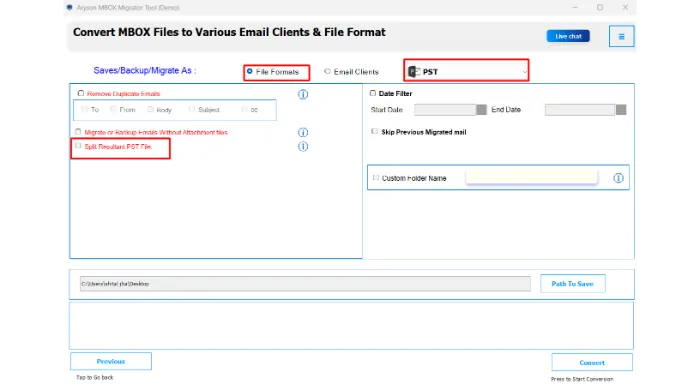
- To split MBOX file, select output as PST and mark option of Split resultant PST file.
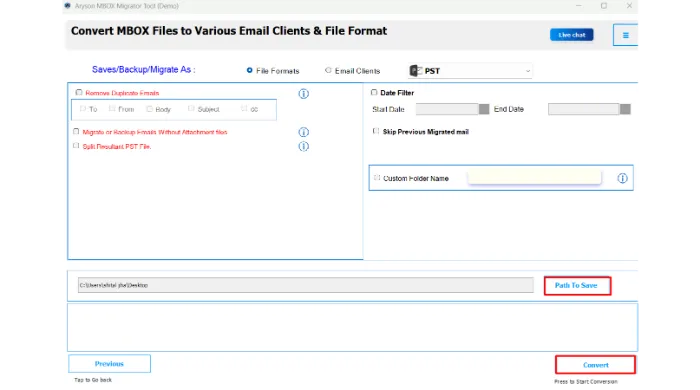
- Choose a destination folder and tap on the Convert button to begin the process.
Conclusion
Above, we got the two simplified approaches to split MBOX file into smaller parts. With the help of the right approach, you can make sure that your mailbox will be organized and accessible. Although it’s up to your personal preference, which method will you prefer? If you have the MBOX file, which is not that big then you will go for the manual solution. Other than that, use the recommended Aryson MBOX Migrator Tool to split MBOX file. In case you face any issues, you can frequently connect with us for further assistance.
Frequently Asked Questions:
Q1. Can I split an MBOX file without losing any emails?
Ans: Yes, using the Aryson MBOX Splitter Tool ensures that all emails and attachments remain intact during the split process.
Q2. Is it possible to split MBOX files manually?
Ans: Yes, you can manually split MBOX files using email clients like Thunderbird or Apple Mail, but it is time-consuming and prone to errors.
Q3. Can I split MBOX files by size?
Ans: Yes, Aryson MBOX Converter Tool allows you to split MBOX files by size, which helps manage large files efficiently.
Q4. Do I need to install Thunderbird or Apple Mail to split MBOX files?
Ans: Not always. Manual splitting requires an email client, but the Aryson MBOX Splitter Tool can split MBOX files without installing any client.
Q5. Can I split MBOX files on both Windows and Mac?
Ans: Yes, many Aryson MBOX Converter Tool is compatible with both Windows and Mac operating systems.
About The Author:

Rohan Wiese is a Technical Writer at Aryson Technologies. He is an expert Email Forensic, Cloud Computing, and a passionate nerd with over 10 years of experience in technical content writing. He writes about Cloud Migration, Database Recovery, Email Backup, Windows, Mac, and Tech.
Related Post