-

Written By Rohan Wiese
-
Updated on July 18th, 2025
How to Repair Corrupt PST Files Without ScanPST – Expert Tips
Facing a corrupt Outlook PST file? This guide offers a powerful solution to repair corrupt PST data without relying on ScanPST or the Inbox Repair Tool.
Users often face errors in Outlook while trying to access mailbox data. However, ultimately, what they find is that the PST file is damaged, corrupt, or inaccessible. Most users depend on the Inbox Repair Tool (ScanPST.exe) to repair corrupt PST files. But what if ScanPST fails or the PST file is severely corrupt? For that scenario, read this blog and find an alternative way to repair corrupt PST files without using SCANPST. Aryson PST Recovery Software is handy to all, a regular Outlook user or an IT professional. Download Now Purchase Now
What is the ScanPST.exe Tool?
ScanPST.exe, or popularly known as the Inbox Repair Tool, is a free Outlook utility. Microsoft built this as a utility to repair minor corruption in Outlook PST. It scans the PST file for structure-related errors. So, this utility is capable of fixing only minor issues like index mismatches, corrupted headers, and minor data inconsistencies.
Limitations: You must be wondering why one does not want to recover PST file without ScanPST. It is because this tool cannot fix severe corruption. Sometimes, it may fail to recover deleted emails or repair large PST files over 10–20 GB.
How to Locate ScanPST.exe?
You can find it in your Outlook installation folder. Here are common paths where you can find ScanPST.exe Tool:
| For Outlook 2019, 2016, 2013 (64-bit Windows)
C:\Program Files\Microsoft Office\root\Office16\ |
| For Outlook 2019, 2016, 2013 (32-bit Outlook on 64-bit Windows)
C:\Program Files (x86)\Microsoft Office\root\Office16\ |
| For Outlook 2010
C:\Program Files (x86)\Microsoft Office\Office14\ |
| For Outlook 2007
C:\Program Files (x86)\Microsoft Office\Office12\ |
Alternatively, you can also search for ScanPST.exe directly:
- First, press Windows + S.
- Type and search ScanPST.exe.
- Right-click > Open file location.
Why Repair PST File Without ScanPST?
Outlook Inbox Repair Tool has some limitations restricting its use:
- May fail to repair large PST files over 10-20 GB.
- Cannot handle severe damage, only fixes header-level issues.
- Also, it has a risk of permanently losing corrupted data blocks.
- Non-technical users have to juggle between finding the tool to repair PST.
Hence, it’s better to look for a ScanPST.exe alternative and repair Outlook data file with ease.
What Causes Outlook PST File Corruption?
If you are on the way to recover emails from PST file, it’s important to know the causes. PST, the backup file of Outlook, stores mailbox data and is highly prone to corruption and damage. Here is why:
- Sudden system shutdowns.
- If any faulty add-in is installed.
- Due to virus or malware attacks.
- PST File size is exceeding the limit.
- Additionally, improper Outlook closure.
- Faulty network or synchronization errors.
So, now let us proceed to the solution part, searching for the best ScanPST.exe alternative.
How to Repair PST File Without ScanPST Tool?
What proves better than the Inbox Repair Tool is professional recovery software. Experts suggest using the Aryson PST Repair Tool for better outcomes. Wondering why? The reason is its capability to handle minor as well as severe corruptions.
This is a multi-functional software, allowing users to repair corrupt Outlook PST files locally. Moreover, it shows a preview of the recovered data, and you can choose what to restore. The software allows users to download PST data locally in New PST, MBOX, DBX, MSG, EML, and Archive.
Steps to Repair Corrupt PST Files Without ScanPST.exe
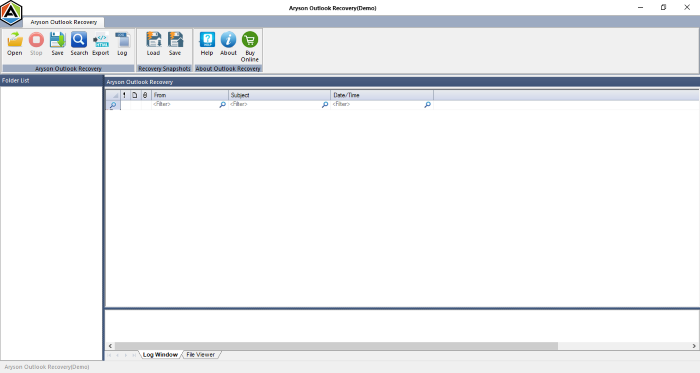
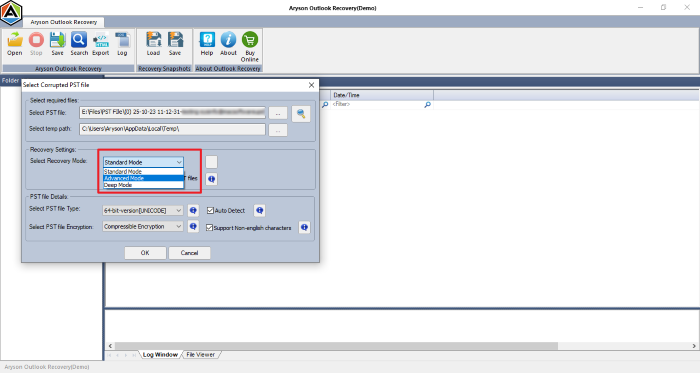
- Firstly, download and run the Aryson PST Recovery Tool.
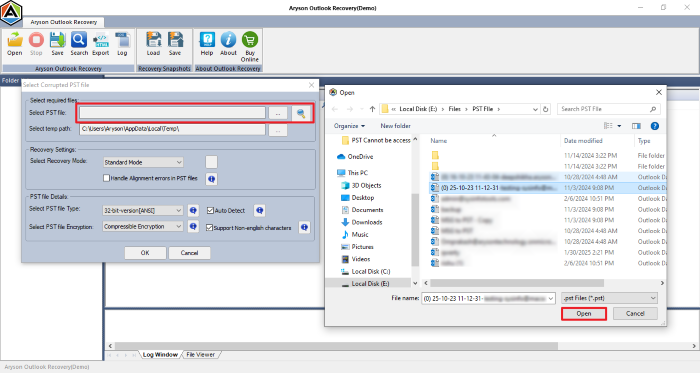
- Next, click on Open > browse and select the damaged PST file.
- Choose a Recovery Mode as per the level of PST corruption.
- Next, click OK to begin PST scanning.
- After that, you will see a Preview of the recovered mailbox items.
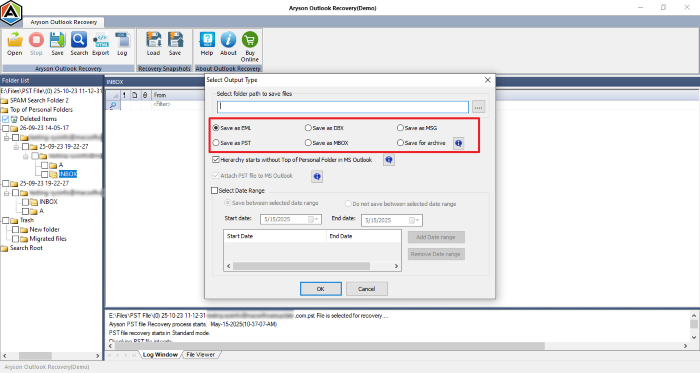
- Select folders to save > choose PST or other output formats.
- If needed, choose to attach PST to Outlook and other options.
- Lastly, click on OK and save the recovered PST data.
How is Professional Tool Better?
- Can recover data from highly corrupted PST files.
- Supports both ANSI and UNICODE PST formats.
- Restores emails, calendar, tasks, journals, and contacts
- It also maintains the folder hierarchy after recovery.
- Saves PST data as EML, PST, MSG, DBX, MBOX, and Archive.
- In addition, it lets users repair encrypted PST files as well.
- Is compatible with all Outlook versions- latest or older.
Hence, now you know what sets this software apart from the free ScanPST.exe.
| Feature | ScanPST.exe | Aryson Software |
| Core Function | Repairs the file structure and minor issues | Deep recovery of all Outlook mailbox items |
| Recovery Capabilities | Repairs the header and index corruption only | Retrieves emails, attachments, contacts, calendars, tasks & more |
| File Size Limitations | Often crashes with files >2 GB or >10 GB | Supports large PST files over 50 GB |
| Corruption Handling | Handles only light or moderate corruption | Fixes severely corrupted and inaccessible PST files |
| User Interface (UI) | Minimal UI with basic file selection | Interactive GUI with file preview, filters & navigation |
| Preview Feature | No preview of recovered data | Yes – Preview entire mailbox content before saving |
| Selective Export | Not available | Export specific folders or items as needed |
| Export Format Options | Only PST format is supported | PST, EML, MSG, MBOX, HTML, and more |
| Outlook Compatibility | Limited support, may fail with the latest builds | Supports all versions (Outlook 2021, 2019, 2016, 2013, etc.) |
| Performance with Large Files | Slows down or fails on large PSTs | Maintains fast recovery even with bulky files |
| Deleted Item Recovery | Cannot recover deleted emails | Recovers permanently deleted or lost items |
| Encryption Support | Not capable of handling encrypted files | Supports recovery from password-protected PSTs |
| Ease of Use | Basic utility; may confuse non-technical users | Designed for both IT experts and beginners |
| Pricing | Completely free | Paid tool with a free demo version available |
Conclusion
If you’re facing a corrupted Outlook PST file and SCANPST isn’t helping, you still have reliable options. As discussed in the blog, you can try manual recovery through the Outlook Inbox Repair Tool or use backup files. However, this may be a fail for heavily damaged or inaccessible PST files. Therefore, a professional tool like Aryson PST Recovery Tool is your best bet. This tool is a lifesaver for IT professionals, business users, and anyone needing a fast and complete recovery, without data loss.
Frequently Asked Questions:-
Q. Can I recover deleted emails from a corrupted PST file?
Ans- Yes, you can recover deleted emails from a corrupted PST file using a professional PST Repair Tool by Aryson. This tool scans the entire file and restores deleted items, which ScanPST may not retrieve.
Q. How do I open a corrupted PST file without ScanPST and Outlook?
Ans- Use Aryson PST Recovery Software to open a corrupted PST file without ScanPST and Outlook. With multiple recovery modes, it repairs PST first and shows you the mailbox preview. You can access Outlook emails, contacts, and calendars from a damaged or inaccessible file.
About The Author:

Rohan Wiese is a Technical Writer at Aryson Technologies. He is an expert Email Forensic, Cloud Computing, and a passionate nerd with over 10 years of experience in technical content writing. He writes about Cloud Migration, Database Recovery, Email Backup, Windows, Mac, and Tech.
Related Post