-

Written By Harshita Sachdeva
-
Updated on July 1st, 2026
Migrate 1000 Mailboxes from IMAP to Office 365 for IT Admins
Query: Our company is switching from a hosted IMAP server to Office 365, and we have over 1,000 user mailboxes to migrate. Every time IT attempts the manual CSV-based IMAP migration through the Exchange Admin Center, it stops halfway through. How do we migrate all mailboxes, with attachments and folder structure intact, without restarting the process from scratch each time?
Summary: Microsoft’s built-in IMAP migration moves email, nothing else. Contacts, calendars, tasks, and notes get missed entirely. Folder mapping breaks too, particularly with GoDaddy, cPanel hosts, and non-standard IMAP providers where folder structures don’t align properly with Exchange Online. Eventually, the IT teams need to fix the mismatched folders manually or look for ways to migrate 1000 mailboxes from IMAP to Office 365. For a proper migration, the Aryson IMAP Backup Tool handles the complete migration with the least post-migration work to do.
Quick Way to Migrate IMAP to Office 365
- First, install & run the Aryson IMAP Backup Tool on your system.
- After that, enter the IMAP credentials >> Login IMAP server account.
- Select the required IMAP data >> select Office 365 as the destination >> log in.
- Lastly, apply the required filters of the software as required >> Click Next.
How to Migrate 1000 Mailboxes from IMAP to Office 365?
In this section of the article, we will mainly focus on the manual and automated methods to migrate IMAP emails to Office 365. It is essential to choose the right method to achieve a successful migration. Go through both the methods and choose either one as per your requirement.
Method 1: Manually Migrate IMAP Emails to Office 365
Users can utilize the Exchange Admin Center in order to manually migrate IMAP emails to O365. It basically allows you to migrate IMAP mailboxes using a CSV file, but the process is slightly technical and time-consuming. Here is how you can perform it:
- First, log in to the Microsoft 365 Admin Center >> ensure all user accounts are created with licenses assigned.
- After that, open the Exchange Admin Center (EAC) >> Recipients >> Migration >> More (…) >>
- Create the Migration Endpoints >> New (+) >> Select IMAP >> Enter server address and port >> Test and save.
- Then, prepare a CSV file with three columns only: EmailAddress, UserName, and Password.
- In EAC, click on + New >> Migrate to Exchange Online >> IMAP Migration.
- Now, upload CSV >> Select your endpoint >> Name the batch >> Click Start.
- Wait for all mailboxes to show Synced >> Click Complete Migration Batch.
- At last, update MX and Autodiscover DNS records to point to Microsoft 365 and allow up to 72 hours for propagation.
Why Users Avoid Using the Manual Method
- IMAP migration transfers emails only; contacts and calendars are excluded.
- Moreover, CSV preparation errors cause entire migration batches to fail instantly.
- Additionally, even timeout errors may take place due to large mailboxes.
- Folder mapping breaks frequently with GoDaddy-hosted IMAP environments.
- Also, there is no built-in duplicate detection feature that creates redundant emails.
Method 2: Professional Method to Migrate 1000 Mailboxes from IMAP to O365
Most of the large-scale organizations handle thousands of mailboxes. It is important to carefully migrate this data in a way that the data integrity is maintained. Thus, this is the primary aim of the Aryson IMAP Backup Tool. This software connects directly to any IMAP-enabled server, including GoDaddy Webmail, cPanel, Zimbra, and hosted Exchange, and migrates mailbox data straight into Office 365. Using the CSV import feature of the same software, you can convert IMAP emails to PST efficiently, without any data loss.
Step-by-Step Process to Convert Emails from IMAP to Office 365
- Install and open Aryson IMAP Backup Tool on Windows >> Run as administrator.
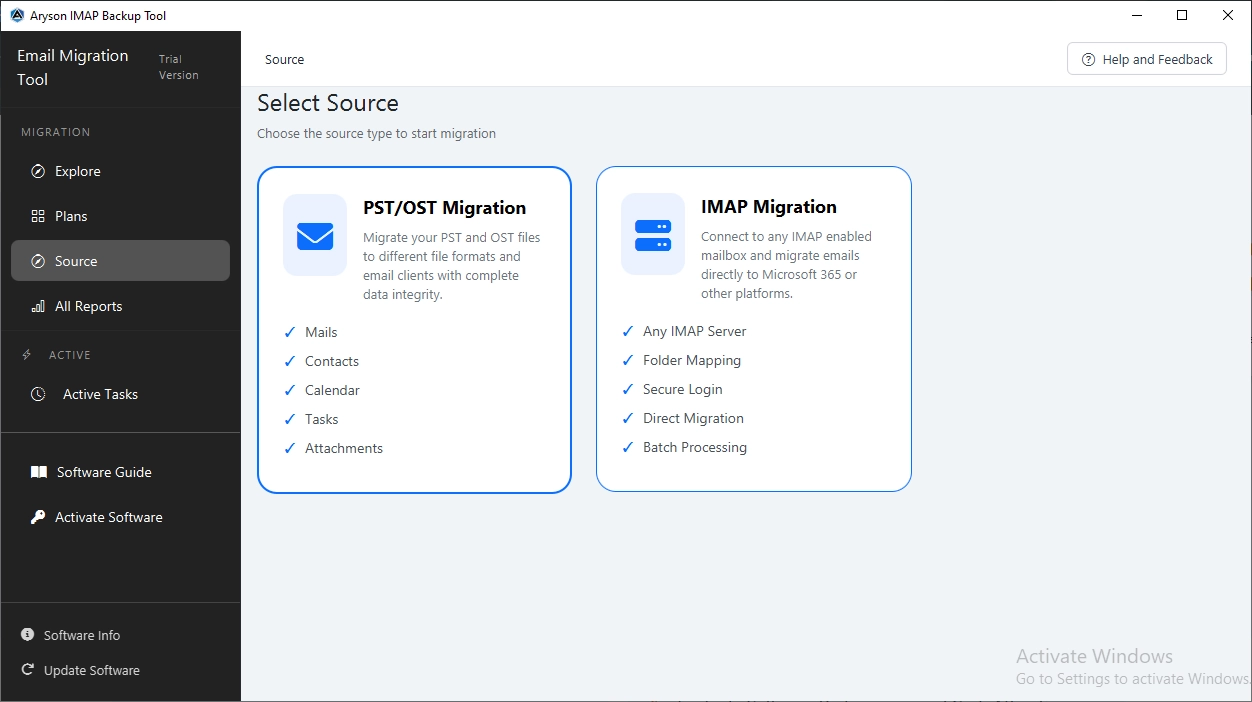
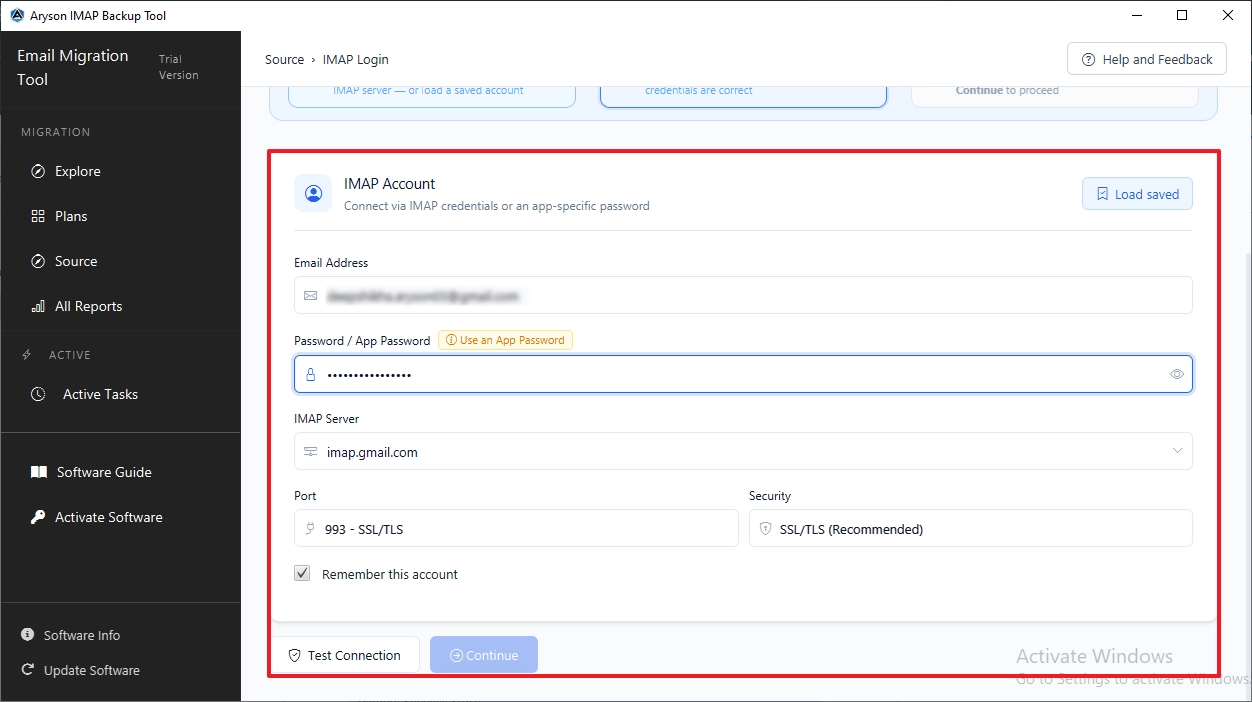
- After that, choose the IMAP migration card >> log in to IMAP via credentials.
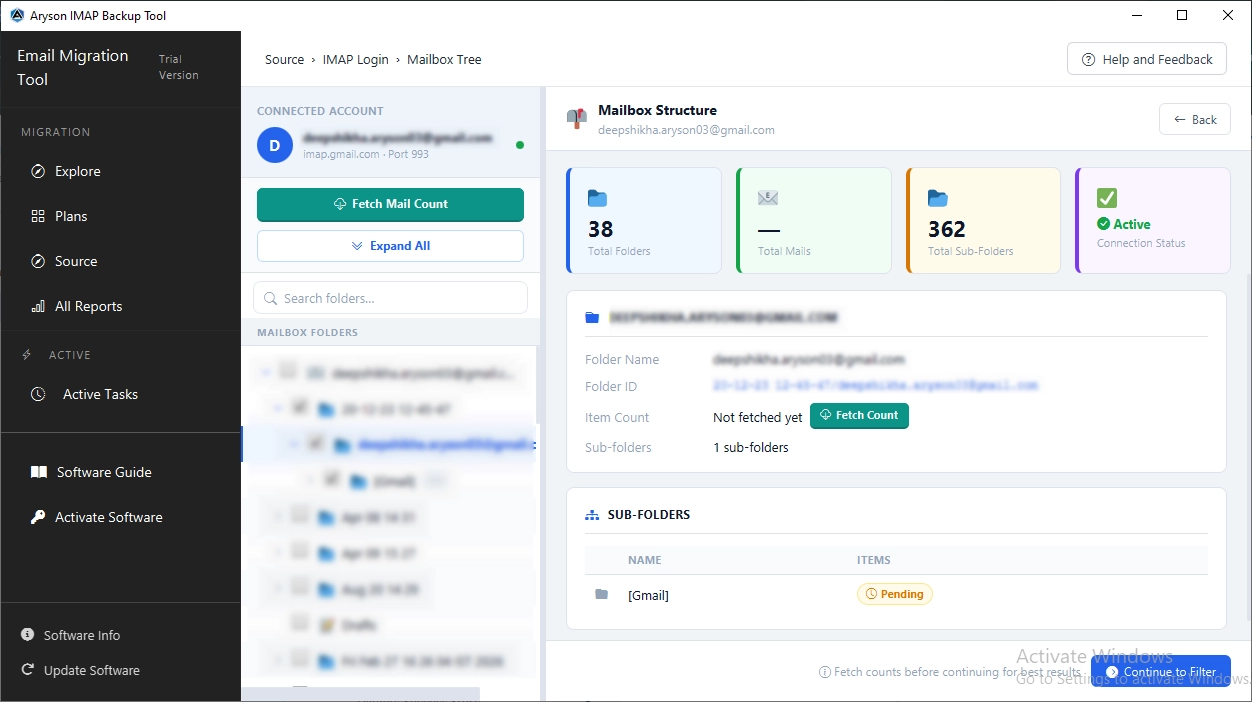
- Select the required mailbox folders from the folder tree >> click Next.
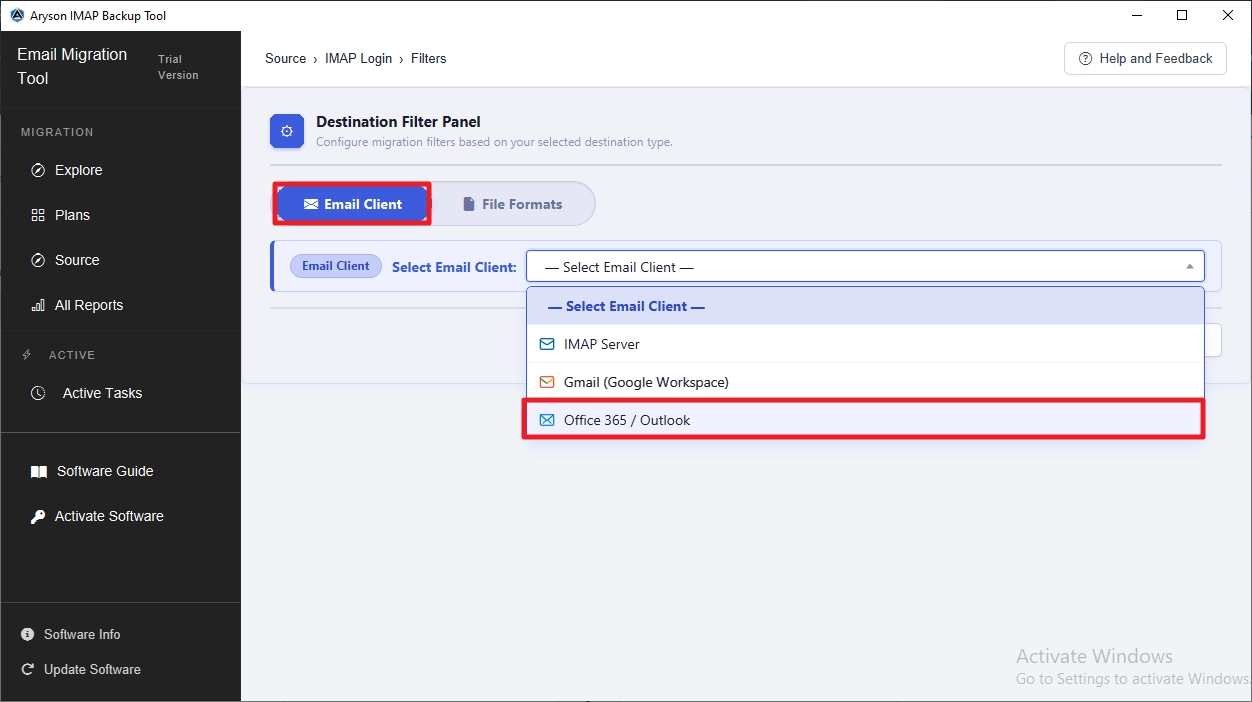
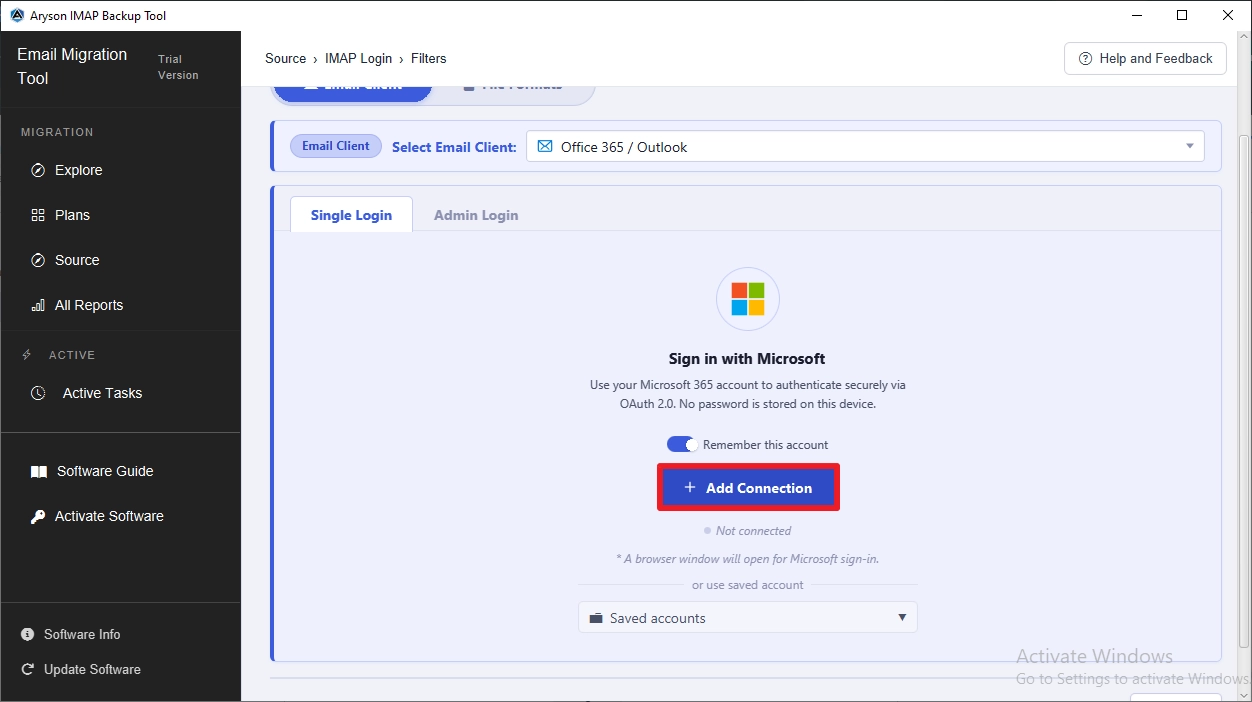
- Now, choose Office 365/Outlook under the Email Clients drop-down list.
- Log in via the Modern OAuth2.0 or Impersonation method.
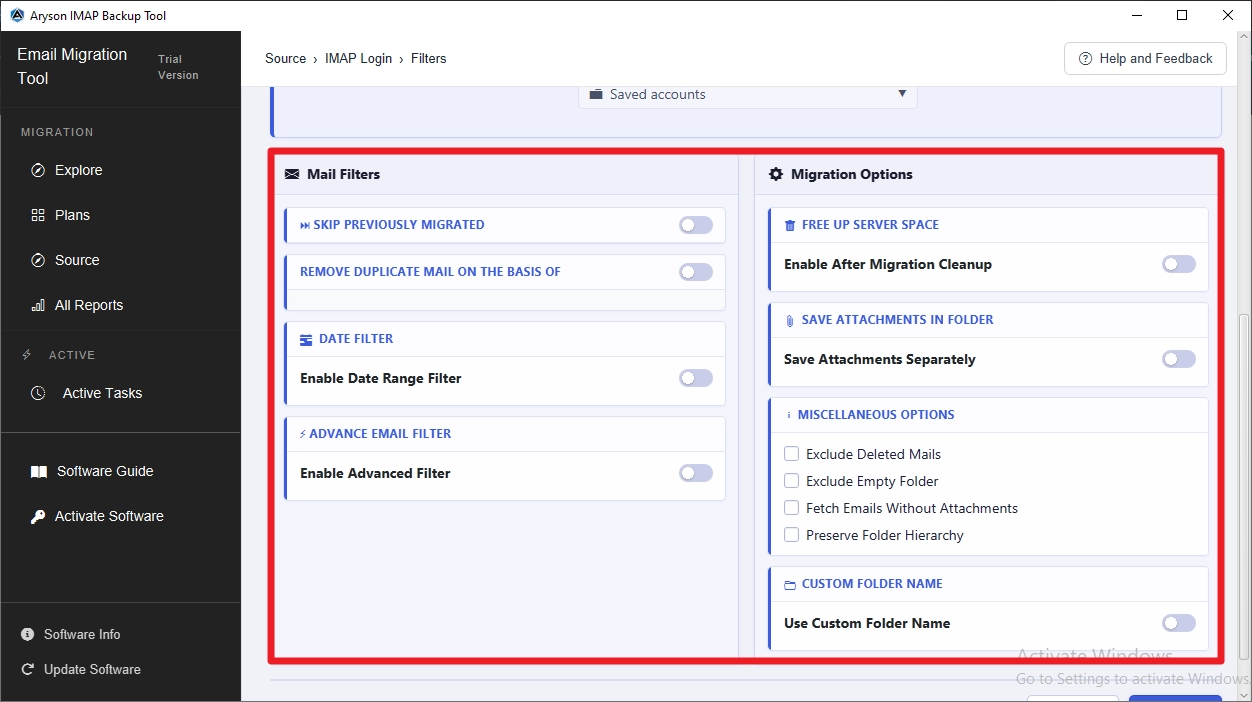
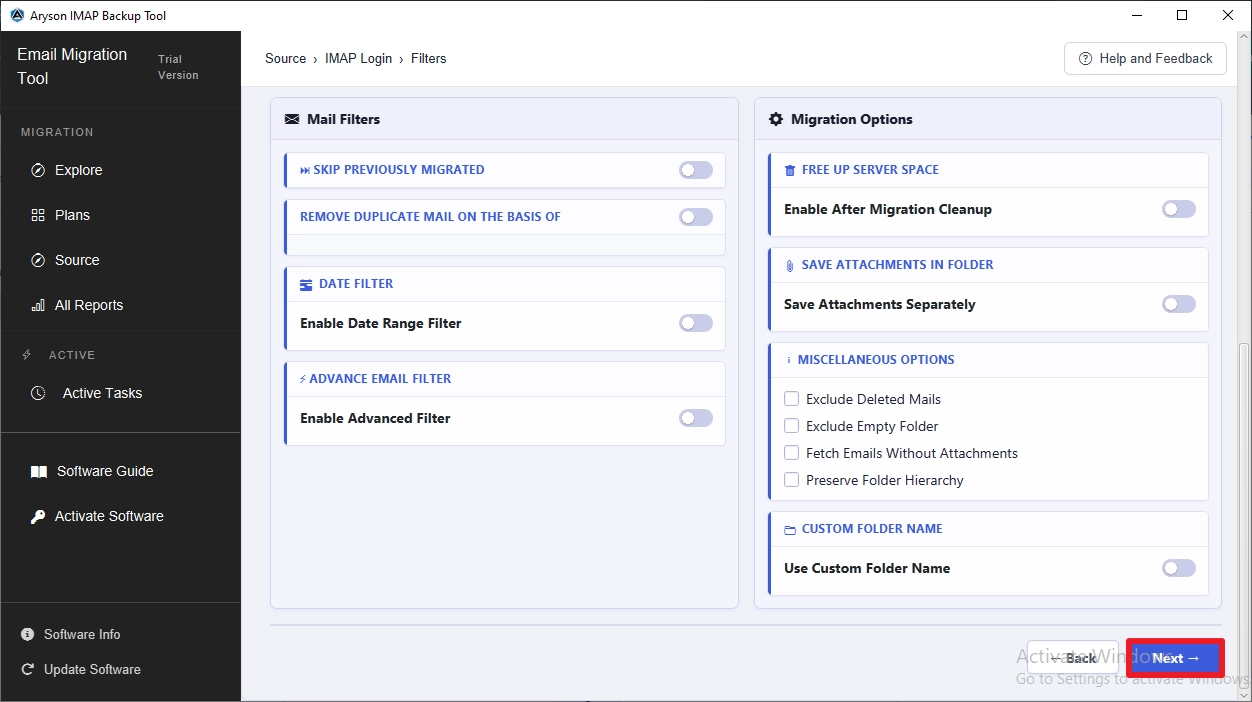
- Use the built-in features of the software as per the requirement.
- At last, click on the Next button to begin the migration.
Key Features of the Aryson IMAP Backup Tool
- Bulk CSV import migrates 1000+ IMAP mailboxes without manual setup.
- Even the original folder structure and email metadata stay completely intact.
- OAuth 2.0 ensures secure, token-based Office 365 authentication.
- Furthermore, the duplicate removal feature skips redundant emails.
- Date-range filters let IT admins migrate only relevant data.
- Moreover, you can export IMAP to MBOX within a few seconds.
- Free demo tests up to 50 emails per folder.
Not just conversion or migration, the same software can be used to download all emails from IMAP Server without any issues.
Daniel’s Success Story
Daniel Harris, an IT admin at a logistics firm in Ohio, had 1,200 IMAP mailboxes to move to Office 365. Manual migration kept stopping at 400 accounts. He switched to Aryson IMAP Backup Tool to migrate IMAP emails to Microsoft 365 platform, loaded the CSV, and finished the entire migration—folders and attachments intact.
Conclusion
Manual IMAP migration through the Exchange Admin Center has clear limits. Timeout errors, broken folder mapping, and missing contacts become persistent problems once the mailbox count crosses a few hundred. IT professionals who manage large-scale migrations need a solution built for volume. The Aryson IMAP Backup Tool can efficiently migrate 1,000 mailboxes with the help of its CSV import feature.
Frequently Asked Questions
Q.1 Can I use IMAP with Office 365?
Ans: Yes. Office 365 supports IMAP for incoming email access. IT professionals can configure IMAP settings directly within Outlook or migrate existing IMAP mailboxes into Office 365 using the Aryson IMAP Backup Tool.
Q.2 What is the best way to migrate 1000 IMAP mailboxes to Office 365?
Ans: Aryson IMAP Backup Tool is the most reliable option. It uses bulk CSV import to migrate 1,000+ mailboxes – without timeout errors or manual per-account configuration by IT teams.
Q.3 Can I migrate IMAP mailboxes with attachments?
Ans: Yes. The software migrates complete mailbox data, including all attachments. Email formatting, inline images, and file attachments transfer intact to the Office 365 destination without any data loss during migration.
Q.4 Does the tool preserve folder hierarchy during migration?
Ans: Yes. Aryson IMAP Backup Tool maintains the original folder structure throughout migration. IT professionals receive an accurately mapped Office 365 mailbox that mirrors the source IMAP account’s complete folder organization.
Q.5 Can I preview emails and search specific folders before migration?
Ans: Yes. The software provides a built-in preview panel. IT professionals can browse mailbox folders, search emails by subject, sender, or recipient, and verify content before initiating the actual migration process.
Q.6 Does the IMAP Backup Tool support batch email conversion?
Ans: Yes. Batch mode allows IT teams to import multiple IMAP account credentials via CSV. The software processes all accounts simultaneously, converting and migrating mailbox data to Office 365 without interruption.
Q.7 Is it possible to assign a custom folder name to the migrated data?
Ans: Yes. The software allows IT professionals to assign custom folder names to migrated mailbox data. This helps organizations maintain a structured, easily identifiable mailbox organization inside the destination Office 365 tenant.
Q.8 Is there an option to back up emails within a specific date range?
Ans: Yes. The date range filter restricts migration to emails within a defined start and end date. IT admins use this for phased migrations or archiving only historically relevant mailbox data.
Q.9 How does the tool handle duplicate emails during migration or backup?
Ans: The duplicate detection feature identifies and skips redundant emails. IT professionals receive a clean, clutter-free Office 365 mailbox without manually reviewing or removing duplicate items after migration completes.
Q.10 Does the tool support splitting large PST files and merging PDF files?
Ans: Yes. The Aryson software supports splitting oversized PST output files into smaller segments. IT professionals can also merge multiple PDF exports into a single file for organized archival and compliance purposes.
Q.11 How does the software protect user data integrity during the process?
Ans: The software uses secure authentication protocols and advanced algorithms throughout migration. Every email, attachment, and folder transfers without modification, ensuring complete data integrity from the source IMAP server to Office 365.
Q.12 What kind of help can I get through 24/7 chat support?
Ans: Aryson’s support team assists IT professionals with installation, configuration, credential errors, and migration failures. 24/7 chat support ensures migration projects stay on track without prolonged delays or unresolved technical issues.
About The Author:

Harshita Sachdeva, a professional technical writer at Aryson Technologies, specialize in delivering clear, hands-on documentation for data management, migration, and recovery solutions. With a meticulous, reader-first approach, I break down complex technical processes into simple, actionable content - helping IT professionals and decision-makers tackle challenges efficiently.
Related Post


