






Screenshots

Video

Guide

Eula

Choose Services to Secure Your Google Workspace Data

Gmail

Gmail

Apple Mail

Drive

Apple Mail

Calendar

Apple Mail

Contacts

Comprehensive Google Workspace Data Backup

  • Complete Email Content: Provides a full backup of original Gmail emails without any modification, including Subject, To, From, Body, headers, and other metadata.
  • Backup Attachments: Safely preserves all attachments such as images, documents, calendars, PDFs, and other files along with the emails.
  • Mailbox Folders: Supports backup of all mailbox folders, including Inbox, Sent, Drafts, Trash, Starred, Important, and user-created labels.
  • Properly maintains the original read and unread status of each email message.
  • Label Hierarchy Preservation: Maintains nested Gmail labels and their original structure during backup.
  • Threaded Conversations: Keeps email conversations grouped exactly as they appear in Gmail.
  • Inline Image Retention: Preserves inline images embedded within the email body without distortion.
  • Files & Folders: Downloads all Google Drive files and folders while maintaining the original structure.
  • Multiple File Types: Supports documents, images, videos, PDFs, and other file formats.
  • Folder Hierarchy: Keeps the parent and sub-folder hierarchy completely intact.
  • Shared Drive Content: Allows secure backup of both shared and user-owned Google Drive data.
  • Shared Drive Support: Backs up files from shared drives along with ownership and access roles.
  • Data Accuracy: Retains all your info as it was earlier.
  • Permission Metadata: Saves file-sharing permissions for better reference during restore.
  • Contact Details: Securely backs up all contact information, including names, email addresses, phone numbers, and other contact fields.
  • Personal & Directory Contacts: Includes both personal user contacts and organization directory contacts in the backup.
  • Groups: Preserves contact groups in their original structure.
  • Additional Information: Keeps extra details such as address, company name, designation, and notes safely intact.
  • Contact Groups Backup: Preserves contact groups and their assigned members.
  • Save Data with Accuracy: Backup all your selected contact data with ease.
  • Field-Level Accuracy: Retains custom contact fields without data loss.
  • Events & Meetings: Creates a complete backup of calendar events, meetings, and schedules.
  • Date & Time Accuracy: Accurately preserves event start time, end time, time zone, and duration.
  • Recurring Events: Supports proper backup of recurring events such as daily, weekly, and monthly schedules.
  • Reminders & Alerts: Ensures that event reminders and alert notifications remain secure.
  • Recurring Event Rules: Maintains recurrence patterns such as daily, weekly, or monthly events.
  • Shared Calendar Backup: Supports calendars shared with other users.
  • Time Zone Consistency: Preserves original time zone settings for all events.
  • Full Presentation Backup: Backs up complete Google Slides presentations, including all slides and embedded elements.
  • Design & Layout Backup: Retains slide themes, fonts, layouts, transitions, and animations accurately.
  • Media & Objects: Keeps images, videos, charts, and linked objects embedded within slides.
  • Original Slide Order: Maintains the exact slide sequence and structure for smooth restoration.
  • Slide Animations: Retains basic animations and transition settings.
  • Speaker Notes Backup: Preserves presenter notes linked with each slide.
  • Theme Consistency: Maintains original slide themes and layouts.
  • Complete Document Content: Safely backs up all document data, including text, tables, images, and hyperlinks.
  • Formatting Preservation: Keeps fonts, headings, paragraph spacing, and styles unchanged.
  • Maintain Integrity: Preserves all your associated info with Google Workspace data.
  • Version Consistency: Ensures the most recent saved version is backed up without modification.
  • Revision History: Keeps document version changes for reference.
  • Hyperlinks Preservation: Maintains internal and external links.
  • Formatting Accuracy: Retains headings, spacing, and alignment correctly.
  • Comprehensive Spreadsheet Data: Backup all spreadsheets, including rows, columns, and cell data, securely.
  • Formulas & Calculations: Preserves formulas, functions, and calculated values accurately.
  • Charts & Analytics: Maintains graphs, charts, pivot tables, and data visualizations.
  • Sheet Hierarchy: Retains sheet names, order, and internal structure exactly as original.
  • Multiple Sheet Tabs: Backs up all tabs within a spreadsheet file.
  • Data Validation Rules: Preserves dropdowns and validation constraints.
  • Conditional Formatting: Maintains color rules and cell highlighting.
  • Form Layout & Settings: Backup complete form structure, re including sections, questions, and configurations.
  • Response & Submission Data: Securely preserves all collected responses and user entries.
  • Multiple Question Types: Supports backup of MCQs, dropdowns, short answers, and checkbox fields.
  • Conditional Logic: Retains form logic, branching, and response validation rules.
  • File Upload Responses: Safely backs up responses that include uploaded files.
  • Form Sharing Settings: Retains collaborator access and response collection permissions.
  • Notes & Checklists: Backs up all text notes, to-do lists, and checklist items safely.
  • Labels & Organization: Preserves labels, color coding, and pinned notes for better organization.
  • Reminders & Timestamps: Maintains reminder alerts, dates, and time-based information.
  • Media Attachments: Supports backup of images and audio notes linked with Keep entries.
  • Saving Format: The tool saved Google Keep in PDF format.
  • Archived Notes Backup: Ensures archived notes are included along with active notes.
  • Collaborative Notes: Preserves shared Keep notes with contributor details.
  • Note Ordering: Maintains the original order of notes for easier reference.

Aryson Google Workspace Backup Tool- Rating & Reviews

See what our users have to say about the Aryson Google Workspace Backup Software.

Expert Review

Rating & Reviews

When to Use Aryson Google Workspace Backup Software?

Discover How This Software Makes Google Workspace Backup Simple and Secure:

when-1
All-in-One Google Workspace Backup Solution

Using the Best Google Workspace(G Suite) backup tool from Aryson, Users can backup the entire data of Google Workspace with emails, attachments, Google Drive, etc. As there is no direct method to back up Google Workspace Drive Data to an external hard drive. So, it will be the best method to back up the data completely.
when-2
Secure Data Archiving for Long-Term Storage

Aryson Google Workspace Backup Tool is helpful for businesses that need to store and migrate Google Workspace data for long-term reference. Data can be saved in multiple file formats like PST, PDF, or CSV for easy access later. Secure archiving ensures important records remain available when needed.

when-3
Backup Management for Large Enterprises

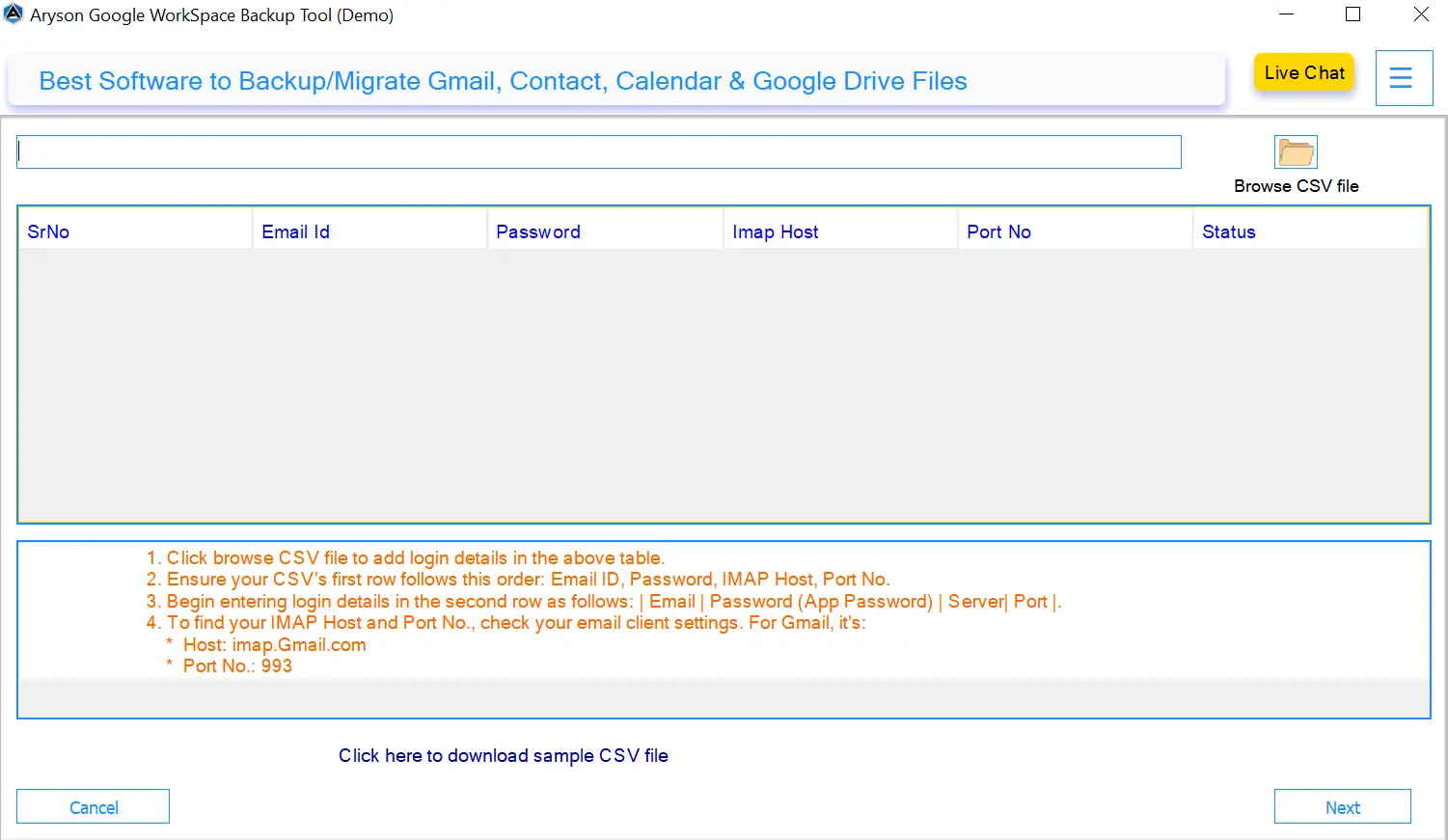
For companies with multiple employees, managing individual backups can be time-consuming. This Reliable Google Workspace Backup Software supports bulk user backup through CSV import and multi-account handling. Also, it allows IT teams to manage backups for large organizations efficiently and with less manual effort.

Best Google Workspace Backup Tool with Unique Capabilities

Explore Secure and Reliable Features Built for Complete Google Workspace Data Backup:

How to Use the Aryson Google Workspace Backup Tool Utility

Google Workspace Services for Complete Backup Solution

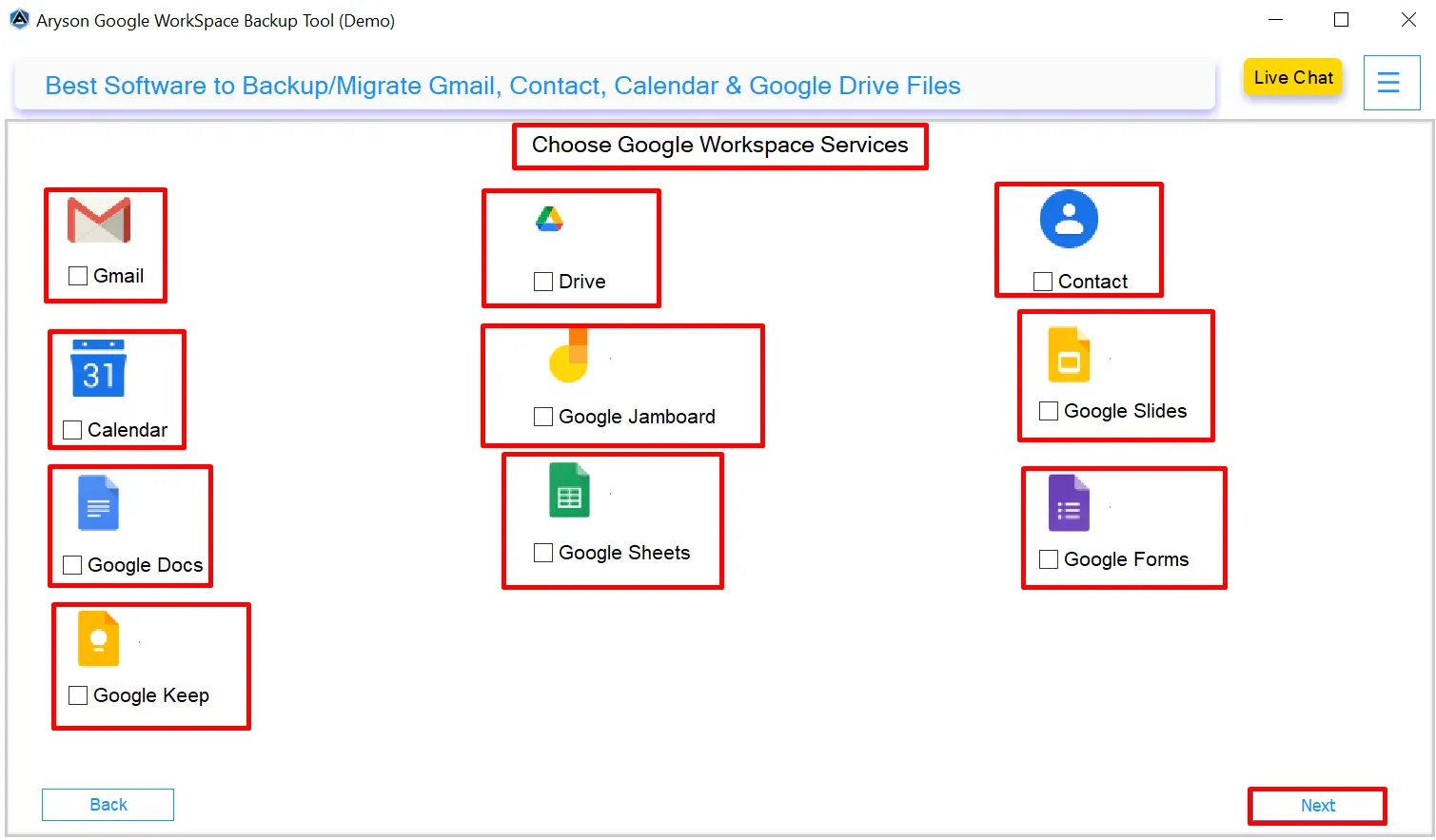
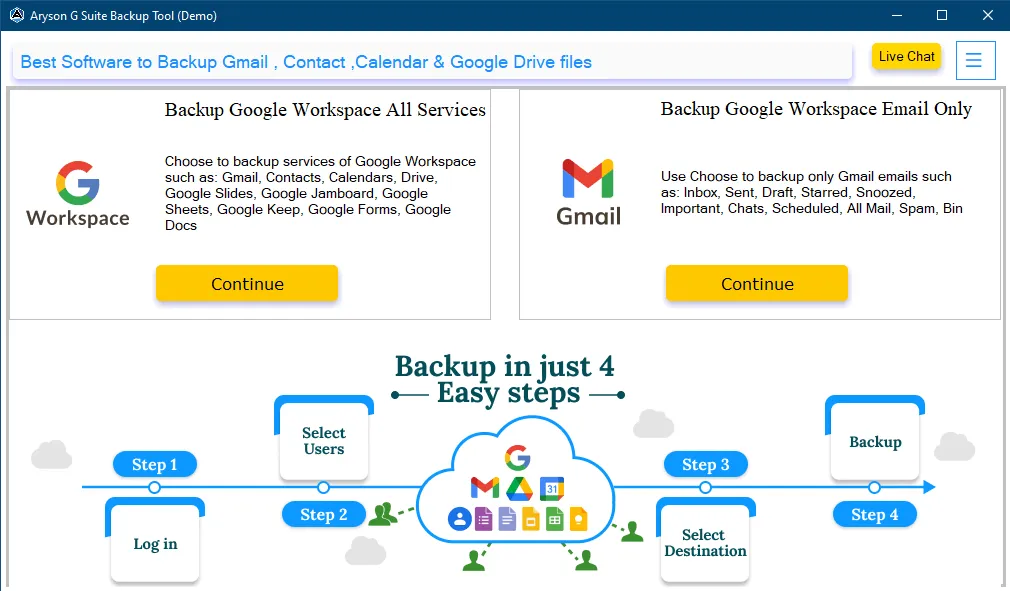
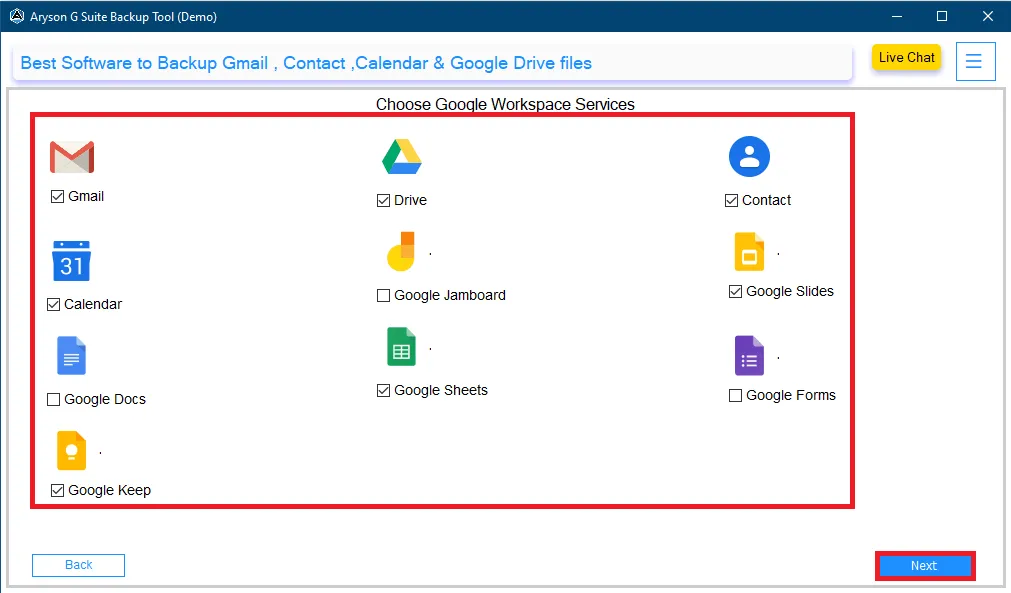
Aryson Google Workspace Backup Software provides a complete backup solution by covering all major Google Workspace services in a single process. It ensures that important data from Gmail, Drive, Contacts, Calendar, Docs, Sheets, Slides, Forms, Keep is included with all essential information. As a result, users get centralized control, better data safety, and a reliable way to protect their entire Google Workspace environment.

  • Covers all major Google Workspace services to protect complete data.
  • Supports backup of multiple services in a single process.
  • Maintains original data structure and integrity during backup.
  • Provides centralized control to manage Google Workspace data efficiently.

Specific Option to Backup Google Workspace Email Only

Embedded with an additional option to Backup Google Workspace Emails Only. Users who want a dedicated solution can proceed with this feature frequently. It allows complete Gmail data Backup without including other Workspace services. Users can safely secure all email folders and messages while keeping the process simple and focused on email data only.

  • Supports complete Gmail, including Inbox, Sent, Drafts, Starred, Important, & All Mail.
  • Includes additional folders such as Snoozed, Scheduled, Spam, and Bin.
  • Email-specific backup without selecting Drive, Contacts, or other services.
  • Maintains the original folder hierarchy during the backup process.
How to Use the Aryson Google Workspace Backup Tool Utility

Provides Different Options to Manage Attachments

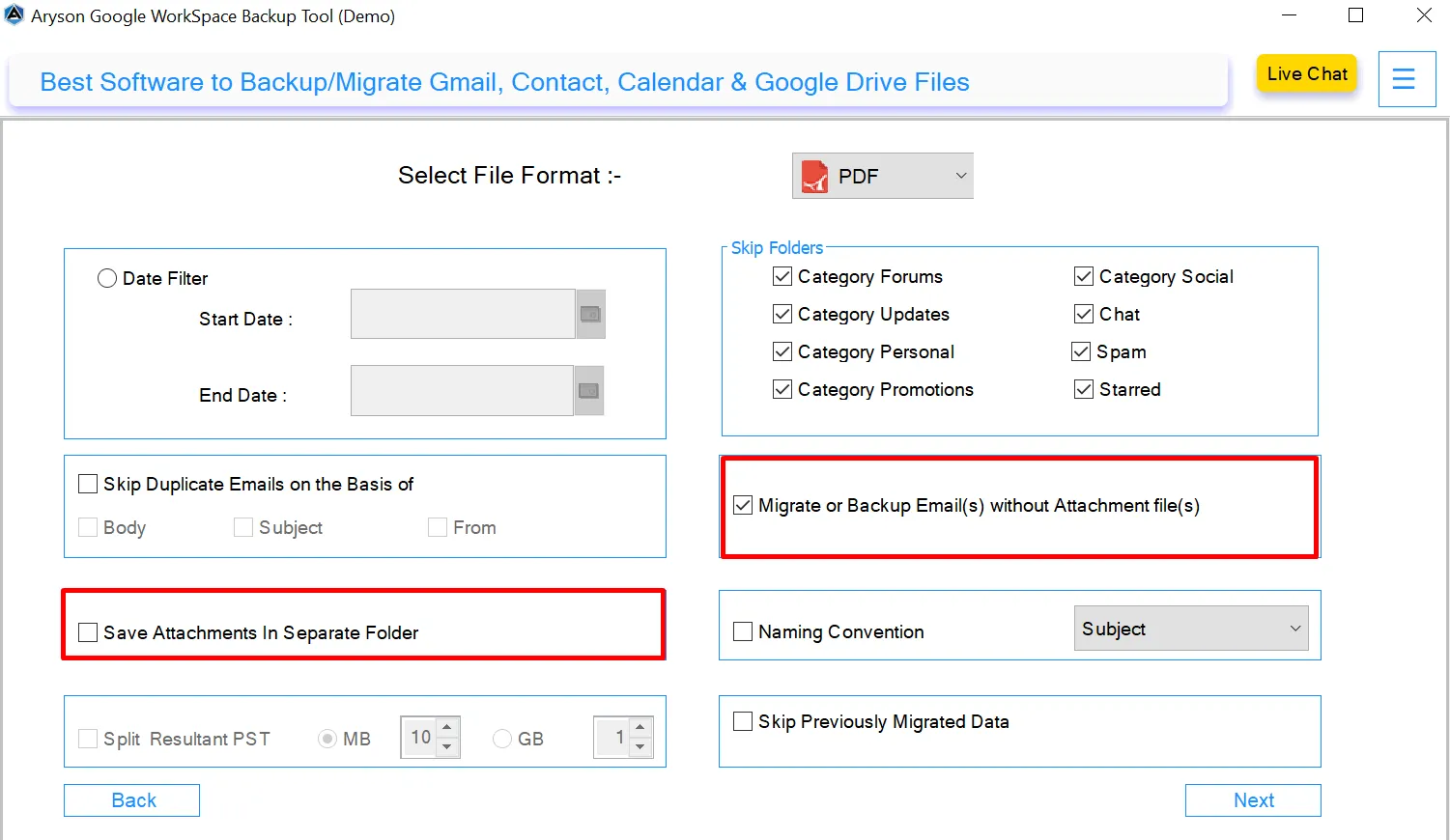
Along with Emails and Other Google Workspace data, Aryson Google Workspace Backup Tool provides flexible ways to handle Google Workspace Attachment with ease. Users can manage how email attachments are handled during the backup or migration process. It allows users to choose whether attachments are included with emails or saved separately, based on their storage and accessibility requirements.

  • Allows backup or migration of emails without attachment files to reduce backup size.
  • Provides an option to save attachments in a separate folder for better organization.
  • Helps manage storage efficiently by separating email content from attachments.
  • Ensures email messages remain intact even when attachments are excluded.

Built-In Skip Folders & Naming Convention Features

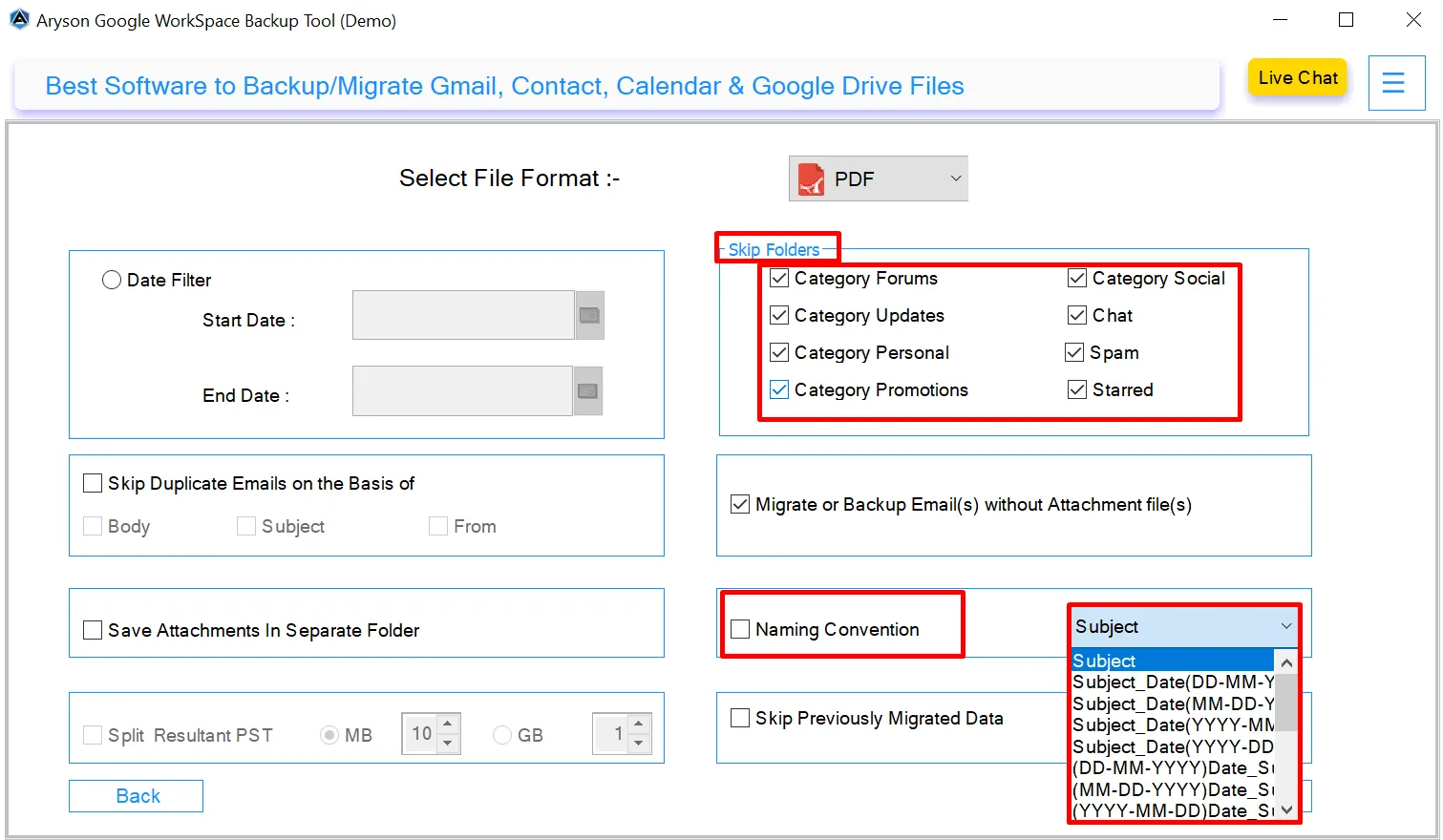
The Skip Folders and Naming Convention features in Aryson Google Workspace Backup Tool give users more flexibility to backup or migrate their emails. With these options, you can efficiently manage which emails to include or exclude and organize the exported files in a way that suits your workflow. These features save time, reduce clutter, and make post-backup management easy.

  • Skip Unwanted Folders: Users can exclude specific Gmail categories like Forums, Updates, Promotions, Social, Chat, Spam, or Starred.
  • Naming Convention Options: Apply custom naming conventions based on subject, date, or a combination to maintain a structured backup system.
  • Options include Subject, Subject with Date in various formats (DD-MM-YYYY, MM-DD-YYYY, YYYY-MM-DD).
How to Use the Aryson Google Workspace Backup Tool Utility

Advanced Capabilities of Aryson Google Workspace Backup Tool

Discover the complete features of the best Google Workspace Backup Tool for clearer insight.

Complete Backup of Google Workspace Data Securely

Complete Backup of Google Workspace Data Securely

Google Suite Backup Software is an all-in-one utility that backs up the entire data from the service account of Google Workspace. This software is highly effective to backup Google Workspace data from Gmail, Google Drive, Contacts, Calendar, Google Docs, Google Slides, Google Sheets, Google Keep, Google Forms, etc.

Save Google Workspace Data

Save Google Workspace Data into Multiple Formats

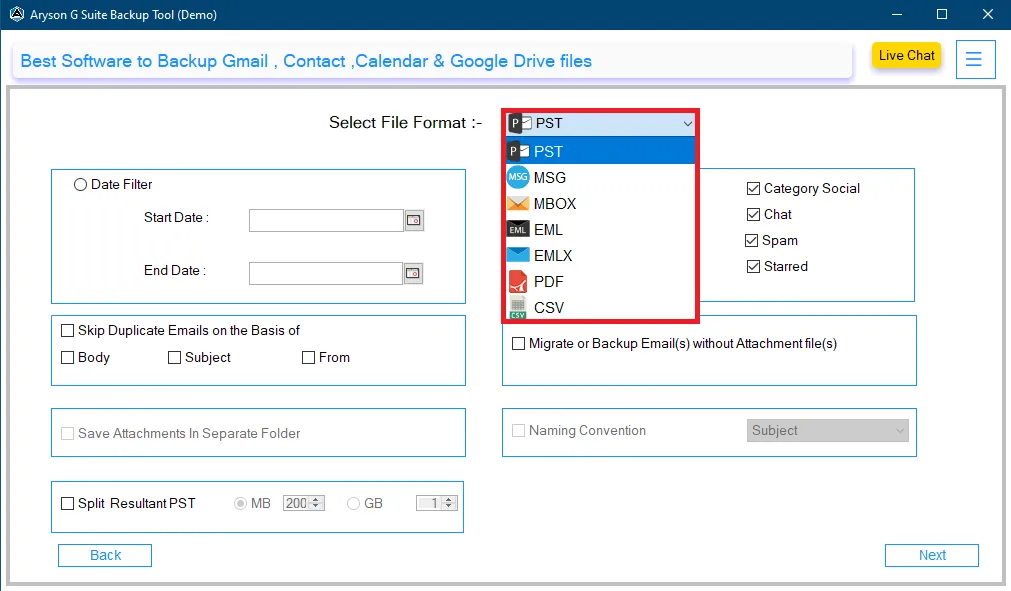
Users can save Google Workspace data into PST, MSG, MBOX, EML, PDF, CSV, EMLX, and several popular file formats. This flexibility ensures data compatibility with different platforms and storage requirements. As a result, users get a single solution to protect every important Workspace service without missing any data.

Migrate to Different Email

Migrate to Different Email Platforms

Aryson Google Workspace Backup Software is the best and most effective utility to transfer Google Workspace to Another Account, Gmail, Office 365, IMAP, and other email clients. You can also move or migrate emails from Google Workspace into Cloud & Web-based email clients like Hotmail, Google Workspace, iCloud, Zoho Mail, Yahoo Mail, and AOL Mail.

Maintains Email Attachments

Backup of Multiple Google Workspace Accounts

This Google Workspace Backup Tool for Admins allows administrators to back up data from multiple Google Workspace user accounts in a single process. It helps large organizations save time, reduces manual effort, and ensures that no user’s data is missed. With this feature, you can easily manage backups for multiple employees or teams becomes fast, organized, and hassle-free.

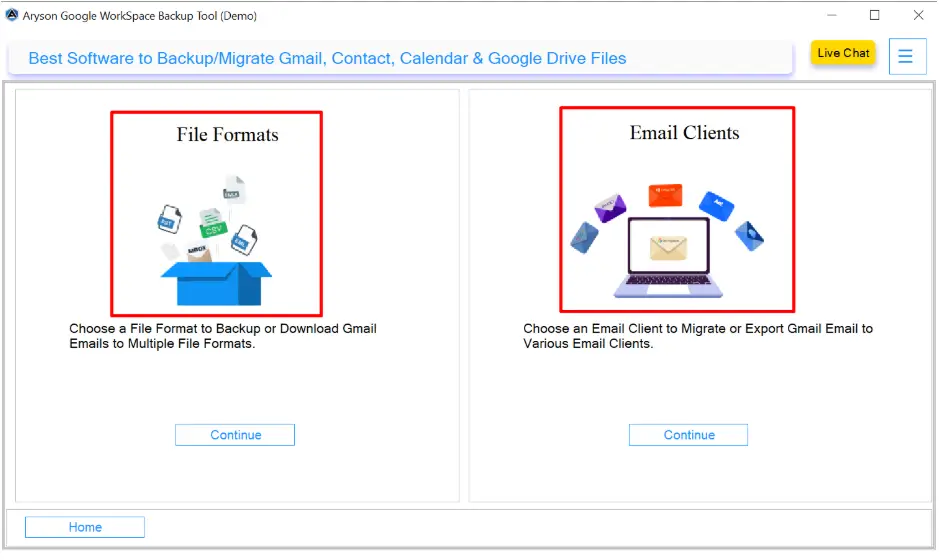
CSV-Based User Import

CSV-Based User Import for Bulk Accounts

Administrators can import multiple Google Workspace user accounts using a CSV file. This feature of Google Workspace Backup Software simplifies bulk operations and reduces manual effort when dealing with large user lists. It ensures that no user account is missed, streamlines backup management for large organizations, and improves productivity for IT teams.

Secure Admin Access with

Secure Admin Access with P12/JSON

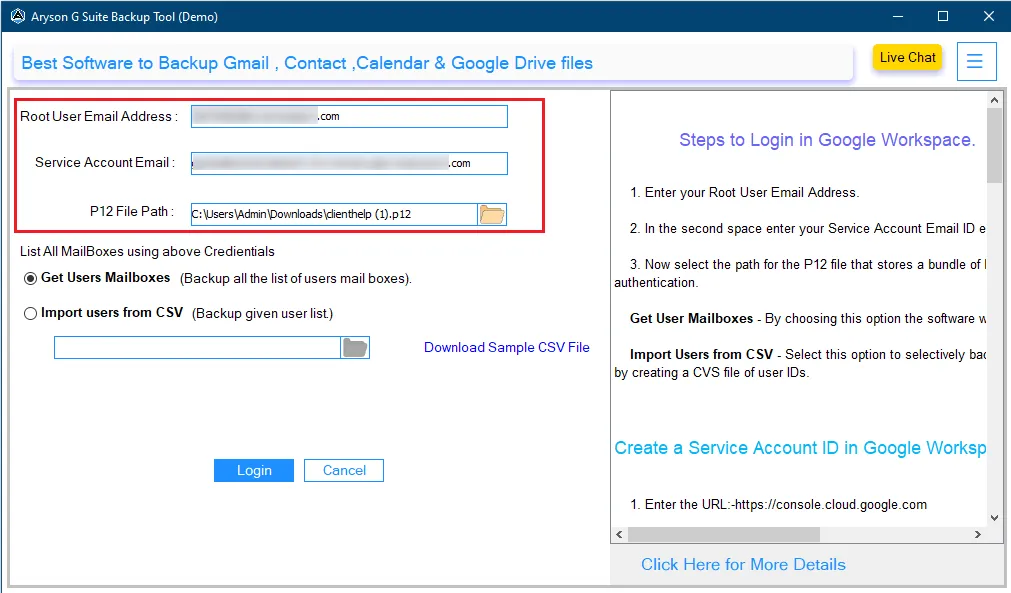
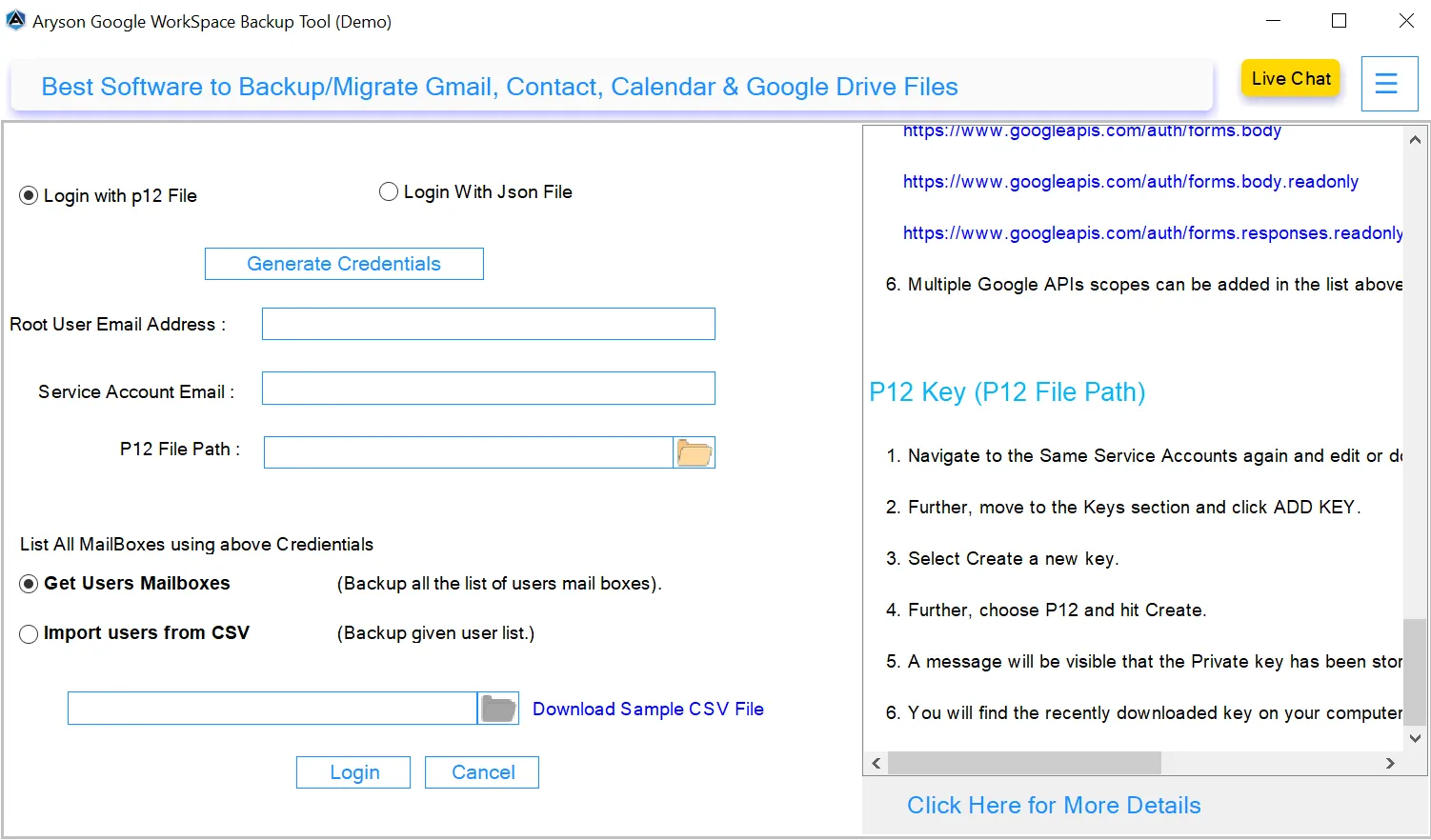
Aryson Google Workspace Backup Tool allows administrators to log in securely using P12 or JSON service account credentials. It makes sure that only authorized users can access Google Workspace data. It follows Google’s recommended security standards. Also, the login panel provides a step-by-step process to create these credentials for easy setup.

PDF Output Size Control

Duplicate Email Detection and Removal

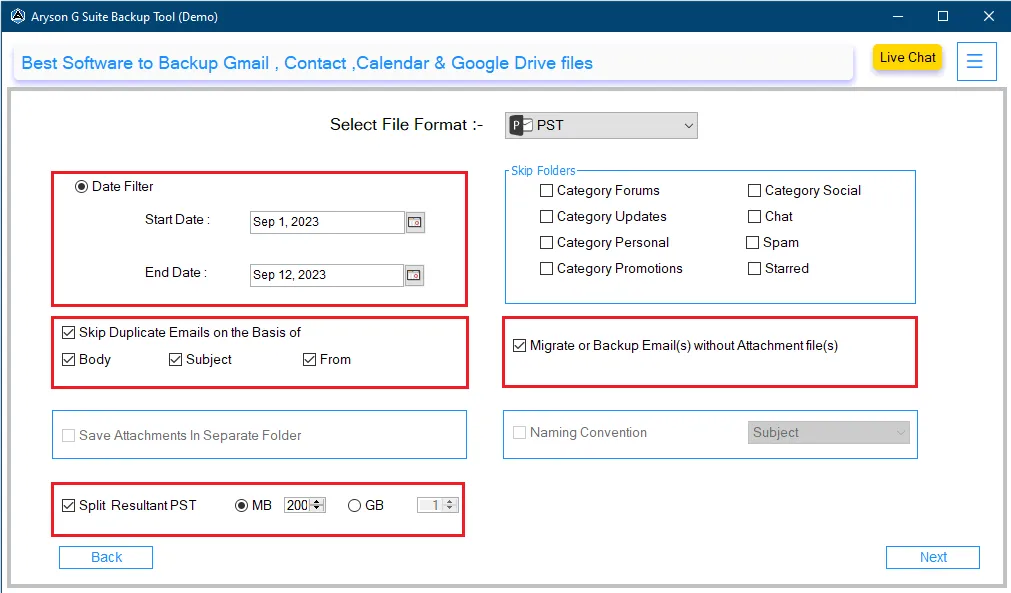
With this advanced Google Workspace Backup Software of Aryson, users can identify and remove duplicate emails based on parameters like Body, Subject, or From fields. This way, users get a clean, organized, and duplication-free backup of Google Workspace data. It saves storage space. Therefore, users receive clean and duplication-free backup data.

Naming Conventions

Date Range Filter for Selective Backup

Users can select a specific start and end date to back up only the required Google Workspace data. It helps avoid unnecessary or old data, which reduces backup size and saves storage space. It also speeds up the backup process by focusing only on emails and files from the selected time period.

Assign Custom Folder Name

Large PST File Splitting Feature

When you are saving Google Workspace data into PST format, the Aryson Google Workspace(G Suite) Backup Tool can split large PST files into small parts based on MB or GB size. Users can manually enter the PST file size in MB or GB. It helps avoid file size limitations and improves performance while saving data.

Date Range & Duplicate Removal Filter

Skips Previously Backed-Up Data

With the Skip previously migrated data feature, only new or modified data is included during the backup process, while already backed-up items are skipped automatically. Google Workspace Backup Software avoids reprocessing data that has already been backed up earlier. As a result, repeated backups remain fast and storage-efficient.

Skip Perviously converted files

User-Friendly Interface with Free Trial

The Automated Google Workspace Backup Software comes with an intuitive interface designed for both technical and non-technical users. Therefore, anyone can perform backup or migration tasks of Google Workspace data without advanced technical knowledge. Additionally, a free trial is available, allowing users to explore the tool’s capabilities and test its functions.

Mapped with Default Mailbox

Wide Windows Compatibility

The Aryson Google Workspace Backup Tool is fully compatible with all major Windows versions, including Windows 11, 10, 8.1, and 7. Users can install and run the software without any technical issues, ensuring smooth performance on their existing systems. This wide compatibility makes it easy for individuals, businesses, and IT teams to use the software on any OS.
How to Use the Aryson Google Workspace Backup Tool Utility
How to Backup Google Workspace Data: Complete Guide

Aryson Google Workspace Backup Tool is designed to securely back up and migrate complete Workspace data, including Gmail, Drive, Contacts, Calendar, and other services. This software follows a simple, guided process that suits both technical and non-technical users.

  • Step 01: Install & run the Aryson Google Workspace Backup Tool on your PC.
  • Step 02: Enter the Google Workspace user name with the Service Account ID>> Login.
  • Step 03: Here, you can view the user Count, Name, and Email Address. Tap Next.
  • Step 04: Choose a backup option like Mail, Drive, Contact, or Calendar. Click Next.
  • Step 05: Choose the saving format from the drop-down list as per the need.
  • Step 06: Now, opt for other inbuilt-feature of the tool and click Next.
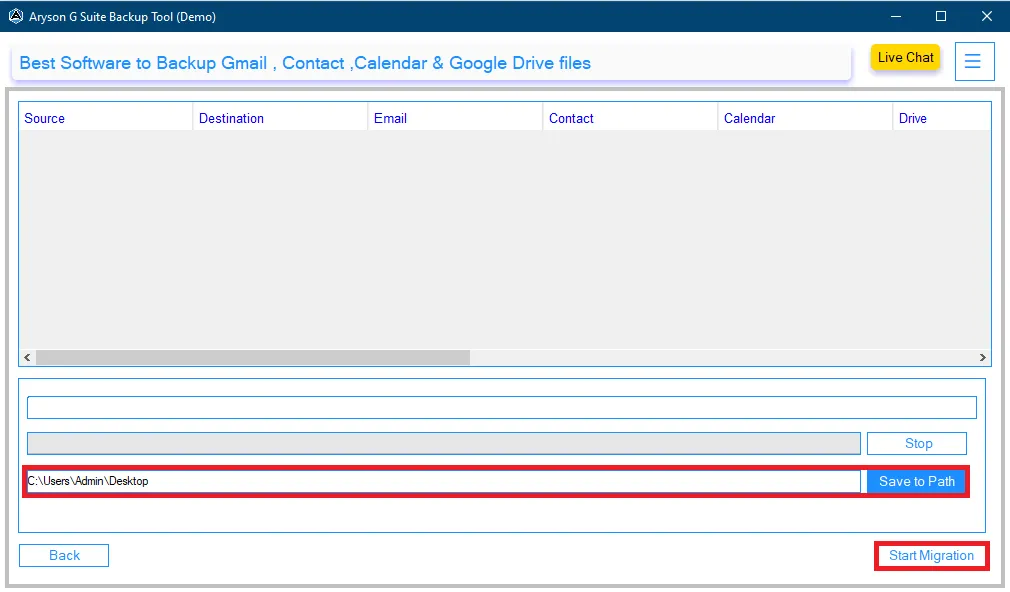
  • Step 07: Select the Destination path and click the Start Migration button.

Aryson Google Workspace Backup Tool: Enterprise & Business Use Cases

Here’s how organizations securely protect and manage Google Workspace data at scale.

Centralized Backup

Centralized Backup for Entire Google Workspace:

Helps enterprises create a centralized backup of emails, contacts, calendars, and Drive data from all user accounts. As a result, IT teams can securely retain business data during employee exits, policy changes, or Workspace restructuring without manual effort.

Allows IT administrators to

Backup Management for Large Organizations:

Allows IT administrators to back up multiple Google Workspace accounts in a single process using admin credentials or CSV-based user import. Consequently, large enterprises can manage hundreds of user backups efficiently while reducing operational overhead.

Compliance & Long-Term

Compliance & Long-Term Data Retention:

Preserves complete email content, headers, metadata, and attachments in secure backup formats. As a result, enterprises can meet legal, audit, and compliance requirements by maintaining long-term access to historical Workspace data.

Selective Backup for

Selective Backup for Audits & Investigations:

Offers date-range and user-based filters to back up only the required data instead of the entire Workspace. Thus, enterprises can collect business-critical information efficiently for audits, internal reviews, or legal cases.

Scalable for Growing

Scalable for Growing Business Needs:

Designed to support organizations with expanding user bases and increasing data volumes. The solution scales smoothly as the business grows, without affecting performance or backup reliability.

Secure Admin-Level

Secure Admin-Level Access & Authentication:

Uses Google-recommended authentication methods such as P12 and JSON credentials for admin login. Hence, organizations ensure enterprise-grade security while accessing and backing up Workspace data.

Aryson Google Workspace Backup Tool: System Specifications

Software Download

(Windows)

Download Now

(Linux)

Download Now

Size: 233MBVersion: 26.01 ( Updated On 29 January 2026 )

Trial Limitations

Free Versions of Aryson Google Workspace Backup Software allow users to backup or download only 50 emails per folder. Or, you can save Google Contacts, Calendar, and Drive only 15 from your Google Workspace account to your local folder. To proceed with the complete backup, you need licensed version of the Google Workspace Backup Tool.

Requirements & Supported Versions

Processor: Intel® Core™ 2 Duo CPU E4600 @ 2.40GHz 2.39GHz

Hard Disk Space: 500 MB of free hard disk space required

RAM: 4 GB of RAM (4 GB is recommended)

Supported Platforms

Window OS: Windows 11, 10, 8.1, 8, 7, Vista, XP, 2000, 98, NT, and 95.

Software Prerequisites

  • If you are operating Windows OS 11, 10, 8, or 7 (32-bit or 64-bit) then you must launch the tool as an Administrator.
  • Turn off the Windows Firewall for proper installation.
  • Disable the Antivirus programs.

FAQ

Request For Software Customization

If you need to customize Aryson Software or need some additional specific features, then provide the software customization Request Quote.

Aryson Google Workspace Backup Tool: Free & Premium Version

Overview of the Free & Full versions of the Google Workspace Backup Tool to Backup Google Workspace Data

Product Features Free Version Full Version
Backup Google Workspace Mailboxes to PST, PDF, EML, MSG, CSV & others. 50 Emails per Folder Complete Google Workspace Data
Migrate to Gmail, Office 365, IMAP & Others 50 Emails per Folder Complete Google Workspace Data
Download Google Contacts, Calendar, Meet, Drive, Docs, Sheets, Forms, and others. 15 Items Locally Complete Google Workspace Data
Gmail-Only Backup Option
Multiple User Account Backup
Skip Duplicate Emails
Secure Admin Login (P12 / JSON)
Backup Emails Without Attachments
PST Split by Size (MB/GB)
Save Attachments Separately
Skip Previously Backed-Up Data
Wide Windows Compatibility
Simple GUI & 24/7 Technical Support
Price Free $49
Money Back Policy

Frequently Asked Questions

Ans. Aryson Google Workspace Backup Solution backup all your Google Workspace data, including Gmail, Google Drive, Contacts, Calendar, Docs, Sheets, Slides, Forms, and Google Keep data.

Ans. Yes, the Google Workspace Backup Software provides a Gmail-only backup option when a full Workspace backup is not required.

Ans. The tool supports PST, MSG, MBOX, EML, EMLX, PDF, CSV, and other common file formats.

Ans. Yes, it supports Gmail, Office 365, Google Workspace, Hotmail, IMAP, iCloud Mail, Zoho Mail, Yahoo Mail, and AOL Mail.

Ans. Yes, multiple user accounts can be backed up in a single process using bulk selection or CSV import.

Ans. Yes, the tool uses P12 and JSON service account credentials for secure admin authentication.

Ans. The Google Workspace Drive Backup Tool for business will use the native format to save the Google Drive data. In addition, it allows you to save the Google Contacts into VCF and Calendars into CSV.

Ans. Yes, it maintains original folder hierarchy, email structure, and metadata like sender, subject, and timestamps.

Ans. Yes, folders such as Promotions, Social, Forums, Updates, Spam, Chats, and Starred can be excluded.

Ans. Yes, users can back up emails without attachments or save attachments in a separate folder.

Ans. Admin consent is required if the application requests permissions beyond an individual user’s data, such as organization-wide or multi-user access. In these cases, only a Microsoft 365 administrator can approve the login for security reasons.

Ans. Yes, it is compulsory to enable user sign-in for Modern Authentication. Modern Authentication requires that the user account have sign-in access enabled to generate the authentication token. If the user sign-in is disabled, the tool or application will not be able to connect to the account or access its data.

To ensure successful login and data access, please verify that user sign-in is enabled for all accounts before using Modern Authentication.

Trusted by IT Professionals & Enterprises Worldwide

See what our IT professionals say about their experience with the Aryson Google Workspace Backup Tool:

review-rating