-

Written By Harshita Sachdeva
-
Approved By
Shivam Rathore -
Updated on July 3rd, 2026
ShareGate vs Aryson for Large-Scale Tenant Migration (1000+ Mailboxes)
Recently, we came across a common concern raised by IT professionals:
Query: We are migrating over 1,200 mailboxes across two Microsoft 365 tenants after a corporate acquisition. ShareGate seems capable, but cost considerations are our priority, and we need Exchange Online migration included from day one without paying for premium tiers. Are there other enterprise-grade tools that can handle this scale without the heavy licensing cost?
Summary: In this era of digitalization, surveys reflect that most of the organizations plan a large-scale Microsoft 365 tenant migration involving 1,000 or more mailboxes. To perform this migration, it is crucial to choose the right software. ShareGate is a well-known platform, trusted by IT professionals worldwide for its solution. However, as enterprises are actively looking for secure yet cost-effective substitutes, most of them prefer to opt for the Aryson Tenant-to-Tenant Migration Tool. Thus, in this article, we will examine ShareGate vs Aryson for large-scale tenant migration. Read through the entire blog to know the suitable platform as per your needs.
What to Look for in an Alternative: Based on Enterprise Concerns
Before examining ShareGate vs Aryson for large-scale tenant migration, it is important to consider a few pointers. IT administrators and enterprises should consider the following requirements:
- Secure tenant-to-tenant migration with modern authentication (OAuth 2.0).
- Complete Exchange Online mailbox migration—emails, contacts, calendars, and attachments.
- OneDrive and SharePoint site migration with metadata and folder hierarchy preserved.
- Bulk user migration support for 100+ or 1,000+ user environments.
- Secure user and mailbox mapping between source and destination tenants.
- Incremental migration to avoid duplicate data transfers.
- Date range and file-type filtering for selective migration.
- Real-time reporting and detailed migration logs for audit purposes.
- Flexible, affordable licensing that fits both SMB and enterprise budgets.
- A free trial or demo version for evaluation before purchase.
- Cost-effective migration without compromising on data security or integrity.
These factors directly determine whether a migration runs efficiently or turns into a prolonged, resource-draining project.
How Aryson Tenant-to-Tenant Migration Tool Is the Best Substitute?
The Aryson Tenant-to-Tenant Migration Tool is an affordable ShareGate alternative for Large Cross-Tenant Migration. This Graph API-based solution is built specifically for migrating Microsoft 365 data between tenants. It supports Exchange Online mailboxes, OneDrive accounts, and SharePoint Online sites and is designed to handle large-scale migrations involving thousands of users. Moreover, there are separate modules to remove duplication from the mailboxes, SharePoint Drive, and OneDrive data. Users can use this software to transfer list from one tenant to another. It preserves folder hierarchy, permissions, metadata, and email structure throughout the migration process—without requiring complex scripts or deep technical setup.
Exceptional Features of Aryson Tenant-To-Tenant Migration Software
Go through the features of Aryson tenant-to-tenant migration software before comparing ShareGate vs Aryson for large-scale tenant migration.
- Complete Exchange Online mailbox migration: available on all license plans, including the entry-level Single User License. ShareGate only includes this on plans at a high cost.
- OneDrive and SharePoint migration—transfers files, folder structure, and metadata intact.
- Secure user and mailbox mapping—accurately maps source accounts to destination accounts to eliminate manual errors.
- Data fidelity preservation—maintains email content, attachments, folder hierarchy, permissions, and metadata throughout the migration process to ensure complete data consistency.
- Shadow duplication support—creates duplicate copies of mailbox data in the destination tenant without impacting source mailboxes, enabling validation, coexistence, and risk-free migration execution.
- Incremental migration with duplicate detection– detects and skips previously migrated items; compares sender, recipient, subject, and message body to prevent duplicate emails.
- Date range and file filters—enables selective migration by date, file size, file type, content type, and custom folders.
- PST export with split option – exports mailbox data to PST files and splits large PSTs by size or date range.
- Flexible attachment management—administrators can include or exclude attachment handling in projects.
- Custom destination folder and path mapping – keeps migrated content organized and prevents it from merging with existing data.
- Real-time monitoring and detailed migration reports— a complete GUI-based monitoring panel and progress bar for audit and verification.
- Free demo version—users can migrate 50 emails per folder and evaluate core features before purchase. Moreover, this software can also migrate 25 contacts and 25 calendars for free.
Steps to Perform Tenant-to-Tenant Migration Using Aryson
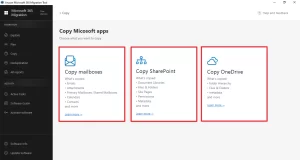
- Launch the Aryson Tenant-to-Tenant Migration Tool.
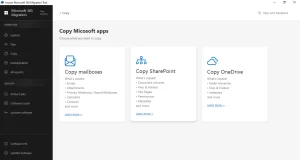
- Select among the available cards—copy mailboxes, OneDrive, or SharePoint.
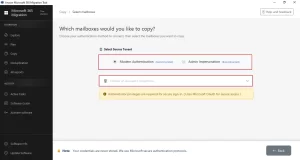
- Choose the login mode >> enter Admin Source tenant credentials >> click Sign In.
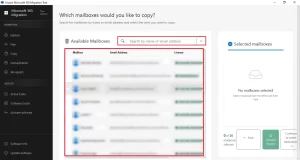
- Select from the source mailboxes, OneDrive accounts, or SharePoint as required.
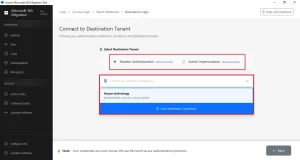
- Provide the destination Admin Tenant credentials >> authenticate in the same manner.
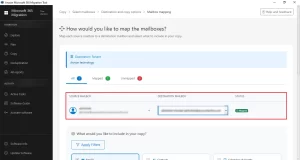
- Map the source and destination users and mailboxes >> verify it before proceeding.
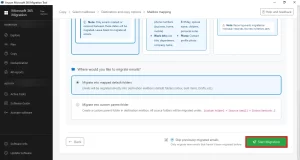
- Apply the required filters as per your requirements >> Click Start Migration.
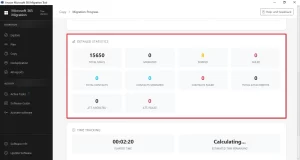
- After migration, monitor the migration process via the progress bar.
ShareGate vs Aryson Which is Better for Bulk Migration?
|
Feature |
Aryson |
ShareGate |
| Exchange Online Migration (all plans) |
Yes |
Enterprise Plans |
| OneDrive Migration |
Yes |
Yes |
| SharePoint Migration |
Yes |
Yes |
| Bulk User Migration |
Yes |
Yes |
| Incremental Migration |
Yes |
Yes |
| PST Export & Split Option |
Yes |
Not available |
| Attachment Management Control |
Yes |
Not available |
| SharePoint Deduplication |
Yes |
Not available |
| OneDrive Deduplication |
Yes |
Not available |
| Mailboxes Deduplication |
Yes |
Not available |
| Local Installation (No SaaS dependency) |
Yes |
SaaS-based |
| One-Time Migration Service Option |
Yes |
Not Available |
Why Are Enterprises Moving to Aryson?
The decision does not depend solely on one or two features. Rather, it is about the whole migration scenario. For enterprises that manage 1,000+ mailboxes on a defined migration timeline and budget, the cost gap alone makes Aryson difficult to overlook. Aryson’s Enterprise License costs roughly nine times less than ShareGate’s equivalent plan. This makes it a cost-effective ShareGate alternative for Microsoft 365 migration.
Beyond pricing, Aryson addresses scenarios that ShareGate does not. The PST export, split feature, and deduplication modules (SharePoint, Mailboxes, and OneDrive) are particularly valuable for organizations that need archival copies of migrated mailboxes. The granular attachment management capability gives IT administrators precise control over what gets transferred. This becomes useful for reducing storage overhead in large-scale migrations.
For organizations that need Teams, Google Workspace, or Microsoft Purview label migration, ShareGate remains the stronger platform. But for enterprises whose primary workload is Exchange Online mailboxes, OneDrive, and SharePoint, Aryson provides every essential capability at a fraction of the investment.
Conclusion
As we compared ShareGate vs Aryson for large-scale tenant migration, it was observed that both ShareGate and Aryson are legitimate, capable migration platforms. ShareGate leads when multi-workload complexity, Teams migration, or Purview label preservation is involved. Medium- or small-scale organizations can opt for the Aryson software, as it is cost-effective and provides users with advanced filtering and deduplication capabilities. At the end, the right choice depends entirely on your organization’s specific requirements & budget.
Frequently Asked Questions
Q1. Can Aryson handle migrations involving 1,000 or more mailboxes?
Ans: Yes. Aryson’s enterprise license supports up to 250 users per license, and organizations managing larger environments can work with Aryson’s technical team for custom solutions. The tool’s bulk processing capability makes it suitable for large-scale enterprise migrations.
Q2. Does Aryson support incremental migration like ShareGate?
Ans: Yes. Aryson’s incremental migration engine detects and skips previously migrated items, transferring only new or changed data. Moreover, it prevents duplicate transfers—functionality comparable to ShareGate’s incremental migration capability.
Q3. Does Aryson preserve folder hierarchy, metadata, and permissions during migration?
Ans: Yes. Aryson preserves mailbox folder hierarchy, SharePoint sites (drive and list), file metadata, and access permissions throughout the migration process.
Q4 Which tool is better for a one-time tenant migration project?
Ans: For a one-time migration, Aryson is more financially practical. It also offers a one-time migration service for Microsoft 365 mailboxes (up to 15 users), SharePoint (up to 5 sites), and OneDrive (up to 15 users); no software installation is required. Via the one-time service, users can evaluate the performance of Aryson Tenant-to-Tenant migration software, and if it fulfills the need, they can opt for the licensed version.
Q5: How does the Aryson Microsoft 365 Migration Tool remove duplicate items during tenant migration?
Ans: There are three separate deduplication modules to remove duplicates from the tenant mailbox data. The mailbox duplicates are detected based on the To, From, and Subject fields and the Date. For SharePoint and OneDrive, based on the hash code and the date.
Q6 Is admin consent mandatory to perform an Office 365 tenant-to-tenant migration with Aryson?
Ans: Yes, admin consent is mandatory to perform tenant migration via Aryson tenant-to-tenant migration via tenant-wide modern auth permissions. However, the software works with user-level credentials when the source tenant blocks admin app consent, so a full tenant migration can proceed even without admin-level consent on the source side.
Q7: Does Aryson support migrating SharePoint generic lists and custom lists via Graph API?
Ans: Aryson’s SharePoint migration is built on a Graph API-based solution that transfers data over TLS-encrypted HTTPS. Graph API allows migration of generic SharePoint lists, while custom lists fall outside the current Graph API support and thus aren’t migrated.
Q8: Can the Aryson tool migrate data if user sign-in is blocked on the source tenant?
Ans: Yes. The Aryson Tenant to Tenant Migration Tool can access and back up a user’s mailbox even if the user’s sign-in is blocked, provided that the backup is performed using an administrator account with the necessary Microsoft 365 permissions and admin consent. Since the mailbox remains active within the tenant, the tool can still retrieve and back up its data. However, the mailbox must not be deleted or inaccessible due to licensing or administrative restrictions.
Q9: How can users track the ongoing tenant migration?
Ans: Aryson provides the users with a detailed migration report via a GUI-based panel that represents the total mailboxes migrated and active migration tasks. This allows users to track the entire migration process.
About The Author:

Harshita Sachdeva, a professional technical writer at Aryson Technologies, specialize in delivering clear, hands-on documentation for data management, migration, and recovery solutions. With a meticulous, reader-first approach, I break down complex technical processes into simple, actionable content - helping IT professionals and decision-makers tackle challenges efficiently.
Related Post