-

Written By Rohan Wiese
-
Updated on June 19th, 2025
Fix “Cannot Start Outlook / Unable to Open Outlook Window” Error
Summary: Are you facing the frustrating “Cannot start Microsoft Outlook” or “Cannot open the Outlook Window” error when you try to launch Outlook? It is a surprisingly common issue for many Outlook users. Typically, this problem indicates an underlying issue with your Outlook profile, a corrupted data file (PST/OST), or incorrect application settings.
In this comprehensive guide, we’ll walk you through various methods to effectively fix the “Outlook won’t open” error. From simple troubleshooting steps to more advanced solutions like Aryson Outlook PST Recovery Tool, our goal is to help you get Outlook up and running smoothly again. Download Now Purchase Now
Why Does Outlook Show “Cannot Open the Outlook Window” Error?
Before fixing the problem, let’s quickly understand why this error occurs. Here are some common reasons:
|
Possible Causes |
What It Means |
|
Corrupt Outlook Profile |
Your Outlook user settings are broken or unreadable. |
|
Damaged PST or OST File |
If the data file storing your emails is corrupted or unreadable. |
|
Faulty Add-ins |
Installed Outlook add-ins may be preventing Outlook from loading. |
|
Sometimes, Problem with the Navigation Pane |
This is the panel on the left of Outlook (Inbox, Sent Items, etc.). |
|
Compatibility Mode Enabled |
Outlook may be running with settings meant for an older Windows version. |
|
Moreover, incorrect Outlook Startup Command |
Outlook is being opened with a broken or wrong shortcut. |
How to Fix the “Outlook Won’t Open” Error
When Microsoft Outlook refuses to open, it’s incredibly frustrating. This issue often stems from common culprits like a corrupted user profile, a damaged data file (PST or OST), or even a minor conflict within its settings or add-ins. The good news is that most “Outlook won’t open” errors can be resolved with a few proven troubleshooting steps.
Below, we’ll guide you through a series of solutions, from simple, quick fixes to more in-depth repairs, to help you get Outlook up and running again.
Aslo Read: How to Fix Damage Outlook Personal Folder File?
05 Methods to Fix “Cannot Start Outlook / Unable to Open Outlook Window” Error
Learn five effective methods to fix the “Cannot Start Outlook” or “Unable to Open Outlook Window” error. This guide covers quick troubleshooting steps like Safe Mode and profile creation, ensuring you can quickly regain access to your emails and get Outlook working smoothly again. These are the following:
1. Start Outlook in Safe Mode
One of the first and most effective steps is to launch Outlook in Safe Mode. This mode turns off all add-ins and custom settings, helping you quickly identify if a third-party add-in is causing the startup problem.
How to do it:
- Press Windows + R on your keyboard to open the Run dialogue box.
- Type: outlook.exe /safe
- Press Enter.
If Outlook opens successfully in Safe Mode, it strongly suggests that an add-in is the culprit. To resolve this:
- Go to File > Options > Add-ins.
- At the bottom, next to “Manage,” select “COM Add-ins” from the dropdown and click Go.
- Uncheck all the add-ins in the list.
- Click OK and then restart Outlook normally.

You can then re-enable add-ins one by one to pinpoint the problematic ones.
Aslo Read: How to Open OST File into Outlook?
2. Reset the Outlook Navigation Pane
The navigation pane, which typically displays your Inbox, Sent Items, and other folders on the left sidebar, can sometimes become corrupted. A simple reset often resolves this and allows Outlook to open correctly.
How to reset it:
- Ensure Outlook is completely closed.
- Press Windows + R to open the Run dialog box.
- Type: outlook.exe /resetnavpane
- Press Enter.
This command clears any broken settings related to the navigation pane and can frequently fix startup issues.
Also Read: How to Fix PST File Not Showing Emails in Outlook Error?
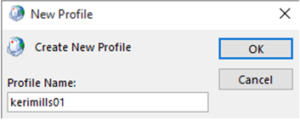
3. Create a New Outlook Profile
A damaged or corrupted Outlook user profile is a common reason for “Outlook won’t open” errors. Creating a fresh profile can provide a clean slate for Outlook to start.
Steps to create a new profile:
- Open the Control Panel on your system.
- Search for and click on Mail (Microsoft Outlook) (32-bit) or Mail (Microsoft Outlook 20XX), then choose Show Profiles…
- Click the Add… button to create a new profile.
- Give the new profile a name (e.g., “New Outlook Profile”) and click OK.
- Follow the prompts to set up your email account within this new profile.
- Once set up, on the “Mail Setup” dialogue box, use the “Always use this profile” dropdown menu to select your newly created profile as the default.
- Click OK and restart Outlook.


4. Repair Corrupted Outlook Data Files (PST/OST)
Outlook stores your emails, contacts, and other data in Personal Storage Table (PST) or Offline Storage Table (OST) files. If these files become damaged, Outlook may refuse to open. Microsoft provides a built-in tool called Inbox Repair Tool (ScanPST.exe) for minor corruptions.
How to use ScanPST.exe:
- Close Outlook completely.
- Navigate to the location of scanpst.exe. This path varies slightly depending on your Office version:
- For Office 2016, 2019, 2021, and Microsoft 365 (64-bit Windows, 32-bit Office): C:\Program Files (x86)\Microsoft Office\root\OfficeXX\ (where XX is your version number, e.g., Office16)
- For Office 2016, 2019, 2021, and Microsoft 365 (64-bit Windows, 64-bit Office): C:\Program Files\Microsoft Office\root\OfficeXX\
- (If you’re unsure, you can often search your C: drive for scanpst.exe)
- Find and run scanpst.exe.
- Click Browse and navigate to your Outlook data file (.pst or .ost), typically located in Documents\Outlook Files.
- Click Start to begin the scan.
- If errors are found, click Repair.
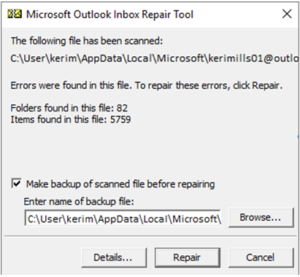
Important Note: The Inbox Repair Tool (ScanPST.exe) is effective only for minor corruptions. If your Outlook data file is severely damaged, this tool may not be sufficient.
Also Read: How to Recover Deleted Emails from PST File in Outlook?
5. Use a Reliable Professional Tool for Severe Corruption
If the above steps, especially ScanPST.exe, fail to resolve the “Outlook won’t open” error, your Outlook data file is likely severely corrupted or extensively damaged. In such critical situations, a specialized and reliable professional tool like the Aryson Outlook PST Repair Tool becomes the best solution.
This software is specifically designed to handle severely corrupted PST files and can meticulously restore all your valuable Outlook data, including emails, attachments, contacts, calendars, tasks, and notes. Key advantages of using such a tool include:
- Comprehensive Data Recovery: Recovers data even from highly damaged files that ScanPST.exe cannot fix.
- Maintains Original Structure: Preserves the original folder hierarchy and email properties.
- Handles Large Files: Capable of repairing oversized PST files without issues.
- User-Friendly Interface: Often provides a straightforward process with just a few easy steps.
The Aryson Outlook PST Repair tool offers a demo version that allows you to scan your corrupted file and preview recoverable items (often up to 50 items per folder) before committing to a purchase. It enables you to verify its performance and functionality and ensures your critical data can be recovered without hassle.
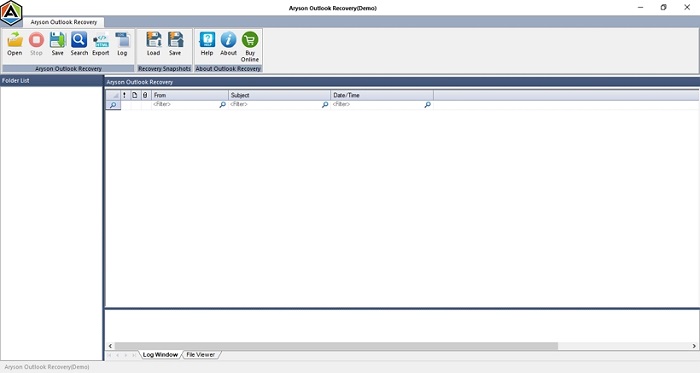
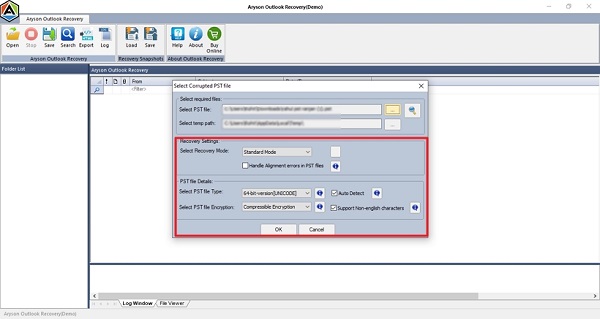
Easy Steps to Repair Outlook Data File Errors:
- First, launch the Outlook PST Repair Tool on your PC.
- Then, browse the PST file by clicking on Open.
- Afterwards, choose Recovery Mode and click OK.
- Now, you can cross-verify the added recovered file.
- After that, click on Save and complete the recovery process.

Final Tips to Avoid This Error Again
- Don’t force-close Outlook while it’s loading or syncing.
- Keep backups of your PST files regularly.
- Avoid using third-party add-ins unless necessary.
- Constantly update Office to the latest version.
- Use antivirus tools that don’t interfere with Outlook.
Conclusion
To sum up, we explored several methods to fix “Outlook won’t open” errors. Whether it’s a profile issue, a corrupted PST file, or faulty add-ins, the methods above can help you get Outlook running again. If manual processes don’t work, a professional repair tool like the Aryson Outlook PST Repair Tool is a reliable and user-friendly option to repair corrupted Outlook data files, helping you regain full access to your mailbox with minimal data loss or disruption.
Frequently Asked Questions (FAQs):-
Q1. Why can’t I open Microsoft Outlook?
Ans. A corrupted profile, a damaged PST file, faulty add-ins, or improper Outlook startup settings often cause this issue.
Q2. Is there a way to fix Outlook without reinstalling Office?
Ans. Yes, you can often fix Outlook without reinstalling Office. Many of the methods described above, such as starting in Safe Mode, resetting the navigation pane, creating a new profile, or repairing PST files with tools like ScanPST.exe or a dedicated PST repair tool, can resolve the issue without a complete Office reinstallation.
About The Author:

Rohan Wiese is a Technical Writer at Aryson Technologies. He is an expert Email Forensic, Cloud Computing, and a passionate nerd with over 10 years of experience in technical content writing. He writes about Cloud Migration, Database Recovery, Email Backup, Windows, Mac, and Tech.
Related Post