-

Written By Rohan Wiese
-
Updated on August 19th, 2025
Export Thunderbird Mail to PST without Data Loss
Mozilla Thunderbird is a free and open-source email client. It stores mailbox data in the MBOX format. On the other hand, Microsoft Outlook uses the PST format to save its emails, contacts, calendars, and other items. Since these file formats are not directly compatible with each other. Hence, you cannot simply open Thunderbird’s MBOX files in Outlook without conversion. So, all you can do is export Thunderbird to PST. For this, you can use Aryson Thunderbird to PST Converter to simplify the process and convert Thunderbird to Outlook PST without data loss.
Key Reasons to Export Thunderbird Emails to PST Format
Before we proceed with the proven methods, it’s understand why this export process is necessary:
- Many users move to Outlook for its advanced features, better UI, and integration with Microsoft 365. PST is a file format used by MS Outlook. So, it’s a better way to export emails to PST to ensure a smooth migration.
- Moreover, PST files allow you to store all your emails, contacts, and attachments in one file. So the individual can backup and access your data. It is easy as compared to handle multiple Thunderbird files.
- Many companies prefer Outlook because PST files integrate well with Microsoft’s compliance tools. Exporting Thunderbird emails to PST ensures your messages meet business needs and archiving policies.
- Also, Outlook allows you to password-protect PST files. As a result, it provides an extra layer of security for your Thunderbird emails after export.
How to Export Thunderbird to PST
If you need to switch from Thunderbird to Outlook, it’s important to make sure that the migration happens without losing emails, attachments, folder structure, or metadata. Manual methods can be time-consuming for large mailboxes. That’s why we will also make you introduce the automated solution in the next section:
Procedure 01: Automated Approach to Export Thunderbird Emails to PST with Attachments
Aryson Thunderbird to Outlook PST Converter is a multi-purpose toolkit to save all your Thunderbird emails in the PST format. It can export entire Thunderbird mailbox data, including emails, attachments, contacts, and other items, into Outlook PST format without data loss. Apart from PST, you can save Thunderbird emails into formats like MBOX, EML, EMLX, MSG, and HTML. The built-in preview feature of this utility can check your email content before conversion. So that you can export your data accurately. Also, it supports Outlook 2021, 2019, 2016, 2013, 2010, and older versions.
Simplest Steps to Save Thunderbird Emails as PST
- Simply launch the Aryson Thunderbird to Outlook PST Converter and open it.
- Now, pick the Thunderbird mailbox that you want to convert as Outlook PST.
- Next, you can preview and cross-verify the selected mailbox once >>Click Next.
- Select PST as the saving format and assign a path to save them on your system.
- Lastly, tap on the Convert button to Export Thunderbird to PST with attachments.
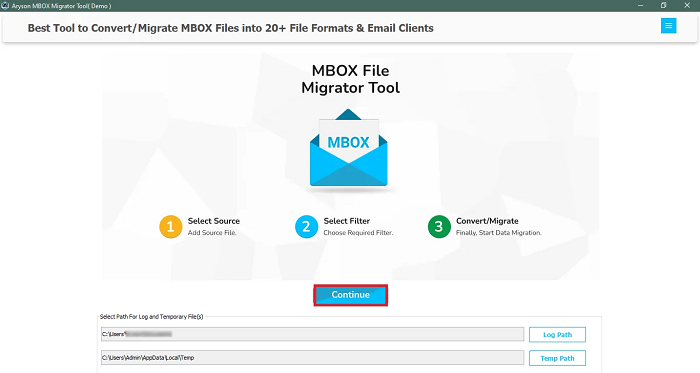
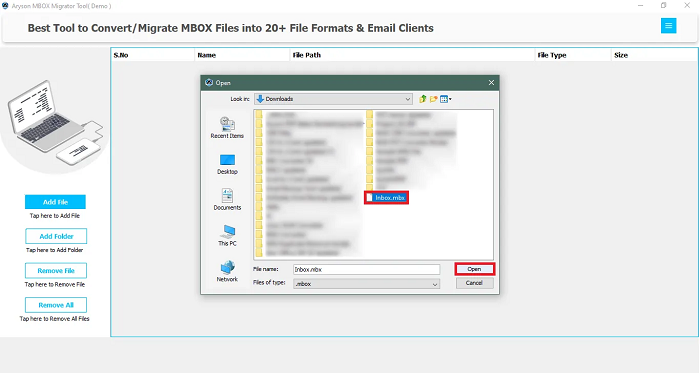
Note: Also, you can keep backup of Thunderbird data in another format, which will be helpful for further use. Free Thunderbird to PST Converter provides a better understanding to the users and converts Thunderbird MBOX to PST without any cost.
Procedure 02: Manual Approach to Convert Thunderbird to Outlook PST
This method uses an IMAP email account (Gmail) as a mediator between Thunderbird and Outlook. You have to import Thunderbird Mail to Outlook using IMAP to export Thunderbird to PST.
- Set up IMAP in Thunderbird: Open Thunderbird>>go to Account Settings>>Add your Gmail account (enable IMAP in Gmail settings first).
- Copy emails to IMAP folders: Drag and drop your Thunderbird emails into the new IMAP account folders.
- Set up the same IMAP account in Outlook: Open Outlook>>Add the same Gmail account via IMAP.
Wait for synchronization: All the emails you copied in Thunderbird will appear in Outlook. - Export as PST from Outlook: Go to File>>Open & Export>>Import/Export>> Export to a file>> Outlook Data File (.pst).
Another Manual Procedure to Convert Thunderbird to Outlook PST
Thunderbird lets you save emails as .eml files, which Outlook can open.
- Select the emails you want in Thunderbird.
- Right-click and choose Save As>> save them in .eml format.
- Open Outlook and drag the .eml files into your Outlook mailbox.
- Export the folder as PST using Outlook’s export feature.
- Also, you can use the EML to PST Converter to get Outlook data.
Conclusion
With the approaches mentioned above, you can easily export Thunderbird to PST. As manual methods are available, they can be time-consuming and risky if you have large or important data. As an alternative, you can use the given software to accomplish the task with accuracy. This way, you can access your Thunderbird emails in Outlook without any compatibility or integrity issues.
Frequently Asked Questions (FAQs)
Q1. Can I export Thunderbird emails directly to PST?
Ans: Use Aryson Thunderbird to Outlook Converter to export Thunderbird to PST directly:
Download & install the Thunderbird to PST Converter.
Now, add the required Thunderbird mailbox to convert to PST.
Preview your mailbox content in the next panel interface.
After that, choose PST as the saving format.
Select the destination location to save the output file.
Click Convert and wait for the process to finish.
Q2. Will exporting Thunderbird to PST delete my original emails?
Ans: No. The export process only creates a copy of your data in PST format; it does not remove or alter your original Thunderbird mailbox.
Q3. What is the safest way to export Thunderbird mail to PST without losing data?
Ans: The safest method is to use Aryson Thunderbird to PST converter that preserves folder structure, attachments, metadata, and formatting without corruption.
Q4. How long does it take to export Thunderbird to PST?
Ans: It depends on the size of your mailbox and the method used. Manual methods can take hours or days. In contrast, Aryson Thunderbird to Outlook Converter can complete the process in minutes for small to medium mailboxes.
Q5. Can I export only selected Thunderbird folders to PST?
Ans: Yes, with the help of recommended software, you can perform selective export options. Hence, you can choose specific folders or apply date-based filters.
About The Author:

Rohan Wiese is a Technical Writer at Aryson Technologies. He is an expert Email Forensic, Cloud Computing, and a passionate nerd with over 10 years of experience in technical content writing. He writes about Cloud Migration, Database Recovery, Email Backup, Windows, Mac, and Tech.
Related Post



