-

Written By Rohan Wiese
-
Updated on April 22nd, 2026
How to Export Google Workspace Email to PST Safely [2026 Guides]
Thinking of making the switch to Microsoft 365 from Google Workspace? Many users prefer to export Google Workspace email to PST to create a backup. With the rise in cyber attacks, it is important to regularly back up emails to stay secure. But exporting emails from G Suite to PST is not easy. In this blog, we will provide step-by-step instructions to export your Google Workspace email data to PST. These include both manual options and a specialized automated Google Workspace Backup Tool. Continue reading the blog till the end to find out how the tool works and simplifies the process.
Why Export Google Wrokspace (G Suite) Mailbox to PST?
G Suite to PST migration is primarily done for data migration, backup, and security reasons. Here are the main reasons why users prefer exporting Google Workspace emails to PST format:
- Users export and back up data in a PST file for better compatibility and email management.
- Switching from Gmail to Outlook, export Gmail emails to PST for a smoother transition.
- One key advantage of PST files is the ability to access mail data offline.
- Securing PST files by setting a password will restrict unauthorized access while ensuring privacy.
- Backing up the essential data in PST format is a reliable choice.
Methods to Export Google Workspace Email to PST
Google Workspace to PST migration is crucial for backing up email data in a secure file format. Users can choose between manual techniques or use the automated tool for backing up data instantly. Let’s look at both techniques one by one.
Manual Method 01: Using MS Outlook
This method involves enabling IMAP in Google Workspace. Then, add the Google Workspace account to Outlook. Lastly, export the G Suite emails to PST file format.
The following step-by-step process successfully exports emails to PST:
Step 1: Configure IMAP in Google Workspace
- First, log in to your Gmail account.
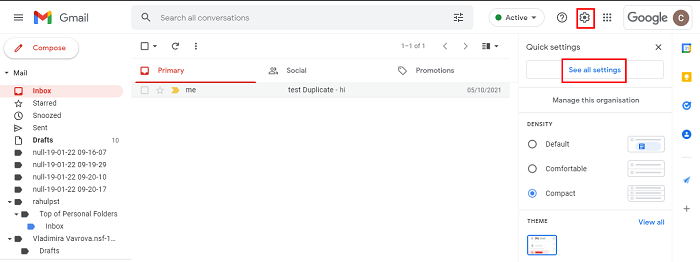
- Then, head to the (gear icon) Settings > See all Settings.
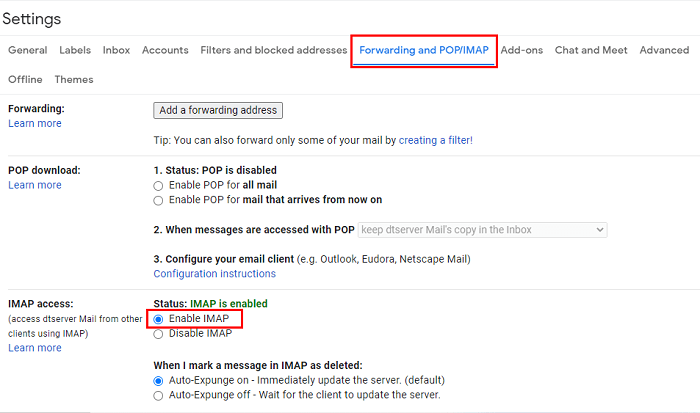
- Now, in the Forwarding and POP/IMAP tab, Enable IMAP under IMAP Access.
- Next, click on Save Changes.

Step 2: Add Google Workspace Account to Outlook
- Open MS Outlook on your system.
- Use the Files option and click on Info > Add Account.
- Now, type in the Google Workspace email address and tap Connect.
- After that, enter the password.
Step 3: Export Google Workspace to PST
- In Outlook, go to File > Open & Export > Import/Export.
- Then, choose Export to a file and click Next.
- Afterwards, select Outlook Data File (.pst) and tap Next.
- Now, choose the preferred Gmail account and check the Include subfolders checkbox.
- Finally, click Next > Browse a location to save the file and hit Finish.
Limitations: This method has to be repeated again and again for exporting emails from multiple G Suite accounts. Therefore, it becomes a tedious task and is time-consuming. Using this method, users cannot export contacts and calendar data. Plus, the IMAP sync requires a stable Wi-Fi connection.
Manual Method 02: Using Google Data Export Tool
This method is free and is offered by Google. This method is only for administrators to export G Suite to PST. The method involves exporting the G Suite emails using the Data Export Tool and then converting the resultant MBOX file to PST.
Use the instructions given below to start the process:
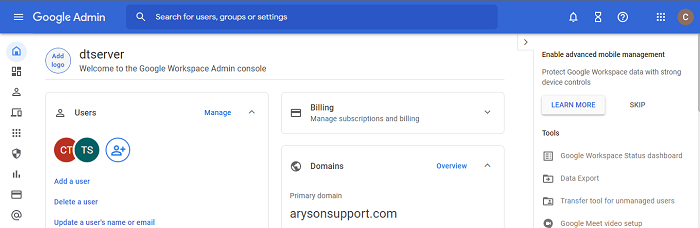
- To start with, sign in to Google Admin Console.
- After that, press the Main Menu icon and click on Tools > Data Export.
- Then, tap Start Export.
- Now, wait for 10-15 days, Google will send a confirmation link to your email ID.
- Then, click the link to download the files in .zip format.
- Now, the downloaded file will be in MBOX format. To access it in Outlook, convert MBOX to PST.
Limitations: The method does not directly export Google Workspace emails to PST. Also, it export the G Suite emails as MBOX format which needs to be converted to PST format. Moreover, this method is only suitable to those who have admin privileges.
Secure Way to Export Google Workspace Email to PST
The Aryson G Suite Backup Tool makes it easy to securely back up or move Google Workspace email data. Whether handling business data or personal files, its advanced features and simple interface makes migration easy. The software easily backup G Suite Drive Data to Exteral Drive without any data loss. Some of its key features are:
- Support multiple file formats such as PST, MSG, MBOX, EML, PDF, etc.
- Enables email migration across platforms like Gmail, Office 365, Hotmail, etc.
- Option to remove duplicate emails while preserving data integrity.
- Ability to export contacts in VCF format and calendar in ICS format.
- Built-in Date-Range filter for selective backups.
Follow the Simple steps to export Google Workspace mailbox to PST:
- Download, install, and run the tool as an administrator.
- Now, choose Backup Google Workspace Email Only.
- Next, log in to your Google account using your Email ID and password.
- Afterwards, select the G Suite account and click Next.
- Then, from the File Format option, choose PST from the drop-down list.
- Now, tick the additional filters if required to refine the process.
- Lastly, specify the destination location to save the resultant file.
Conclusion
Exporting G Suite to PST is essential for those migrating to Outlook or creating a backup. The manual method using MS Outlook and Google’s built-in Data Export Tool is available. But they are technically complex and time-consuming. In contrast, the automated backup tool offers secure and reliable results with minimal effort. It is the preferred choice among individuals and businesses.
Frequently Asked Questions (FAQs)
Q1. How can I export Google Workspace emails to PST format?
Ans: You can use Google Takeout or the Google Workspace Admin Console to download user data, then use tools like Microsoft Outlook or third-party Aryson G Suite Backup Tool to save the emails as PST files.
Q2. Can I export multiple Google Workspace user mailboxes to PST at once?
Ans: Yes, admins can export multiple mailboxes using the Google Workspace Admin Console’s Data Export tool. However, converting them to PST will require individual processing through Outlook or third-party Aryson G Suite Email Backup software.
Q3. What’s the best method for businesses to export Google Workspace emails to PST for backup or compliance?
Ans: The most efficient method is using the Aryson G Suite Backup Tool, which allows businesses to securely export multiple Google Workspace emails directly to PST format with ease. It’s ideal for backup, archiving, and compliance needs.
Q4. Do I need admin access to export Google Workspace emails to PST?
Ans: Admin access is required to export other users’ data via the Admin Console. For individual accounts, users can use Google Takeout without admin privileges.
Q5. Are there any size limitations when exporting Google Workspace data to PST?
Ans: Google Takeout has file size limits (usually 2GB or 50GB per archive), and Outlook PST files also have size limitations depending on the version (20GB for older, 50GB for newer).
About The Author:

Rohan Wiese is a Technical Writer at Aryson Technologies. He is an expert Email Forensic, Cloud Computing, and a passionate nerd with over 10 years of experience in technical content writing. He writes about Cloud Migration, Database Recovery, Email Backup, Windows, Mac, and Tech.
Related Post