-

Written By Mithilesh Tata
-
Updated on August 22nd, 2025
How to Transfer Mail From Apple Mac to Windows Outlook
Many users face difficulties when they shift from Apple Mail on macOS to Outlook on Windows. The main challenge comes from the fact that Apple Mail saves data in MBOX format, while Outlook relies on PST files. Because of this difference, direct migration is not possible without following a proper method.
This blog will explain simple and effective ways to transfer Apple Mail to Outlook on Windows. Both manual techniques and an automated Aryson MBOX to PST Converter, to ensure your emails, attachments, and folder structure remain safe during the process.
Brief of MBOX(Apple Mail)& PST(Windows Outlook)
PST and MBOX are both email file formats that store email messages and other mailbox content. But there’s a difference between them. MS Outlook client creates a PST file, whereas an MBOX file is created in various email clients, such as Thunderbird, Entourage, Spicebird, Pocomail, Apple Mail, Netscape, Claws Mail, Opera Mail, Mozilla Mail, Evolution, Sylpheed, Eudora, Mulberry, SeaMonkey, etc.
Understanding the Need to Export Mailbox from Apple Mail to Outlook
The core issue lies in the file formats. Apple Mail saves data in MBOX format, while Outlook requires PST. Without conversion, Outlook cannot open or manage these emails. As a result, you have to export Mac Outlook to PST format. This process of exporting the mailbox becomes important to:
- Access emails on Windows systems.
- Maintain professional communication through Outlook.
- Ensure compatibility with Office 365 and Exchange.
- Create a reliable backup of important emails.
These points clearly show why exporting Apple Mail to Outlook is not just a choice but often a necessity for users who switch to Windows or use Outlook in their workplace.
Top Methods to Transfer Apple Mail to Outlook
To help you, we will explain the easiest ways to transfer Mac Mailbox to Outlook on Windows. Further, we are going to cover both manual methods and a quick automated solution. So, you can move your emails without losing attachments or folder structure.
Method 01: Transfer Mac Mail Folders to Windows Outlook Manually
With technical expertise, you have to perform multiple steps to transfer Apple Mail to Outlook by manual process. Proceed with the given steps one by one, separately, to export Mac Mail to Outlook 365:
Step 1: Import Mailbox into Apple Mail
- Open the Apple Mail application.
- Go to File >> Import Mailboxes.
- Select the folder where your MBOX file is stored and click Continue.
- Browse and pick the required MBOX files, then press Continue again.
- Once the import finishes, click Done.
Step 2: Create a Mailbox in Eudora
- Download and install the Eudora application.
- Rename the imported MBOX file (which was imported earlier).
- For example: if it’s named “InboxMBOX”, rename it “InboxMBOX.mbx”.
- Copy and move this file to the default Eudora directory:
C: Documents and Settings<user>Application Data\Qualcomm\Eudora - Open Eudora, click on the new MBX file once, and then close the program.
Step 3: Import Eudora Mailbox into Outlook Express
- Launch Outlook Express on your system.
- On the File menu, click Import >> Messages…
- Select Eudora in the list, and click Next to continue the process.
- Browse the location in which you’ve moved the InboxMBOX.mbx file earlier.
- Click OK.
- Click on Next >> Next again. And then finally click Finish.
- You can find the imported mailbox in the Local Folders section of Outlook Express.
Step 4: Move Emails from Outlook Express to Outlook
- Open Microsoft Outlook on Windows.
- Go to File >> Open & Export >> Import/Export.
- Choose Import from another program or file and click Next.
- Select Import Internet Mail and Addresses>>Next.
- Pick Outlook Express 4.x, 5.x, 6.x, or Windows Mail, then click Next.
- Browse and select the file you want to import.
- Click Next, then hit Finish when the process completes.
Manual Method: Points You Should Consider Before Trying
- The process is long and complicated, requiring several applications like Apple Mail, Eudora, and Outlook Express.
- There is a risk of losing attachments, formatting, or metadata during conversion.
- Handling large mailboxes can cause errors or incomplete transfers.
- Non-technical users may find the steps confusing and time-consuming.
- Repeating the same method for multiple mailboxes is not practical.
Because of these drawbacks, many users look for an alternative solution that ensures data safety and saves time.
Note: As you are aware that Mac supports the MBOX format. Simply export the Mac mailbox as MBOX and then convert MBOX to PST. So that you can easily import a PST file into Windows Outlook.
Method 02: Simple & Reliable Approach to Transfer Apple Mail to Outlook
The Aryson MBOX to PST Converter is a reliable software to make the process of switching from Mac Mail or any MBOX-supported email client to Microsoft Outlook flawless and secure. It allows users to convert MBOX files into PST format without any data loss. Also, supports bulk conversion, making it convenient for users handling multiple mailboxes at once. This utility is easy to use, even for beginners. Along with that, it works well for both individuals and businesses to perform an Apple Mail to Outlook migration.
- Apart from PST, you can save MBOX files into EML, MSG, and other formats.
- Large PST files can be divided into smaller sizes to prevent Outlook corruption.
- You can import converted PST into Outlook 2021, 2019, 2016, 2013, and earlier versions.
- Works smoothly on all Windows versions, including the latest Windows 11.
Simple Steps to Transfer Mail From Apple Mac to Windows Outlook:-
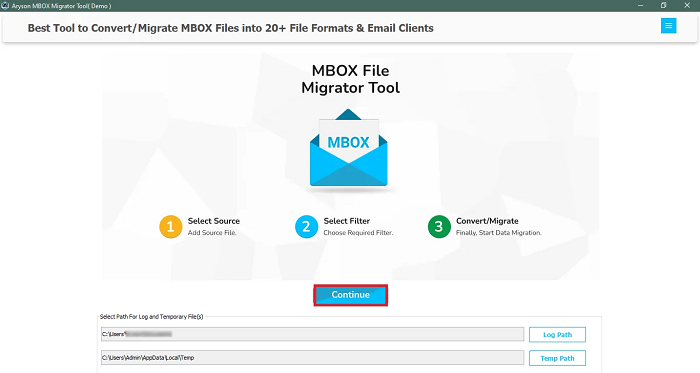
- First, download and install the Aryson MBOX to PST Converter on your system.
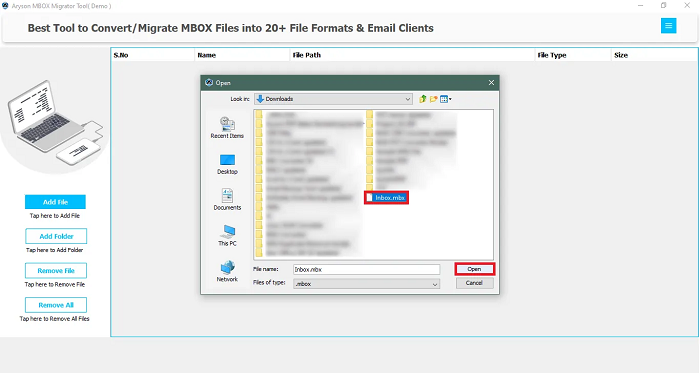
- Open the software and click on the Add File(s) button to upload your MBOX file(s).
- Now, preview the MBOX mailboxes and click on the save button to proceed.
- Next, mark the radio button to Save as PST format along with the destination path.
- Configure any additional settings and click on the OK button to save MBOX as PST.
Important Note: Now, you can import PST file into Outlook with Step 4 of above mentioned manual method.
Conclusion
Switching emails from Apple Mail on Mac to Outlook for Windows is not always simple, but it is definitely possible with the right steps. However, once the right method is chosen, the process becomes simple and smooth. For users with technical knowledge, manual techniques can work, though they are time-consuming and risky. On the other hand, using a professional tool is more reliable to transfer Apple Mail to Outlook without data loss. In the end, the best approach depends on your comfort level, time availability, and how important your mailbox data is to you.
Frequently Asked Questions (FAQs)
Q1. Can I transfer Apple Mail directly to Outlook on Windows?
Ans: As Mac Outlook does not support the PST format. So, you need to convert MBOX to PST File for Free in Easy Steps using Aryosn MBOX to PST Converter.
Q2. What file format does Apple Mail use for storing emails?
Ans: Apple Mail stores its mailbox data in MBOX format. This format is not directly supported by Outlook. Outlook uses the PST format.
Q3. Do I need Outlook installed on Mac to perform the transfer?
Ans: No, Outlook on Mac is not mandatory. You only need access to Apple Mail data and Outlook installed on your Windows system.
Q4. How long does it take to transfer emails from Mac Mail to Outlook?
Ans: However, the migration time depends on the mailbox size and the method used. The manual method can take hours, while the recommended automated tool can complete the process within a few clicks.
Q5. Which is the best way to transfer Mac Mail to Windows Outlook?
Ans: Using Aryson MBOX to PST Converter is the best way to transfer Mac Mail to Windows Outlook. Simply, you can convert Mac Mail data MBOX to Outlook PST with easy steps.
About The Author:

Mithilesh Tata is dedicated to making the lives of his customers as simple as possible. He enjoys learning about new applications and utilities that can help people protect their data. Mithilesh also has a strong grasp on email migration & data recovery. He enjoys validating every component of the software, technical materials, and anything else that has to do with his working life.
Related Post