-

Written By Harshita Sachdeva
-
Approved By
Shivam Rathore -
Updated on June 9th, 2026
Import MBOX File to GoDaddy: Step-by-Step Guide 2026
Fact-checked and reviewed in accordance with our
Editorial Policy
Rachel’s Query: I switched my Gmail account but have 30GB of MBOX archives stored there. Recently, when I needed to move it into GoDaddy, the synchronization stopped midway, and as a result, I lost my emails. Is there a reliable way to import MBOX file to GoDaddy without losing data or folder structure?
Summary:Businesses and professionals relying on email clients like Gmail, Thunderbird, or Apple Mail store critical data in MBOX files—emails, threads, and attachments all packed together. As GoDaddy grows as a go-to cloud email hosting solution, the demand to import MBOX files to GoDaddy is rising. Therefore, this guide covers all the manual methods, their limitations, and the effective use of the Aryson MBOX Converter to make migration fast and error-free.
Instantly Import MBOX to GoDaddy
- Download and install Aryson MBOX Converter > run it.
- Load the required MBOX files and folders >> preview them >> Next.
- Select GoDaddy as the destination >> log in with valid credentials.
- Apply the required built-in features as per requirement >> Start Export.
Best Methods to Import MBOX File to GoDaddy
Users attempting to migrate MBOX data to GoDaddy typically have two manual workflows available. Both work well on their own, but each comes with demerits worth knowing before you start. For large archives or complex folder structures, the professional method covered below is worth considering first.
Method 1: Move MBOX File to GoDaddy via Thunderbird and ImportExportTools NG
Users can try the combination of Mozilla Thunderbird and ImportExportTools NG add-on to import MBOX files to GoDaddy. This method is absolutely free and works in four stages: install the tool, connect GoDaddy via IMAP, load the MBOX file, and drag emails into the GoDaddy folder for sync.
Step 1: Install Thunderbird and Add-on
- Download and install Mozilla Thunderbird.
- Run Thunderbird >> click the menu (☰) >> select Add-ons and Themes.
- Search for the ImportExportTools NG add-on >> install it & rerun Thunderbird.
Step 2: Configure Your GoDaddy Email
- In Thunderbird, go to Account Settings and select Add Mail Account.
- Enter your GoDaddy email address and password, and choose the IMAP configuration so your changes sync to the server.
Step 3: Import the MBOX File
- In Thunderbird’s left sidebar, right-click on Local Folders.
- Hover over ImportExportTools NG and select Import mbox file.
- Choose Import directly one or more mbox files, click OK, and browse your computer to select your .mbox file.
- You can view your emails under the Local Folders section in Thunderbird.
Step 4: Synchronization of Emails to GoDaddy
- Now, open the imported folder in Thunderbird >> select emails to transfer.
- Drag and drop the selected emails directly into your GoDaddy IMAP folder or Inbox.
- It may take a few minutes to sync Thunderbird emails to your GoDaddy Webmail.
Drawbacks of Manual Methods
- It is a tedious and error-prone task to drag large email batches.
- Your migration process might get interrupted due to a weak internet connection.
- There is even a possibility of dragging emails twice accidentally.
- Moreover, there is no way to track the progress, which makes it impossible to know if the upload is stuck or running
- Due to GoDaddy’s storage limit, the uploads may get blocked without any error message.
Method 3: Quick Solution to Import MBOX File to GoDaddy
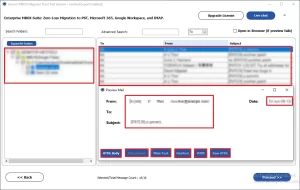
Enterprises and professionals dealing with large MBOX archives prefer the Aryson MBOX Converter to import MBOX to GoDaddy Webmail. This software aims to eliminate the need for manual IMAP setup and provide users with 100% data integrity. Moreover, the advanced preview panel allows them to view the Raw HTML, plain text, calendars, contacts, attachments, etc. With the help of its simple GUI and interactive interface, beginners can import MBOX to Microsoft 365, Google Workspace, IMAP, etc. To evaluate the software first, try the free demo version and migrate up to 50 emails/folder.
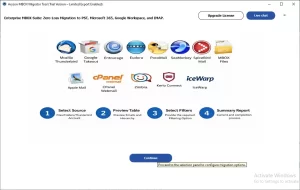
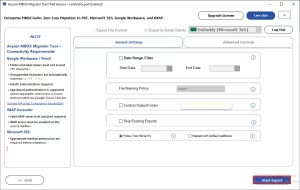
Simplified Steps to Upload MBOX to GoDaddy Account Using Aryson Tool
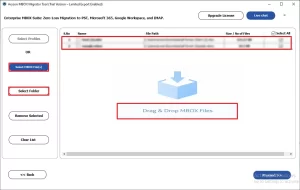
- Download and install Aryson MBOX Converter, then run it as administrator.
- Load the required MBOX files via the Select Files or drag-and-drop method.
- Select specific files to check their content in the advanced preview window.
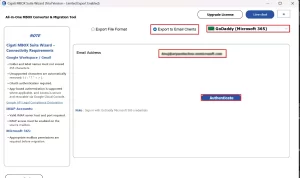
- Select GoDaddy (Office 365) under Export to Email Client >> log in to it.
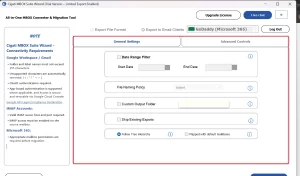
- Use the valid built-in filters as per your requirement.
- Click Start Export to import MBOX file to GoDaddy.
How Does Aryson MBOX Converter Outperform Manual Methods?
- Import MBOX Files to Gmail, Thunderbird, Yahoo Mail, IMAP, etc., email clients.
- Keeps the headers, thread order, and inline attachments intact.
- The duplicate detection feature removes redundant emails to be migrated.
- Batch processing handles unlimited MBOX files at once with no file size restriction.
- Import MBOX to Google Workspace via the JSON key and admin ID.
- You can use the Advanced filters to enable selective migration.
- The free demo version lets users verify output quality before purchasing a license.
Eliven’s Success Story
Eliven M., an operations lead from Chicago, needed to migrate three years of MBOX archives from her old Gmail workspace into GoDaddy mail. The Thunderbird sync kept stopping midway. Therefore, she switched to Aryson MBOX Converter, loaded all files at once, entered her GoDaddy credentials, and completed the full migration—folders, attachments, and metadata intact- within minutes.
Conclusion
In this blog, we primarily focused on two main methods to import MBOX file to GoDaddy. The manual method discussed is suitable for technical users with small datasets. Whereas, for the non-technical segment of users, opting for the Aryson MBOX Converter would be a better choice. While using the software, if you get stuck in the process, reach out to our tech support team for further assistance.
Frequently Asked Questions
Q.1 How do I import MBOX file to GoDaddy Workspace Email?
Ans. You can use the Aryson MBOX Migrator Tool to efficiently import an MBOX file to GoDaddy Workspace Email. Simply load the required MBOX files, preview them, select GoDaddy as the destination, log in to it, apply filters, and start export.
Q.2 Can I import multiple MBOX files to GoDaddy at once?
Ans. Yes, with the help of the Aryson MBOX Migrator, users can import multiple MBOX files to GoDaddy at once.
Q.3 Does importing MBOX to GoDaddy require any technical knowledge?
Ans. No, if you are using the Aryson MBOX Migrator, you don’t need to have any technical knowledge. Even if you are a complete beginner, the simple and interactive interface of the software makes it easier to use.
Q.4 Will attachments be included when I import MBOX files to GoDaddy?
Ans. Yes, if you are using the above-discussed software, all your attachments will also be included when you import MBOX files to GoDaddy.
Q.5 Can I filter emails by date before importing MBOX files to GoDaddy?
Ans. Yes, using the in-built date range filter of the Aryson MBOX Converter, you can easily filter emails by date before importing MBOX files to GoDaddy.
Q.6 How do I get support if I face issues importing MBOX files to GoDaddy?
Ans. In case you face any migration-related issues, you may reach out to our 24/7 available technical support team for personalised assistance.
About The Author:

Harshita Sachdeva, a professional technical writer at Aryson Technologies, specialize in delivering clear, hands-on documentation for data management, migration, and recovery solutions. With a meticulous, reader-first approach, I break down complex technical processes into simple, actionable content - helping IT professionals and decision-makers tackle challenges efficiently.
Related Post