-

Written By Harshita Sachdeva
-
Approved By
Shivam Rathore -
Updated on July 23rd, 2025
Convert OLM to PST for Outlook Using 02 Free Methods
When switching from Outlook for Mac to Windows, users often struggle to access their mailbox data due to incompatible file formats. Mac Outlook stores data in OLM files, while Windows Outlook uses PST. To bridge this gap, it’s necessary to convert OLM to PST format. In this blog, we’ll cover manual solutions as well as a recommended professional solution Aryson OLM Converter for a more secure and efficient conversion. By the end of this blog, you’ll have everything you need to perform the conversion without losing data or getting stuck in a complex technical process. Let’s get started with why this conversion is important.
Understanding the Need to Export OLM to PST File
Here are some common reasons users need to export OLM to PST:
- Platform Shift: When switching from macOS to Windows, users must convert OLM to PST to access their mailbox data.
- Cross-Platform Compatibility: PST format is widely supported by all versions of Windows Outlook, making it ideal for backup or migration.
- Data Migration for Organizations: IT teams often need to migrate Mac Outlook data to Windows systems during organizational shifts or mergers.
- Backup Purpose: Saving OLM data as PST ensures easier restore options in Windows environments.
- Access Without Mac Outlook: PST files can be opened without Mac Outlook, unlike OLM files.
Brief About OLM & PST
OLM File: An OLM file is the proprietary data file format used by Microsoft Outlook for Mac. It stores a user’s entire mailbox, including emails, contacts, calendars, tasks, and notes. These files are not compatible with Windows Outlook.
PST File: A PST (Personal Storage Table) file is used by Microsoft Outlook for Windows to store similar mailbox data, emails, attachments, contacts, calendars, and more. It is the most commonly used format for data export, backup, and migration within Windows-based Outlook versions.
How to Convert OLM to PST
There are multiple ways to convert OLM files into PST format, but not all are user-friendly or efficient. In the upcoming section, we’ll explain two effective methods that users often try for OLM to PST conversion.
Method 1: Recommended Solution: Use an OLM to PST Converter Tool
The Aryson OLM Converter Tool is a trusted solution for users who need to migrate mailbox data from Mac Outlook (OLM files) to Windows Outlook (PST format). It offers a fast and efficient way to convert all OLM mailbox items, including emails, contacts, calendars, tasks, and more, without compromising data integrity. Also, it is easy to use and doesn’t require Outlook installation to perform the conversion. Moreover, it supports various output formats like EML, MBOX, MSG, PDF, and HTML, giving users the flexibility to access their data in different applications. Whether you’re moving to a new system or just need a backup in PST format, this utility makes the entire process flawless and accurate.
Follow the Steps to Convert OLM to PST Using Aryson OLM Converter:
- Download & Install Aryson OLM Converter on your system.
- Launch the Tool and click on Open to add your OLM file.
- Preview Mailbox Data after scanning the OLM file.
- Select PST Format from the saving options.
- Choose Destination Path to save the converted PST file.
- Click Convert to begin the OLM to PST conversion.
- Save the Report if needed, after successful conversion.

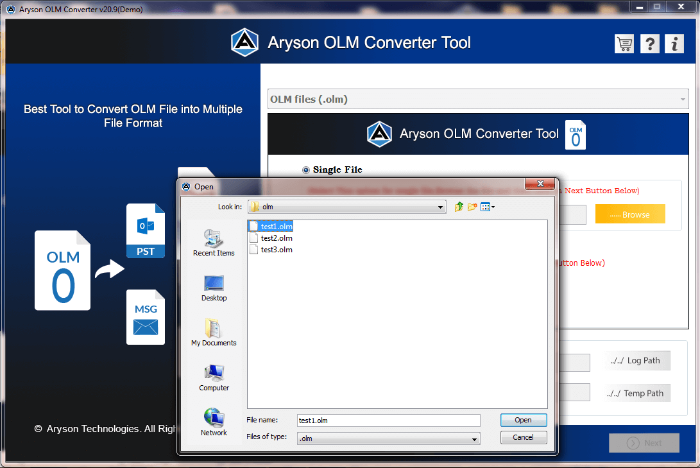
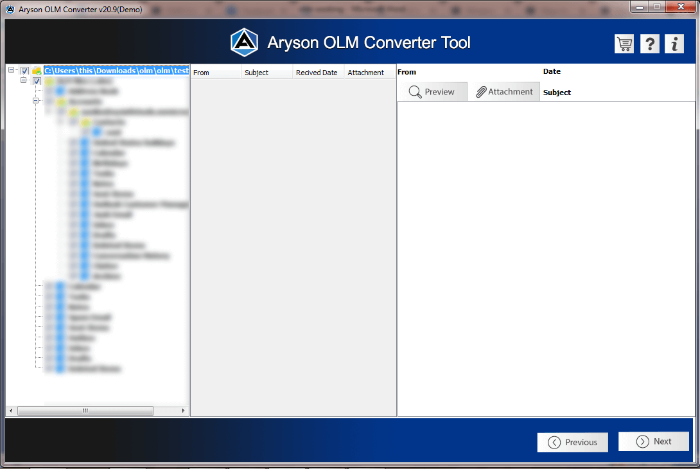
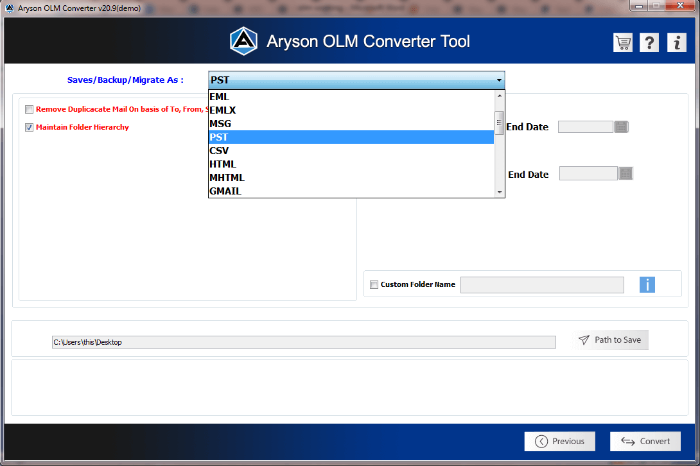
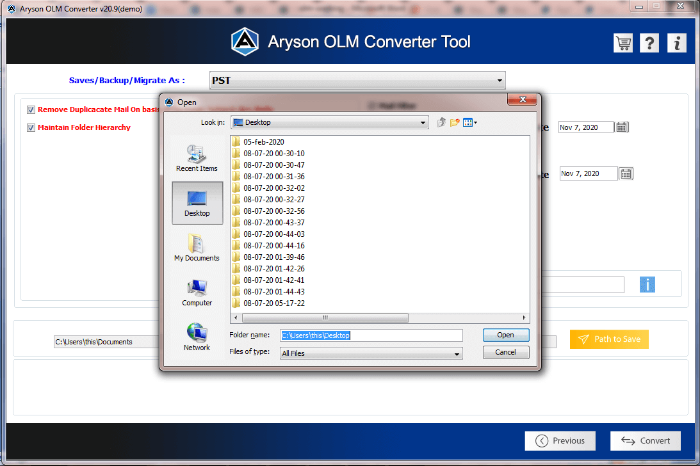
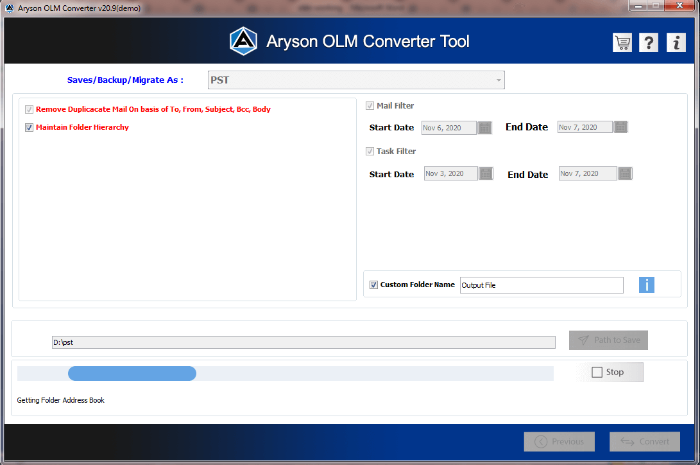
Note: Once completed, the tool will notify you, and your PST file will be saved at the selected location. If you are comfortable with the technical terms of Outlook, then you can proceed with the manual OLM to PST conversion as well.
Method 2: Manual Conversion of OLM to PST Using Gmail IMAP
The manual method involves syncing your Outlook for Mac data to a Gmail account. And then configure that Gmail account in Outlook for Windows to convert OLM to PST.
Pre-requirements:
- A Gmail account
- Outlook installed on both Mac and Windows
- Stable internet connection
- Basic understanding of Outlook account settings
Step-1: Enable IMAP in Gmail
- Log into your Gmail account.
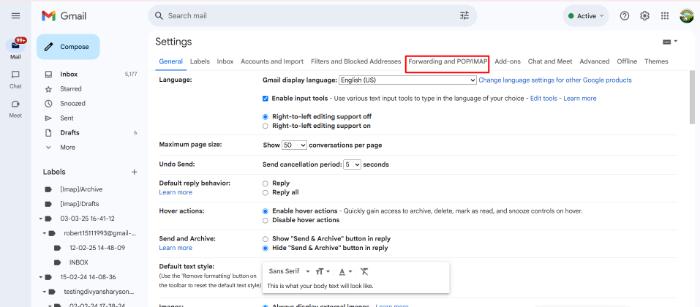
- Click on the gear icon>>Go to Settings.
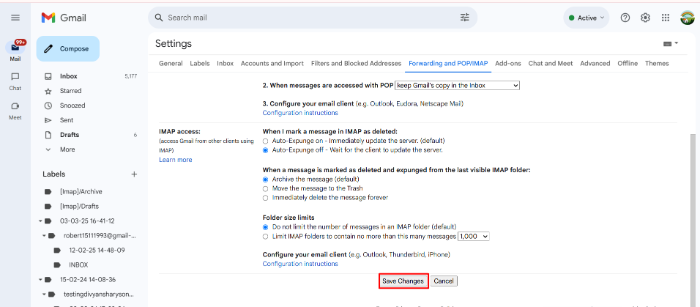
- Select See all settings>> Forwarding and POP/IMAP tab.
- Enable IMAP Access and click Save Changes.
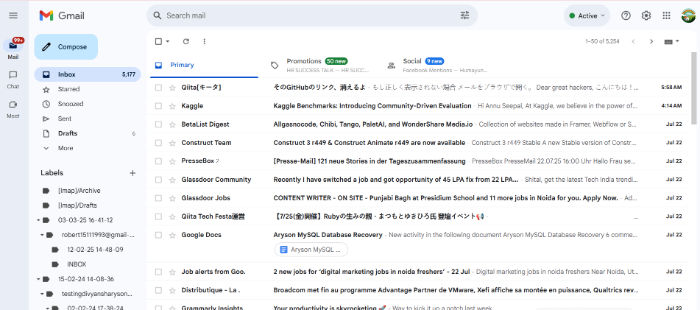
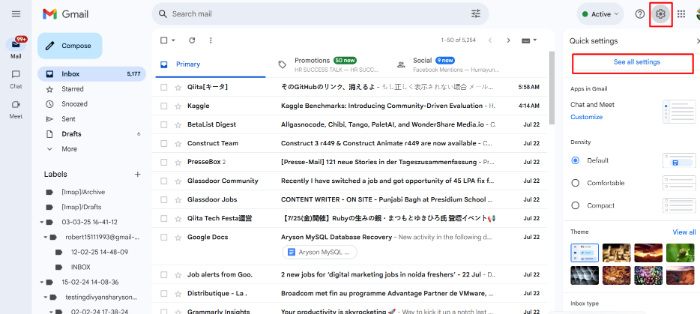
Step-2: Add Gmail Account to Mac Outlook
- Open Outlook on your Mac.
- Go to Tools >> Accounts.
- Click the + icon and select New Account.
- Enter your Gmail credentials and configure using IMAP.
Step-3: Move OLM Data to Gmail
- In Mac Outlook, select your specific email item.
- Drag and drop them into your Gmail folders.
- Wait for synchronization to complete.
- Also, you can directly import OLM File to Gmail.
Step-4: Configure Gmail on Windows Outlook
- Launch Outlook on your Windows PC.
- Add the same Gmail account using IMAP.
- Allow time for syncing all Gmail data (now containing your OLM emails).
Step-5: Export Gmail Data to PST
Now, all you have to do is export Gmail Mailbox into PST.
- In Windows Outlook, go to File >> Open & Export >> Import/Export.
- Choose Export to a file >> Outlook Data File (.pst).
- Select the Gmail folders>> Choose destination path.
- Lastly, click Finish to save data as a PST file.
Drawbacks of Using the Manual Method
Although this is a cost-free method, but associated with some limitations which you should be aware of:
- Requires Outlook installation on both Mac and Windows systems.
- The process is lengthy and not ideal for beginners.
- Only emails are transferred; contacts, calendars, and tasks are skipped.
- Heavily depends on a stable internet connection for IMAP sync.
- No option to filter or convert selected mailbox folders.
- Not suitable for large OLM files or multiple mailbox conversions.
- High risk of data loss or incomplete migration due to sync issues.
- Chances of Gmail IMAP sync errors and conflicts during transfer.
If you’re not comfortable with this method or need to convert large files, then using a professional tool is a better option.
Conclusion
Converting OLM files to PST is essential when moving from Mac Outlook to Windows Outlook. In this complete blog, we explored two practical ways to perform this task: one manual and one automated. However, the manual method using Gmail IMAP is free; it’s often time-consuming, technical, and limited in what it can transfer. On the other hand, a professional OLM to PST converter offers a faster, safer, and more complete solution with minimal effort. Also, it provides the free version to evaluate the functionality of the software, which will be quite helpful to the user to convert OLM to PST with ease.
Frequently Asked Questions (FAQs)
Q1. Is there any free way to convert OLM to PST?
Ans: Yes, using the Gmail IMAP method, though it’s technical and not suitable for large files.
Q2. Can the Aryson tool convert OLM to other formats?
Ans: Yes, it supports PST, EML, MBOX, MSG, PDF, and more.
Q3. What is an OLM file and why do I need to convert it to PST?
Ans: An OLM file is used by Microsoft Outlook for Mac to store emails, contacts, calendars, and more. PST is the equivalent file format for Outlook on Windows. You need to convert OLM to PST when switching from Outlook for Mac to Outlook for Windows.
Q4. Will the folder structure remain intact after converting OLM to PST?
Ans: Yes, reliable tools like Aryson OLM Converter maintain the original folder hierarchy during and after the conversion.
About The Author:

Harshita Sachdeva, a professional technical writer at Aryson Technologies, specialize in delivering clear, hands-on documentation for data management, migration, and recovery solutions. With a meticulous, reader-first approach, I break down complex technical processes into simple, actionable content - helping IT professionals and decision-makers tackle challenges efficiently.
Related Post