




LiveChat

Aryson VMDK Recovery Tool
Efficient Tool to Repair and Recover Corrupt VMware VMDK Files

Aryson VMDK Recovery Tool is a standalone utility to repair and recover the data from the damaged and corrupted VMDK (Virtual Machine Disk) files. It is designed to support corrupt VMDK files of all types, including Fixed and Dynamic. Moreover, it is capable of recovering data from VMDK files of various file systems like FAT, FAT16, FAT32, FAT64, NTFS, HFS+, EXTX, etc., containing any type of partition tables.

  • Offers the effective recovery of the maximum possible data from corrupt VMDK files.
  • It supports the VMDK files saved in Fixed and Dynamic disk types.
  • Allows recovering data from VMDK files that are Split, Sparse, Flat, and even Descriptor.
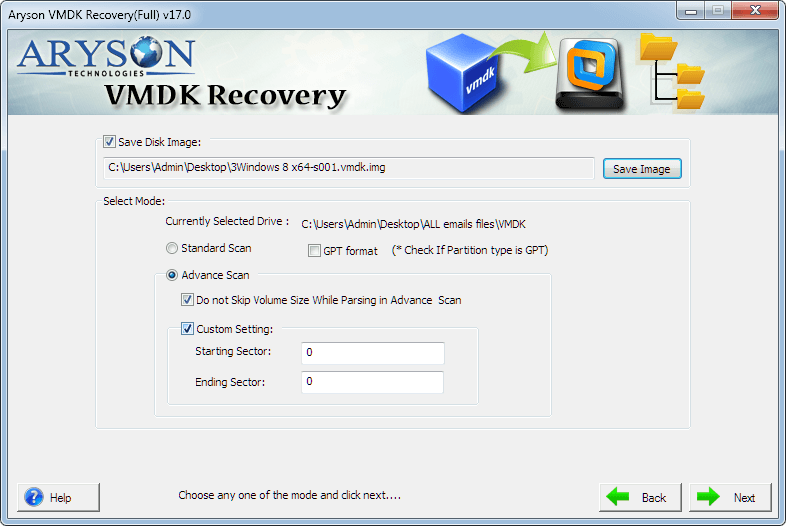
  • Embedded with two scanning modes, namely, Standard and Advanced, for tackling different levels of corruption.
  • The Tool supports both the partition tables, i.e., Master Boot Record (MBR) and GUID Partition Table(GPT).
  • Custom Settings for Select Volume feature allows the user to choose the Start and End Sector for recovery.
  • Designed to run the file systems of all major Operating Systems, such as FAT, FAT16, FAT32, FAT64, NTFS, HFS+, and EXTX.
  • Equipped with RAW recovery mode to execute powerful recovery of heavily corrupt VMDK files.
  • It features three different recovery modes: Standard, Advanced, and Deep for a successful recovery.
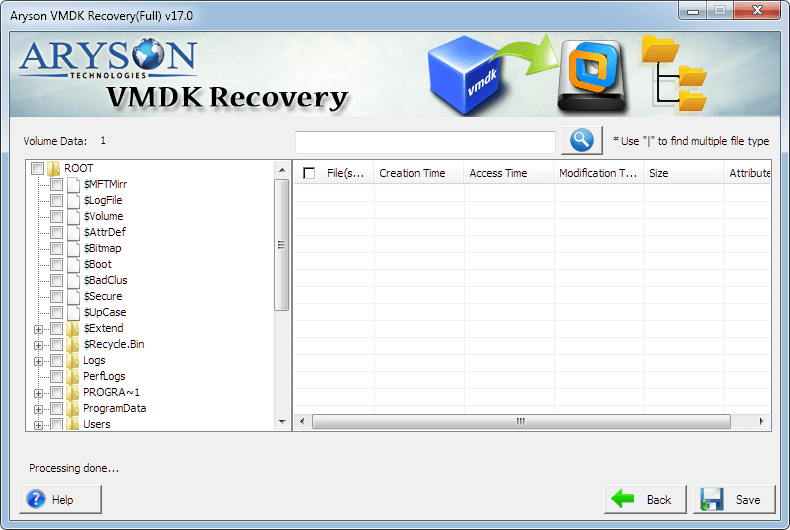
  • The Preview feature provides the user to view the recovered files and folders before the recovery process.
  • Unique Auto-Search feature to look for the files in the tree structure.

 Download Now100% safe    Purchase Now

Finest Software to Restore the Corrupt VMDK Files

Aryson VMDK Recovery Tool is one of the finest software to restore the damaged and corrupt VMDK files of the VMware machines. It is a smartly programmed utility that comprises a powerful recovery algorithm that restores the entire VMDK data in a minimal amount of time.

How to Recover VMDK Files

Follow the Steps to Restore or Repair Corrupt VMDK Files

  • Step 1: Run the VMDK Recovery software on your system.
  • Step 2: Click on Browse and choose the corrupt VMDK file.
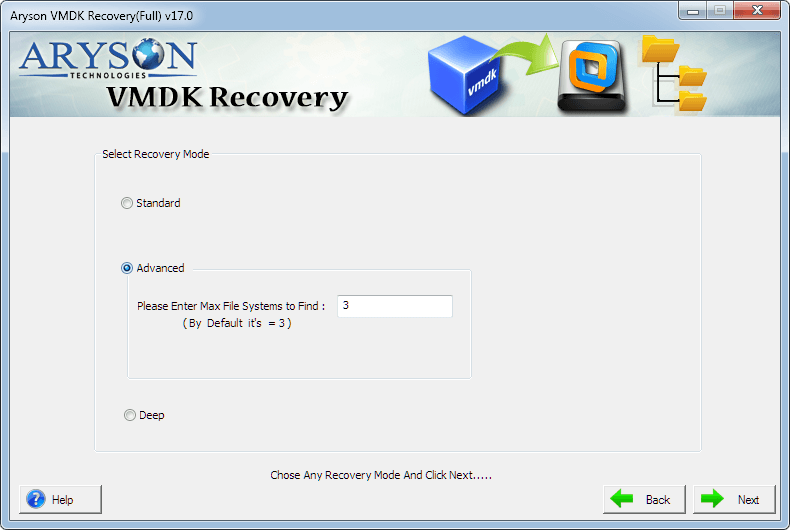
  • Step 3: Now, pick the scanning modes from the Standard or Advanced options.
  • Step 4: Choose the Additional Options as per your need.
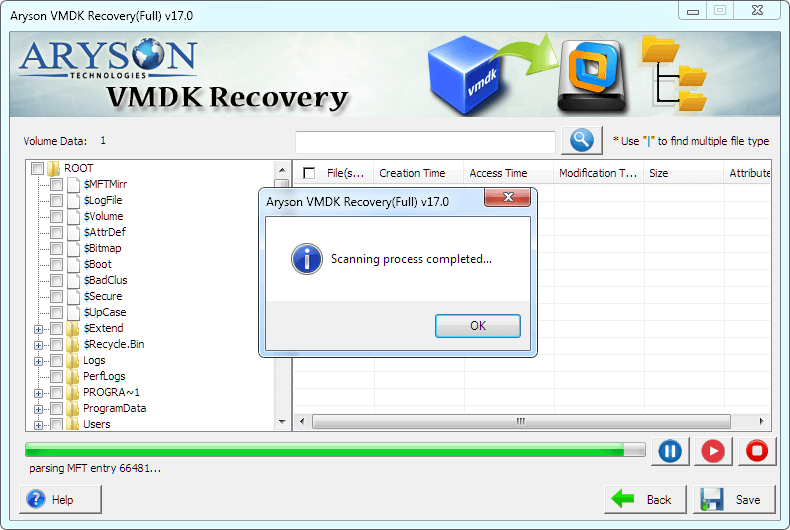
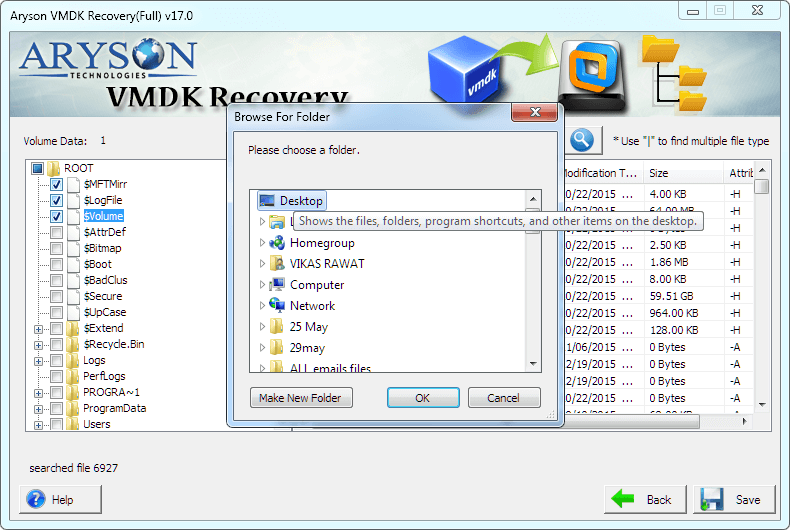
  • Step 5: Select the files and folders to recover and press Save.
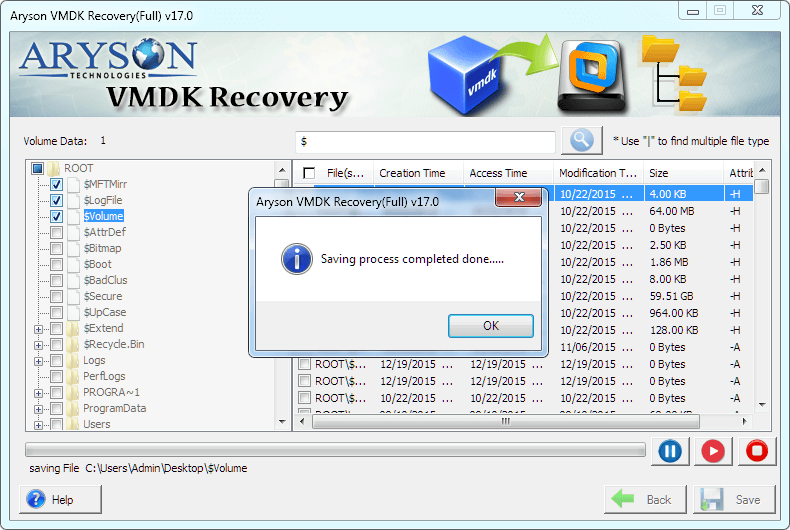
  • Step 6: At last, pick the location to save the result data and hit OK.
VMDK Recovery Software

Need to Use Aryson VMDK Recovery Tool

Repair VMDK Flat File

Aryson VMDK File Recovery Tool is the best solution to recover and repair the corrupt VMDK flat files. You can fix any issue with your VMware machines and make the hard disk of these devices easily accessible.

Restore Both Table Formats

If you have some issue with any of the tables of the VMDK files of the virtual machines, you can resolve it swiftly using this utility. You do not have to worry about the type of table as it can resolve the issues from both.

Fix VMDK File Not Showing Issue

VMDK files become inaccessible and cannot be viewed in the datastore. The VMDK Data Recovery Software can recover the corrupt VMDK files and make them accessible to the users. As the corruption is fixed, the files can be viewed again.

Recover VMDK ESXi

VMware machines or the VMware ESXi devices store huge data in the VMDK files making them corrupt. You can easily fix this issue by recovering the ESXi VMDK files with the help of the VMDK Repair Utility.


Key Features of Aryson VMDK Recovery Tool

Smooth Recovery Process

Smooth Recovery Process

Aryson VMDK Restore Software swiftly restores the data from damaged and corrupt VMDK files and saves them in their original format at a user-defined location on the PC. The main specialty of the tool is that it does not hamper the data integrity throughout the recovery process. Furthermore, the folder hierarchy is maintained in the recovered data files.

Allows Both Disk Types

Allows Both Disk Types

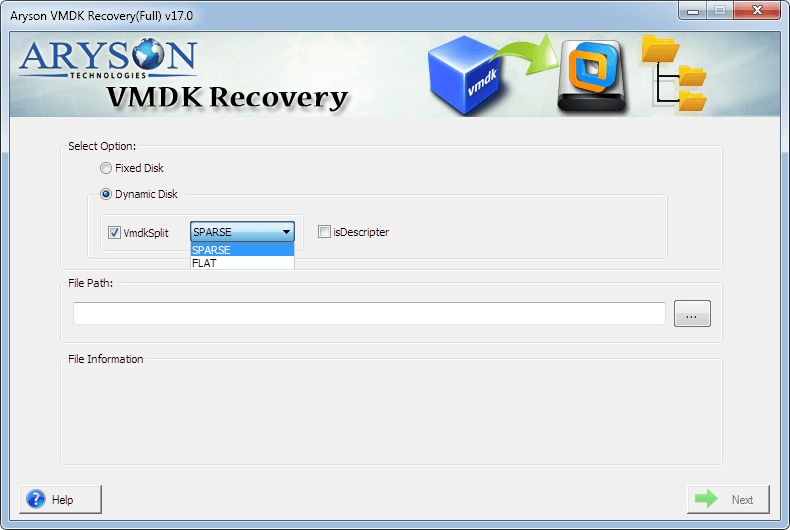
VMDK Recovery Tool provides you an option for selecting the type of the VMDK file, i.e., Fixed or Dynamic, as it is capable of recovering both. In addition to that, if you choose the dynamic disk type, under that, you further have the option to restore both the Sparse and Flat types of VMDK files.

Recovers Split VMDK File

Recovers Split VMDK File

VMware Machine File Repair Utility is designed to recover the VMDK file data even if the file is split into multiple parts. It can recover your entire data from every part of the file. You only have to ensure that all the parts of the split files are located in the same folder. Also, it can auto-detect the other parts of the file and recover the respective data from them.

Supports Descriptor VMDK Files

Supports Descriptor VMDK Files

Recovery of VMDK files can also be carried out in this tool by using the descriptor VMDK file. If you don't know the type of your split VMDK file, i.e., Sparse or Flat, then you can simply choose any Descriptor option of your choice. The VMDK Recovery Tool will automatically detect the type of your selected split VMDK file and perform the recovery with ease.

Different Scanning Modes

Different Scanning Modes

Corruption in the VMDK files can be less or at a severe level. The VMDK Repair Tool provides you with the option to scan your VMDK files in two different scanning modes, viz. Standard and Advanced. So, based on the level of corruption of your VMDK files, you can perform the ideal recovery to restore all the possible data.

MBR & GPT Table Compatible

MBR & GPT Table Compatible

It is designed with advanced algorithms to ensure maximum productivity for users. Hence, it is capable of supporting both the MBR(Master Boot Record) and GPR(GUID Partition Table) tables. The partition tables are not a barrier for the VMDK Recovery Tool, and it works perfectly fine with each table.

Custom Volume Settings

Custom Volume Settings

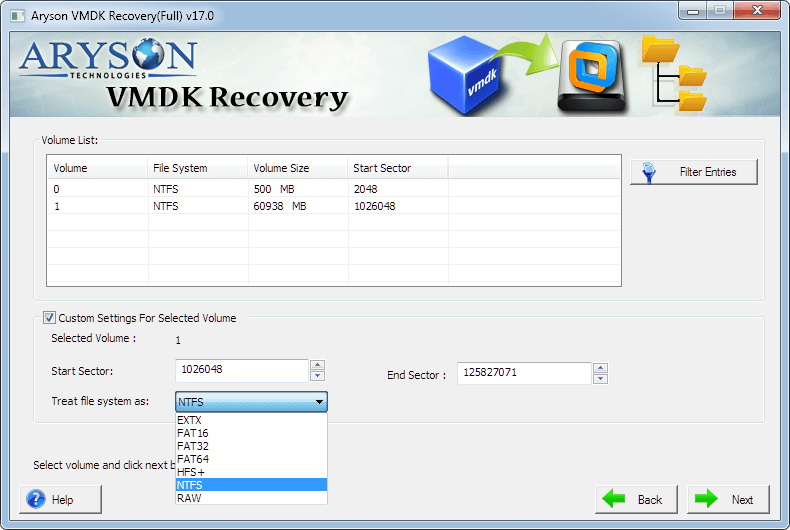
There is an advanced option in the utility to opt for the Custom Settings option. You can choose the Start and End Sectors using this option to perform selective recovery of the VMDK file. Additionally, you can skip the selection of the volume size while the parsing operation is being conducted on your system. /p>

Compatible with All File Systems

Compatible with All File Systems

Aryson VMDK Recovery Tool supports all file systems of major operating systems, such as FAT, FAT16, FAT32, FAT64 (exFAT), NTFS of Windows OS, HFS+ of Mac, and EXTX (the entire extended file system family) of Linux system. Therefore, the user need not worry about the compatibility of the VMDK file with this tool.

Auto-Search Files Feature

Auto-Search Files Feature

To ease your process to recover your corrupt VMDK files, the Recovery Software is designed with immense productive features. One such feature to help you is the Auto-search feature. It will help you find a specific file in an instant from the list of options saving your time. You can also search for multiple files with this feature.

Multiple Recovery Options

Multiple Recovery Options

This VMDK Recovery Tool consists of three different recovery modes for different levels of corruption in your VMDK files, namely, Standard Mode for minor corruption, Advanced Mode for moderate corruption, and Deep Mode for severe corruption issues. You can select the modes one at a time and perform the appropriate recovery.

Easy-to-Use Application

Easy-to-Use Application

It is a very simple-to-use tool that does not require any prior technical knowledge. It is made such that novice users can easily operate it. It contains an interactive and self-explanatory user interface that guides the users throughout the recovery process. This makes the VMDK repair task very easy and effective.

Fully Compatible

Fully Compatible

VMDK Data Recovery Software supports the virtual machine disk files created by all the major versions of VMware and Oracle Virtual Box machines. It also runs smoothly on all popular Windows versions, such as Windows 8, 7, Vista, XP, and the latest Windows 10.

Technical Overview

Why do we need to restore VMDK Files?

The VMDK files store all the data of the VMware machines like VMware Workstation, QEMU, Virtual Box, etc. All this data is crucial for the proper functioning of the VMware systems. Once these files get corrupted or damaged, you can not open these files and also not access the data in them. Hence, it becomes very essential to restore and recover the VMDK files using the VMDK Recovery Tool to keep the VMware systems running efficiently.

Software Specification

System Requirement
processor
Ram Recommended
Opreating System
License Types
Home License
Home License
Corporate License
Corporate License
Technical License
Technical License
Software Delivery & Version
ElectronicYes
Version 17.0

Comparison of Demo and Full Version of VMDK Recovery Software

Get an Overview about Aryson VMDK Recovery Software in Detail Demo/Full Version

Product Features Free Version Full Version
Add or Open VMware VMDK Files
Recover Data from VMDK virtual disk partitions
Supports VMDK Data Recovery from FAT, FAT16, FAT32, FAT64, NTFS, HFS+, and EXTX files
Preview Data Feature
Compatible with both master boot record (MBR) & GUID partition table (GPT)
Allows recovery from Split, Sparse & Flat VMDK files
Save Recovered VMware VMDK Data Preview Only Save All Items
24*7 Tech Support & secure 100%
Price Free $99
Money-Back Guarantee
Aryson VMDK Recovery Tool Award & Rating
cinet

Aryson VMDK Recovery Tool is a complete solution to all the VMware file corruption issues. The experts at CNET have analyzed the tool and found it productive. It has several exemplary features that make it different from its competitors.Read More..

softpedia

The tool is designed by keeping in mind the compatibility of the Operating Systems. Therefore, it runs on all versions of the MS Windows Operating system, including the latest Windows 10. Read More..

Softonic

Loaded with two recovery modes, the Aryson VMDK Restore Software flawlessly recovers & restores the corrupt VMDK files. Moreover, the Preview feature of this utility makes it a top-notch software with incredible results.

Soft 32

The dual scanning mode of the Aryson VMDK Recovery Tool helps users to tackle different types of corruption. It assists in scanning the corrupt VMDK file as per the level of corruption present in them. Read More..

Frequently Asked Questions

You can follow the below-mentioned steps to recover your Vmware data.

  • Download and Run the Aryson VMDK Repair Tool on your PC.
  • Click on the Browse button and pick the corrupt VMDK file.
  • Choose the different features of the tool and file options as per your need and press Next.
  • Select the scan mode from Standard and Advanced and hit Next.
  • Now, select the Custom Volume and click on the Next button.
  • Pick the Mode of Recovery from the options and press Next.
  • At last, choose the files to recover and click on the Save icon.

SPARSE and FLAT are two file types used by VMDK (Virtual Machine Hard Disk) files. While creating a VMDK file, an option will be displayed in the VMDK Recovery Tool to allocate all disk space. If you check this option, the file type which is created is FLAT, and it uses all the allocated disk space. With FLAT file type, you can facilitate the performance of your VMware and Virtual Machine Hard Disk files. But if you don't mark on this option, the file type will be automatically set to SPARSE. With the SPARSE file type, you can not allocate the space, and the virtual disk starts small and increases as you add data to it.

A VMDK descriptor is just like a log file for the VMDK files if you split it into multiple parts. If you choose the Split virtual disk into multiple files option, a descriptor file will be created in the same folder where the split VMDK file is stored. Furthermore, if you have no idea about the file type in which your VMDK is saved, you can check the Descriptor option in the VMDK Recovery Tool. Therefore, instead of selecting the corrupt VMDK file, you need to select the VMDK descriptor file, and the tool will automatically detect the file type.

RAW recovery mode should be preferred when the corruption level is severe, and you want to recover the maximum possible data from your corrupt VMDK files. The algorithm of RAW recovery is quite different from other recovery modes, i.e., Standard, Advanced, and Deep. To use RAW recovery mode, just select the volume in the list and select RAW in the Treat file system as an option.

There is a feature in this VMDK Recovery Tool that enables you to add a custom volume to the list. Once the selected VMDK file is scanned, the available volumes will be displayed in the list. If you think there's still something left out, you could add a custom volume in the list and define the custom settings. The custom settings include the Start and End sector. Also, you need to define the file system format in which you want to treat your new custom volumes, such as FAT, FAT16, FAT32, FAT64 (exFAT), NTFS, HFS+, and EXTX.

Some antivirus software occasionally misinterprets new software as a threat to the PC, preventing their installation. Moreover, if the antivirus is on, it prevents the complete installation of the tool.

There would be chances that your screen resolution is not optimized. So please check it and increase the resolution to its average state.

  • capgemini
  • moto
  • ibm
  • county
  • oreilly
What Our Customers Are Saying About Us
 Submit Your Review
You Might Be Interested in These Products Too

Aryson Hyper-V Recovery

Aryson Hyper-V Recovery

Read More 

Aryson VDI Recovery

Aryson VDI Recovery

Read More 

Aryson VHD Recovery

Aryson VHD Recovery

Read More 

Aryson Virtual Machine Data Recovery

Aryson Virtual Machine Data Recovery

Read More 
Service

At Service Since
2010

Trusted

Trusted by
Millions

SSL Secure

SSL
Secure

McAfee

McAfee SECURE
100% Secure

Aryson Technologies

united states

2880 Zanker Road, Suite 203, San Jose, CA - 95134, USA

india

A-58 , 2nd Floor A Block Sector 57, Noida, Uttar Pradesh 201301, India

Find Us on

Subscribe to our newsletter to get the latest News & Update

© Copyrights 2014 by Aryson Technologies Private Limited - All Rights Reserved

DMCA.com Protection Status